Troubleshooting Quay Repository Mirroring
Table of Contents
Introduction
-
Red Hat Quay mirroring is a feature that allows you to mirror images from external container registries (or another local registry) into your Red Hat Quay cluster. This can be useful for a variety of purposes, such as:
- Distributing images to multiple locations. You can use mirroring to distribute images to multiple locations, such as different regions or data centers. This can improve performance and availability for users who are located in different parts of the world.
- Backing up images. Mirroring can be used to back up images in case of a disaster. This can help you quickly restore images if your primary registry is unavailable.
- Managing image versions. You can use mirroring to manage image versions. For example, you can mirror a specific tag or range of tags from an external registry. This can help you to keep your images up-to-date and to avoid conflicts between different versions of the same image.
-
Benefits of using Red Hat Quay Mirroring:
- Reduced latency: If you have users in multiple regions, mirroring can help to reduce latency by serving images from the closest region.
- Increased availability: Mirroring can help to increase availability by providing a backup copy of your images.
- Simplified management: Mirroring can help to simplify management by allowing you to manage your images in a single location.
Troubleshooting Steps
- Review logs: Check the logs of Quay mirror instances for any error messages or warnings related to mirroring. If required, turn on debugging log level(by adding env variable debuglog:true) and look for any stack traces or specific error codes that can provide insights into the root cause of the issue.
-
For operator deployment:
-
set env variable in QuayRegistry CR
kind: QuayRegistry metadata: name: quay37 spec: configBundleSecret: config-bundle-secret components: - kind: objectstorage managed: false - kind: route managed: true - kind: mirror managed: true overrides: env: - name: DEBUGLOG value: "true" -
Capture logs from all mirror pods running
$ oc logs mirror-pod
-
-
For VM deployment:
-
set env variable when creating container
$ sudo podman run -d --name mirroring-worker -e DEBUGLOG=true \ -v $QUAY/config:/conf/stack:Z \ registry.redhat.io/quay/quay-rhel8:v3.8.5 repomirror -
Capture logs from all mirror pods running
$ podman logs repomirror-container
-
-
Usage logs from Quay Web UI:

- Check mirroring configuration: Review the mirroring configuration settings in Quay instances:
-
From Quay Web UI


-
From Quay config.yaml file
$ oc exec -it quay-pod -- cat /conf/stack/config.yaml

$ podman exec -it quay-container cat /conf/stack/config.yaml
- Verify authentication and permissions: Ensure that the authentication credentials used for mirroring have the necessary permissions and access rights on both the source and destination Quay instances. Double-check the access control settings and ensure that the user or service account performing the mirroring operation has the required privileges.
-
Check credentials to access the external registry from Quay Web UI settings.
-
Check permissions to robot account on Quay registry
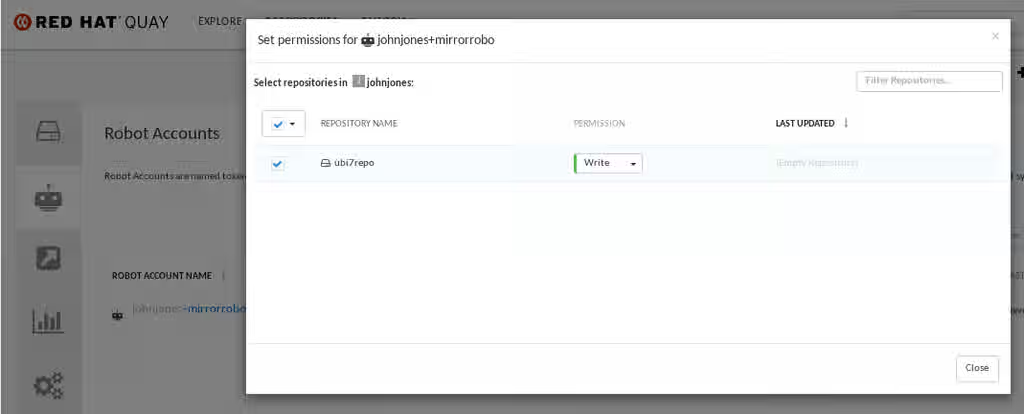
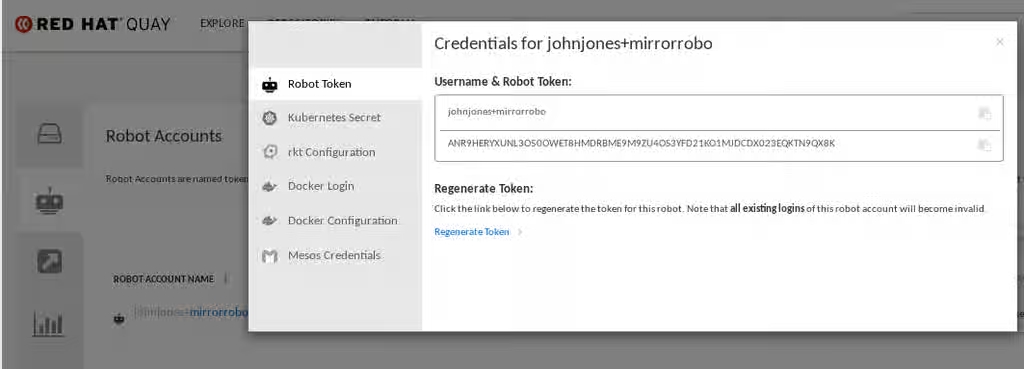
- Repository Mirroring uses Content from github.com is not included.skopeo copy in the background. Try to do a manual copy. Combine earlier command with
timeto check slow disk issues
  $ time { skopeo copy docker://SOURCE_REGISTRY_IMAGE docker://DESTINATION_REGISTRY/REPOSITPRY/IMAGE:TAG }

  $ time skopeo copy  docker://registry.example.com/image:tag docker://destination.quay.example.com/repo1/image1:tag --src-tls-verify=false
  Getting image source signatures
  Copying blob 4182b7568f06 skipped: already exists
  Copying blob 4182b7568f06 skipped: already exists
  Copying blob b7f76d1d9088 skipped: already exists
  Copying blob ede3648667b7 skipped: already exists
  Copying blob 021495d3c262 done
  Copying blob 335fbccacdd3 done
  Copying blob 4c70e3d931b6 done
  Copying config d9f6ca2777 done
  Writing manifest to image destination
  Storing signatures

  real    6m19.291s
  user    0m58.207s
  sys     0m40.666s
-
Test with a minimal image set: If you are encountering issues with mirroring a large number of container images tags, try mirroring a smaller set initially. This can help isolate any issues related to specific images or repositories and narrow down the troubleshooting scope.
-
Monitor network traffic: Use network monitoring tools to inspect the network traffic between the source and destination Quay instances during the mirroring process. This can help identify any network issues or bottlenecks that might be impacting the mirroring performance or causing failures. Pay attention to network latency, packet loss, or any unusual network patterns.
Known Issues
- Red Hat Quay Image mirroring fails with error "signature does not exist"
- Quay containers can't run due to missing runc files
- This content is not included.Quay Mirroring fails with invalid credentials