Troubleshooting Guide for SAP Data Intelligence 3 on OpenShift Container Platform 4
Contents
- 1. Troubleshooting installation, upgrade and restore problems
- 1.1. Unassigned privileged security context
- 1.2. Default storage class set
- 1.3. vsystem-app pods are unable to load
- 1.4. Unable to initialize License Manager
- 1.5. Unable to start diagnostics prometheus node exporter pods
- 1.6. Failure of builds in the Pipeline Modeler
- 1.7. Failure of container
- 1.8. Failure of jobs during installation or upgrade
- 1.9. vsystem-vrep is unable to export NFS on RHCOS
- 1.10. Kaniko unable to push images to a registry
- 1.11. Failure of SLCBridge pod to deploy
- 1.12. Failure of Kibana pod to start
- 1.13. Fluentd pods are unable to access container logs
- 1.14. Failure of validation during the SDI installation
- 1.15. Crashing of Vora components
- 1.16. Failure of image mirroring to Quay
- 1.17. Failure of SLC Bridge init with Quay
- 1.18. Failure of SLC Bridge image to be pulled from Quay
- 1.19. Failure of PVC expansion
- 2. Troubleshooting SDI runtime problems
- 3. Troubleshooting SDI Observer (implemented with a bash script) problems
1. Troubleshooting installation, upgrade and restore problems
1.1. Unassigned privileged security context
If there are no pods, replica sets, or stateful sets coming up and you can see an event similar to the one below, you need to add privileged security context constraint to its service account.
   # oc get events | grep securityContext
   1m          32m          23        diagnostics-elasticsearch-5b5465ffb.156926cccbf56887                          ReplicaSet                                                                            Warning   FailedCreate             replicaset-controller                  Error creating: pods "diagnostics-elasticsearch-5b5465ffb-" is forbidden: unable to validate against any security context constraint: [spec.initContainers[0].securityContext.privileged: Invalid value: true: Privileged containers are not allowed spec.initContainers[0].securityContext.privileged: Invalid value: true: Privileged containers are not allowed spec.initContainers[0].securityContext.privileged: Invalid value: true: Privileged containers are not allowed]
Copy the name in the fourth column (the event name - diagnostics-elasticsearch-5b5465ffb.156926cccbf56887) and determine its corresponding service account name.
   # eventname="diagnostics-elasticsearch-5b5465ffb.156926cccbf56887"
   # oc get -o go-template=$'{{with .spec.template.spec.serviceAccountName}}{{.}}{{else}}default{{end}}\n' \
       "$(oc get events "${eventname}" -o jsonpath='{.involvedObject.kind}/{.involvedObject.name}{"\n"}')"
   sdi-elasticsearch
The obtained service account name (sdi-elasticsearch) now needs to be assigned privileged SCC:
# oc adm policy add-scc-to-user privileged -z sdi-elasticsearch
The pod shall then come up on its own, unless this is the only problem.
1.2. Default storage class set
If pods are failing because PVCs are not being bound, the problem may be that the default storage class has not been set and no storage class was specified to the installer.
   # oc get pods
   NAME                                                  READY     STATUS    RESTARTS   AGE
   hana-0                                                0/1       Pending   0          45m
   vora-consul-0                                         0/1       Pending   0          45m
   vora-consul-1                                         0/1       Pending   0          45m
   vora-consul-2                                         0/1       Pending   0          45m


   # oc describe pvc data-hana-0
   Name:          data-hana-0
   Namespace:     sdi
   StorageClass:
   Status:        Pending
   Volume:
   Labels:        app=vora
                  datahub.sap.com/app=hana
                  vora-component=hana
   Annotations:   <none>
   Finalizers:    [kubernetes.io/pvc-protection]
   Capacity:
   Access Modes:
   Events:
     Type    Reason         Age                  From                         Message
     ----    ------         ----                 ----                         -------
     Normal  FailedBinding  47s (x126 over 30m)  persistentvolume-controller  no persistent volumes available for this claim and no storage class is set
To fix this, either make sure to set the Default StorageClass (4.12) / (4.10) or provide the storage class name to the installer.
1.3. vsystem-app pods are unable to load
If you have SELinux in enforcing mode, you may see the pods launched by vsystem crash-looping because of the container named vsystem-iptables, as shown below:
   # oc get pods
   NAME                                                          READY     STATUS             RESTARTS   AGE
   auditlog-59b4757cb9-ccgwh                                     1/1       Running            0          40m
   datahub-app-db-gzmtb-67cd6c56b8-9sm2v                         2/3       CrashLoopBackOff   11         34m
   datahub-app-db-tlwkg-5b5b54955b-bb67k                         2/3       CrashLoopBackOff   10         30m
   ...
   internal-comm-secret-gen-nd7d2                                0/1       Completed          0          36m
   license-management-gjh4r-749f4bd745-wdtpr                     2/3       CrashLoopBackOff   11         35m
   shared-k98sh-7b8f4bf547-2j5gr                                 2/3       CrashLoopBackOff   4          2m
   ...
   vora-tx-lock-manager-7c57965d6c-rlhhn                         2/2       Running            3          40m
   voraadapter-lsvhq-94cc5c564-57cx2                             2/3       CrashLoopBackOff   11         32m
   voraadapter-qkzrx-7575dcf977-8x9bt                            2/3       CrashLoopBackOff   11         35m
   vsystem-5898b475dc-s6dnt                                      2/2       Running            0          37m
When you inspect one of those pods, you can see an error message similar to the one below:
   # oc logs voraadapter-lsvhq-94cc5c564-57cx2 -c vsystem-iptables
   2018-12-06 11:45:16.463220|+0000|INFO |Execute: iptables -N VSYSTEM-AGENT-PREROUTING -t nat||vsystem|1|execRule|iptables.go(56)
   2018-12-06 11:45:16.465087|+0000|INFO |Output: iptables: Chain already exists.||vsystem|1|execRule|iptables.go(62)
   Error: exited with status: 1
   Usage:
     vsystem iptables [flags]


   Flags:
     -h, --help               help for iptables
         --no-wait            Exit immediately after applying the rules and don't wait for SIGTERM/SIGINT.
         --rule stringSlice   IPTables rule which should be applied. All rules must be specified as string and without the iptables command.
In the audit log on the node where the pod got scheduled, you should be able to find an AVC denial similar to the following: On RHCOS nodes, you may need to inspect the output of dmesg command instead.
   # grep 'denied.*iptab' /var/log/audit/audit.log
   type=AVC msg=audit(1544115868.568:15632): avc:  denied  { module_request } for  pid=54200 comm="iptables" kmod="ipt_REDIRECT" scontext=system_u:system_r:container_t:s0:c826,c909 tcontext=system_u:system_r:kernel_t:s0 tclass=system permissive=0
   ...
   # # on RHCOS
   # dmesg | grep denied
To fix this, the ipt_REDIRECT kernel module needs to be loaded. Please refer to Pre-load needed kernel modules.
1.4. Unable to initialize License Manager
The installation may fail with the following error:
   2019-07-22T15:07:29+0000 [INFO] Initializing system tenant...
   2019-07-22T15:07:29+0000 [INFO] Initializing License Manager in system tenant...2019-07-22T15:07:29+0000 [ERROR] Couldn't start License Manager!
   The response: {"status":500,"code":{"component":"router","value":8},"message":"Internal Server Error: see logs for more info"}Error: http status code 500 Internal Server Error (500)
   2019-07-22T15:07:29+0000 [ERROR] Failed to initialize vSystem, will retry in 30 sec...
In the log of license management pod, you can find an error as shown below:
   # oc logs deploy/license-management-l4rvh
   Found 2 pods, using pod/license-management-l4rvh-74595f8c9b-flgz9
   + iptables -D PREROUTING -t nat -j VSYSTEM-AGENT-PREROUTING
   + true
   + iptables -F VSYSTEM-AGENT-PREROUTING -t nat
   + true
   + iptables -X VSYSTEM-AGENT-PREROUTING -t nat
   + true
   + iptables -N VSYSTEM-AGENT-PREROUTING -t nat
   iptables v1.6.2: can't initialize iptables table `nat': Permission denied
   Perhaps iptables or your kernel needs to be upgraded.
This means, the vsystem-iptables container in the pod lacks permission to manipulate iptables. Please make sure to pre-load kernel modules.
1.5. Unable to start diagnostics prometheus node exporter pods
During an installation or upgrade, it may happen, that the Node Exporter pods keep restarting:
   # oc get pods  | grep node-exporter
   diagnostics-prometheus-node-exporter-5rkm8                        0/1       CrashLoopBackOff   6          8m
   diagnostics-prometheus-node-exporter-hsww5                        0/1       CrashLoopBackOff   6          8m
   diagnostics-prometheus-node-exporter-jxxpn                        0/1       CrashLoopBackOff   6          8m
   diagnostics-prometheus-node-exporter-rbw82                        0/1       CrashLoopBackOff   7          8m
   diagnostics-prometheus-node-exporter-s2jsz                        0/1       CrashLoopBackOff   6          8m
The possible reason is that the limits on resource consumption set on the pods are too low. To address this post-installation, you can patch the DaemonSet, in the SDI's namespace, as shown below:
   # oc patch -p '{"spec": {"template": {"spec": {"containers": [
       { "name": "diagnostics-prometheus-node-exporter",
         "resources": {"limits": {"cpu": "200m", "memory": "100M"}}
       }]}}}}' ds/diagnostics-prometheus-node-exporter
To address this during the installation (using any installation method), add the following parameters:
   -e=vora-diagnostics.resources.prometheusNodeExporter.resources.limits.cpu=200m
   -e=vora-diagnostics.resources.prometheusNodeExporter.resources.limits.memory=100M
1.6. Failure of builds in the Pipeline Modeler
If the graph builds hang in Pending state or fail completely, you may find the following pod not coming up in the sdi namespace because its image cannot be pulled from the registry:
   # oc get pods | grep vflow
   datahub.post-actions.validations.validate-vflow-9s25l             0/1     Completed          0          14h
   vflow-bus-fb1d00052cc845c1a9af3e02c0bc9f5d-5zpb2                  0/1     ImagePullBackOff   0          21s
   vflow-graph-9958667ba5554dceb67e9ec3aa6a1bbb-com-sap-demo-dljzk   1/1     Running            0          94m
   # oc describe pod/vflow-bus-fb1d00052cc845c1a9af3e02c0bc9f5d-5zpb2 | sed -n '/^Events:/,$p'
   Events:
     Type     Reason     Age                From                    Message
     ----     ------     ----               ----                    -------
     Normal   Scheduled  30s                default-scheduler       Successfully assigned sdi/vflow-bus-fb1d00052cc845c1a9af3e02c0bc9f5d-5zpb2 to sdi-moworker3
     Normal   BackOff    20s (x2 over 21s)  kubelet, sdi-moworker3  Back-off pulling image "container-image-registry-sdi-observer.apps.morrisville.ocp.vslen/sdi3modeler-blue/vora/vflow-node-f87b598586d430f955b09991fc1173f716be17b9:3.0.23-com.sap.sles.base-20200617-174600"
     Warning  Failed     20s (x2 over 21s)  kubelet, sdi-moworker3  Error: ImagePullBackOff
     Normal   Pulling    6s (x2 over 21s)   kubelet, sdi-moworker3  Pulling image "container-image-registry-sdi-observer.apps.morrisville.ocp.vslen/sdi3modeler-blue/vora/vflow-node-f87b598586d430f955b09991fc1173f716be17b9:3.0.23-com.sap.sles.base-20200617-174600"
     Warning  Failed     6s (x2 over 21s)   kubelet, sdi-moworker3  Failed to pull image "container-image-registry-sdi-observer.apps.morrisville.ocp.vslen/sdi3modeler-blue/vora/vflow-node-f87b598586d430f955b09991fc1173f716be17b9:3.0.23-com.sap.sles.base-20200617-174600": rpc error: code = Unknown desc = Error reading manifest 3.0.23-com.sap.sles.base-20200617-174600 in container-image-registry-sdi-observer.apps.morrisville.ocp.vslen/sdi3modeler-blue/vora/vflow-node-f87b598586d430f955b09991fc1173f716be17b9: unauthorized: authentication required
     Warning  Failed     6s (x2 over 21s)   kubelet, sdi-moworker3  Error: ErrImagePull
To amend this, one needs to link the secret for the modeler's registry to a corresponding service account associated with the failed pod. In this case, the default one.
   # oc get -n "${SDI_NAMESPACE:-sdi}" -o jsonpath='{.spec.serviceAccountName}{"\n"}' \
       pod/vflow-bus-fb1d00052cc845c1a9af3e02c0bc9f5d-5zpb2
   default
   # oc create secret -n "${SDI_NAMESPACE:-sdi}" docker-registry sdi-registry-pull-secret \
       --docker-server=container-image-registry-sdi-observer.apps.morrisville.ocp.vslen \
       --docker-username=user-n5137x --docker-password=ec8srNF5Pf1vXlPTRLagEjRRr4Vo3nIW
   # oc secrets link -n "${SDI_NAMESPACE:-sdi}" --for=pull default sdi-registry-pull-secret
   # oc delete -n "${SDI_NAMESPACE:-sdi}" pod/vflow-bus-fb1d00052cc845c1a9af3e02c0bc9f5d-5zpb2
Also, please make sure to restart the Pipeline Modeler and any failing graph builds in the offended tenant.
1.7. Failure of container
If pods fail with a similar error like the one below, the containers are most likely not allowed to run under the desired UID.
   # oc get pods
   NAME                                READY   STATUS             RESTARTS   AGE
   datahub.checks.checkpoint-m82tj     0/1     Completed          0          12m
   vora-textanalysis-6c9789756-pdxzd   0/1     CrashLoopBackOff   6          9m18s
   # oc logs vora-textanalysis-6c9789756-pdxzd
   Traceback (most recent call last):
     File "/dqp/scripts/start_service.py", line 413, in <module>
       sys.exit(Main().run())
     File "/dqp/scripts/start_service.py", line 238, in run
       **global_run_args)
     File "/dqp/python/dqp_services/services/textanalysis.py", line 20, in run
       trace_dir = utils.get_trace_dir(global_trace_dir, self.config)
     File "/dqp/python/dqp_utils.py", line 90, in get_trace_dir
       return get_dir(global_trace_dir, conf.trace_dir)
     File "/dqp/python/dqp_utils.py", line 85, in get_dir
       makedirs(config_value)
     File "/usr/lib64/python2.7/os.py", line 157, in makedirs
       mkdir(name, mode)
   OSError: [Errno 13] Permission denied: 'textanalysis'
To remedy that, be sure to apply all the oc adm policy add-scc-to-* commands from the project setup section. The one that has not been applied in this case is:
# oc adm policy add-scc-to-group anyuid "system:serviceaccounts:$(oc project -q)"
1.8. Failure of jobs during installation or upgrade
If the installation jobs are failing with the following error, either the anyuid security context constraint has not been applied or the cluster is too old.
   # oc logs solution-reconcile-vsolution-vsystem-ui-3.0.9-vnnbf
   Error: mkdir /.vsystem: permission denied.
   2020-03-05T15:51:18+0000 [WARN] Could not login to vSystem!
   2020-03-05T15:51:23+0000 [INFO] Retrying...
   Error: mkdir /.vsystem: permission denied.
   2020-03-05T15:51:23+0000 [WARN] Could not login to vSystem!
   2020-03-05T15:51:28+0000 [INFO] Retrying...
   Error: mkdir /.vsystem: permission denied.
   ...
   2020-03-05T15:52:13+0000 [ERROR] Timeout while waiting to login to vSystem...
The reason behind is that vctl binary in the containers determines HOME directory for its user from /etc/passwd. When the container is not run with the desired UID, the value is set incorrectly to /. The binary then lacks permissions to write to the root directory.
To remedy that, make sure that the following conditions are met:
- Make sure that you are running OpenShift cluster 4.2.32 or newer.
- Make sure that anyuid SCC has been applied to the SDI namespace. To verify this, make sure the SDI namespace is listed in the 3rd column of the output of the following command:
      # oc get -o json scc/anyuid | jq -r '.groups[]'
       system:cluster-admins
       system:serviceaccounts:sdi
When the jobs are rerun, anyuid scc will be assigned to them:
      # oc get pods -n "${SDI_NAMESPACE:-sdi}" -o json | jq -r '.items[] | select((.metadata.ownerReferences // []) |
           any(.kind == "Job")) | "\(.metadata.name)\t\(.metadata.annotations["openshift.io/scc"])"' | column -t
       datahub.voracluster-start-1d3ffe-287c16-d7h7t                    anyuid
       datahub.voracluster-start-b3312c-287c16-j6g7p                    anyuid
       datahub.voracluster-stop-5a6771-6d14f3-nnzkf                     anyuid
       ...
       strategy-reconcile-strat-system-3.0.34-3.0.34-pzn79              anyuid
       tenant-reconcile-default-3.0.34-wjlfs                            anyuid
       tenant-reconcile-system-3.0.34-gf7r4                             anyuid
       vora-config-init-qw9vc                                           anyuid
       vora-dlog-admin-f6rfg                                            anyuid
- Additionally, please make sure that all the other
oc adm policy add-scc-to-*commands listed in the project setup have been applied to the same$SDI_NAMESPACE.
1.9. vsystem-vrep is unable to export NFS on RHCOS
If vsystem-vrep-0 pod fails with the following error, it means it is unable to start an NFS server on top of overlayfs.
   # oc logs -n ocpsdi1 vsystem-vrep-0 vsystem-vrep
   2020-07-13 15:46:05.054171|+0000|INFO |Starting vSystem version 2002.1.15-0528, buildtime 2020-05-28T18:5856, gitcommit ||vsystem|1|main|server.go(107)
   2020-07-13 15:46:05.054239|+0000|INFO |Starting Kernel NFS Server||vrep|1|Start|server.go(83)
   2020-07-13 15:46:05.108868|+0000|INFO |Serving liveness probe at ":8739"||vsystem|9|func2|server.go(149)
   2020-07-13 15:46:10.303625|+0000|WARN |no backup or restore credentials mounted, not doing backup and restore||vsystem|1|NewRcloneBackupRestore|backup_restore.go(76)
   2020-07-13 15:46:10.311488|+0000|INFO |vRep components are initialised successfully||vsystem|1|main|server.go(249)
   2020-07-13 15:46:10.311617|+0000|ERROR|cannot parse duration from "SOLUTION_LAYER_CLEANUP_DELAY" env variable: time: invalid duration ||vsystem|16|CleanUpSolutionLayersJob|manager.go(351)
   2020-07-13 15:46:10.311719|+0000|INFO |Background task for cleaning up solution layers will be triggered every 12h0m0s||vsystem|16|CleanUpSolutionLayersJob|manager.go(358)
   2020-07-13 15:46:10.312402|+0000|INFO |Recreating volume mounts||vsystem|1|RemountVolumes|volume_service.go(339)
   2020-07-13 15:46:10.319334|+0000|ERROR|error re-loading NFS exports: exit status 1
   exportfs: /exports does not support NFS export||vrep|1|AddExportsEntry|server.go(162)
   2020-07-13 15:46:10.319991|+0000|FATAL|Error creating runtime volume: error exporting directory for runtime data via NFS: export error||vsystem|1|Fail|termination.go(22)
There are two solutions to the problem. Both of them result in an additional volume mounted at /exports, which is the root directory of all exports.
- (Recommended) Deploy This content is not included.SDI Observer Operator or SDI Observer which will mount the
emptyDirvolume at/exportsin the same pod. - Add
-e=vsystem.vRep.exportsMask=trueto theAdditional Installer Parameterswhich will mount theemptyDirvolume at/exportsin the same pod.
1.10. Kaniko unable to push images to a registry
Symptoms
- Kaniko is enabled in SDI (mandatory on OpenShift 4).
- Registry is secured by TLS certificates with a self-signed certificate.
- Other SDI and OpenShift components can use the registry without issues.
- The pipeline modeler crashes with a traceback preceded by the following error:
      # oc logs -f -c vflow  "$(oc get pods -o name \
         -l vsystem.datahub.sap.com/template=pipeline-modeler | head -n 1)" | grep 'push permissions'
       error checking push permissions -- make sure you entered the correct tag name, and that you are authenticated correctly, and try again: checking push permission for "container-image-registry-miminar-sdi-observer.apps.sydney.example.com/vora/vflow-node-f87b598586d430f955b09991fc11
       73f716be17b9:3.0.27-com.sap.sles.base-20201001-102714": BLOB_UPLOAD_UNKNOWN: blob upload unknown to registry
Resolution
The root cause has not been identified yet. To work around it, the modeler shall be configured to use an insecure registry accessible via plain HTTP (without TLS) and requiring no authentication. Such a registry can be provisioned with SDI Observer. If the existing registry is provisioned by SDI Observer, one can modify it in such a way that it requires no authentication, as shown below:
- Initiate an update of SDI Observer.
- Re-configure sdi-observer for no authentication:
# oc set env -n "${NAMESPACE:-sdi-observer}" SDI_REGISTRY_AUTHENTICATION=none dc/sdi-observer
- Wait until the registry gets re-deployed.
- Verify that the registry is running and that neither
REGISTRY_AUTH_HTPASSWD_REALMnorREGISTRY_AUTH_HTPASSWD_PATHare present in the output of the following command:
      # oc set env -n "${NAMESPACE:-sdi-observer}" --list dc/container-image-registry
       REGISTRY_HTTP_SECRET=mOjuXMvQnyvktGLeqpgs5f7nQNAiNMEE
- Note the registry service address, which can be determined as shown below:
      # # <service-name>.<namespace>.cluster.local:<service-port>
       # oc project "${NAMESPACE:-sdi-observer}"
       # printf "$(oc get -o jsonpath='{.metadata.name}.{.metadata.namespace}.svc.%s:{.spec.ports[0].port}' \
               svc container-image-registry)\n" \
           "$(oc get dnses.operator.openshift.io/default -o jsonpath='{.status.clusterDomain}')"
       container-image-registry.sdi-observer.svc.cluster.local:5000
- Verify that the service is responsive over plain HTTP from inside the OpenShift cluster and requires no authentication:
      # registry_url=http://container-image-registry.sdi-observer.svc.cluster.local:5000
       # oc rsh -n openshift-authentication "$(oc get pods -n openshift-authentication | \
           awk '/oauth-openshift.*Running/ {print $1; exit}')" curl -I "$registry_url"
       HTTP/1.1 200 OK
       Content-Length: 2
       Content-Type: application/json; charset=utf-8
       Docker-Distribution-Api-Version: reg
Note: The service URL is not reachable from outside of the OpenShift cluster.
-
For each SDI tenant using the registry:
-
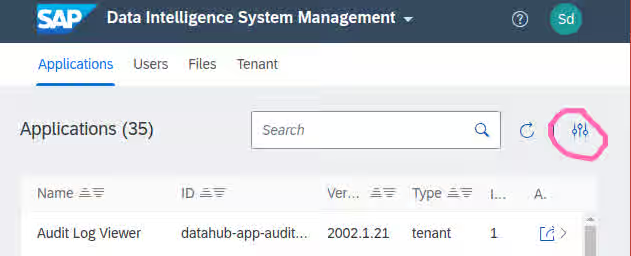
Login to the tenant as an administrator and open System Management.
-
View Application Configuration and Secrets.
-
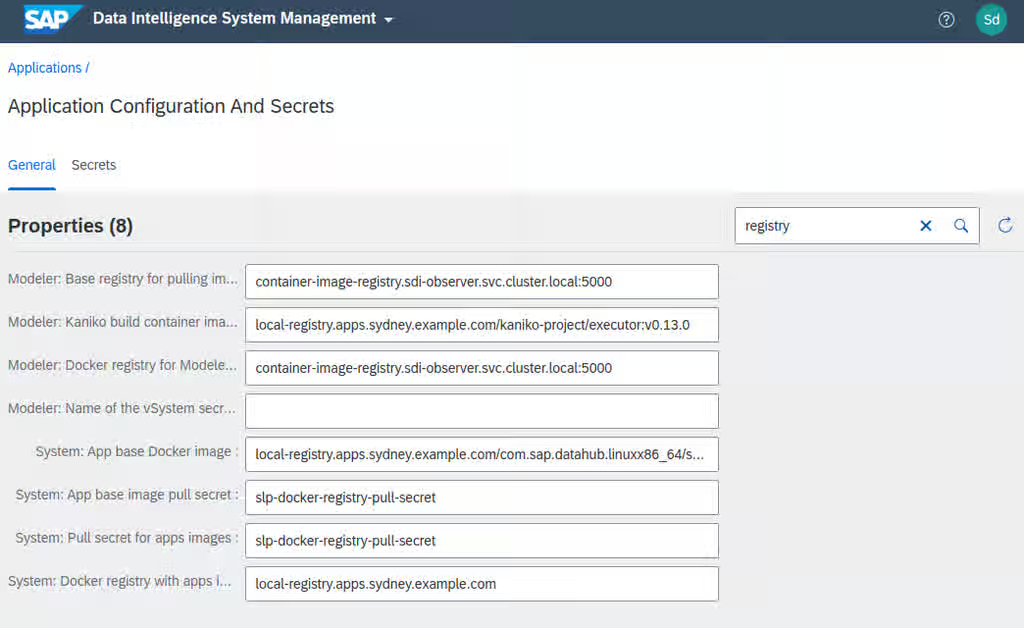
Set the following properties to the registry address:
- Modeler: Base registry for pulling images
- Modeler: Docker registry for Modeler images
-
Unset the following properties:
- Modeler: Name of the vSystem secret containing the credentials for Docker registry
- Modeler: Docker image pull secret for Modeler
The end result should look like this:
-
Return to "Applications" in System Management and select Modeler.
-
Delete all the instances.
-
Create a new instance with the plus button.
-
Access the instance to verify that it is working.
1.11. Failure of SLCBridge pod to deploy
If the initialization phase of Software Lifecycle Container Bridge fails with an error like the one below, you are probably running SLCB version 1.1.53 configured to push to a registry requiring basic authentication.
   *************************************************
   * Executing Step WaitForK8s SLCBridgePod Failed *
   *************************************************


     Execution of step WaitForK8s SLCBridgePod failed
     Synchronizing Deployment slcbridgebase failed (pod "slcbridgebase-5bcd7946f4-t6vfr" failed) [1.116647047s]
     .
     Choose "Retry" to retry the step.
     Choose "Rollback" to undo the steps done so far.
     Choose "Cancel" to cancel deployment immediately.


   # oc logs -n sap-slcbridge -c slcbridge -l run=slcbridge --tail=13
   ----------------------------
   Code: 401
   Scheme: basic
   "realm": "basic-realm"
   {"errors":[{"code":"UNAUTHORIZED","message":"authentication required","detail":null}]}
   ----------------------------
   2020-09-29T11:49:33.346Z        INFO    images/registry.go:182  Access check of registry "container-image-registry-sdi-observer.apps.sydney.example.com" returned AuthNeedBasic
   2020-09-29T11:49:33.346Z        INFO    slp/server.go:199       Shutting down server
   2020-09-29T11:49:33.347Z        INFO    hsm/hsm.go:125  Context closed
   2020-09-29T11:49:33.347Z        INFO    hsm/state.go:56 Received Cancel
   2020-09-29T11:49:33.347Z        DEBUG   hsm/hsm.go:118  Leaving event loop
   2020-09-29T11:49:33.347Z        INFO    slp/server.go:208       Server shutdown complete
   2020-09-29T11:49:33.347Z        INFO    slcbridge/master.go:64  could not authenticate at registry SLP_BRIDGE_REPOSITORY container-image-registry-sdi-observer.apps.sydney.example.com
   2020-09-29T11:49:33.348Z        INFO    globals/goroutines.go:63        Shutdown complete (exit status 1).
More information can be found in Content from launchpad.support.sap.com is not included.SAP Note #2589449.
To fix this, please download the latest SLCB version, newer than 1.1.53, according to Content from launchpad.support.sap.com is not included.SAP Note #2589449
1.12. Failure of Kibana pod to start
When Kibana pod is stuck in CrashLoopBackOff status, and the following error shows up in its log, you will need to delete the existing index.
   # oc logs -n "${SDI_NAMESPACE:-sdi}" -c diagnostics-kibana -l datahub.sap.com/app-component=kibana --tail=5
   {"type":"log","@timestamp":"2020-10-07T14:40:23Z","tags":["status","plugin:ui_metric@7.3.0-SNAPSHOT","info"],"pid":1,"state":"green","message":"Status changed from uninitialized to green - Ready","prevState":"uninitialized","prevMsg":"uninitialized"}
   {"type":"log","@timestamp":"2020-10-07T14:40:23Z","tags":["status","plugin:visualizations@7.3.0-SNAPSHOT","info"],"pid":1,"state":"green","message":"Status changed from uninitialized to green - Ready","prevState":"uninitialized","prevMsg":"uninitialized"}
   {"type":"log","@timestamp":"2020-10-07T14:40:23Z","tags":["status","plugin:elasticsearch@7.3.0-SNAPSHOT","info"],"pid":1,"state":"green","message":"Status changed from yellow to green - Ready","prevState":"yellow","prevMsg":"Waiting for Elasticsearch"}
   {"type":"log","@timestamp":"2020-10-07T14:40:23Z","tags":["info","migrations"],"pid":1,"message":"Creating index .kibana_1."}
   {"type":"log","@timestamp":"2020-10-07T14:40:23Z","tags":["warning","migrations"],"pid":1,"message":"Another Kibana instance appears to be migrating the index. Waiting for that migration to complete. If no other Kibana instance is attempting migrations, you can get past this message by deleting index .kibana_1 and restarting Kibana."}
Please note the name of the index in the last warning message. In this case, it is .kibana_1. Execute the following command with the proper index name at the end of the curl command to delete the index and then delete the Kibana pod as well.
   # oc exec -n "${SDI_NAMESPACE:-sdi}" -it diagnostics-elasticsearch-0 -c diagnostics-elasticsearch \
       -- curl -X DELETE 'http://localhost:9200/.kibana_1'
   # oc delete pod -n "${SDI_NAMESPACE:-sdi}" -l datahub.sap.com/app-component=kibana
The Kibana pod will be spawned and shall start running in a few minutes as long as its dependent diagnostics pods are running as well.
1.13. Fluentd pods are unable to access container logs
If you see the following errors, fluentd cannot access container logs on the hosts.
- Error from SLC Bridge:
      2021-01-26T08:28:49.810Z  INFO  cmd/cmd.go:243  1> DataHub/kub-slcbridge/default [Pending]
       2021-01-26T08:28:49.810Z  INFO  cmd/cmd.go:243  1> └── Diagnostic/kub-slcbridge/default [Failed]  [Start Time:  2021-01-25 14:26:03 +0000 UTC]
       2021-01-26T08:28:49.811Z  INFO  cmd/cmd.go:243  1>     └── DiagnosticDeployment/kub-slcbridge/default [Failed]  [Start Time:  2021-01-25 14:26:29 +0000 UTC]
       2021-01-26T08:28:49.811Z  INFO  cmd/cmd.go:243  1>
       2021-01-26T08:28:55.989Z  INFO  cmd/cmd.go:243  1> DataHub/kub-slcbridge/default [Pending]
       2021-01-26T08:28:55.989Z  INFO  cmd/cmd.go:243  1> └── Diagnostic/kub-slcbridge/default [Failed]  [Start Time:  2021-01-25 14:26:03 +0000 UTC]
       2021-01-26T08:28:55.989Z  INFO  cmd/cmd.go:243  1>     └── DiagnosticDeployment/kub-slcbridge/default [Failed]  [Start Time:  2021-01-25 14:26:29 +0000 UTC]
- Fluentd pod description:
      # oc describe pod diagnostics-fluentd-bb9j7
       Name:           diagnostics-fluentd-bb9j7
       …
         Warning  FailedMount  6m35s                 kubelet, compute-4  Unable to attach or mount volumes: unmounted volumes=[varlibdockercontainers], unattached volumes=[vartmp kub-slcbridge-fluentd-token-k5c9n settings varlog varlibdockercontainers]: timed out waiting for the condition
         Warning  FailedMount  2m1s (x2 over 4m19s)  kubelet, compute-4  Unable to attach or mount volumes: unmounted volumes=[varlibdockercontainers], unattached volumes=[varlibdockercontainers vartmp kub-slcbridge-fluentd-token-k5c9n settings varlog]: timed out waiting for the condition
         Warning  FailedMount  23s (x12 over 8m37s)  kubelet, compute-4  MountVolume.SetUp failed for volume "varlibdockercontainers" : hostPath type check failed: /var/lib/docker/containers is not a directory
- Log from one of the pods:
      # oc logs $(oc get pods -o name -l datahub.sap.com/app-component=fluentd | head -n 1) | tail -n 20
         2019-04-15 18:53:24 +0000 [error]: unexpected error error="Permission denied @ rb_sysopen - /var/log/es-containers-sdh25-mortal-garfish.log.pos"
         2019-04-15 18:53:24 +0000 [error]: suppressed same stacktrace
         2019-04-15 18:53:25 +0000 [warn]: '@' is the system reserved prefix. It works in the nested configuration for now but it will be rejected: @timestamp
         2019-04-15 18:53:26 +0000 [error]: unexpected error error_class=Errno::EACCES error="Permission denied @ rb_sysopen - /var/log/es-containers-sdh25-mortal-garfish.log.pos"
         2019-04-15 18:53:26 +0000 [error]: /usr/lib64/ruby/gems/2.5.0/gems/fluentd-0.14.8/lib/fluent/plugin/in_tail.rb:151:in `initialize'
         2019-04-15 18:53:26 +0000 [error]: /usr/lib64/ruby/gems/2.5.0/gems/fluentd-0.14.8/lib/fluent/plugin/in_tail.rb:151:in `open'
       ...
Those errors are fixed automatically by SDI Observer; please make sure it is running and can access the SDI_NAMESPACE.
One can also apply a fix manually with the following commands:
   # oc -n "${SDI_NAMESPACE:-sdi}" patch dh default --type='json' -p='[
       { "op": "replace"
       , "path": "/spec/diagnostic/fluentd/varlibdockercontainers"
       , "value":"/var/log/pods" }]'
   # oc -n "${SDI_NAMESPACE:-sdi}" patch ds/diagnostics-fluentd -p '{"spec":{"template":{"spec":{
       "containers": [{"name":"diagnostics-fluentd", "securityContext":{"privileged": true}}]}}}}'
1.14. Failure of validation during the SDI installation
If the following error message is displayed at the end of SDI installation, it means that the pipeline modeler cannot communicate with the configured registry:
   ************************************
   * Executing Step Validation Failed *
   ************************************


   Execution of step Validation failed
   execution failed: status 1, error: time="2021-10-18T13:49:13Z" level=error msg="Job execution failed for job:
   datahub.post-actions.validations.validate-vflow, job failed with reason BackoffLimitExceeded:Job has reached the specified
   backoff limit"
   time="2021-10-18T13:49:13Z" level=error msg="Running script post-actions.validations.validate-vflow...Failed!"
   time="2021-10-18T13:49:13Z" level=error msg="Error: job failed with reason BackoffLimitExceeded:Job has reached the
   specified backoff limit"
   time="2021-10-18T13:50:00Z" level=error msg="Running post-actions/validations...Failed!"
   time="2021-10-18T13:50:00Z" level=fatal msg="Failed: there are failed scripts: post-actions.validations.validate-vflow"
   .
   Choose "Retry" to retry the step.
   Choose "Abort" to abort the SLC Bridge and return to the "Welcome" dialog.
   Choose "Cancel" to cancel the SLC Bridge immediately.


     Choose action Retry(r)/Abort(a)/<F1> for help: n
Often, it is due to the registry's CA certificate not being imported properly.
Verification
To verify that the certificate is correct, perform the following steps: If any of the steps fail, the certificate must be reconfigured.
- From the Management host, get the configured certificate from the SDI namespace:
      # oc get -n "${SDI_NAMESPACE:-sdi}" secret/cmcertificates \
               -o jsonpath='{.data.cert}' | base64 -d >cmcertificates.crt
- Verify the connection to the registry and its trustworthiness:
# curl --cacert cmcertificates.crt -I https://<configured-registry-for-pipeline-modeler>/v2/
Example output for a trusted registry:
      HTTP/1.1 200 OK
       Content-Length: 2
       Content-Type: application/json; charset=utf-8
       Docker-Distribution-Api-Version: registry/2.0
       Date: Mon, 18 Oct 2021 14:55:37 GMT
Resolution
Update the trusted CA certificates.
- Ensure the registry is trusted with the correct CA bundle file:
# curl --cacert correct-ca-bundle.crt -I https://<configured-registry-for-pipeline-modeler>/v2/
- (Optional) Update the secret directly or indirectly.
- Directly as shown below:
          # oc create -n "${SDI_NAMESPACE:-sdi}" secret generic cmcertificates \
                   --from-file=cert=correct-ca-bundle.crt --dry-run=client -o json | \
               oc apply -f -
-
Indirectly using SDI Observer:
1. Update the `run-observer-template.sh` for `CABUNDLE_PATH=./correct-ca-bundle.crt` and `INJECT_CABUNDLE=true`.
2. Re-run the `run-observer-template.sh` script.
- Follow the Content from help.sap.com is not included.Manage Certificates guide (3.3) / Content from help.sap.com is not included.(3.2) / Content from help.sap.com is not included.(3.1) to import the
correct-ca-bundle.crtvia SDI Connection Management. - Re-run the validation in the Software Lifecycle Bridge.
1.15. Crashing of Vora components
Symptoms
- After a restoration from backup, Vora pods keep crashing and restarting:
      NAME                                   READY   STATUS      RESTARTS   AGE   IP             NODE            NOMINATED NODE   READINESS GATES
       vora-disk-0                            1/2     Running     3          37m   10.131.1.194   sdi-siworker1   <none>           <none>
       vora-relational-86b67c64b6-gn4pp       1/2     Running     7          37m   10.131.1.190   sdi-siworker1   <none>           <none>
       vora-tx-coordinator-5c6b45bb7b-qqnpn   1/2     Running     7          37m   10.130.2.249   sdi-siworker2   <none>           <none>
vora-disk-0pod does not produce any output:
# oc logs -c disk -f vora-disk-0
- Local connection to
vora-tx-coordinatorcannot be established.
Resolution
The resolution is described in Content from launchpad.support.sap.com is not included.SAP Note 2918288 - SAP Data Intelligence Backup and Restore Note, in the section d030326, DIBUGS-11651, 2021-11-09 "Restoration fails with error in Vora disk engine".
1.16. Failure of image mirroring to Quay
During image mirroring to a local Quay registry, it may happen that an upload of a blob fails with the error message below. This is a This content is not included.known bug on the Quay side and will be addressed in future versions.
writing blob: initiating layer upload to /v2/sdimorrisville/com.sap.datahub.linuxx86_64/datahub-operator-installer-base/blobs/uploads/ in quay.apps.cluster.example.com: unauthorized: access to the requested resource is not authorized
Please retry the image mirroring until all the SAP images are successfully mirrored.
1.17. Failure of SLC Bridge init with Quay
As of SLC Bridge 1.1.71, the pull secrets are not created on the OpenShift side as long as a docker authentication file on the Management host contains the quay registry.
Symptoms
- SLC Bridge init fails with an error like the one below:
      *************************************************
       * Executing Step WaitForK8s SLCBridgePod Failed *
       *************************************************


       Execution of step WaitForK8s SLCBridgePod failed
       Synchronizing Deployment slcbridgebase failed (pod "slcbridgebase-6f985dcb87-6plql" failed) [517.957512ms]
       .
       Choose "Retry" to retry the step.
       Choose "Abort" to abort the SLC Bridge and return to the "Welcome" dialog.
       Choose "Cancel" to cancel the SLC Bridge immediately.


         Choose action Retry(r)/Abort(a)/<F1> for help: r
- Pod images in the
sap-slcbridgenamespace cannot be pulled:
      # oc describe pod | sed -n '/^Events:/,$p'
       Events:
         Type     Reason          Age                From               Message
         ----     ------          ----               ----               -------
         Normal   Scheduled       61s                default-scheduler  Successfully assigned slcb-test/slcbridgebase-6f985dcb87-6plql to leworker1.cluster.example.com
         Normal   AddedInterface  61s                multus             Add eth0 [10.131.0.113/23] from openshift-sdn
         Warning  Failed          43s (x2 over 60s)  kubelet            Failed to pull image "quay.apps.cluster.example.com/sdi3/com.sap.sl.cbpod/nginx-sidecar:1.1.71": rpc error: code = Unknown desc = Error reading manifest 1.1.71 in quay.apps.cluster.example.com/sdi3/com.sap.sl.cbpod/nginx-sidecar: unauthorized: access to the requested resource is not authorized
         Warning  Failed          43s (x2 over 60s)  kubelet            Error: ErrImagePull
         Normal   Pulling         43s (x2 over 60s)  kubelet            Pulling image "quay.apps.cluster.example.com/sdi3/com.sap.sl.cbpod/slcbridgebase:1.1.71"
         Warning  Failed          43s (x2 over 60s)  kubelet            Failed to pull image "quay.apps.cluster.example.com/sdi3/com.sap.sl.cbpod/slcbridgebase:1.1.71": rpc error: code = Unknown desc = Error reading manifest 1.1.71 in quay.apps.cluster.example.com/sdi3/com.sap.sl.cbpod/slcbridgebase: unauthorized: access to the requested resource is not authorized
         Warning  Failed          43s (x2 over 60s)  kubelet            Error: ErrImagePull
         Normal   BackOff         31s (x3 over 60s)  kubelet            Back-off pulling image "quay.apps.cluster.example.com/sdi3/com.sap.sl.cbpod/nginx-sidecar:1.1.71"
         Warning  Failed          31s (x3 over 60s)  kubelet            Error: ImagePullBackOff
         Normal   BackOff         31s (x3 over 60s)  kubelet            Back-off pulling image "quay.apps.cluster.example.com/sdi3/com.sap.sl.cbpod/slcbridgebase:1.1.71"
         Warning  Failed          31s (x3 over 60s)  kubelet            Error: ImagePullBackOff
         Normal   Pulling         20s (x3 over 60s)  kubelet            Pulling image "quay.apps.cluster.example.com/sdi3/com.sap.sl.cbpod/nginx-sidecar:1.1.71"
- No pull secret is present in the
sap-slcbridgenamespace:
      # oc get secret -n slcb-test | grep 'NAME\|pull-secret'
       NAME                        TYPE                                  DATA   AGE
Resolution
Please update SLC Bridge to the latest version (at least 1.1.73).
1.18. Failure of SLC Bridge image to be pulled from Quay
As of SLC Bridge 1.1.72, the bridge container fails to authenticate to Quay during the registry test.
Symptoms
- SLC Bridge init fails with an error like the one below:
      *************************************************
       * Executing Step WaitForK8s SLCBridgePod Failed *
       *************************************************


       Execution of step WaitForK8s SLCBridgePod failed
       Synchronizing Deployment slcbridgebase failed (pod "slcbridgebase-6f985dcb87-6plql" failed) [517.957512ms]
       .
       Choose "Retry" to retry the step.
       Choose "Abort" to abort the SLC Bridge and return to the "Welcome" dialog.
       Choose "Cancel" to cancel the SLC Bridge immediately.


         Choose action Retry(r)/Abort(a)/<F1> for help: r
- The container
slcbridgebaseis crashing.
      # kubectl get pods -n sap-slcbridge
       NAME                             READY   STATUS             RESTARTS   AGE
       slcbridgebase-8488d65d67-tqk7f   0/2     CrashLoopBackOff   25         31m
- Its log contains the following error message:
      # oc logs -l app=slcbridge -c sidecar -n sap-slcbridge | grep unauthorized | head -n 1
       2022-02-11T15:19:29.792Z        WARN    images/registrycheck.go:57      Copying image memtarball:/canary.tar failed: trying to reuse blob sha256:8e0a91696253bb936c9603caed888f624af04b6eb335265a6e7a66e07bd23b51 at destination: checking whether a blob sha256:8e0a91696253bb936c9603caed888f624af04b6eb335265a6e7a66e07bd23b51 exists in quay.apps.lenbarehat.ocp.vslen/sdi172test/com.sap.sl.cbpod/canary: unauthorized: authentication required
Resolution
Please update SLC Bridge to the latest version (at least 1.1.73).
1.19. Failure of PVC expansion
Pod diagnostics-prometheus-server-0 failed to start after the expansion of its persistent volume claim.
Symptoms
- Diagnostics-prometheus-server crashes and generates the following error:
      # kubectl logs diagnostics-prometheus-server-0 -c diagnostics-prometheus-server


         ts=2023-05-17T06:32:22.510Z caller=main.go:525 level=info msg="Starting Prometheus" version="(version=2.35.0, branch=non-git, revision=non-git)"

         ts=2023-05-17T06:32:22.510Z caller=main.go:530 level=info build_context="(go=go1.17.8, user=root@09fd96d4e0c7, date=20220818-10:05:28)"

         ts=2023-05-17T06:32:22.511Z caller=main.go:531 level=info host_details="(Linux 4.18.0-305.62.1.el8_4.x86_64 #1 SMP Thu Aug 11 12:07:27 EDT 2022 x86_64 diagnostics-prometheus-server-0 (none))"

         ts=2023-05-17T06:32:22.511Z caller=main.go:532 level=info fd_limits="(soft=1048576, hard=1048576)"

         ts=2023-05-17T06:32:22.511Z caller=main.go:533 level=info vm_limits="(soft=unlimited, hard=unlimited)"

         unexpected fault address 0x7f48189f9000

         fatal error: fault

         [signal SIGBUS: bus error code=0x2 addr=0x7f48189f9000 pc=0x46bca2]
Resolution
- Verify if the expansion of the PVC was done successfully by running the command:
# oc describe pvc storage-diagnostics-prometheus-server-0 -n di-ml
Now, check the output for any errors or warnings related to PVC expansion. Here is an example:
   ❯ oc describe pvc storage-diagnostics-prometheus-server-0
   Name:          storage-diagnostics-prometheus-server-0
   ...
   Events:
     Type     Reason                      Age   From                                                 Message
     ----     ------                      ----  ----                                                 -------
     Normal   Resizing                    67m   external-resizer openshift-storage.rbd.csi.ceph.com  External resizer is resizing volume pvc-48e165e9-64e9-4188-b84d-7884f7597fcb
     Warning  ExternalExpanding           67m   volume_expand                                        Ignoring the PVC: didn't find a plugin capable of expanding the volume; waiting for an external controller to process this PVC.
     Normal   FileSystemResizeRequired    67m   external-resizer openshift-storage.rbd.csi.ceph.com  Require file system resize of volume on node
     Normal   FileSystemResizeSuccessful  67m   kubelet                                              MountVolume.NodeExpandVolume succeeded for volume "pvc-48e165e9-64e9-4188-b84d-7884f7597fcb" morrisville-s7vxz-worker-fcxk2
- Rebind the PVC to the stateful set. You can achieve this by scaling down the stateful set diagnostics-prometheus-server to zero replicas. Once scaled down, the SDI operator will automatically scale it back up, but please note that this process may take some time to complete.
# oc scale sts diagnostics-prometheus-server --replicas=0
2. Troubleshooting SDI runtime problems
2.1. Time-out of the 504 gateway
When accessing SDI services exposed via OpenShift's Ingress Controller (as routes) and experiencing 504 gateway time-out errors, it is most likely caused by the following factors:
- SDI components accessed for the first time on a per tenant and per user basis require a new pod to be started, which takes a considerable amount of time.
- The default time-out for server connection configured on the load balancers is usually too small to tolerate containers being pulled, initialized and started.
To amend that, make sure to do the following:
- Set the
"haproxy.router.openshift.io/timeout"annotation to"2m"on the vsystem route as shown below (assuming the route is namedvsystem):
# oc annotate -n "${SDI_NAMESPACE:-sdi}" route/vsystem haproxy.router.openshift.io/timeout=2m
This results in the following haproxy settings being applied to the ingress router and the route in question:
      # oc rsh -n openshift-ingress $(oc get pods -o name -n openshift-ingress | \
               awk '/\/router-default/ {print;exit}') cat /var/lib/haproxy/conf/haproxy.config | \
           awk 'BEGIN { p=0 }
               /^backend.*:'"${SDI_NAMESPACE:-sdi}:vsystem"'/ { p=1 }
               { if (p) { print; if ($0 ~ /^\s*$/) {exit} } }'
       Defaulting container name to router.
       Use 'oc describe pod/router-default-6655556d4b-7xpsw -n openshift-ingress' to see all of the containers in this pod.
       backend be_secure:sdi:vsystem
         mode http
         option redispatch
         option forwardfor
         balance leastconn
         timeout server  2m
- Set the same server timeout (2 minutes) on the external load balancer forwarding traffic to OpenShift's Ingress routers; the following is an example configuration for haproxy:
      frontend                                    https
           bind                                    *:443
           mode                                    tcp
           option                                  tcplog
           timeout     server                      2m
           tcp-request inspect-delay               5s
           tcp-request content accept              if { req_ssl_hello_type 1 }


           use_backend sydney-router-https         if { req_ssl_sni -m end -i apps.sydney.example.com }
           use_backend melbourne-router-https      if { req_ssl_sni -m end -i apps.melbourne.example.com }
           use_backend registry-https              if { req_ssl_sni -m end -i registry.example.com }


       backend         sydney-router-https
           balance     source
           server      compute1                     compute1.sydney.example.com:443     check
           server      compute2                     compute2.sydney.example.com:443     check
           server      compute3                     compute3.sydney.example.com:443     check


       backend         melbourne-router-https
           ....
2.2. HANA backup pod is unable to pull an image from an authenticated registry
If the configured container image registry requires authentication, HANA backup jobs might fail, as shown in the following example:
   # oc get pods | grep backup-hana
   default-chq28a9-backup-hana-sjqph                                 0/2     ImagePullBackOff   0          15h
   default-hfiew1i-backup-hana-zv8g2                                 0/2     ImagePullBackOff   0          38h
   default-m21kt3d-backup-hana-zw7w4                                 0/2     ImagePullBackOff   0          39h
   default-w29xv3w-backup-hana-dzlvn                                 0/2     ImagePullBackOff   0          15h


   # oc describe pod default-hfiew1i-backup-hana-zv8g2 | tail -n 6
     Warning  Failed          12h (x5 over 12h)       kubelet            Error: ImagePullBackOff
     Warning  Failed          12h (x3 over 12h)       kubelet            Failed to pull image "sdi-registry.apps.shanghai.ocp.vslen/com.sap.datahub.linuxx86_64/hana:2010.22.0": rpc error: code = Unknown desc = Error reading manifest 2010.22.0 in sdi-registry.apps.shanghai.ocp.vslen/com.sap.datahub.linuxx86_64/hana: unauthorized: authentication required
     Warning  Failed          12h (x3 over 12h)       kubelet            Error: ErrImagePull
     Normal   Pulling         99m (x129 over 12h)     kubelet            Pulling image "sdi-registry.apps.shanghai.ocp.vslen/com.sap.datahub.linuxx86_64/hana:2010.22.0"
     Warning  Failed          49m (x3010 over 12h)    kubelet            Error: ImagePullBackOff
     Normal   BackOff         4m21s (x3212 over 12h)  kubelet            Back-off pulling image "sdi-registry.apps.shanghai.ocp.vslen/com.sap.datahub.linuxx86_64/hana:2010.22.0"
Resolution
There are two ways to resolve this:
-
The recommended approach is to update SDI Observer to version 0.1.9 or newer.
-
A manual alternative fix is to execute the following:
- Determine the currently configured image pull secret:
          # oc get -n "${SDI_NAMESPACE:-sdi}" vc/vora -o jsonpath='{.spec.docker.imagePullSecret}{"\n"}'
           slp-docker-registry-pull-secret
- Link the secret with the default service account:
# oc secret link --for=pull default slp-docker-registry-pull-secret
3. Troubleshooting SDI Observer (implemented with a bash script) problems
3.1. Failure of build due to repository outage
If the build of SDI Observer or SDI Registry is failing with a similar error like the one below, the chosen Fedora repository mirror is probably temporarily down:
   # oc logs -n "${NAMESPACE:-sdi-observer}" -f bc/sdi-observer
   Extra Packages for Enterprise Linux Modular 8 - 448  B/s |  16 kB     00:36
   Failed to download metadata for repo 'epel-modular'
   Error: Failed to download metadata for repo 'epel-modular'
   subprocess exited with status 1
   subprocess exited with status 1
   error: build error: error building at STEP "RUN dnf install -y   https://dl.fedoraproject.org/pub/epel/epel-release-latest-8.noarch.rpm &&   dnf install -y parallel procps-ng bc git httpd-tools && dnf clean all -y": exit status 1
Please try to start the build again after a minute or two as shown below:
# oc start-build NAMESPACE="${NAMESPACE:-sdi-observer}" -F bc/sdi-observer