How do I authenticate Red Hat Enterprise Linux to Active Directory using SSSD?
*[SSSD]: System Security Services Daemon
*[sssd]: System Security Services Daemon
Contents
- Important Notice
- GUI method
- CLI method
- Configuring sssd-1.9.2 or Above for Active Directory Authentication
- Configuring sssd 1.8.0 or Below for Active Directory Authentication
- Extra Features
- Firewall Ports required to be Open
Important Notice
- Please note that this guide is for posix user and group accounts.
- Winbind should be used if setting up a fileserver.
- There are two similar processes when using SSSD with Active Directory, please review the version table below and ensure you are following the correct process.
GUI method
- Run the authconfig-tui tool. Select ldap under the "User Information" section and Kerberos under the "Authentication" Section.
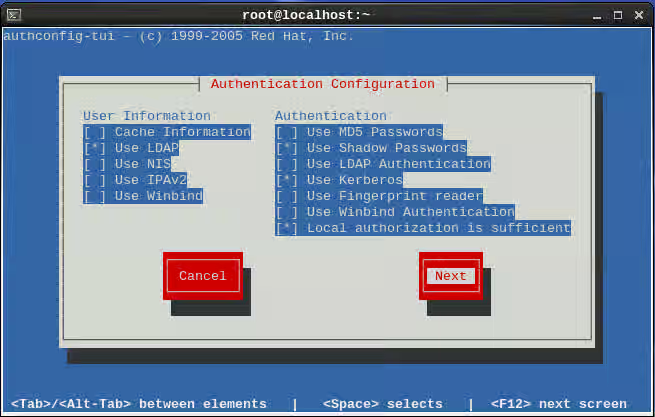
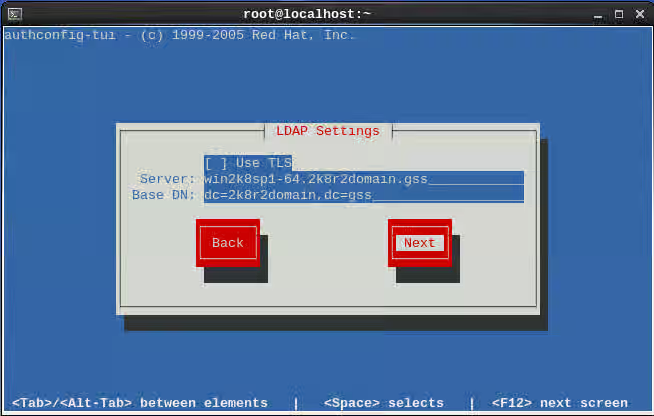
- On the ldap Settings step. Leave the use TLS option unselected put the AD servers fully qualified domain name in and the base DN.
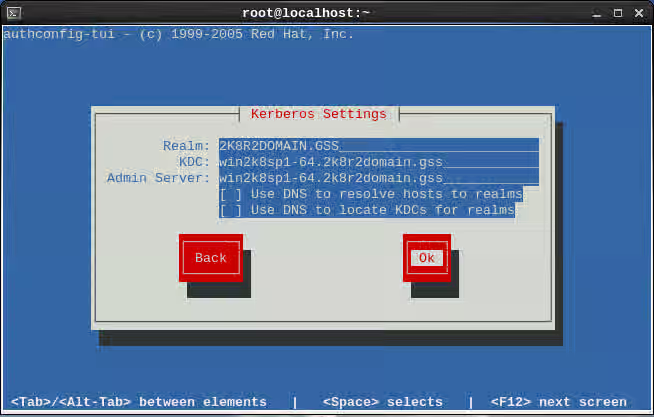
- On the kerberos Settings page enter the AD servers Realm, also list the AD servers fully qualified domain name for the KDC and Admin Server.
CLI method
Initial configuration
-
For the cli method, the authconfig tool is used.
-
If a backup of the original configuration is desired use this command.
authconfig --savebackup=mybackup -
The following command will set up your /etc/nsswitch.conf and your your pam stack.
authconfig --enablesssd --enablesssdauth --enablelocauthorize --enablemkhomedir --update
Confirm which version of SSSD is installed.
rpm -q sssd
Starting with sssd-1.9.2 there is a simpler configuration as well as a greater feature set with the Active Directory provider. Please note that if using and older version please see the SSSD 1.8.0 or Below section.
Depending on the version of RHEL there are different options for sssd. Here are the versions shipped in RHEL.
| RHEL Release | Shipped SSSD Version | Process Version |
|---|---|---|
| RHEL 6 | ||
| RHEL6.4 | sssd-1.9.2-82.el6 | SSSD 1.9.2 or Above |
| RHEL6.3 | sssd-1.8.0-32.el6 | SSSD 1.8.0 or Below |
| RHEL6.2 | sssd-1.5.1-66.el6 | |
| RHEL6.1 | sssd-1.5.1-34.el6 | |
| RHEL6.0 | sssd-1.2.1-28.el6 | |
| RHEL 5 | ||
| RHEL5.6 | sssd-1.2.1-39.el5 | SSSD 1.8.0 or Below |
| RHEL5.7 | sssd-1.5.1-37.el5 | |
| RHEL5.8 | sssd-1.5.1-49.el5 | |
| RHEL5.9 | sssd-1.5.1-58.el5 |
Configuring sssd-1.9.2 or Above for Active Directory Authentication
Configure Kerberos
Configuring Kerberos with DNS set up for Active Directory
-
In most cases the DNS environment is properly setup for Active Directory.
-
In these cases, edit
/etc/krb5.confand setdns_lookup_realmanddns_lookup_kdctotrue -
Also set
default_realmyour kerberos realm.includedir /var/lib/sss/pubconf/krb5.include.d/ [logging] default = FILE:/var/log/krb5libs.log kdc = FILE:/var/log/krb5kdc.log admin_server = FILE:/var/log/kadmind.log [libdefaults] default_realm = 2K8R2DOMAIN.GSS dns_lookup_realm = true dns_lookup_kdc = true ticket_lifetime = 24h renew_lifetime = 7d forwardable = true [realms] [domain_realm] -
Do make sure the includedir is in /etc/krb5.conf to enable sssd localauth plugin.
Configuring Kerberos when DNS is not set up for Active Directory
-
If DNS is not working correctly for Active Directory, manually edit the kerberos settings in
/etc/krb5.confincludedir /var/lib/sss/pubconf/krb5.include.d/ [logging] default = FILE:/var/log/krb5libs.log kdc = FILE:/var/log/krb5kdc.log admin_server = FILE:/var/log/kadmind.log [libdefaults] default_realm = 2K8R2DOMAIN.GSS dns_lookup_realm = false dns_lookup_kdc = false ticket_lifetime = 24h renew_lifetime = 7d forwardable = true [realms] 2K8R2DOMAIN.GSS = { kdc = win2k8sp1-64.2k8r2domain.gss } [domain_realm] 2k8r2domain.gss = 2K8R2DOMAIN.GSS .2k8r2domain.gss = 2K8R2DOMAIN.GSS -
Do make sure the includedir is in /etc/krb5.conf to enable sssd localauth plugin.
Configure Samba
-
Edit the following setting in
/etc/samba/smb.conf. -
The workgroup is the NetBIOS name of the domain and also set the realm.
-
This config will be used by the
netcommand to retrieve a kerberos service principle. -
Running samba or winbind as a service is not required.
[global] workgroup = 2K8R2DOMAIN client signing = yes client use spnego = yes kerberos method = secrets and keytab log file = /var/log/samba/%m.log realm = 2K8R2DOMAIN.GSS security = ads -
If dns is not functioning properly you may need to add this line in
/etc/samba/smb.confto directly point to an AD controller.password server = win2k8sp1-64.2k8r2domain.gss
Configure SSSD
First Method
-
There are different ways that sssd can map users and groups in AD.
-
The first method requires no changes to AD and the Identity Management for UNIX component is not needed.
-
This method will use the SID info on AD to map UID/GID data on RHEL.
-
For both methods make sure the domain string is changed from default to the AD domain string. In this example the domain is 2k8r2domain.gss.
    [domain/2k8r2domain.gss]
    id_provider = ad
    debug_level = 0

    [sssd]
    services = nss, pam
    config_file_version = 2
    domains = 2k8r2domain.gss

    [nss]

    [pam]
Second Method
-
The second method that can be used is to read the uidNumber and gidNumber attributes set in Identity Management for UNIX on Active Directory.
-
This method requires extra setup steps on Active Directory where attributes are set by the AD administrator.
-
Use the
/etc/sssd/sssd.confconfig above howeverldap_id_mappingis set to false.[domain/2k8r2domain.gss] id_provider = ad ldap_id_mapping = False debug_level = 0
Less common SSSD configuration options
-
To point to a specific AD server when service discovery is not working. Please see the man page for failover if this setting is used.
ad_server = win2k8sp1-64.2k8r2domain.gss -
Specifies the name of the Active Directory domain.
ad_domain = 2k8r2domain.gss -
Client hostname does not reflect the fully qualified name on AD.
ad_hostname = rhel6-2k8-adpro.2k8r2domain.gss -
For additional details please see the full man page
man sssd-ad
Joining AD and creating a keytab
-
The last step is to create a service principle for sssd to use in the gssapi bind process to AD.
-
This is done using the
netcommand. -
We first get a kerberos ticket from an account that is authorised to join systems to AD.
kinit Administrator -
If you get a clock skew error, use ntpdate to to resolve the time skew by syncing the RHEL server to AD.
# kinit Administrator Password for Administrator@2K8R2DOMAIN.GSS: kinit: Clock skew too great while getting initial credentials # ntpdate win2k8sp1-64.2k8r2domain.gss 14 Mar 10:38:27 ntpdate[11892]: step time server 2620:52:0:dd3:9b1:faf:180:3b80 offset -43199.015260 sec -
After retrieving a working tgt ticket, the
netcommand can be used to create the/etc/krb5.keytab.# klist Ticket cache: FILE:/tmp/krb5cc_0 Default principal: Administrator@2K8R2DOMAIN.GSS Valid starting Expires Service principal 03/14/13 10:38:30 03/14/13 20:38:32 krbtgt/2K8R2DOMAIN.GSS@2K8R2DOMAIN.GSS renew until 03/21/13 10:38:30 -
When the net command is run you should see a successful join. It is ok if you get the dns update failed message.
# net ads join -k Using short domain name -- 2K8R2DOMAIN Joined 'RHEL6-2K8-ADPRO' to dns domain '2k8r2domain.gss' No DNS domain configured for rhel6-2k8-adpro. Unable to perform DNS Update. DNS update failed! -
Following a successful join the RHEL system should be setup. Restart sssd and check to make sure user and group info is working.
[root@rhel6-2k8-adpro ~]# /etc/init.d/sssd restart
Stopping sssd:                                             [  OK  ]
Starting sssd:                                               [  OK  ]

** Testing the new configuration**

[root@rhel6-2k8-adpro ~]# id jagee
uid=1777801104(jagee) gid=1777800513(domain users) groups=1777800513(domain users),1777800512(domain admins),1777801105(redhat),1777800572(denied rodc password replication group)

[root@rhel6-2k8-adpro ~]# getent group redhat
redhat:*:1777801105:jagee,ccoursey,chudson,ekeck,rnelson
Configuring sssd 1.8.0 or Below for Active Directory Authentication
- Edit the
/etc/sssd/sssd.conffile and look in the[domain/default]section of the config file. - By default Active directory will not allow anonymous binding and will require an AD account to bind with.
- There are two ways we can work with non-anonymous binds.
- One way is to use a user account to bind with and the other way is a GSSAPI bind with a service principle.
User Bind
-
The following three lines will enable the sssd daemon to bind as a user.
-
In this example the
jagee@2k8r2domain.gssuser is used but you may choose to create a specificsssdbinduser on AD for example. This user does not need any special privileges. -
Choose one of the following two methods to declare
ldap_default_bind_dnldap_default_bind_dn = CN=Jeremy Agee,CN=Users,DC=2k8r2domain,DC=gssldap_default_bind_dn = jagee@2k8r2domain.gss -
and add the authentication token details
ldap_default_authtok_type = password
ldap_default_authtok = <YourPassword>
GSSAPI Bind
-
First you will need to create a keytab for the host and copy this to the RHEL server. Follow How to create a kerberos keytab on Active Directory for RHEL to accomplish this on the AD controller.
-
SSSD will use the following setting instead of the
ldap_default_bind_dnandldap_default_authtok*settings. -
Please note that the
sasl_authidstring will depend on your environment and should match what is used in the previous step.ldap_sasl_mech = GSSAPI ldap_sasl_authid = host/rhel6-2k8-sssd.2k8r2domain.gss@2K8R2DOMAIN.GSS krb5_canonicalize = false -
Active Directory uses different object classes compared to other ldap servers. To account for these differences the following extra maps need to be set.
ldap_schema = rfc2307bis ldap_user_object_class = person ldap_group_object_class = group ldap_user_gecos = displayName ldap_user_home_directory = unixHomeDirectory -
Here is a full example:
[domain/default] ldap_id_use_start_tls = True ldap_tls_cacertdir = /etc/openldap/cacerts cache_credentials = True id_provider = ldap auth_provider = krb5 chpass_provider = krb5 ldap_schema = rfc2307bis ldap_force_upper_case_realm = True ldap_user_object_class = person ldap_group_object_class = group ldap_user_gecos = displayName ldap_user_home_directory = unixHomeDirectory ldap_uri = ldap://win2k8sp1-64.2k8r2domain.gss ldap_search_base = DC=2k8r2domain,DC=gss ldap_default_bind_dn = CN=Jeremy Agee,CN=Users,DC=2k8r2domain,DC=gss ldap_default_authtok_type = password ldap_default_authtok = <YourPassword> ldap_referrals = false krb5_realm = 2K8R2DOMAIN.GSS krb5_server = win2k8sp1-64.2k8r2domain.gss debug_level = 0 -
After making the changes described above, you will need to restart the
sssdservice.service sssd restart
Extra Features
expire policy
-
Note: this is default for the AD provider in sssd-1.9.2.
ldap_access_order = expire
ldap_account_expire_policy = ad
Access control
-
simple filter for users or groups:
[domain/xxxxxx] access_provider = simple simple_allow_users = user1, user2 simple_allow_groups = group1, group2 -
See man sssd-simple
ldap filter
-
1.8.0 and below
access_provider = ldap ldap_access_filter = memberOf=CN=linux_users,CN=Users,DC=2k8r2domain,DC=gss -
ssd-1.9.2
-
First find your host principle in the keytab.
# klist -k 2 RHEL6-2K8-ADPRO$@2K8R2DOMAIN.GSS -
Then point at the ldap group while using a gssapi bind for the lookup.
access_provider = ldap ldap_schema = ad ldap_access_filter = memberOf=CN=sshadmins,OU=groups,DC=2k8r2domain,DC=gss ldap_sasl_mech = GSSAPI ldap_sasl_authid = RHEL6-2K8-ADPRO$@2K8R2DOMAIN.GSS -
Note this will not find a nested group. The user must be a member of this group.
-
If both expire and filter are used this setting is also needed in the domain section.
ldap_access_order = filter, expire
-
-
Note Unless there is a specific reason to follow ldap referrals, this feature should be disabled with the
ldap_referrals = falsesetting. This setting is disabled by default when using the AD provider in version 1.9.2.- If this is not disabled in older versions,
sssdwill follow the referrals that are reported by Active Directory. - In Active Directory there are referrals for the ForestDnsZones, DomainDnsZones, and Configuration trees.
- If this is not disabled in older versions,
-
Also Note The sssd daemon is very different than earlier setups.
- This daemon does not enumerate users by default.
- Setting
enumerate = Truein the[domain/default]section will result in user and group enumeration.- This will configure a systems to behave more closely like older NSS ldap setups.
- When the daemon is running with the default of
enumerate = False, You will not see all the users data until it is queried and cached.- While this appears odd, it will look up the info when needed.
- This is done to make things faster are reduce load on the ldap server.
-
Example
[root@jagee-rhel6 ~]# id jagee
uid=10001(jagee) gid=10000(Domain Users) groups=10000(Domain Users)
[root@jagee-rhel6 ~]# getent group redhat
redhat:*:10002:jagee,ccoursey,chudson,ekeck,rnelson
[root@jagee-rhel6 ~]# id jagee
uid=10001(jagee) gid=10000(Domain Users) groups=10000(Domain Users),10002(redhat)
Note on SID ranges
-
The ldap_idmap_range_size defaults to 200k (see
man sssd-ldap). -
If the SIDs on the AD are larger than this you will need to change this in the
sssd.confto ensure these can be converted to unix uid's. -
If the SID is larger than 200k and you have not changed the
ldap_idmap_range_sizeyou will see errors in/var/log/sssd/sssd_default.logsimilar to:sdap_idmap_sid_to_unix] (0x0080): Could not convert objectSID [S-1-5-21-11111111-11111111-111111-720000] to a UNIX ID (Mon Dec 30 15:26:27 2013) [sssd[be[test.example.com]]] [sdap_save_user] (0x0040): Failed to save user [TESTUSER] (Mon Dec 30 15:26:27 2013) [sssd[be[test.example.com]]] [sdap_save_users] (0x0040): Failed to store user 0. Ignoring. -
In the above example we can see the SID is 720000 so you would need to change the
ldap_idmap_range_sizeto a number greater than this e.g. 1000000.