This document provides guidance on deploying, configuring, and administering a Ceph Object Gateway environment. This guide uses a "Day Zero", "Day One", and "Day Two" organizational methodology, providing readers with a logical progression path. Day Zero is where research and planning are done before implementing a potential solution, see Chapters 1 and 2. Day One is where the actual deployment, and installation of the software happens, see Chapter 3. Day Two is where all the basic, and advanced configuration happens, see Chapters 4, 5, and 6.
Red Hat is committed to replacing problematic language in our code, documentation, and web properties. We are beginning with these four terms: master, slave, blacklist, and whitelist. Because of the enormity of this endeavor, these changes will be implemented gradually over several upcoming releases. For more details, see our CTO Chris Wright's message
Chapter 1. The Ceph Object Gateway
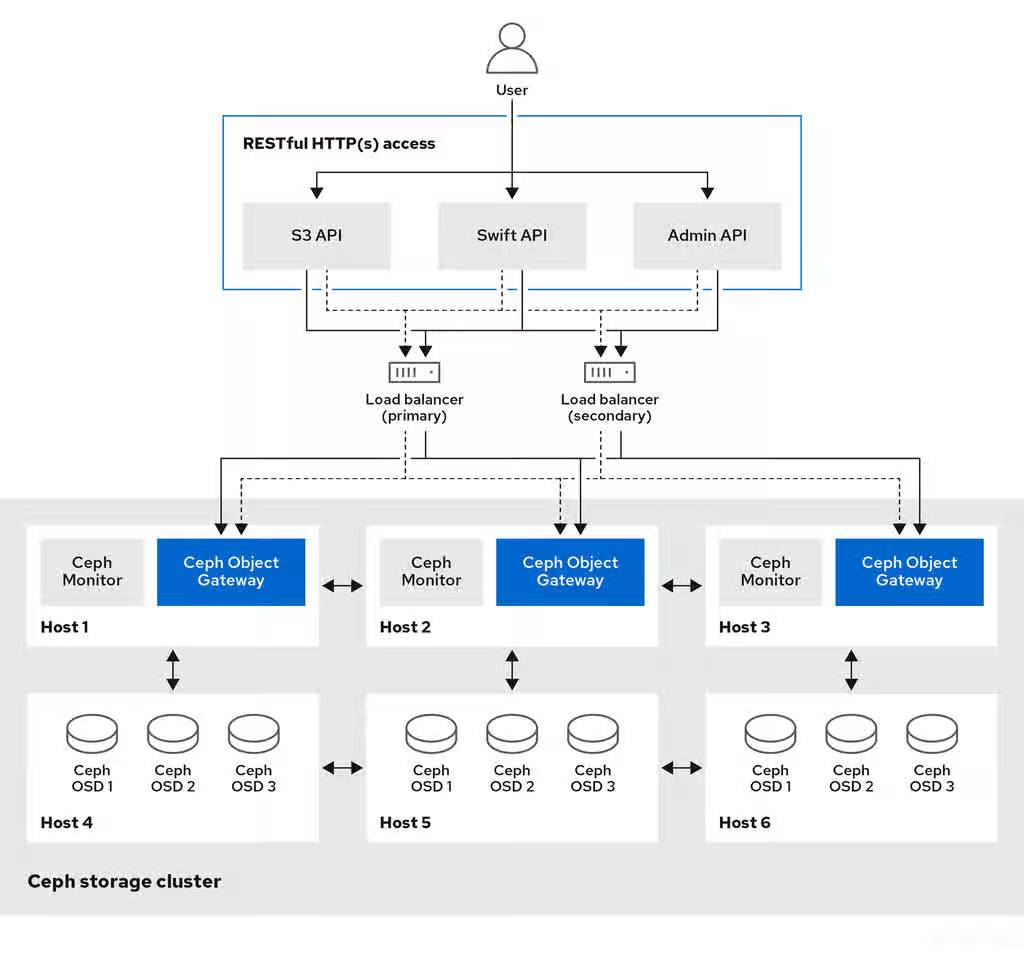
Ceph Object Gateway, also known as RADOS Gateway (RGW), is an object storage interface built on top of the librados library to provide applications with a RESTful gateway to Ceph storage clusters. Ceph Object Gateway supports three interfaces:
S3-compatibility:
Provides object storage functionality with an interface that is compatible with a large subset of the Amazon S3 RESTful API.
You can run S3 select to accelerate throughput. Users can run S3 select queries directly without a mediator. There are two S3 select workflows, one for CSV and one for Apache Parquet (Parquet), that provide S3 select operations with CSV and Parquet objects. For more details about these S3 select operations, see section S3 select operations in the Red Hat Ceph Storage Developer Guide.
Swift-compatibility:
Provides object storage functionality with an interface that is compatible with a large subset of the OpenStack Swift API.
The Ceph Object Gateway is a service interacting with a Ceph storage cluster. Since it provides interfaces compatible with OpenStack Swift and Amazon S3, the Ceph Object Gateway has its own user management system. Ceph Object Gateway can store data in the same Ceph storage cluster used to store data from Ceph block device clients; however, it would involve separate pools and likely a different CRUSH hierarchy. The S3 and Swift APIs share a common namespace, so you can write data with one API and retrieve it with the other.
Administrative API:
Provides an administrative interface for managing the Ceph Object Gateways.
Administrative API requests are done on a URI that starts with the admin resource end point. Authorization for the administrative API mimics the S3 authorization convention. Some operations require the user to have special administrative capabilities. The response type can be either XML or JSON by specifying the format option in the request, but defaults to the JSON format.
Introduction to WORM
Write-Once-Read-Many (WORM) is a secured data storage model that is used to guarantee data protection and data retrieval even in cases where objects and buckets are compromised in production zones.
In Red Hat Ceph Storage, data security is achieved through the use of S3 Object Lock with read-only capability that is used to store objects and buckets using a Write-Once-Read-Many (WORM) model, preventing them from being deleted or overwritten. They cannot be deleted even by the Red Hat Ceph Storage administrator.
S3 Object Lock provides two retention modes:
GOVERNANCE
COMPLIANCE
These retention modes apply different levels of protection to your objects. You can apply either retention mode to any object version that is protected by Object Lock.
In GOVERNANCE, users cannot overwrite or delete an object version or alter its lock settings unless they have special permissions. With GOVERNANCE mode, you can protect objects against deletion by most users, although you can still grant some users permission to alter the retention settings or delete the object if necessary.
In COMPLIANCE mode, a protected object version cannot be overwritten or deleted by any user. When an object is locked in COMPLIANCE mode, its retention mode cannot be changed or shortened.
As a storage administrator, a basic understanding about what to consider before running a Ceph Object Gateway and implementing a multi-site Ceph Object Gateway solution is important. You can learn the hardware and network requirements, knowing what type of workloads work well with a Ceph Object Gateway, and Red Hat’s recommendations.
Prerequisites
Time to understand, consider, and plan a storage solution.
2.1. Network considerations for Red Hat Ceph Storage
An important aspect of a cloud storage solution is that storage clusters can run out of IOPS due to network latency, and other factors. Also, the storage cluster can run out of throughput due to bandwidth constraints long before the storage clusters run out of storage capacity. This means that the network hardware configuration must support the chosen workloads to meet price versus performance requirements.
Storage administrators prefer that a storage cluster recovers as quickly as possible. Carefully consider bandwidth requirements for the storage cluster network, be mindful of network link oversubscription, and segregate the intra-cluster traffic from the client-to-cluster traffic. Also consider that network performance is increasingly important when considering the use of Solid State Disks (SSD), flash, NVMe, and other high performing storage devices.
Ceph supports a public network and a storage cluster network. The public network handles client traffic and communication with Ceph Monitors. The storage cluster network handles Ceph OSD heartbeats, replication, backfilling, and recovery traffic. At a minimum, a single 10 GB Ethernet link should be used for storage hardware, and you can add additional 10 GB Ethernet links for connectivity and throughput.
Important
Red Hat recommends allocating bandwidth to the storage cluster network, such that it is a multiple of the public network using the osd_pool_default_size as the basis for the multiple on replicated pools. Red Hat also recommends running the public and storage cluster networks on separate network cards.
Important
Red Hat recommends using 10 GB Ethernet for Red Hat Ceph Storage deployments in production. A 1 GB Ethernet network is not suitable for production storage clusters.
In the case of a drive failure, replicating 1 TB of data across a 1 GB Ethernet network takes 3 hours, and 3 TB takes 9 hours. Using 3 TB is the typical drive configuration. By contrast, with a 10 GB Ethernet network, the replication times would be 20 minutes and 1 hour. Remember that when a Ceph OSD fails, the storage cluster recovers by replicating the data it contained to other OSDs within the same failure domain and device class as the failed OSD.
The failure of a larger domain such as a rack means that the storage cluster utilizes considerably more bandwidth. When building a storage cluster consisting of multiple racks, which is common for large storage implementations, consider utilizing as much network bandwidth between switches in a "fat tree" design for optimal performance. A typical 10 GB Ethernet switch has 48 10 GB ports and four 40 GB ports. Use the 40 GB ports on the spine for maximum throughput. Alternatively, consider aggregating unused 10 GB ports with QSFP+ and SFP+ cables into more 40 GB ports to connect to other rack and spine routers. Also, consider using LACP mode 4 to bond network interfaces. Additionally, use jumbo frames, with a maximum transmission unit (MTU) of 9000, especially on the backend or cluster network.
Before installing and testing a Red Hat Ceph Storage cluster, verify the network throughput. Most performance-related problems in Ceph usually begin with a networking issue. Simple network issues like a kinked or bent Cat-6 cable could result in degraded bandwidth. Use a minimum of 10 GB ethernet for the front side network. For large clusters, consider using 40 GB ethernet for the backend or cluster network.
Important
For network optimization, Red Hat recommends using jumbo frames for a better CPU per bandwidth ratio, and a non-blocking network switch back-plane. Red Hat Ceph Storage requires the same MTU value throughout all networking devices in the communication path, end-to-end for both public and cluster networks. Verify that the MTU value is the same on all hosts and networking equipment in the environment before using a Red Hat Ceph Storage cluster in production.
2.2. Basic Red Hat Ceph Storage considerations
The first consideration for using Red Hat Ceph Storage is developing a storage strategy for the data. A storage strategy is a method of storing data that serves a particular use case. If you need to store volumes and images for a cloud platform like OpenStack, you can choose to store data on faster Serial Attached SCSI (SAS) drives with Solid State Drives (SSD) for journals. By contrast, if you need to store object data for an S3- or Swift-compliant gateway, you can choose to use something more economical, like traditional Serial Advanced Technology Attachment (SATA) drives. Red Hat Ceph Storage can accommodate both scenarios in the same storage cluster, but you need a means of providing the fast storage strategy to the cloud platform, and a means of providing more traditional storage for your object store.
One of the most important steps in a successful Ceph deployment is identifying a price-to-performance profile suitable for the storage cluster’s use case and workload. It is important to choose the right hardware for the use case. For example, choosing IOPS-optimized hardware for a cold storage application increases hardware costs unnecessarily. Whereas, choosing capacity-optimized hardware for its more attractive price point in an IOPS-intensive workload will likely lead to unhappy users complaining about slow performance.
Red Hat Ceph Storage can support multiple storage strategies. Use cases, cost versus benefit performance tradeoffs, and data durability are the primary considerations that help develop a sound storage strategy.
Use Cases
Ceph provides massive storage capacity, and it supports numerous use cases, such as:
The Ceph Block Device client is a leading storage backend for cloud platforms that provides limitless storage for volumes and images with high performance features like copy-on-write cloning.
The Ceph Object Gateway client is a leading storage backend for cloud platforms that provides a RESTful S3-compliant and Swift-compliant object storage for objects like audio, bitmap, video, and other data.
The Ceph File System for traditional file storage.
Cost vs. Benefit of Performance
Faster is better. Bigger is better. High durability is better. However, there is a price for each superlative quality, and a corresponding cost versus benefit tradeoff. Consider the following use cases from a performance perspective: SSDs can provide very fast storage for relatively small amounts of data and journaling. Storing a database or object index can benefit from a pool of very fast SSDs, but proves too expensive for other data. SAS drives with SSD journaling provide fast performance at an economical price for volumes and images. SATA drives without SSD journaling provide cheap storage with lower overall performance. When you create a CRUSH hierarchy of OSDs, you need to consider the use case and an acceptable cost versus performance tradeoff.
Data Durability
In large scale storage clusters, hardware failure is an expectation, not an exception. However, data loss and service interruption remain unacceptable. For this reason, data durability is very important. Ceph addresses data durability with multiple replica copies of an object or with erasure coding and multiple coding chunks. Multiple copies or multiple coding chunks present an additional cost versus benefit tradeoff: it is cheaper to store fewer copies or coding chunks, but it can lead to the inability to service write requests in a degraded state. Generally, one object with two additional copies, or two coding chunks can allow a storage cluster to service writes in a degraded state while the storage cluster recovers.
Replication stores one or more redundant copies of the data across failure domains in case of a hardware failure. However, redundant copies of data can become expensive at scale. For example, to store 1 petabyte of data with triple replication would require a cluster with at least 3 petabytes of storage capacity.
Erasure coding stores data as data chunks and coding chunks. In the event of a lost data chunk, erasure coding can recover the lost data chunk with the remaining data chunks and coding chunks. Erasure coding is substantially more economical than replication. For example, using erasure coding with 8 data chunks and 3 coding chunks provides the same redundancy as 3 copies of the data. However, such an encoding scheme uses approximately 1.5x the initial data stored compared to 3x with replication.
The CRUSH algorithm aids this process by ensuring that Ceph stores additional copies or coding chunks in different locations within the storage cluster. This ensures that the failure of a single storage device or host does not lead to a loss of all of the copies or coding chunks necessary to preclude data loss. You can plan a storage strategy with cost versus benefit tradeoffs, and data durability in mind, then present it to a Ceph client as a storage pool.
Important
ONLY the data storage pool can use erasure coding. Pools storing service data and bucket indexes use replication.
Important
Ceph’s object copies or coding chunks make RAID solutions obsolete. Do not use RAID, because Ceph already handles data durability, a degraded RAID has a negative impact on performance, and recovering data using RAID is substantially slower than using deep copies or erasure coding chunks.
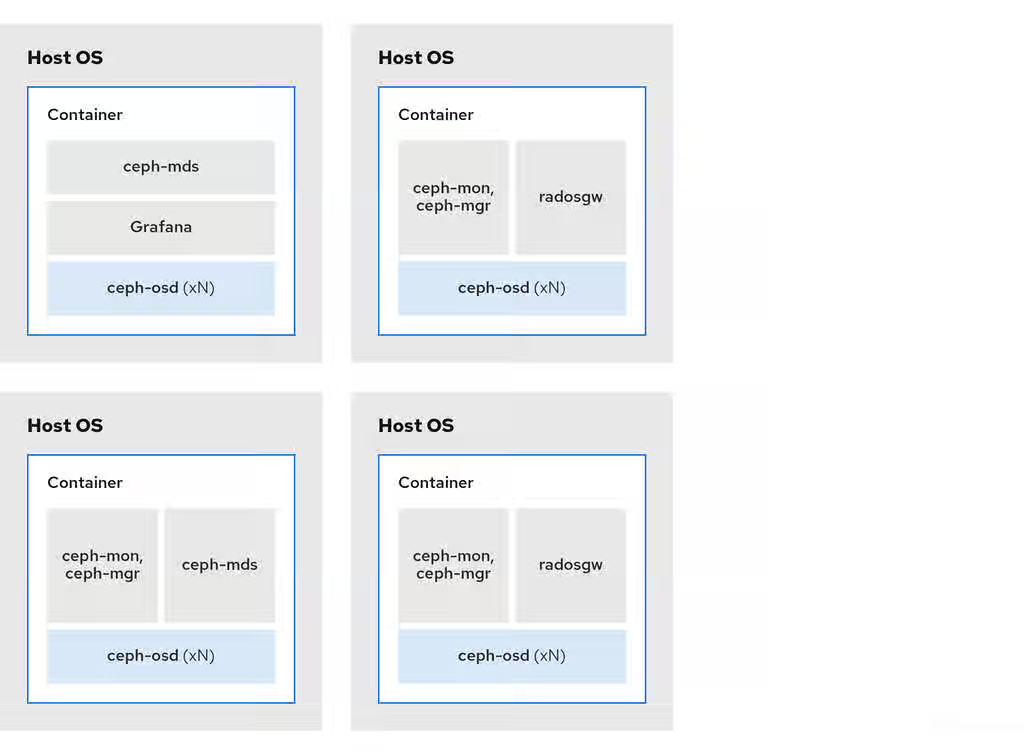
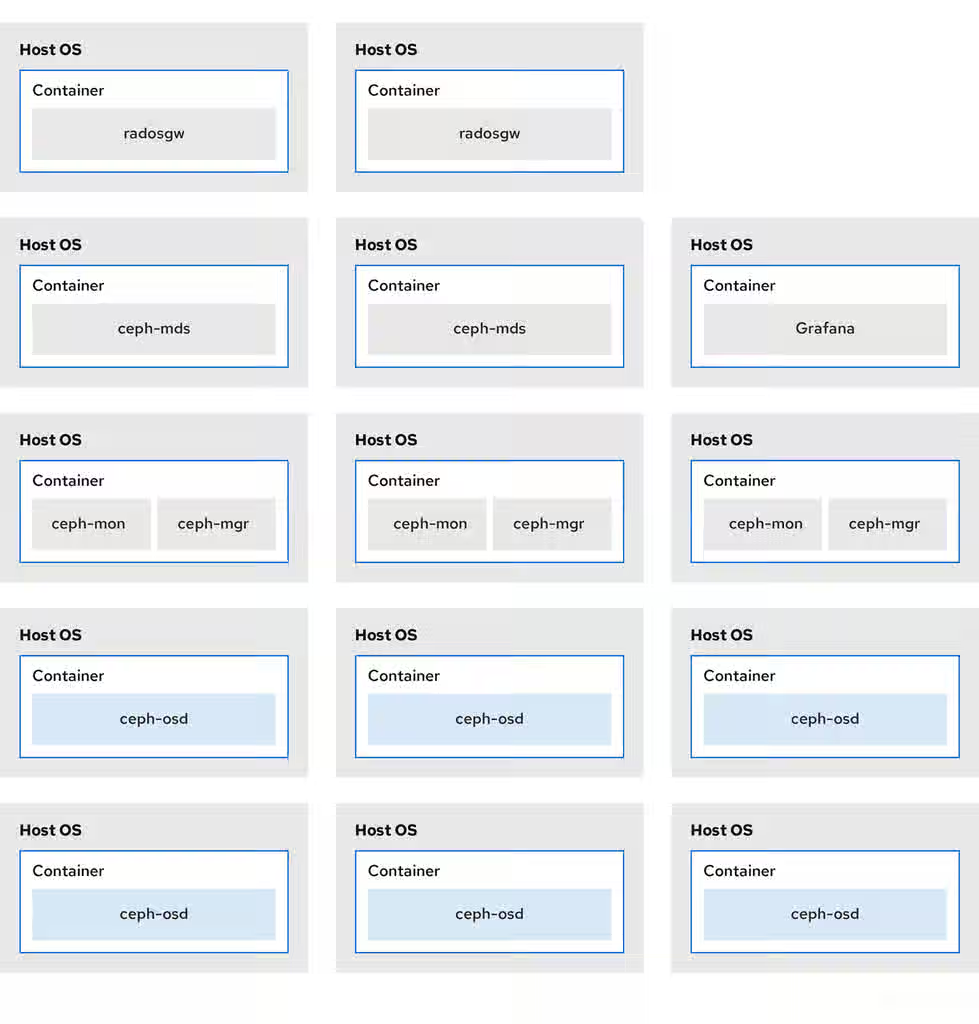
You can colocate containerized Ceph daemons on the same host. Here are the advantages of colocating some of Ceph’s daemons:
Significantly improves the total cost of ownership (TCO) at small scale.
Can increase overall performance.
Reduces the amount of physical hosts for a minimum configuration.
Better resource utilization.
Upgrading Red Hat Ceph Storage is easier.
By using containers you can colocate one daemon from the following list with a Ceph OSD daemon (ceph-osd). Additionally, for the Ceph Object Gateway (radosgw), Ceph Metadata Server (ceph-mds), and Grafana, you can colocate it either with a Ceph OSD daemon, plus a daemon from the list below.
Ceph Metadata Server (ceph-mds)
Ceph Monitor (ceph-mon)
Ceph Manager (ceph-mgr)
NFS Ganesha (nfs-ganesha)
Ceph Manager (ceph-grafana)
Table 2.1. Daemon Placement Example
Host Name
Daemon
Daemon
Daemon
host1
OSD
Monitor & Manager
Prometheus
host2
OSD
Monitor & Manager
RGW
host3
OSD
Monitor & Manager
RGW
host4
OSD
Metadata Server
host5
OSD
Metadata Server
Note
Because ceph-mon and ceph-mgr work closely together, they are not considered two separate daemons for the purposes of colocation.
Colocating Ceph daemons can be done from the command line interface, by using the --placement option to the ceph orch command, or you can use a service specification YAML file.
Red Hat recommends colocating the Ceph Object Gateway with Ceph OSD containers to increase performance. To achieve the highest performance without incurring additional hardware cost, use two Ceph Object Gateway daemons per host.
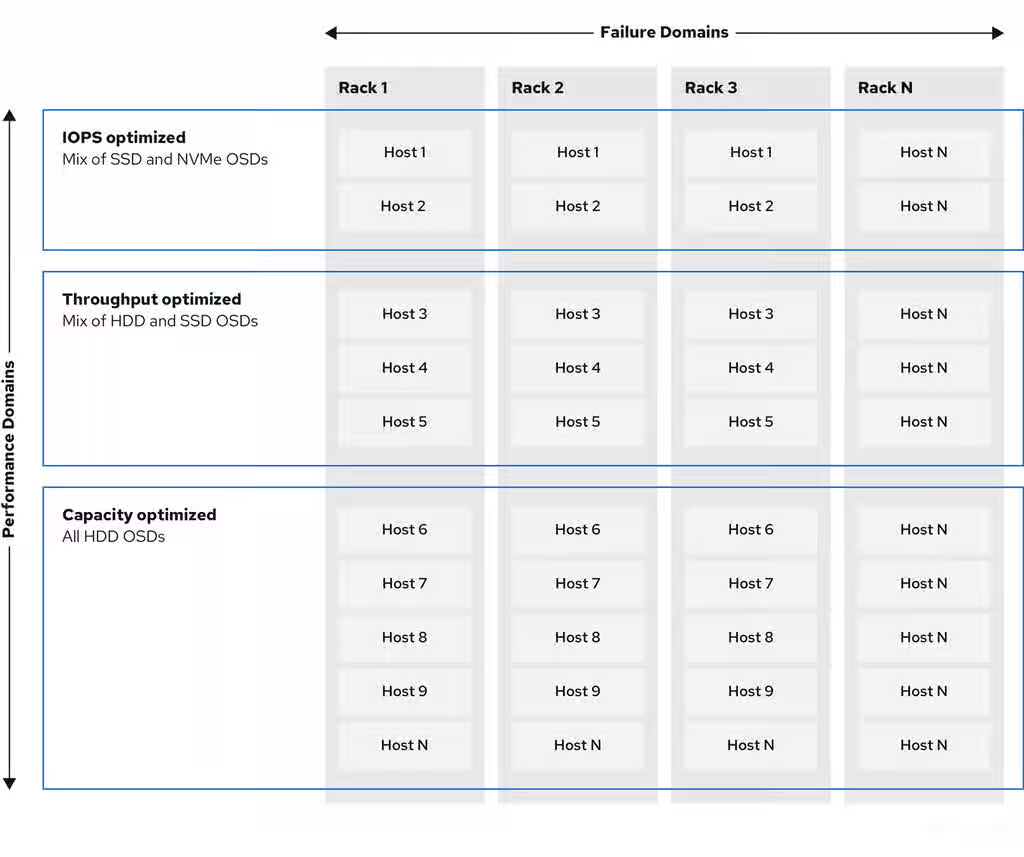
One of the key benefits of a Ceph storage cluster is the ability to support different types of workloads within the same storage cluster using performance domains. Different hardware configurations can be associated with each performance domain. Storage administrators can deploy storage pools on the appropriate performance domain, providing applications with storage tailored to specific performance and cost profiles. Selecting appropriately sized and optimized servers for these performance domains is an essential aspect of designing a Red Hat Ceph Storage cluster.
To the Ceph client interface that reads and writes data, a Ceph storage cluster appears as a simple pool where the client stores data. However, the storage cluster performs many complex operations in a manner that is completely transparent to the client interface. Ceph clients and Ceph object storage daemons, referred to as Ceph OSDs, or simply OSDs, both use the Controlled Replication Under Scalable Hashing (CRUSH) algorithm for the storage and retrieval of objects. Ceph OSDs can run in containers within the storage cluster.
A CRUSH map describes a topography of cluster resources, and the map exists both on client hosts as well as Ceph Monitor hosts within the cluster. Ceph clients and Ceph OSDs both use the CRUSH map and the CRUSH algorithm. Ceph clients communicate directly with OSDs, eliminating a centralized object lookup and a potential performance bottleneck. With awareness of the CRUSH map and communication with their peers, OSDs can handle replication, backfilling, and recovery—allowing for dynamic failure recovery.
Ceph uses the CRUSH map to implement failure domains. Ceph also uses the CRUSH map to implement performance domains, which simply take the performance profile of the underlying hardware into consideration. The CRUSH map describes how Ceph stores data, and it is implemented as a simple hierarchy, specifically an acyclic graph, and a ruleset. The CRUSH map can support multiple hierarchies to separate one type of hardware performance profile from another. Ceph implements performance domains with device "classes".
For example, you can have these performance domains coexisting in the same Red Hat Ceph Storage cluster:
Hard disk drives (HDDs) are typically appropriate for cost and capacity-focused workloads.
Throughput-sensitive workloads typically use HDDs with Ceph write journals on solid state drives (SSDs).
IOPS-intensive workloads, such as MySQL and MariaDB, often use SSDs.
Figure 2.3. Performance and Failure Domains
Workloads
Red Hat Ceph Storage is optimized for three primary workloads.
Important
Carefully consider the workload being run by Red Hat Ceph Storage clusters BEFORE considering what hardware to purchase, because it can significantly impact the price and performance of the storage cluster. For example, if the workload is capacity-optimized and the hardware is better suited to a throughput-optimized workload, then hardware will be more expensive than necessary. Conversely, if the workload is throughput-optimized and the hardware is better suited to a capacity-optimized workload, then the storage cluster can suffer from poor performance.
IOPS optimized: Input, output per second (IOPS) optimization deployments are suitable for cloud computing operations, such as running MYSQL or MariaDB instances as virtual machines on OpenStack. IOPS optimized deployments require higher performance storage such as 15k RPM SAS drives and separate SSD journals to handle frequent write operations. Some high IOPS scenarios use all flash storage to improve IOPS and total throughput.
An IOPS-optimized storage cluster has the following properties:
Lowest cost per IOPS.
Highest IOPS per GB.
99th percentile latency consistency.
Uses for an IOPS-optimized storage cluster are:
Typically block storage.
3x replication for hard disk drives (HDDs) or 2x replication for solid state drives (SSDs).
MySQL on OpenStack clouds.
Throughput optimized: Throughput-optimized deployments are suitable for serving up significant amounts of data, such as graphic, audio, and video content. Throughput-optimized deployments require high bandwidth networking hardware, controllers, and hard disk drives with fast sequential read and write characteristics. If fast data access is a requirement, then use a throughput-optimized storage strategy. Also, if fast write performance is a requirement, using Solid State Disks (SSD) for journals will substantially improve write performance.
A throughput-optimized storage cluster has the following properties:
Lowest cost per MBps (throughput).
Highest MBps per TB.
Highest MBps per BTU.
Highest MBps per Watt.
97th percentile latency consistency.
Uses for a throughput-optimized storage cluster are:
Block or object storage.
3x replication.
Active performance storage for video, audio, and images.
Streaming media, such as 4k video.
Capacity optimized: Capacity-optimized deployments are suitable for storing significant amounts of data as inexpensively as possible. Capacity-optimized deployments typically trade performance for a more attractive price point. For example, capacity-optimized deployments often use slower and less expensive SATA drives and co-locate journals rather than using SSDs for journaling.
A cost and capacity-optimized storage cluster has the following properties:
Lowest cost per TB.
Lowest BTU per TB.
Lowest Watts required per TB.
Uses for a cost and capacity-optimized storage cluster are:
Typically object storage.
Erasure coding for maximizing usable capacity
Object archive.
Video, audio, and image object repositories.
2.4. Ceph Object Gateway considerations
Another important aspect of designing a storage cluster is to determine if the storage cluster will be in one data center site or span multiple data center sites. Multi-site storage clusters benefit from geographically distributed failover and disaster recovery, such as long-term power outages, earthquakes, hurricanes, floods or other disasters. Additionally, multi-site storage clusters can have an active-active configuration, which can direct client applications to the closest available storage cluster. This is a good storage strategy for content delivery networks. Consider placing data as close to the client as possible. This is important for throughput-intensive workloads, such as streaming 4k video.
Important
Red Hat recommends identifying realm, zone group and zone names BEFORE creating Ceph’s storage pools. Prepend some pool names with the zone name as a standard naming convention.
A Ceph Object Gateway stores administrative data in a series of pools defined in an instance’s zone configuration. For example, the buckets, users, user quotas, and usage statistics discussed in the subsequent sections are stored in pools in the Ceph storage cluster. By default, Ceph Object Gateway creates the following pools and maps them to the default zone.
.rgw.root
.default.rgw.control
.default.rgw.meta
.default.rgw.log
.default.rgw.buckets.index
.default.rgw.buckets.data
.default.rgw.buckets.non-ec
Note
The .default.rgw.buckets.index pool is created only after the bucket is created in Ceph Object Gateway, while the .default.rgw.buckets.data pool is created after the data is uploaded to the bucket.
Consider creating these pools manually so you can set the CRUSH ruleset and the number of placement groups. In a typical configuration, the pools that store the Ceph Object Gateway’s administrative data will often use the same CRUSH ruleset, and use fewer placement groups, because there are 10 pools for the administrative data.
Red Hat recommends that the .rgw.root pool and the service pools use the same CRUSH hierarchy, and use at least node as the failure domain in the CRUSH rule. Red Hat recommends using replicated for data durability, and NOT erasure for the .rgw.root pool, and the service pools.
The mon_pg_warn_max_per_osd setting warns you if you assign too many placement groups to a pool, 300 by default. You may adjust the value to suit your needs and the capabilities of your hardware where n is the maximum number of PGs per OSD.
Garbage collection uses the .log pool with regular RADOS objects instead of OMAP. In future releases, more features will store metadata on the .log pool. Therefore, Red Hat recommends using NVMe/SSD Ceph OSDs for the .log pool.
.rgw.root Pool
The pool where the Ceph Object Gateway configuration is stored. This includes realms, zone groups, and zones. By convention, its name is not prepended with the zone name.
Service Pools
The service pools store objects related to service control, garbage collection, logging, user information, and usage. By convention, these pool names have the zone name prepended to the pool name.
.ZONE_NAME.rgw.control : The control pool.
.ZONE_NAME.log : The log pool contains logs of all bucket, container, and object actions, such as create, read, update, and delete.
.ZONE_NAME.rgw.buckets.index : This pool stores index of the buckets.
.ZONE_NAME.rgw.buckets.data : This pool stores data of the buckets.
.ZONE_NAME.rgw.meta : The metadata pool stores user_keys and other critical metadata.
.ZONE_NAME.meta:users.uid : The user ID pool contains a map of unique user IDs.
.ZONE_NAME.meta:users.keys : The keys pool contains access keys and secret keys for each user ID.
.ZONE_NAME.meta:users.email : The email pool contains email addresses associated to a user ID.
.ZONE_NAME.meta:users.swift : The Swift pool contains the Swift subuser information for a user ID.
Additional Resources
See the About pools section in the Red Hat Ceph Storage Object Gateway Guide for more details.
When selecting OSD hardware for use with a Ceph Object Gateway--irrespective of the use case--an OSD node that has at least one high performance drive, either an SSD or NVMe drive, is required for storing the index pool. This is particularly important when buckets contain a large number of objects.
For Red Hat Ceph Storage running Bluestore, Red Hat recommends deploying an NVMe drive as a block.db device, rather than as a separate pool.
Ceph Object Gateway index data is written only into an object map (OMAP). OMAP data for BlueStore resides on the block.db device on an OSD. When an NVMe drive functions as a block.db device for an HDD OSD and when the index pool is backed by HDD OSDs, the index data will ONLY be written to the block.db device. As long as the block.db partition/lvm is sized properly at 4% of block, this configuration is all that is needed for BlueStore.
An index entry is approximately 200 bytes of data, stored as an OMAP in rocksdb. While this is a trivial amount of data, some uses of Ceph Object Gateway can result in tens or hundreds of millions of objects in a single bucket. By mapping the index pool to a CRUSH hierarchy of high performance storage media, the reduced latency provides a dramatic performance improvement when buckets contain very large numbers of objects.
Important
In a production cluster, a typical OSD node will have at least one SSD or NVMe drive for storing the OSD journal and the index pool or block.db device, which use separate partitions or logical volumes for the same physical drive.
2.4.3. Data pool
The data pool is where the Ceph Object Gateway stores the object data for a particular storage policy. The data pool has a full complement of placement groups (PGs), not the reduced number of PGs for service pools. Consider using erasure coding for the data pool, as it is substantially more efficient than replication, and can significantly reduce the capacity requirements while maintaining data durability.
To use erasure coding, create an erasure code profile. See the Erasure Code Profiles section in the Red Hat Ceph Storage Storage Strategies Guide for more details.
Important
Choosing the correct profile is important because you cannot change the profile after you create the pool. To modify a profile, you must create a new pool with a different profile and migrate the objects from the old pool to the new pool.
The default configuration is two data chunks and one encoding chunk, which means only one OSD can be lost. For higher resiliency, consider a larger number of data and encoding chunks. For example, some large scale systems use 8 data chunks and 3 encoding chunks, which allows 3 OSDs to fail without losing data.
Important
Each data and encoding chunk SHOULD get stored on a different node or host at a minimum. For smaller storage clusters, this makes using rack impractical as the minimum CRUSH failure domain for a larger number of data and encoding chunks. Consequently, it is common for the data pool to use a separate CRUSH hierarchy with host as the minimum CRUSH failure domain. Red Hat recommends host as the minimum failure domain. If erasure code chunks get stored on Ceph OSDs within the same host, a host failure, such as a failed journal or network card, could lead to data loss.
To create a data pool, run the ceph osd pool create command with the pool name, the number of PGs and PGPs, the erasure data durability method, the erasure code profile, and the name of the rule.
2.4.4. Data extra pool
The data_extra_pool is for data that cannot use erasure coding. For example, multi-part uploads allow uploading a large object, such as a movie in multiple parts. These parts must first be stored without erasure coding. Erasure coding applies to the whole object, not the partial uploads.
Note
The placement group (PG) per Pool Calculator recommends a smaller number of PGs per pool for the data_extra_pool; however, the PG count is approximately twice the number of PGs as the service pools and the same as the bucket index pool.
To create a data extra pool, run the ceph osd pool create command with the pool name, the number of PGs and PGPs, the replicated data durability method, and the name of the rule. For example:
# ceph osd pool create .us-west.rgw.buckets.non-ec 64 64 replicated rgw-service
2.5. Developing CRUSH hierarchies
As a storage administrator, when deploying a Ceph storage cluster and an Object Gateway, typically the Ceph Object Gateway has a default zone group and zone. The Ceph storage cluster will have default pools, which in turn will use a CRUSH map with a default CRUSH hierarchy and a default CRUSH rule.
Important
The default rbd pool can use the default CRUSH rule. DO NOT delete the default rule or hierarchy if Ceph clients have used them to store client data.
Production gateways typically use a custom realm, zone group and zone named according to the use and geographic location of the gateways. Additionally, the Ceph storage cluster will have a CRUSH map that has multiple CRUSH hierarchies.
Service Pools: At least one CRUSH hierarchy will be for service pools and potentially for data. The service pools include .rgw.root and the service pools associated with the zone. Service pools typically fall under a single CRUSH hierarchy, and use replication for data durability. A data pool may also use the CRUSH hierarchy, but the pool will usually be configured with erasure coding for data durability.
Index: At least one CRUSH hierarchy SHOULD be for the index pool, where the CRUSH hierarchy maps to high performance media, such as SSD or NVMe drives. Bucket indices can be a performance bottleneck. Red Hat recommends to use SSD or NVMe drives in this CRUSH hierarchy. Create partitions for indices on SSDs or NVMe drives used for Ceph OSD journals. Additionally, an index should be configured with bucket sharding.
Placement Pools: The placement pools for each placement target include the bucket index, the data bucket, and the bucket extras. These pools can fall under separate CRUSH hierarchies. Since the Ceph Object Gateway can support multiple storage policies, the bucket pools of the storage policies may be associated with different CRUSH hierarchies, reflecting different use cases, such as IOPS-optimized, throughput-optimized, and capacity-optimized. The bucket index pool SHOULD use its own CRUSH hierarchy to map the bucket index pool to higher performance storage media, such as SSD or NVMe drives.
2.5.1. Creating CRUSH roots
From the command line on the administration node, create CRUSH roots in the CRUSH map for each CRUSH hierarchy. There MUST be at least one CRUSH hierarchy for service pools that may also potentially serve data storage pools. There SHOULD be at least one CRUSH hierarchy for the bucket index pool, mapped to high performance storage media, such as SSDs or NVMe drives.
For details on CRUSH hierarchies, see the CRUSH Hierarchies section in the Red Hat Ceph Storage Storage Strategies Guide 7.
To manually edit a CRUSH map, see the Editing a CRUSH Map section in the Red Hat Ceph Storage Storage Strategies Guide 7.
In the following examples, the hosts named data0, data1, and data2 use extended logical names, such as data0-sas-ssd, data0-index, and so forth in the CRUSH map, because there are multiple CRUSH hierarchies pointing to the same physical hosts.
A typical CRUSH root might represent nodes with SAS drives and SSDs for journals. For example:
A CRUSH root for bucket indexes SHOULD represent high performance media, such as SSD or NVMe drives. Consider creating partitions on SSD or NVMe media that store OSD journals. For example:
##
# INDEX ROOT DECLARATION
##

root index {
  id -2    # do not change unnecessarily
  # weight 0.000
  alg straw
  hash 0  # rjenkins1
  item data2-index weight 1.000
  item data1-index weight 1.000
  item data0-index weight 1.000
}
2.5.2. Using logical host names in a CRUSH map
In RHCS 3 and later releases, CRUSH supports the notion of a storage device "class," which is not supported in RHCS 2 and earlier releases. In RHCS 3 clusters with hosts or nodes that contain multiple classes of storage device, such as NVMe, SSD or HDD, use a single CRUSH hierarchy with device classes to distinguish different classes of storage device. This eliminates the need to use logical host names. In RHCS 2 and earlier releases, use multiple CRUSH hierarchies, one for each class of device, and logical host names to distinguish the hosts or nodes in the CRUSH hierarchy.
In RHCS 3 and later releases, CRUSH supports the notion of a storage device "class", which is not supported in RHCS 2 and earlier releases. In RHCS 3 clusters with hosts or nodes that contain multiple classes of a storage device, such as NVMe, SSD, or HDD, use a single CRUSH hierarchy with device classes to distinguish different classes of a storage device. This eliminates the need to use logical host names. In RHCS 2 and earlier releases, use multiple CRUSH hierarchies, one for each class of device, and logical host names to distinguish the hosts or nodes in the CRUSH hierarchy.
In the CRUSH map, host names must be unique and used only once. When the host serves multiple CRUSH hierarchies and use cases, a CRUSH map may use logical host names instead of the actual host name in order to ensure the host name is only used once. For example, a node may have multiple classes of drives such as SSDs, SAS drives with SSD journals, and SATA drives with co-located journals. To create multiple CRUSH hierarchies for the same host in RHCS 2 and earlier releases, the hierarchies need to use logical host names in lieu of the actual host names so the bucket names are unique within the CRUSH hierarchy. For example, if the host name is data2, the CRUSH hierarchy might use logical names, such as data2-sas-ssd and data2-index:
In the foregoing example, the host data2 uses the logical name data2-sas-ssd to map the SAS drives with journals on SSDs into one hierarchy. The OSD IDs osd.0 through osd.3 represent SAS drives using SSD journals in a high throughput hardware configuration. These OSD IDs differ from the OSD ID in the following example.
In the following example, the host data2 uses the logical name data2-index to map the SSD drive for a bucket index into a second hierarchy. The OSD ID osd.4 represents an SSD drive or other high speed storage media used exclusively for a bucket index pool.
host data2-index {
  id -21   # do not change unnecessarily
  # weight 0.000
  alg straw
  hash 0  # rjenkins1
  item osd.4 weight 1.000
}
Important
When using logical host names, ensure that one of the following settings is present in the Ceph configuration file to prevent the OSD startup scripts from using the actual host names upon startup and thereby, failing to locate data in the CRUSH map.
When the CRUSH map uses logical host names, as in the foregoing examples, prevent the OSD startup scripts from identifying the hosts according to their actual host names at initialization. In the [global] section of the Ceph configuration file, add the following setting:
osd_crush_update_on_start = false
An alternative method of defining a logical host name is to define the location of the CRUSH map for each OSD in the [osd.<ID>] sections of the Ceph configuration file. This will override any locations the OSD startup script defines. From the foregoing examples, the entries might look like the following:
If one of the foregoing approaches is not taken when a CRUSH map uses logical host names rather than actual host names, on restart, the Ceph Storage Cluster assumes that the OSDs map to the actual host names, the actual host names are not found in the CRUSH map, and Ceph Storage Cluster clients will not find the OSDs and their data.
2.5.3. Creating CRUSH rules
Like the default CRUSH hierarchy, the CRUSH map also contains a default CRUSH rule.
Note
The default rbd pool may use this rule. DO NOT delete the default rule if other pools have used it to store customer data.
For general details on CRUSH rules, see the CRUSH rules section in the Red Hat Ceph Storage Storage Strategies Guide for Red Hat Ceph Storage 7. To manually edit a CRUSH map, see the Editing a CRUSH map section in the Red Hat Ceph Storage Storage Strategies Guide for Red Hat Ceph Storage 7.
For each CRUSH hierarchy, create a CRUSH rule. The following example illustrates a rule for the CRUSH hierarchy that will store the service pools, including .rgw.root. In this example, the root sas-ssd serves as the main CRUSH hierarchy. It uses the name rgw-service to distinguish itself from the default rule. The step take sas-ssd line tells the pool to use the sas-ssd root created in Creating CRUSH roots, whose child buckets contain OSDs with SAS drives and high performance storage media, such as SSD or NVMe drives, for journals in a high throughput hardware configuration. The type rack portion of step chooseleaf is the failure domain. In the following example, it is a rack.
##
# SERVICE RULE DECLARATION
##

rule rgw-service {
 type replicated
 min_size 1
 max_size 10
 step take sas-ssd
 step chooseleaf firstn 0 type rack
 step emit
}
Note
In the foregoing example, if data gets replicated three times, there should be at least three racks in the cluster containing a similar number of OSD nodes.
Tip
The type replicated setting has NOTHING to do with data durability, the number of replicas, or the erasure coding. Only replicated is supported.
The following example illustrates a rule for the CRUSH hierarchy that will store the data pool. In this example, the root sas-ssd serves as the main CRUSH hierarchy—the same CRUSH hierarchy as the service rule. It uses rgw-throughput to distinguish itself from the default rule and rgw-service. The step take sas-ssd line tells the pool to use the sas-ssd root created in Creating CRUSH roots, whose child buckets contain OSDs with SAS drives and high performance storage media, such as SSD or NVMe drives, in a high throughput hardware configuration. The type host portion of step chooseleaf is the failure domain. In the following example, it is a host. Notice that the rule uses the same CRUSH hierarchy, but a different failure domain.
##
# THROUGHPUT RULE DECLARATION
##

rule rgw-throughput {
 type replicated
 min_size 1
 max_size 10
 step take sas-ssd
 step chooseleaf firstn 0 type host
 step emit
}
Note
In the foregoing example, if the pool uses erasure coding with a larger number of data and encoding chunks than the default, there should be at least as many racks in the cluster containing a similar number of OSD nodes to facilitate the erasure coding chunks. For smaller clusters, this may not be practical, so the foregoing example uses host as the CRUSH failure domain.
The following example illustrates a rule for the CRUSH hierarchy that will store the index pool. In this example, the root index serves as the main CRUSH hierarchy. It uses rgw-index to distinguish itself from rgw-service and rgw-throughput. The step take index line tells the pool to use the index root created in Creating CRUSH roots, whose child buckets contain high performance storage media, such as SSD or NVMe drives, or partitions on SSD or NVMe drives that also store OSD journals. The type rack portion of step chooseleaf is the failure domain. In the following example, it is a rack.
##
# INDEX RULE DECLARATION
##

rule rgw-index {
 type replicated
 min_size 1
 max_size 10
 step take index
 step chooseleaf firstn 0 type rack
 step emit
}
Additional Resources
For general details on CRUSH hierarchies, see the CRUSH Administration section of the Red Hat Ceph Storage Storage Strategies Guide.
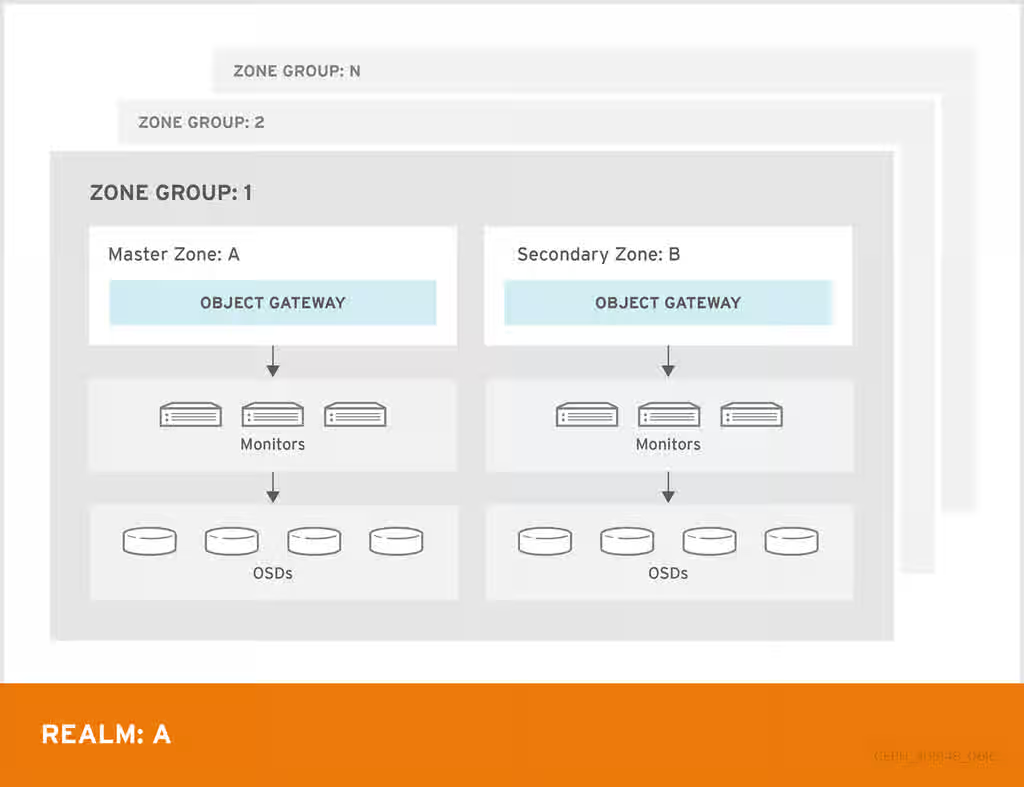
A Ceph Object Gateway multi-site configuration requires at least two Red Hat Ceph Storage clusters, and at least two Ceph Object Gateway instances, one for each Red Hat Ceph Storage cluster. Typically, the two Red Hat Ceph Storage clusters will be in geographically separate locations; however, this same multi-site configuration can work on two Red Hat Ceph Storage clusters located at the same physical site.
Multi-site configurations require a primary zone group and a primary zone. Additionally, each zone group requires a primary zone. Zone groups might have one or more secondary zones.
The primary zone within the primary zone group of a realm is responsible for storing the primary copy of the realm’s metadata, including users, quotas, and buckets. This metadata gets synchronized to secondary zones and secondary zone groups automatically. Metadata operations issued with the radosgw-admin command line interface (CLI) MUST be issued on a node within the primary zone of the primary zone group to ensure that they synchronize to the secondary zone groups and zones. Currently, it is possible to issue metadata operations on secondary zones and zone groups, but it is NOT recommended because they WILL NOT be synchronized, which can lead to fragmentation of the metadata.
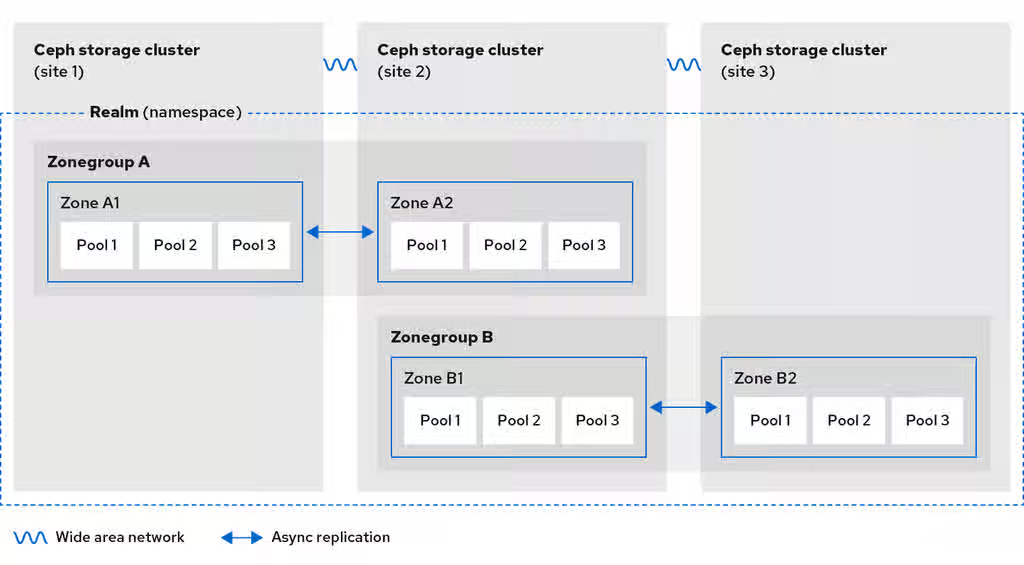
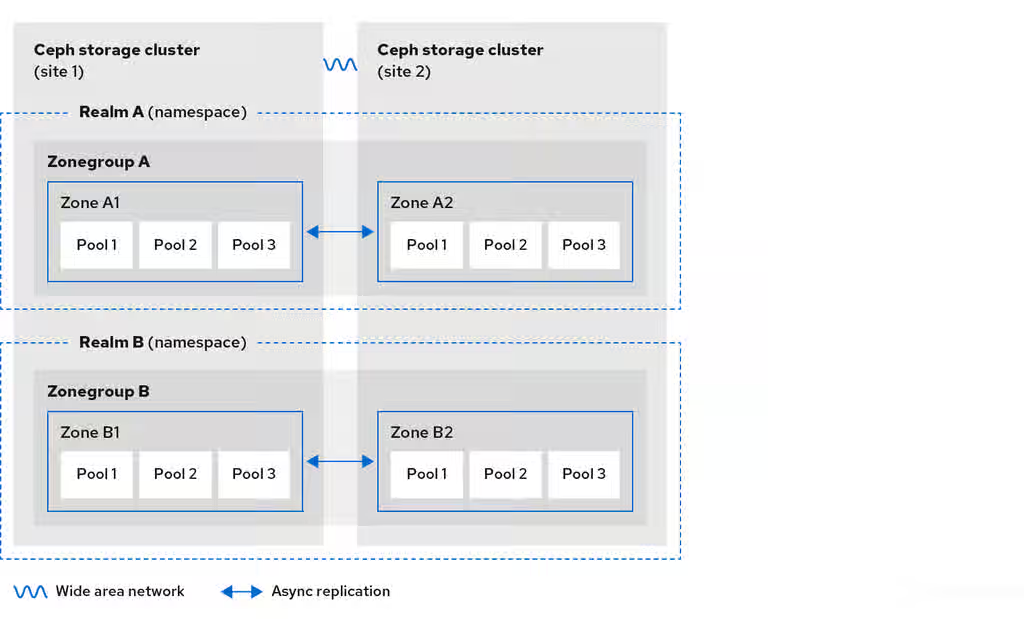
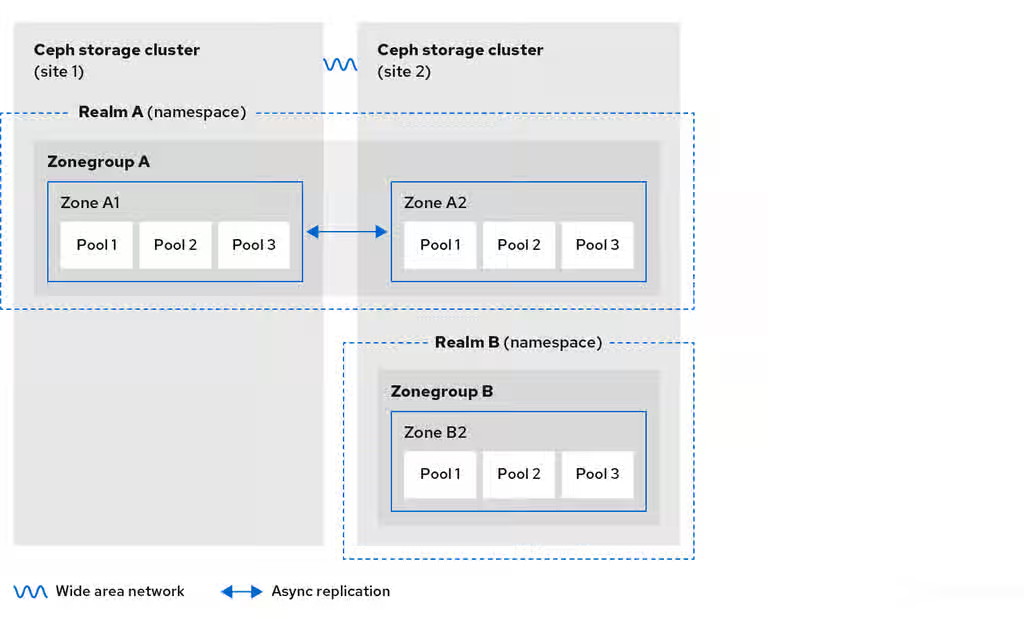
The diagrams below illustrate the possible one, and two realm configurations in multi-site Ceph Object Gateway environments.
Figure 2.4. One Realm
Figure 2.5. Two Realms
Figure 2.6. Two Realms Variant
2.7. Considering storage sizing
One of the most important factors in designing a cluster is to determine the storage requirements (sizing). Ceph Storage is designed to scale into petabytes and beyond. The following examples are common sizes for Ceph storage clusters.
Small: 250 terabytes
Medium: 1 petabyte
Large: 2 petabytes or more
Sizing includes current needs and near future needs. Consider the rate at which the gateway client will add new data to the cluster. That can differ from use-case to use-case. For example, recording 4k videos or storing medical images can add significant amounts of data faster than less storage-intensive information, such as financial market data. Additionally, consider that the data durability methods, such as replication versus erasure coding, can have a significant impact on the storage media required.
Another important aspect of Ceph’s design, includes storage density. Generally, a storage cluster stores data across at least 10 nodes to ensure reasonable performance when replicating, backfilling, and recovery. If a node fails, with at least 10 nodes in the storage cluster, only 10% of the data has to move to the surviving nodes. If the number of nodes is substantially less, a higher percentage of the data must move to the surviving nodes. Additionally, the full_ratio and near_full_ratio options need to be set to accommodate a node failure to ensure that the storage cluster can write data. For this reason, it is important to consider storage density. Higher storage density is not necessarily a good idea.
Another factor that favors more nodes over higher storage density is erasure coding. When writing an object using erasure coding and using node as the minimum CRUSH failure domain, the Ceph storage cluster will need as many nodes as data and coding chunks. For example, a cluster using k=8, m=3 should have at least 11 nodes so that each data or coding chunk is stored on a separate node.
Hot-swapping is also an important consideration. Most modern servers support drive hot-swapping. However, some hardware configurations require removing more than one drive to replace a drive. Red Hat recommends avoiding such configurations, because they can bring down more Ceph OSDs than required when swapping out failed disks.
2.9. Considering disks for the Ceph Monitor nodes
Ceph Monitors use rocksdb, which is sensitive to synchronous write latency. Red Hat strongly recommends using SSD disks to store the Ceph Monitor data. Choose SSD disks that have sufficient sequential write and throughput characteristics.
2.10. Adjusting backfill and recovery settings
I/O is negatively impacted by both backfilling and recovery operations, leading to poor performance and unhappy end users. To help accommodate I/O demand during a cluster expansion or recovery, set the following options and values in the Ceph Configuration file:
By default, the ceph-osd daemon caches 500 previous osdmaps. Even with deduplication, the map might consume a lot of memory per daemon. Tuning the cache size in the Ceph configuration might help reduce memory consumption significantly. For example:
[ceph: root@host01 /]# ceph config set global osd_map_message_max 10
[ceph: root@host01 /]# ceph config set osd osd_map_cache_size 20
[ceph: root@host01 /]# ceph config set osd osd_map_share_max_epochs 10
[ceph: root@host01 /]# ceph config set osd osd_pg_epoch_persisted_max_stale 10
For Red Hat Ceph Storage version 3 and later, the ceph-manager daemon handles PG queries, so the cluster map should not impact performance.
2.12. Adjusting scrubbing
By default, Ceph performs light scrubbing daily and deep scrubbing weekly. Light scrubbing checks object sizes and checksums to ensure that PGs are storing the same object data. Over time, disk sectors can go bad irrespective of object sizes and checksums. Deep scrubbing checks an object’s content with that of its replicas to ensure that the actual contents are the same. In this respect, deep scrubbing ensures data integrity in the manner of fsck, but the procedure imposes an I/O penalty on the cluster. Even light scrubbing can impact I/O.
The default settings may allow Ceph OSDs to initiate scrubbing at inopportune times, such as peak operating times or periods with heavy loads. End users may experience latency and poor performance when scrubbing operations conflict with end user operations.
To prevent end users from experiencing poor performance, Ceph provides a number of scrubbing settings that can limit scrubbing to periods with lower loads or during off-peak hours. For details, see the Scrubbing the OSD section in the Red Hat Ceph Storage Configuration Guide.
If the cluster experiences high loads during the day and low loads late at night, consider restricting scrubbing to night time hours. For example:
[osd]
osd_scrub_begin_hour = 23   #23:01H, or 10:01PM.
osd_scrub_end_hour = 6      #06:01H or 6:01AM.
If time constraints aren’t an effective method of determining a scrubbing schedule, consider using the osd_scrub_load_threshold. The default value is 0.5, but it could be modified for low load conditions. For example:
[osd]
osd_scrub_load_threshold = 0.25
2.13. Increase objecter_inflight_ops
To improve scalability, you can edit the value of the objecter_inflight_ops parameter, which specifies the maximum number of unsent I/O requests allowed. This parameter is used for client traffic control.
objecter_inflight_ops = 24576
2.14. Increase rgw_thread_pool_size
To improve scalability, you can edit the value of the rgw_thread_pool_size parameter, which is the size of the thread pool. The new beast frontend is not restricted by the thread pool size to accept new connections.
rgw_thread_pool_size = 512
2.15. Tuning considerations for the Linux kernel when running Ceph
Production Red Hat Ceph Storage clusters generally benefit from tuning the operating system, specifically around limits and memory allocation. Ensure that adjustments are set for all hosts within the storage cluster. You can also open a case with Red Hat support asking for additional guidance.
Increase the File Descriptors
The Ceph Object Gateway can hang if it runs out of file descriptors. You can modify the /etc/security/limits.conf file on Ceph Object Gateway hosts to increase the file descriptors for the Ceph Object Gateway.
ceph soft nofile unlimited
Adjusting the ulimit value for Large Storage Clusters
When running Ceph administrative commands on large storage clusters, for example, with 1024 Ceph OSDs or more, create an /etc/security/limits.d/50-ceph.conf file on each host that runs administrative commands with the following contents:
USER_NAME soft nproc unlimited
Replace USER_NAME with the name of the non-root user account that runs the Ceph administrative commands.
Note
The root user’s ulimit value is already set to unlimited by default on Red Hat Enterprise Linux.
As a storage administrator, you can deploy the Ceph Object Gateway using the Ceph Orchestrator with the command line interface or the service specification. You can also configure multi-site Ceph Object Gateways, and remove the Ceph Object Gateway using the Ceph Orchestrator.
The cephadm command deploys the Ceph Object Gateway as a collection of daemons that manages a single-cluster deployment or a particular realm and zone in a multi-site deployment.
Note
With cephadm, the Ceph Object Gateway daemons are configured using the Ceph Monitor configuration database instead of the ceph.conf file or the command line options. If the configuration is not in the client.rgw section, then the Ceph Object Gateway daemons start up with default settings and bind to port 80.
This section covers the following administrative tasks:
NUMBER_OF_DAEMONS controls the number of Ceph object gateways deployed on each host. To achieve the highest performance without incurring an additional cost, set this value to 2.
3.2. Deploying the Ceph Object Gateway using the service specification
You can deploy the Ceph Object Gateway using the service specification with either the default or the custom realms, zones, and zone groups.
Prerequisites
A running Red Hat Ceph Storage cluster.
Root-level access to the bootstrapped host.
Hosts are added to the cluster.
All manager, monitor, and OSD daemons are deployed.
Procedure
As a root user, create a specification file:
Example
[root@host01 ~]# touch radosgw.yml
Configure S3 requests to wait for the duration defined in the rgw_exit_timeout_secs parameter for all outstanding requests to complete by setting rgw_graceful_stop to 'true' during Ceph Object gateway shutdown/restart.
Syntax
ceph config set client.rgw rgw_graceful_stop true

ceph config set client.rgw rgw_exit_timeout_secs 120
Note
In containerized deployments, an additional extra_container_args configuration of --stop-timeout=120 (or the value of rgw_exit_timeout_secs configuration, if not default) is also necessary in order for it to work as expected with ceph orch stop/restart commands.
Edit the radosgw.yml file to include the following details for the default realm, zone, and zone group:
Syntax
service_type: rgw
service_id: REALM_NAME.ZONE_NAME
placement:
  hosts:
  - HOST_NAME_1
  - HOST_NAME_2
  count_per_host: NUMBER_OF_DAEMONS
spec:
  rgw_realm: REALM_NAME
  rgw_zone: ZONE_NAME
  rgw_zonegroup: ZONE_GROUP_NAME
  rgw_frontend_port: FRONT_END_PORT
networks:
  -  NETWORK_CIDR # Ceph Object Gateway service binds to a specific network
Note
NUMBER_OF_DAEMONS controls the number of Ceph Object Gateways deployed on each host. To achieve the highest performance without incurring an additional cost, set this value to 2.
3.3. Deploying a multi-site Ceph Object Gateway using the Ceph Orchestrator
Ceph Orchestrator supports multi-site configuration options for the Ceph Object Gateway.
You can configure each object gateway to work in an active-active zone configuration allowing writes to a non-primary zone. The multi-site configuration is stored within a container called a realm.
The realm stores zone groups, zones, and a time period. The rgw daemons handle the synchronization eliminating the need for a separate synchronization agent, thereby operating with an active-active configuration.
You can also deploy multi-site zones using the command line interface (CLI).
Note
The following configuration assumes at least two Red Hat Ceph Storage clusters are in geographically separate locations. However, the configuration also works on the same site.
Prerequisites
At least two running Red Hat Ceph Storage clusters.
At least two Ceph Object Gateway instances, one for each Red Hat Ceph Storage cluster.
Root-level access to all the nodes.
Nodes or containers are added to the storage cluster.
All Ceph Manager, Monitor and OSD daemons are deployed.
Optional: Delete the default zone, zone group, and the associated pools.
Important
Do not delete the default zone and its pools if you are using the default zone and zone group to store data. Also, removing the default zone group deletes the system user.
To access old data in the default zone and zonegroup, use --rgw-zone default and --rgw-zonegroup default in radosgw-admin commands.
As a storage administrator, you can deploy Ceph Object Gateway, single site and multi-site, using the rgw module. It helps with bootstrapping and configuring Ceph Object realm, zonegroup, and the different related entities.
You can use the available tokens for the newly created or existing realms. This token is a base64 string that encapsulates the realm information and its master zone endpoint authentication data.
In a multi-site configuration, these tokens can be used to pull a realm to create a secondary zone on a different cluster that syncs with the master zone on the primary cluster by using the rgw zone create command.
3.5.1. Deploying Ceph Object Gateway using the rgw module
Bootstrapping Ceph Object Gateway realm creates a new realm entity, a new zonegroup, and a new zone. The rgw module instructs the orchestrator to create and deploy the corresponding Ceph Object Gateway daemons.
Enable the rgw module using the ceph mgr module enable rgw command. After enabling the rgw module, either pass the arguments in the command line or use the yaml specification file to bootstrap the realm.
Prerequisites
A running Red Hat Ceph Storage cluster with at least one OSD deployed.
Procedure
Log into the Cephadm shell:
Example
[root@host01 ~]# cephadm shell
Enable the` rgw`module:
Example
[ceph: root@host01 /]# ceph mgr module enable rgw
Bootstrap the Ceph Object Gateway realm using either the command-line or the yaml specification file:
The specification file used by the rgw module has the same format as the one used by the orchestrator. Thus, you can provide any orchestration supported Ceph Object Gateway parameters including advanced configuration features such as SSL certificates.
If you run the above command before the Ceph Object Gateway daemons get deployed, it displays a message that there are no tokens as there are no endpoints yet.
Verification
Verify Object Gateway deployment:
Example
[ceph: root@host01 /]# ceph orch list --daemon-type=rgw
NAME                                                                HOST                                    PORTS  STATUS          REFRESHED   AGE  MEM USE  MEM LIM  VERSION          IMAGE ID      CONTAINER ID
rgw.myrealm.myzonegroup.ceph-saya-6-osd-host01.eburst  ceph-saya-6-osd-host01  *:80   running (111m)     9m ago  111m    82.3M        -  17.2.6-22.el9cp  2d5b080de0b0  2f3eaca7e88e
Verify the hostnames added via realm bootstrap:
Syntax
radosgw-admin zonegroup get --rgw-zonegroup _zone_group_name_
See the hostnames section of the zonegroup for the list of host names specified in zonegroup_hostnames in the Ceph Object Gateway specification file.
3.5.2. Deploying Ceph Object Gateway multi-site using the rgw module
Bootstrapping Ceph Object Gateway realm creates a new realm entity, a new zonegroup, and a new zone. It configures a new system user that can be used for multi-site sync operations. The rgw module instructs the orchestrator to create and deploy the corresponding Ceph Object Gateway daemons.
Enable the rgw module using the ceph mgr module enable rgw command. After enabling the rgw module, either pass the arguments in the command line or use the yaml specification file to bootstrap the realm.
Prerequisites
A running Red Hat Ceph Storage cluster with at least one OSD deployed.
Procedure
Log into the Cephadm shell:
Example
[root@host01 ~]# cephadm shell
Enable the` rgw`module:
Example
[ceph: root@host01 /]# ceph mgr module enable rgw
Bootstrap the Ceph Object Gateway realm using either the command-line or the yaml specification file:
The specification file used by the rgw module has the same format as the one used by the orchestrator. Thus, you can provide any orchestration supported Ceph Object Gateway parameters including advanced configuration features such as SSL certificates.
If you run the above command before the Ceph Object Gateway daemons get deployed, it displays a message that there are no tokens as there are no endpoints yet.
Create the secondary zone using these tokens and join the existing realms:
As a storage administrator, learning the basics of configuring the Ceph Object Gateway is important. You can learn about the defaults and the embedded web server called Beast. For troubleshooting issues with the Ceph Object Gateway, you can adjust the logging and debugging output generated by the Ceph Object Gateway. Also, you can provide a High-Availability proxy for storage cluster access using the Ceph Object Gateway.
Prerequisites
A running, and healthy Red Hat Ceph Storage cluster.
Installation of the Ceph Object Gateway software package.
4.1. Add a wildcard to the DNS
You can add the wildcard such as hostname to the DNS record of the DNS server.
Prerequisite
A running Red Hat Ceph Storage cluster.
Ceph Object Gateway installed.
Root-level access to the admin node.
Procedure
To use Ceph with S3-style subdomains, add a wildcard to the DNS record of the DNS server that the ceph-radosgw daemon uses to resolve domain names:
Syntax
bucket-name.domain-name.com
For dnsmasq, add the following address setting with a dot (.) prepended to the host name:
Syntax
address=/.HOSTNAME_OR_FQDN/HOST_IP_ADDRESS
Example
address=/.gateway-host01/192.168.122.75
For bind, add a wildcard to the DNS record:
Example
$TTL    604800
@       IN      SOA     gateway-host01. root.gateway-host01. (
                              2         ; Serial
                         604800         ; Refresh
                          86400         ; Retry
                        2419200         ; Expire
                         604800 )       ; Negative Cache TTL
;
@       IN      NS      gateway-host01.
@       IN      A       192.168.122.113
*       IN      CNAME   @
Restart the DNS server and ping the server with a subdomain to ensure that the ceph-radosgw daemon can process the subdomain requests:
Syntax
ping mybucket.HOSTNAME
Example
[root@host01 ~]# ping mybucket.gateway-host01
If the DNS server is on the local machine, you might need to modify /etc/resolv.conf by adding a nameserver entry for the local machine.
Add the host name in the Ceph Object Gateway zone group:
Get the zone group:
Syntax
radosgw-admin zonegroup get --rgw-zonegroup=ZONEGROUP_NAME > zonegroup.json
Example
[ceph: root@host01 /]# radosgw-admin zonegroup get --rgw-zonegroup=us > zonegroup.json
The Ceph Object Gateway provides Beast, a C/C embedded front-end web server. Beast uses the `Boost.Beast` C library to parse HTTP, and Boost.Asio for asynchronous network I/O.
The following Beast configuration options can be passed to the embedded web server in the Ceph configuration file for the RADOS Gateway. Each option has a default value. If a value is not specified, the default value is empty.
Option
Description
Default
endpoint and ssl_endpoint
Sets the listening address in the form address[:port] where the address is an IPv4 address string in dotted decimal form, or an IPv6 address in hexadecimal notation surrounded by square brackets. The optional port defaults to 8080 for endpoint and 443 for ssl_endpoint. It can be specified multiple times as in endpoint=[::1] endpoint=192.168.0.100:8000.
EMPTY
ssl_certificate
Path to the SSL certificate file used for SSL-enabled endpoints.
EMPTY
ssl_private_key
Optional path to the private key file used for SSL-enabled endpoints. If one is not given the file specified by ssl_certificate is used as the private key.
EMPTY
tcp_nodelay
Performance optimization in some environments.
EMPTY
Example /etc/ceph/ceph.conf file with Beast options using SSL:
You can configure the Beast front-end web server to use the OpenSSL library to provide Transport Layer Security (TLS). To use Secure Socket Layer (SSL) with Beast, you need to obtain a certificate from a Certificate Authority (CA) that matches the hostname of the Ceph Object Gateway node. Beast also requires the secret key, server certificate, and any other CA in a single .pem file.
Important
Prevent unauthorized access to the .pem file, because it contains the secret key hash.
Important
Red Hat recommends obtaining a certificate from a CA with the Subject Alternative Name (SAN) field, and a wildcard for use with S3-style subdomains.
Important
For Red Hat Ceph Storage 7.0 storage systems, Red Hat recommends only using SSL with the Beast front-end web server for small to medium sized test environments. For production environments, you must use HAProxy and keepalived to terminate the SSL connection at the HAProxy.
If the Ceph Object Gateway acts as a client and a custom certificate is used on the server, you can inject a custom CA by importing it on the node and then mapping the etc/pki directory into the container with the extra_container_args parameter in the Ceph Object Gateway specification file.
Prerequisites
A running, and healthy Red Hat Ceph Storage cluster.
Installation of the Ceph Object Gateway software package.
Installation of the OpenSSL software package.
Root-level access to the Ceph Object Gateway node.
Procedure
Create a new file named rgw.yml in the current directory:
Example
[ceph: root@host01 /]# touch rgw.yml
Open the rgw.yml file for editing, and customize it for the environment:
Deploy the Ceph Object Gateway using the service specification file:
Example
[ceph: root@host01 /]# ceph orch apply -i rgw.yml
4.5. D3N data cache
Datacenter-Data-Delivery Network (D3N) uses high-speed storage, such as NVMe, to cache datasets on the access side. Such caching allows big data jobs to use the compute and fast-storage resources available on each Rados Gateway node at the edge. The Rados Gateways act as cache servers for the back-end object store (OSDs), storing data locally for reuse.
Note
Each time the Rados Gateway is restarted the content of the cache directory is purged.
4.5.1. Adding D3N cache directory
To enable D3N cache on RGW, you need to also include the D3N cache directory in podman unit.run.
Prerequisites
A running Red Hat Ceph Storage cluster.
Ceph Object Gateway installed.
Root-level access to the admin node.
A fast NVMe drive in each RGW node to serve as the local cache storage.
Procedure
Create a mount point for the NVMe drive.
Syntax
mkfs.ext4 nvme-drive-path
Example
[ceph: root@host01 /]# mkfs.ext4 /dev/nvme0n1
mount /dev/nvme0n1 /mnt/nvme0n1/
If there are multiple instances of RGW in a single host, then a separate rgw_d3n_l1_datacache_persistent_path has to be created for each instance and add each path in extra_container_args.
Example:
For two instances of RGW in each host, create two separate cache-directory under rgw_d3n_l1_datacache_persistent_path: /mnt/nvme0n1/rgw_datacache/rgw1 and /mnt/nvme0n1/rgw_datacache/rgw2
Example for "extra_container_args" in rgw specification file:
See the Understanding Ceph logs section in the Red Hat Ceph Storage Troubleshooting Guide for additional details on using high availability.
4.6. Adjusting logging and debugging output
Once you finish the setup procedure, check your logging output to ensure it meets your needs. By default, the Ceph daemons log to journald, and you can view the logs using the journalctl command. Alternatively, you can also have the Ceph daemons log to files, which are located under the /var/log/ceph/CEPH_CLUSTER_ID/ directory.
Important
Verbose logging can generate over 1 GB of data per hour. This type of logging can potentially fill up the operating system’s disk, causing the operating system to stop functioning.
Prerequisites
A running Red Hat Ceph Storage cluster.
Installation of the Ceph Object Gateway software.
Procedure
Set the following parameter to increase the Ceph Object Gateway logging output:
Syntax
ceph config set client.rgw debug_rgw VALUE
Example
[ceph: root@host01 /]# ceph config set client.rgw debug_rgw 20
You can also modify these settings at runtime:
Syntax
ceph --admin-daemon /var/run/ceph/ceph-client.rgw.NAME.asok config set debug_rgw VALUE
Example
[ceph: root@host01 /]# ceph --admin-daemon /var/run/ceph/ceph-client.rgw.rgw.asok config set debug_rgw 20
Optionally, you can configure the Ceph daemons to log their output to files. Set the log_to_file, and mon_cluster_log_to_file options to true:
Example
[ceph: root@host01 /]# ceph config set global log_to_file true
[ceph: root@host01 /]# ceph config set global mon_cluster_log_to_file true
As a storage administrator, you can configure the Ceph Object Gateway to host static websites in S3 buckets. Traditional website hosting involves configuring a web server for each website, which can use resources inefficiently when content does not change dynamically. For example, sites that do not use server-side services like PHP, servlets, databases, nodejs, and the like. This approach is substantially more economical than setting up virtual machines with web servers for each site.
Prerequisites
A healthy, running Red Hat Ceph Storage cluster.
4.7.1. Static web hosting assumptions
Static web hosting requires at least one running Red Hat Ceph Storage cluster, and at least two Ceph Object Gateway instances for the static web sites. Red Hat assumes that each zone will have multiple gateway instances using a load balancer, such as high-availability (HA) Proxy and keepalived.
Important
Red Hat DOES NOT support using a Ceph Object Gateway instance to deploy both standard S3/Swift APIs and static web hosting simultaneously.
Additional Resources
See the High availability service section in the Red Hat Ceph Storage Object Gateway Guide for additional details on using high availability.
4.7.2. Static web hosting requirements
Static web hosting functionality uses its own API, so configuring a gateway to use static web sites in S3 buckets requires the following:
S3 static web hosting uses Ceph Object Gateway instances that are separate and distinct from instances used for standard S3/Swift API use cases.
Gateway instances hosting S3 static web sites should have separate, non-overlapping domain names from the standard S3/Swift API gateway instances.
Gateway instances hosting S3 static web sites should use separate public-facing IP addresses from the standard S3/Swift API gateway instances.
Gateway instances hosting S3 static web sites load balance, and if necessary terminate SSL, using HAProxy/keepalived.
4.7.3. Static web hosting gateway setup
To enable a Ceph Object Gateway for static web hosting, set the following options:
Syntax
ceph config set client.rgw OPTIONVALUE
Example
[ceph: root@host01 /]# ceph config set client.rgw rgw_enable_static_website true
[ceph: root@host01 /]# ceph config set client.rgw rgw_enable_apis s3,s3website
[ceph: root@host01 /]# ceph config set client.rgw rgw_dns_name objects-zonegroup.example.com
[ceph: root@host01 /]# ceph config set client.rgw rgw_dns_s3website_name objects-website-zonegroup.example.com
[ceph: root@host01 /]# ceph config set client.rgw rgw_resolve_cname true
The rgw_enable_static_website setting MUST be true. The rgw_enable_apis setting MUST enable the s3website API. The rgw_dns_name and rgw_dns_s3website_name settings must provide their fully qualified domains. If the site uses canonical name extensions, then set the rgw_resolve_cname option to true.
Important
The FQDNs of rgw_dns_name and rgw_dns_s3website_nameMUST NOT overlap.
4.7.4. Static web hosting DNS configuration
The following is an example of assumed DNS settings, where the first two lines specify the domains of the gateway instance using a standard S3 interface and point to the IPv4 and IPv6 addresses. The third line provides a wildcard CNAME setting for S3 buckets using canonical name extensions. The fourth and fifth lines specify the domains for the gateway instance using the S3 website interface and point to their IPv4 and IPv6 addresses.
objects-zonegroup.domain.com. IN    A 192.0.2.10
objects-zonegroup.domain.com. IN AAAA 2001:DB8::192:0:2:10
*.objects-zonegroup.domain.com. IN CNAME objects-zonegroup.domain.com.
objects-website-zonegroup.domain.com. IN    A 192.0.2.20
objects-website-zonegroup.domain.com. IN AAAA 2001:DB8::192:0:2:20
Note
The IP addresses in the first two lines differ from the IP addresses in the fourth and fifth lines.
If using Ceph Object Gateway in a multi-site configuration, consider using a routing solution to route traffic to the gateway closest to the client.
The Amazon Web Service (AWS) requires static web host buckets to match the host name. Ceph provides a few different ways to configure the DNS, and HTTPS will work if the proxy has a matching certificate.
Hostname to a Bucket on a Subdomain
To use AWS-style S3 subdomains, use a wildcard in the DNS entry which can redirect requests to any bucket. A DNS entry might look like the following:
*.objects-website-zonegroup.domain.com. IN CNAME objects-website-zonegroup.domain.com.
Access the bucket name, where the bucket name is bucket1, in the following manner:
Ceph supports mapping domain names to buckets without including the bucket name in the request, which is unique to Ceph Object Gateway. To use a domain name to access a bucket, map the domain name to the bucket name. A DNS entry might look like the following:
www.example.com. IN CNAME bucket2.objects-website-zonegroup.domain.com.
Where the bucket name is bucket2.
Access the bucket in the following manner:
http://www.example.com
Hostname to Long Bucket with CNAME
AWS typically requires the bucket name to match the domain name. To configure the DNS for static web hosting using CNAME, the DNS entry might look like the following:
www.example.com. IN CNAME www.example.com.objects-website-zonegroup.domain.com.
Access the bucket in the following manner:
http://www.example.com
Hostname to Long Bucket without CNAME
If the DNS name contains other non-CNAME records, such as SOA, NS, MX or TXT, the DNS record must map the domain name directly to the IP address. For example:
www.example.com. IN A 192.0.2.20
www.example.com. IN AAAA 2001:DB8::192:0:2:20
Access the bucket in the following manner:
http://www.example.com
4.7.5. Creating a static web hosting site
To create a static website, perform the following steps:
Create an S3 bucket. The bucket name MIGHT be the same as the website’s domain name. For example, mysite.com may have a bucket name of mysite.com. This is required for AWS, but it is NOT required for Ceph.
Upload the static website content to the bucket. Contents may include HTML, CSS, client-side JavaScript, images, audio/video content, and other downloadable files. A website MUST have an index.html file and might have an error.html file.
Verify the website’s contents. At this point, only the creator of the bucket has access to the contents.
Set permissions on the files so that they are publicly readable.
4.8. High availability for the Ceph Object Gateway
As a storage administrator, you can assign many instances of the Ceph Object Gateway to a single zone. This allows you to scale out as the load increases, that is, the same zone group and zone; however, you do not need a federated architecture to use a highly available proxy. Since each Ceph Object Gateway daemon has its own IP address, you can use the ingress service to balance the load across many Ceph Object Gateway daemons or nodes. The ingress service manages HAProxy and keepalived daemons for the Ceph Object Gateway environment. You can also terminate HTTPS traffic at the HAProxy server, and use HTTP between the HAProxy server and the Beast front-end web server instances for the Ceph Object Gateway.
Prerequisites
At least two Ceph Object Gateway daemons running on different hosts.
Capacity for at least two instances of the ingress service running on different hosts.
4.8.1. High availability service
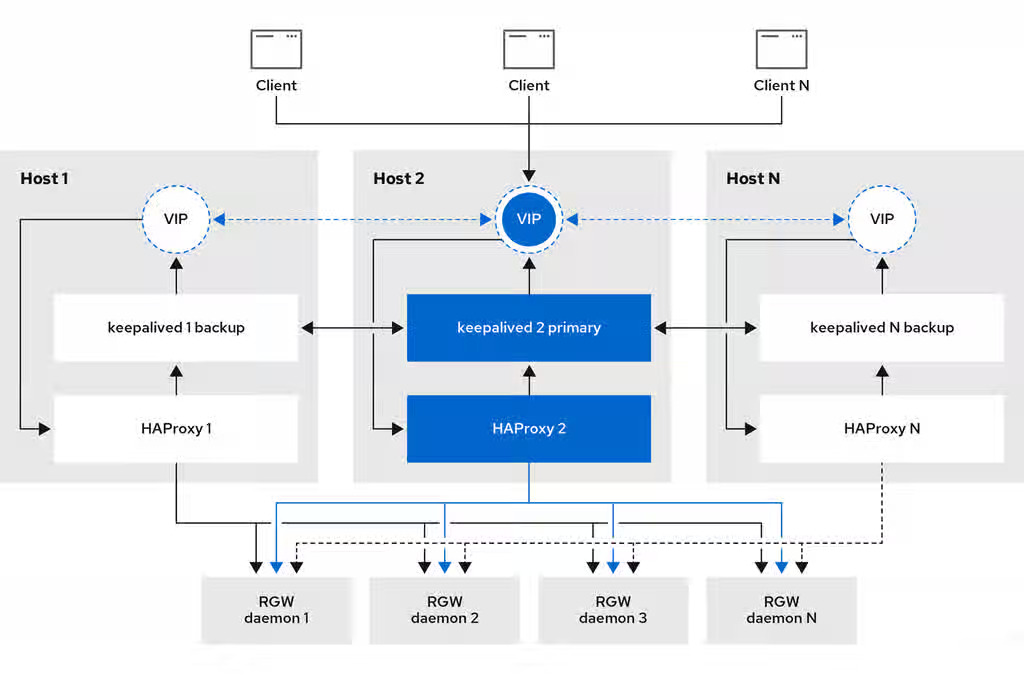
The ingress service provides a highly available endpoint for the Ceph Object Gateway. The ingress service can be deployed to any number of hosts as needed. Red Hat recommends having at least two supported Red Hat Enterprise Linux servers, each server configured with the ingress service. You can run a high availability (HA) service with a minimum set of configuration options. The Ceph orchestrator deploys the ingress service, which manages the haproxy and keepalived daemons, by providing load balancing with a floating virtual IP address. The active haproxy distributes all Ceph Object Gateway requests to all the available Ceph Object Gateway daemons.
A virtual IP address is automatically configured on one of the ingress hosts at a time, known as the primary host. The Ceph orchestrator selects the first network interface based on existing IP addresses that are configured as part of the same subnet. In cases where the virtual IP address does not belong to the same subnet, you can define a list of subnets for the Ceph orchestrator to match with existing IP addresses. If the keepalived daemon and the active haproxy are not responding on the primary host, then the virtual IP address moves to a backup host. This backup host becomes the new primary host.
Warning
Currently, you can not configure a virtual IP address on a network interface that does not have a configured IP address.
Important
To use the secure socket layer (SSL), SSL must be terminated by the ingress service and not at the Ceph Object Gateway.
4.8.2. Configuring high availability for the Ceph Object Gateway
To configure high availability (HA) for the Ceph Object Gateway you write a YAML configuation file, and the Ceph orchestrator does the installation, configuraton, and management of the ingress service. The ingress service uses the haproxy and keepalived daemons to provide high availability for the Ceph Object Gateway.
Prerequisites
A minimum of two hosts running Red Hat Enterprise Linux 9, or higher, for installing the ingress service on.
A healthy running Red Hat Ceph Storage cluster.
A minimum of two Ceph Object Gateway daemons running on different hosts.
Root-level access to the host running the ingress service.
If using a firewall, then open port 80 for HTTP and port 443 for HTTPS traffic.
Procedure
Create a new ingress.yaml file:
Example
[root@host01 ~] touch ingress.yaml
Open the ingress.yaml file for editing. Added the following options, and add values applicable to the environment:
See the High availability service section in the Red Hat Ceph Storage Object Gateway Guide for more details.
Chapter 5. Multi-site configuration and administration
As a storage administrator, you can configure and administer multiple Ceph Object Gateways for a variety of use cases. You can learn what to do during a disaster recovery and failover events. Also, you can learn more about realms, zones, and syncing policies in multi-site Ceph Object Gateway environments.
A single zone configuration typically consists of one zone group containing one zone and one or more ceph-radosgw instances where you may load-balance gateway client requests between the instances. In a single zone configuration, typically multiple gateway instances point to a single Ceph storage cluster. However, Red Hat supports several multi-site configuration options for the Ceph Object Gateway:
Multi-zone: A more advanced configuration consists of one zone group and multiple zones, each zone with one or more ceph-radosgw instances. Each zone is backed by its own Ceph Storage Cluster. Multiple zones in a zone group provides disaster recovery for the zone group should one of the zones experience a significant failure. Each zone is active and may receive write operations. In addition to disaster recovery, multiple active zones may also serve as a foundation for content delivery networks.
Multi-zone-group: Formerly called 'regions', the Ceph Object Gateway can also support multiple zone groups, each zone group with one or more zones. Objects stored to zone groups within the same realm share a global namespace, ensuring unique object IDs across zone groups and zones.
Multiple Realms: The Ceph Object Gateway supports the notion of realms, which can be a single zone group or multiple zone groups and a globally unique namespace for the realm. Multiple realms provides the ability to support numerous configurations and namespaces.
A multi-site configuration requires at least two Ceph storage clusters, and At least two Ceph object gateway instances, one for each Ceph storage cluster.
This guide assumes at least two Ceph storage clusters in geographically separate locations; however, the configuration can work on the same physical site. This guide also assumes four Ceph object gateway servers named rgw1, rgw2, rgw3 and rgw4 respectively.
A multi-site configuration requires a master zone group and a master zone. Additionally, each zone group requires a master zone. Zone groups might have one or more secondary or non-master zones.
Important
When planning network considerations for multi-site, it is important to understand the relation bandwidth and latency observed on the multi-site synchronization network and the clients ingest rate in direct correlation with the current sync state of the objects owed to the secondary site. The network link between Red Hat Ceph Storage multi-site clusters must be able to handle the ingest into the primary cluster to maintain an effective recovery time on the secondary site. Multi-site synchronization is asynchronous and one of the limitations is the rate at which the sync gateways can process data across the link. An example to look at in terms of network inter-connectivity speed could be 1 GbE or inter-datacenter connectivity, for every 8 TB or cumulative receive data, per client gateway. Thus, if you replicate to two other sites, and ingest 16 TB a day, you need 6 GbE of dedicated bandwidth for multi-site replication.
Red Hat also recommends private Ethernet or Dense wavelength-division multiplexing (DWDM) as a VPN over the internet is not ideal due to the additional overhead incurred.
Important
The master zone within the master zone group of a realm is responsible for storing the master copy of the realm’s metadata, including users, quotas and buckets (created by the radosgw-admin CLI). This metadata gets synchronized to secondary zones and secondary zone groups automatically. Metadata operations executed with the radosgw-admin CLI MUST be executed on a host within the master zone of the master zone group in order to ensure that they get synchronized to the secondary zone groups and zones. Currently, it is possible to execute metadata operations on secondary zones and zone groups, but it is NOT recommended because they WILL NOT be synchronized, leading to fragmented metadata.
Note
For new Ceph Object Gateway deployment in multi-site, it takes around 20 minutes to sync metadata operations to the secondary site.
In the following examples, the rgw1 host will serve as the master zone of the master zone group; the rgw2 host will serve as the secondary zone of the master zone group; the rgw3 host will serve as the master zone of the secondary zone group; and the rgw4 host will serve as the secondary zone of the secondary zone group.
Important
Red Hat recommends to use load balancer and three Ceph Object Gateway daemons to have sync end points with multi-site. For the non-syncing Ceph Object Gateway nodes in a multi-site configuration, which are dedicated for client I/O operations through load balancers, run the ceph config set client.rgw.CLIENT_NODE rgw_run_sync_thread false command to prevent them from performing sync operations, and then restart the Ceph Object Gateway.
Following is a typical configuration file for HAProxy for syncing gateways:
[ceph: root@host01 /]# ceph config set osd osd_pool_default_pg_num 32
[ceph: root@host01 /]# ceph config set osd osd_pool_default_pgp_num 32
Note
Making this change to the Ceph configuration will use those defaults when the Ceph Object Gateway instance creates the pools. Alternatively, you can create the pools manually.
Pool names particular to a zone follow the naming convention ZONE_NAME.POOL_NAME. For example, a zone named us-east will have the following pools:
.rgw.root
us-east.rgw.control
us-east.rgw.meta
us-east.rgw.log
us-east.rgw.buckets.index
us-east.rgw.buckets.data
us-east.rgw.buckets.non-ec
us-east.rgw.meta:users.keys
us-east.rgw.meta:users.email
us-east.rgw.meta:users.swift
us-east.rgw.meta:users.uid
Additional Resources
See the Pools chapter in the Red Hat Ceph Storage Storage Strategies Guide for details on creating pools.
5.3. Migrating a single site system to multi-site
To migrate from a single site system with a default zone group and zone to a multi-site system, use the following steps:
Create a realm. Replace REALM_NAME with the realm name.
Rename the default zonegroup’s api_name. Replace NEW_ZONE_GROUP_NAME with the zonegroup name. The api_name field in the zonegroup map refers to the name of the RADOS API used for data replication across different zones. This field helps clients interact with the correct APIs for accessing and managing data within the Ceph storage cluster.
Configure the primary zonegroup. Replace NEW_ZONE_GROUP_NAME with the zonegroup name and REALM_NAME with realm name. Replace ENDPOINT with the fully qualified domain names in the zonegroup.
Configure the primary zone. Replace REALM_NAME with realm name, NEW_ZONE_GROUP_NAME with the zonegroup name, NEW_ZONE_NAME with the zone name, and ENDPOINT with the fully qualified domain names in the zonegroup.
Restoration from a multisite to a single (default zone) site is not supported.
5.4. Establishing a secondary zone
Zones within a zone group replicate all data to ensure that each zone has the same data. When creating the secondary zone, issue ALL of the radosgw-admin zone operations on a host identified to serve the secondary zone.
Note
To add a additional zones, follow the same procedures as for adding the secondary zone. Use a different zone name.
Important
Run the metadata operations, such as user creation and quotas, on a host within the master zone of the master zonegroup. The master zone and the secondary zone can receive bucket operations from the RESTful APIs, but the secondary zone redirects bucket operations to the master zone. If the master zone is down, bucket operations will fail. If you create a bucket using the radosgw-admin CLI, you must run it on a host within the master zone of the master zone group so that the buckets will synchronize with other zone groups and zones.
Bucket creation for a particular user is not supported, even if you create a user in the secondary zone with --yes-i-really-mean-it.
Prerequisites
At least two running Red Hat Ceph Storage clusters.
At least two Ceph Object Gateway instances, one for each Red Hat Ceph Storage cluster.
Root-level access to all the nodes.
Nodes or containers are added to the storage cluster.
All Ceph Manager, Monitor, and OSD daemons are deployed.
Procedure
Log into the cephadm shell:
Example
[root@host04 ~]# cephadm shell
Pull the primary realm configuration from the host:
Pull the primary period configuration from the host:
Syntax
radosgw-admin period pull --url=URL_TO_PRIMARY_ZONE_GATEWAY --access-key=ACCESS_KEY --secret-key=SECRET_KEY
Example
[ceph: root@host04 /]# radosgw-admin period pull --url=http://10.74.249.26:80 --access-key=LIPEYZJLTWXRKXS9LPJC --secret-key=IsAje0AVDNXNw48LjMAimpCpI7VaxJYSnfD0FFKQ
Configure a secondary zone:
Note
All zones run in an active-active configuration by default; that is, a gateway client might write data to any zone and the zone will replicate the data to all other zones within the zone group. If the secondary zone should not accept write operations, specify the `--read-only flag to create an active-passive configuration between the master zone and the secondary zone. Additionally, provide the access_key and secret_key of the generated system user stored in the master zone of the master zone group.
Ensure you have a realm before configuring a zone as an archive. Without a realm, you cannot archive data through an archive zone for default zone/zonegroups.
Important
The object storage archive zone in Red Hat Ceph Storage 7.0 is a Technology Preview feature only. Technology Preview features are not supported with Red Hat production service level agreements (SLAs), might not be functionally complete, and Red Hat does not recommend using them for production. These features provide early access to upcoming product features, enabling customers to test functionality and provide feedback during the development process.
Archive Object data residing on Red Hat Ceph Storage using the Object Storage Archive Zone Feature.
The archive zone uses multi-site replication and S3 object versioning feature in Ceph Object Gateway. The archive zone retains all version of all the objects available, even when deleted in the production file.
The archive zone has a history of versions of S3 objects that can only be eliminated through the gateways that are associated with the archive zone. It captures all the data updates and metadata to consolidate them as versions of S3 objects.
Bucket granular replication to the archive zone can be used after creating an archive zone.
You can control the storage space usage of an archive zone through the bucket Lifecycle policies, where you can define the number of versions you would like to keep for an object.
An archive zone helps protect your data against logical or physical errors. It can save users from logical failures, such as accidentally deleting a bucket in the production zone. It can also save your data from massive hardware failures, like a complete production site failure. Additionally, it provides an immutable copy, which can help build a ransomware protection strategy.
Using the sync policy group procedures is optional and only necessary to use enabling and disabling with bucket granular replication. For using the archive zone without bucket granular replication, it is not necessary to use the sync policy procedures.
During new zone creation, use the archive tier to configure the archive zone.
Syntax
$ radosgw-admin zone create --rgw-zonegroup={ZONE_GROUP_NAME} --rgw-zone={ZONE_NAME} --endpoints={http://FQDN:PORT},{http://FQDN:PORT} --tier-type=archive
Example
[ceph: root@host01 /]# radosgw-admin zone create --rgw-zonegroup=us --rgw-zone=us-east --endpoints={http://example.com:8080} --tier-type=archive
From the archive zone, modify the archive zone to sync from only the primary zone and perform a period update commit.
Syntax
$ radosgw-admin zone modify --rgw-zone archive --sync_from primary --sync_from_all false --sync-from-rm secondary

$ radosgw-admin period update --commit
Note
The recommendation is to reduce the max_objs_per_shard to 50K to account for the omap olh entries in the archive zone. This helps in keeping the number of omap entries per bucket index shard object in check to prevent large omap warnings.
For example,
$ ceph config set client.rgw rgw_max_objs_per_shard 50000
You can use an S3 lifecycle policy extension to delete objects within an <ArchiveZone> element.
Important
Archive zone objects can only be deleted using the expiration lifecycle policy rule.
If any <Rule> section contains an <ArchiveZone> element, that rule executes in archive zone and are the ONLY rules which run in an archive zone.
Rules marked <ArchiveZone> do NOT execute in non-archive zones.
The rules within the lifecycle policy determine when and what objects to delete. For more information about lifecycle creation and management, see Bucket lifecycle.
Prerequisites
A running Red Hat Ceph Storage cluster.
Root-level access to a Ceph Monitor node.
Installation of the Ceph Object Gateway software.
Procedure
Set the <ArchiveZone> lifecycle policy rule. For more information about creating a lifecycle policy, see See the Creating a lifecycle management policy section in the Red Hat Ceph Storage Object Gateway Guide for more details.
The archive zone rule. This is an example of a lifecycle policy with an archive zone rule.
If the Ceph Object Gateway user is deleted, the buckets at the archive site owned by that user is inaccessible. Link those buckets to another Ceph Object Gateway user to access the data.
Syntax
radosgw-admin bucket link --uid NEW_USER_ID --bucket BUCKET_NAME --yes-i-really-mean-it
See the Bucket lifecycle section in the Red Hat Ceph Storage Object Gateway Guide for more details.
See the S3 bucket lifecycle section in the Red Hat Ceph Storage Developer Guide for more details.
5.5.2. Failover and disaster recovery
Recover your data from different failover and disaster scenarios. Use any of the following procedures, according to your needs:
Primary zone failure with a failover to the secondary zone for disaster recovery
Switching archive zone sync from primary to secondary zone with I/Os in progress
Archive zone syncs only from primary zone with primary zone failure
Prerequisites
A running Red Hat Ceph Storage cluster.
Root-level access to a Ceph Monitor node.
Installation of the Ceph Object Gateway software.
5.5.2.1. Primary zone failure with a failover to the secondary zone for disaster recovery
Procedure
Make the secondary zone the primary and default zone. For example:
Syntax
radosgw-admin zone modify --rgw-zone=ZONE_NAME --master --default
By default, Ceph Object Gateway runs in an active-active configuration. If the cluster was configured to run in an active-passive configuration, the secondary zone is a read-only zone. Remove the --read-only status to allow the zone to receive write operations. For example:
Syntax
radosgw-admin zone modify --rgw-zone=ZONE_NAME --master --default --read-only=false
Update the period to make the changes take effect:
Example
[ceph: root@host01 /]# radosgw-admin period update --commit
Restart the Ceph Object Gateway.
Note
Use the output from the ceph orch ps command, under the NAME column, to get the SERVICE_TYPE.ID information.
Restart the Ceph Object Gateway on an individual node in the storage cluster:
Make the recovered zone the primary and default zone:
Syntax
radosgw-admin zone modify --rgw-zone=ZONE_NAME --master --default
Update the period to make the changes take effect:
Example
[ceph: root@host01 /]# radosgw-admin period update --commit
Restart the Ceph Object Gateway in the recovered zone:
Syntax
ceph orch restart SERVICE_TYPE
Example
[ceph: root@host01 /]# ceph orch restart rgw
If the secondary zone needs to be a read-only configuration, update the secondary zone:
Syntax
radosgw-admin zone modify --rgw-zone=ZONE_NAME --read-only
radosgw-admin zone modify --rgw-zone=ZONE_NAME --read-only
Update the period to make the changes take effect:
Example
[ceph: root@host01 /]# radosgw-admin period update --commit
Restart the Ceph Object Gateway in the secondary zone:
Syntax
ceph orch restart SERVICE_TYPE
Example
[ceph: root@host01 /]# ceph orch restart rgw
5.5.2.2. Switching Archive Zone sync from primary to secondary with I/Os in progress
Procedure
Switch the sync source to the secondary zone:
Syntax
radosgw-admin zone modify --rgw-zone archive --sync_from secondary --sync_from_all false --sync-from-rm primary radosgw-admin period update --commit
Verify the sync status and data consistency in the archive zone.
Switch the sync source back to the primary zone:
Syntax
radosgw-admin zone modify --rgw-zone archive --sync_from primary --sync_from_all false --sync-from-rm secondary radosgw-admin period update --commit
Verify the sync status and data consistency in the archive zone after the switch. As a result:
The archive zone starts syncing from the secondary zone after the first modification.
Data consistency is maintained throughout the switch.
Upon switching back to the primary zone, the archive zone resumes syncing from the primary zone without data loss or corruption.
Sync remains consistent in all the zones.
5.5.2.3. Archive Zone Syncs Only from Primary Zone with Primary Zone Failure
Procedure
Ensure the archive zone is set to sync only from the primary zone.
Stop the primary zone gateways to simulate a primary zone failure.
Failover to the secondary zone and perform the period update commit.
Observe the sync status of the archive zone.
Post a time interval of about 30 minutes, restart the primary zone gateways.
Verify that the archive zone resumes syncing from the primary zone. As a result:
The archive zone stops syncing when the primary zone fails.
After restoring the primary zone, the archive zone automatically resumes syncing from the primary zone.
Data integrity and sync status is maintained throughout the process.
5.6. Configuring multiple realms in the same storage cluster
You can configure multiple realms in the same storage cluster. This is a more advanced use case for multi-site. Configuring multiple realms in the same storage cluster enables you to use a local realm to handle local Ceph Object Gateway client traffic, as well as a replicated realm for data that will be replicated to a secondary site.
Note
Red Hat recommends that each realm has its own Ceph Object Gateway.
Prerequisites
Two running Red Hat Ceph Storage data centers in a storage cluster.
The access key and secret key for each data center in the storage cluster.
Root-level access to all the Ceph Object Gateway nodes.
Each data center has its own local realm. They share a realm that replicates on both sites.
Procedure
Create one local realm on the first data center in the storage cluster:
To restart the Ceph Object Gateways on all nodes in the storage cluster:
Syntax
ceph orch restart SERVICE_TYPE
Example
[ceph: root@host04 /]# ceph orch restart rgw
Log in as root on the endpoint for the second data center.
Verify the synchronization status on the master realm:
Syntax
radosgw-admin sync status
Example
[ceph: root@host04 /]# radosgw-admin sync status
          realm 59762f08-470c-46de-b2b1-d92c50986e67 (ldc2)
      zonegroup 7cf8daf8-d279-4d5c-b73e-c7fd2af65197 (ldc2zg)
           zone 034ae8d3-ae0c-4e35-8760-134782cb4196 (ldc2z)
  metadata sync no sync (zone is master)
Log in as root on the endpoint for the first data center.
Verify the synchronization status for the replication-synchronization realm:
Syntax
radosgw-admin sync status --rgw-realm RGW_REALM_NAME
Example
[ceph: root@host01 /]# radosgw-admin sync status --rgw-realm rdc1
          realm 73c7b801-3736-4a89-aaf8-e23c96e6e29d (rdc1)
      zonegroup d67cc9c9-690a-4076-89b8-e8127d868398 (rdc1zg)
           zone 67584789-375b-4d61-8f12-d1cf71998b38 (rdc2z)
  metadata sync syncing
                full sync: 0/64 shards
                incremental sync: 64/64 shards
                metadata is caught up with master
      data sync source: 705ff9b0-68d5-4475-9017-452107cec9a0 (rdc1z)
                        syncing
                        full sync: 0/128 shards
                        incremental sync: 128/128 shards
                        data is caught up with source
          realm 73c7b801-3736-4a89-aaf8-e23c96e6e29d (rdc1)
      zonegroup d67cc9c9-690a-4076-89b8-e8127d868398 (rdc1zg)
           zone 67584789-375b-4d61-8f12-d1cf71998b38 (rdc2z)
  metadata sync syncing
                full sync: 0/64 shards
                incremental sync: 64/64 shards
                metadata is caught up with master
      data sync source: 705ff9b0-68d5-4475-9017-452107cec9a0 (rdc1z)
                        syncing
                        full sync: 0/128 shards
                        incremental sync: 128/128 shards
                        data is caught up with source
To store and access data in the local site, create the user for local realm:
Syntax
radosgw-admin user create --uid="LOCAL_USER" --display-name="Local user" --rgw-realm=_REALM_NAME --rgw-zonegroup=ZONE_GROUP_NAME --rgw-zone=ZONE_NAME
By default, users are created under the default realm. For the users to access data in the local realm, the radosgw-admin command requires the --rgw-realm argument.
5.7. Using multi-site sync policies
As a storage administrator, you can use multi-site sync policies at the bucket level to control data movement between buckets in different zones. These policies are called bucket-granularity sync policies. Previously, all buckets within zones were treated symmetrically. This means that each zone contained a mirror copy of a given bucket, and the copies of buckets were identical in all of the zones. The sync process assumed that the bucket sync source and the bucket sync destination referred to the same bucket.
Important
Bucket sync policies apply to data only, and metadata is synced across all the zones in the multi-site irrespective of the presence of the the bucket sync policies. Objects that were created, modified, or deleted when the bucket sync policy was in allowed or forbidden place, it does not automatically sync when policy takes effect. Run the bucket sync run command to sync these objects.
Important
If there are multiple sync policies defined at zonegroup level, only one policy can be in enabled state at any time. We can toggle between policies if needed
The sync policy supersedes the old zone group coarse configuration (sync_from*). The sync policy can be configured at the zone group level. If it is configured, it replaces the old-style configuration at the zone group level, but it can also be configured at the bucket level.
Important
The bucket sync policies are applicable to the archive zones. The movement from an archive zone is not bidirectional wherein all the objects can be moved from active zone to archive zone. However, you cannot move objects from the archive zone to active zone since archive zone is read-only.
In the sync policy, multiple groups that can contain lists of data-flow configurations can be defined, as well as lists of pipe configurations. The data-flow defines the flow of data between the different zones. It can define symmetrical data flow, in which multiple zones sync data from each other, and it can define directional data flow, in which the data moves in one way from one zone to another.
A pipe defines the actual buckets that can use these data flows, and the properties that are associated with it, such as the source object prefix.
A sync policy group can be in 3 states:
enabled — sync is allowed and enabled.
allowed — sync is allowed.
forbidden — sync, as defined by this group, is not allowed.
When the zones replicate, you can disable replication for specific buckets using the sync policy. The following are the semantics that need to be followed to resolve the policy conflicts:
Zonegroup
Bucket
Result
enabled
enabled
enabled
enabled
allowed
enabled
enabled
forbidden
disabled
allowed
enabled
enabled
allowed
allowed
disabled
allowed
forbidden
disabled
forbidden
enabled
disabled
forbidden
allowed
disabled
forbidden
forbidden
disabled
For multiple group polices that are set to reflect for any sync pair (SOURCE_ZONE, SOURCE_BUCKET), (DESTINATION_ZONE, DESTINATION_BUCKET), the following rules are applied in the following order:
Even if one sync policy is forbidden, the sync is disabled.
At least one policy should be enabled for the sync to be allowed.
Sync states in this group can override other groups.
A policy can be defined at the bucket level. A bucket level sync policy inherits the data flow of the zonegroup policy, and can only define a subset of what the zonegroup allows.
A wildcard zone, and a wildcard bucket parameter in the policy defines all relevant zones, or all relevant buckets. In the context of a bucket policy, it means the current bucket instance. A disaster recovery configuration where entire zones are mirrored does not require configuring anything on the buckets. However, for a fine grained bucket sync it would be better to configure the pipes to be synced by allowing (status=allowed) them at the zonegroup level (for example, by using wildcard). However, enable the specific sync at the bucket level (status=enabled) only. If needed, the policy at the bucket level can limit the data movement to specific relevant zones.
Important
Any changes to the zonegroup policy need to be applied on the zonegroup master zone, and require period update and commit. Changes to the bucket policy need to be applied on the zonegroup master zone. Ceph Object Gateway handles these changes dynamically.
S3 bucket replication API
The S3 bucket replication API is implemented, and allows users to create replication rules between different buckets. Note though that while the AWS replication feature allows bucket replication within the same zone, Ceph Object Gateway does not allow it at the moment. However, the Ceph Object Gateway API also added a Zone array that allows users to select to what zones the specific bucket will be synced.
You can use the get command to retrieve the current zonegroup sync policy, or a specific bucket policy.
Prerequisites
A running Red Hat Ceph Storage cluster.
Root or sudo access.
The Ceph Object Gateway is installed.
Procedure
Retrieve the current zonegroup sync policy or bucket policy. To retrieve a specific bucket policy, use the --bucket option:
Syntax
radosgw-admin sync policy get --bucket=BUCKET_NAME
Example
[ceph: root@host01 /]# radosgw-admin sync policy get --bucket=mybucket
5.7.3. Creating a sync policy group
You can create a sync policy group for the current zone group, or for a specific bucket.
When creating a sync policy for bucket granular replication for a sync policy group that has changed from forbidden to enabled, a manual update might be necessary to complete the sync process.
For example, if any data is written to bucket1 when its policy is forbidden, the data might not sync properly across zones after the policy is changed to enabled. To properly sync the changes, run the bucket sync run command on the sync policy. This step is also necessary if the bucket is resharded when the policy is forbidden. In this case the bucket sync run command must also be used after enabling the policy.
Prerequisites
A running Red Hat Ceph Storage cluster.
Root or sudo access.
The Ceph Object Gateway is installed.
When creating for an archive zone, be sure that the archive zone is created before the sync policy group.
Procedure
Create a sync policy group or a bucket policy. To create a bucket policy, use the --bucket option:
[ceph: root@host01 /]# radosgw-admin sync group create --group-id=mygroup1 --status=enabled
Optional: Manually complete the sync process for bucket granular replication.
Note
This step is mandatory when using as part of an archive zone with bucket granular replication if the policy has data written or the bucket was resharded when the policy was forbidden.
Syntax
radosgw-admin bucket sync run
Example
[ceph: root@host01 /]# radosgw-admin bucket sync run
Additional Resources
For more information about configuring an archive zone and bucket granular replication, see Configuring the archive zone.
5.7.4. Modifying a sync policy group
You can modify an existing sync policy group for the current zone group, or for a specific bucket.
When modifying a sync policy for bucket granular replication for a sync policy group that has changed from forbidden to enabled, a manual update might be necessary in order to complete the sync process.
For example, if any data is written to bucket1 when its policy is forbidden, the data might not sync properly across zones after the policy is changed to enabled. To properly sync the changes, run the bucket sync run command on the sync policy. This step is also necessary if the bucket is resharded when the policy is forbidden. In this case the bucket sync run command must also be used after enabling the policy.
Prerequisites
A running Red Hat Ceph Storage cluster.
Root or sudo access.
The Ceph Object Gateway is installed.
When modifying for an archive zone, be sure that the archive zone is created before the sync policy group.
Procedure
Modify the sync policy group or a bucket policy. To modify a bucket policy, use the --bucket option.
[ceph: root@host01 /]# radosgw-admin sync group modify --group-id=mygroup1 --status=forbidden
Optional: Manually complete the sync process for bucket granular replication.
Note
This step is mandatory when using as part of an archive zone with bucket granular replication if the policy has data written or the bucket was resharded when the policy was forbidden.
Syntax
radosgw-admin bucket sync run
Example
[ceph: root@host01 /]# radosgw-admin bucket sync run
Additional Resources
For more information about configuring an archive zone and bucket granular replication, see Configuring the archive zone.
5.7.5. Getting a sync policy group
You can use the group get command to show the current sync policy group by group ID, or to show a specific bucket policy.
If the --bucket option is not provided, the groups created at zonegroup level is retrieved and not the groups at the bucket-level.
Prerequisites
A running Red Hat Ceph Storage cluster.
Root or sudo access.
The Ceph Object Gateway is installed.
Procedure
Show the current sync policy group or bucket policy. To show a specific bucket policy, use the --bucket option:
Syntax
radosgw-admin sync group get --bucket=BUCKET_NAME --group-id=GROUP_ID
Example
[ceph: root@host01 /]# radosgw-admin sync group get --group-id=mygroup
5.7.6. Removing a sync policy group
You can use the group remove command to remove the current sync policy group by group ID, or to remove a specific bucket policy.
Prerequisites
A running Red Hat Ceph Storage cluster.
Root or sudo access.
The Ceph Object Gateway is installed.
Procedure
Remove the current sync policy group or bucket policy. To remove a specific bucket policy, use the --bucket option:
Syntax
radosgw-admin sync group remove --bucket=BUCKET_NAME --group-id=GROUP_ID
Example
[ceph: root@host01 /]# radosgw-admin sync group remove --group-id=mygroup
5.7.7. Creating a sync flow
You can create two different types of flows for a sync policy group or for a specific bucket:
Directional sync flow
Symmetrical sync flow
The group flow create command creates a sync flow. If you issue the group flow create command for a sync policy group or bucket that already has a sync flow, the command overwrites the existing settings for the sync flow and applies the settings you specify.
Option
Description
Required/Optional
--bucket
Name of the bucket to which the sync policy needs to be configured. Used only in bucket-level sync policy.
Optional
--group-id
ID of the sync group.
Required
--flow-id
ID of the flow.
Required
--flow-type
Types of flows for a sync policy group or for a specific bucket - directional or symmetrical.
Required
--source-zone
To specify the source zone from which sync should happen. Zone that send data to the sync group. Required if flow type of sync group is directional.
Optional
--dest-zone
To specify the destination zone to which sync should happen. Zone that receive data from the sync group. Required if flow type of sync group is directional.
Optional
--zones
Zones that part of the sync group. Zones mention will be both sender and receiver zone. Specify zones separated by ",". Required if flow type of sync group is symmetrical.
Optional
Prerequisites
A running Red Hat Ceph Storage cluster.
Root or sudo access.
The Ceph Object Gateway is installed.
Procedure
Create or update a directional sync flow. To create or update directional sync flow for a specific bucket, use the --bucket option.
Create or update a symmetrical sync flow. To specify multiple zones for a symmetrical flow type, use a comma-separated list for the --zones option.
Syntax
radosgw-admin sync group flow create --bucket=BUCKET_NAME --group-id=GROUP_ID --flow-id=FLOW_ID --flow-type=symmetrical --zones=ZONE_NAME1,ZONE_NAME2
zones are comma-separated lists of all zones that need to be added to the flow.
5.7.8. Removing sync flows and zones
The group flow remove command removes sync flows or zones from a sync policy group or bucket.
For sync policy groups or buckets using directional flows, group flow remove command removes the flow. For sync policy groups or buckets using symmetrical flows, you can use the group flow remove command to remove specified zones from the flow, or to remove the flow.
Prerequisites
A running Red Hat Ceph Storage cluster.
Root or sudo access.
The Ceph Object Gateway is installed.
Procedure
Remove a directional sync flow. To remove the directional sync flow for a specific bucket, use the --bucket option.
Remove specific zones from a symmetrical sync flow. To remove multiple zones from a symmetrical flow, use a comma-separated list for the --zones option.
Syntax
radosgw-admin sync group flow remove --bucket=BUCKET_NAME --group-id=GROUP_ID --flow-id=FLOW_ID --flow-type=symmetrical --zones=ZONE_NAME1,ZONE_NAME2
Remove a symmetrical sync flow. To remove the sync flow at the zonegroup level, remove the --bucket option.
Syntax
radosgw-admin sync group flow remove --group-id=GROUP_ID --flow-id=FLOW_ID --flow-type=symmetrical --zones=ZONE_NAME1,ZONE_NAME2
5.7.9. Creating or modifying a sync group pipe
As a storage administrator, you can define pipes to specify which buckets can use your configured data flows and the properties associated with those data flows.
The sync group pipe create command enables you to create pipes, which are custom sync group data flows between specific buckets or groups of buckets, or between specific zones or groups of zones.
This command uses the following options:
Option
Description
Required/Optional
--bucket
Name of the bucket to which sync policy need to be configured. Used only in bucket-level sync policy.
Optional
--group-id
ID of the sync group
Required
--pipe-id
ID of the pipe
Required
--source-zones
Zones that send data to the sync group. Use single quotes (') for value. Use commas to separate multiple zones. Use the wildcard * for all zones that match the data flow rules.
Required
--source-bucket
Bucket or buckets that send data to the sync group. If bucket name is not mentioned, then * (wildcard) is taken as the default value. At bucket-level, source bucket will be the bucket for which the sync group created and at zonegroup-level, source bucket will be all buckets.
Optional
--source-bucket-id
ID of the source bucket.
Optional
--dest-zones
Zone or zones that receive the sync data. Use single quotes (') for value. Use commas to separate multiple zones. Use the wildcard * for all zones that match the data flow rules.
Required
--dest-bucket
Bucket or buckets that receive the sync data. If bucket name is not mentioned, then * (wildcard) is taken as the default value. At bucket-level, destination bucket will be the bucket for which the sync group is created and at zonegroup-level, destination bucket will be all buckets
Optional
--dest-bucket-id
ID of the destination bucket.
Optional
--prefix
Bucket prefix. Use the wildcard * to filter for source objects.
Optional
--prefix-rm
Do not use bucket prefix for filtering.
Optional
--tags-add
Comma-separated list of key=value pairs.
Optional
--tags-rm
Removes one or more key=value pairs of tags.
Optional
--dest-owner
Destination owner of the objects from source.
Optional
--storage-class
Destination storage class for the objects from source.
Optional
--mode
Use system for system mode or user for user mode.
Optional
--uid
Used for permissions validation in user mode. Specifies the user ID under which the sync operation will be issued.
Optional
Note
If you want to enable/disable sync for a specific bucket at a zonegroup level, set the zonegroup level sync policy to enable/disable and create a pipe for each bucket with --source-bucket and --dest-bucket with the same bucket name or with bucket-id, i.e, --source-bucket-id and --dest-bucket-id.
Prerequisites
A running Red Hat Ceph Storage cluster.
Root or sudo access.
The Ceph Object Gateway is installed.
Procedure
Create the sync group pipe. The create command is also used to update a command by creating the sync group pipe with only the relevant options.
As a storage administrator, you can use the sync group pipe modify command or sync group pipe remove command to modify the sync group pipe by removing certain options. You can also use sync group pipe remove command to remove zones, buckets, or the sync group pipe completely.
Prerequisites
A running Red Hat Ceph Storage cluster.
Root or sudo access.
The Ceph Object Gateway is installed.
Procedure
Modify the sync group pipe options with the modify argument.
radosgw-admin sync group pipe remove --bucket=BUCKET_NAME --group-id=GROUP_ID --pipe-id=PIPE_ID
Example
[root@host01 ~]# radosgw-admin sync group pipe remove -bucket-name=mybuck --group-id=zonegroup --pipe-id=pipe
5.7.11. Obtaining information about sync operations
The sync info command enables you to get information about the expected sync sources and targets, as defined by the sync policy.
When you create a sync policy for a bucket, that policy defines how data moves from that bucket toward a different bucket in a different zone. Creating the policy also creates a list of bucket dependencies that are used as hints whenever that bucket syncs with another bucket. Note that a bucket can refer to another bucket without actually syncing to it, since syncing depends on whether the data flow allows the sync to take place.
Both the --bucket and effective-zone-name parameters are optional. If you invoke the sync info command without specifying any options, the Object Gateway returns all of the sync operations defined by the sync policy in all zones.
Prerequisites
A running Red Hat Ceph Storage cluster.
Root or sudo access.
The Ceph Object Gateway is installed.
A group sync policy is defined.
Procedure
Get information about sync operations for buckets:
Syntax
radosgw-admin sync info --bucket=BUCKET_NAME --effective-zone-name=ZONE_NAME
Get information about sync operations at the zonegroup level:
Syntax
radosgw-admin sync info
5.8. Bucket granular sync policies
The following features are now supported:
Greenfield deployment: This release supports new multi-site deployments. To set up bucket granular sync replication, a new zonegroup/zone must be configured at a minimum.
Brownfield deployment: Migrate or upgrade Ceph Object Gateway multi-site replication configurations to the newly featured Ceph Object Gateway bucket granular sync policy replication.
Note
Ensure that all the nodes in the storage cluster are in the same schema during the upgrade.
Data flow - directional, symmetrical: Both unidirectional and bi-directional/symmetrical replication can be configured.
Important
In this release, the following features are not supported:
Source filters
Storage class
Destination owner translation
User mode
When the sync policy of bucket or zonegroup, moves from disabled to enabled state, the below behavioral changes are observed:
Normal scenario:
Zonegroup level: Data written when the sync policy is disabled catches up as soon as it’s enabled, with no additional steps.
Bucket level: Data written when the sync policy is disabled does not catch up when the policy is enabled. In this case, either one of the below two workarounds can be applied:
Writing new data to the bucket re-synchronizes the old data.
Executing bucket sync run command syncs all the old data.
Note
When you want to toggle from the sync policy to the legacy policy, you need to first run the sync init command followed by the radosgw-admin bucket sync run command to sync all the objects.
Reshard scenario:
Zonegroup level: Any reshard that happens when the policy is disabled, sync gets stuck after the policy is enabled again. New objects also do not sync at this point. Run the bucket sync run command as a workaround.
Bucket level: If any bucket is resharded when the policy is disabled, sync gets stuck after the policy is enabled again. New objects also do not sync at this point. Run the bucket sync run command as a workaround.
Note
When the policy is set to enabled for the zonegroup and the policy is set to enabled or allowed for the bucket, the pipe configuration takes effect from zonegroup level and not at the bucket level. This is a known issue This content is not included.BZ#2240719.
5.8.1. Setting bi-directional policy for zonegroups
Zonegroup sync policies are created with the new sync policy engine. Any change to the zonegroup sync policy requires a period update and a commit.
In the below example, create a group policy and define a data flow for the movement of data from one zone to another. Configure a pipe for the zonegroups to define the buckets that can use this data flow. The system in the below examples include 3 zones: us-east (the master zone), us-west, and us-west-2.
Prerequisites
A running Red Hat Ceph Storage cluster.
The Ceph Object Gateway is installed.
Procedure
Create a new sync group with the status set to allowed.
Example
[ceph: root@host01 /]# radosgw-admin sync group create --group-id=group1 --status=allowed
Note
Until a fully configured zonegroup replication policy is created, it is recommended to set the --status to allowed, to prevent the replication from starting.
Create a flow policy for the newly created group with the --flow-type set as symmetrical to enable bi-directional replication.
The id field in the above output reflects the pipe rule that generated that entry. A single rule can generate multiple sync entries as seen in the below example.
5.8.2. Setting directional policy for zonegroups
Set the policy for zone groups uni directionally with the sync policy engine.
In the following example, create a group policy and configure the data flow for the movement of data from one zone to another. Also, configure a pipe for the zonegroups to define the buckets that can use this data flow. The system in the following examples includes 3 zones: us-east (the primary zone), us-west (secondary zone), and us-west-2 (backup zone). Here, us-west-2 is a replica of us-west, but data is not replicated back from it.
Prerequisites
A running Red Hat Ceph Storage cluster.
The Ceph Object Gateway is installed.
Procedure
On the primary zone, create a new sync group with the status set to allowed.
Syntax
radosgw-admin sync group create --group-id=GROUP_ID --status=allowed
Example
[ceph: root@host01 /]# radosgw-admin sync group create --group-id=group1 --status=allowed
Note
Until a fully configured zonegroup replication policy is created, it is recommended to set the --status to allowed, to prevent the replication from starting.
Create the flow.
Syntax
radosgw-admin sync group flow create --group-id=GROUP_ID --flow-id=FLOW_ID --flow-type=directional --source-zone=SOURCE_ZONE_NAME --dest-zone=DESTINATION_ZONE_NAME
[ceph: root@host01 /]# radosgw-admin period update --commit
Note
Updating and committing the period is mandatory for a zonegroup policy.
Verify source and destination of zonegroup using sync info in both the sites.
Syntax
radosgw-admin sync info
5.8.3. Setting directional policy for buckets
Set the policy for buckets uni directionally with the sync policy engine.
In the following example, create a group policy and configure the data flow for the movement of data from one zone to another. Also, configure a pipe for the zonegroups to define the buckets that can use this data flow. The system in the following examples includes 3 zones: us-east (the primary zone), us-west (secondary zone), and us-west-2 (backup zone). Here, us-west-2 is a replica of us-west, but data is not replicated back from it.
The difference between setting the directional policy for zonegroups and buckets is that you need to specify the --bucket option.
Prerequisites
A running Red Hat Ceph Storage cluster.
The Ceph Object Gateway is installed.
Procedure
On the primary zone, create a new sync group with the status set to allowed.
Syntax
radosgw-admin sync group create --group-id=GROUP_ID --status=allowed --bucket=BUCKET_NAME
Example
[ceph: root@host01 /]# radosgw-admin sync group create --group-id=group1 --status=allowed --bucket=buck
Note
Until a fully configured zonegroup replication policy is created, it is recommended to set the --status to allowed, to prevent the replication from starting.
Verify source and destination of zonegroup using sync info in both the sites.
Syntax
radosgw-admin sync info --bucket-name=BUCKET_NAME
5.8.4. Setting bi-directional policy for buckets
The data flow for the bucket-level policy is inherited from the zonegroup policy. The data flow and pipes need not be changed for the bucket-level policy, as the bucket-level policy flow and pipes are only be a subset of the flow defined in the zonegroup policy.
Note
A bucket-level policy can enable pipes that are not enabled, except forbidden, at the zonegroup policy.
Bucket-level policies do not require period updates.
Prerequisites
A running Red Hat Ceph Storage cluster.
The Ceph Object Gateway is installed.
A sync flow is created.
Procedure
Set the zonegroup policy --status to allowed to permit per-bucket replication.
Example
[ceph: root@host01 /]# radosgw-admin sync group modify --group-id=group1 --status=allowed
Update the period after modifying the zonegroup policy.
Example
[ceph: root@host01 /]# radosgw-admin period update --commit
Create a sync group for the bucket we want to synchronize to and set --status to enabled.
Create a pipe for the group that was created in the previous step. The flow is inherited from the zonegroup level policy where data flow is symmetrical.
Use wildcards * to specify the source and destination zones for the bucket replication.
Optional: To retrieve information about the expected bucket sync sources and targets, as defined by the sync policy, run the radosgw-admin bucket sync info command with the --bucket flag.
Example
[ceph: root@host01 /]# radosgw-admin bucket sync info --bucket buck
realm 33157555-f387-44fc-b4b4-3f9c0b32cd66 (india)
zonegroup 594f1f63-de6f-4e1e-90b6-105114d7ad55 (shared)
zone ffaa5ba4-c1bd-4c17-b176-2fe34004b4c5 (primary)
bucket :buck[ffaa5ba4-c1bd-4c17-b176-2fe34004b4c5.16191.1]

source zone e0e75beb-4e28-45ff-8d48-9710de06dcd0
bucket :buck[ffaa5ba4-c1bd-4c17-b176-2fe34004b4c5.16191.1]
Optional: To retrieve information about the expected sync sources and targets, as defined by the sync policy, run the radosgw-admin sync info command with the --bucket flag.
You can sync data between the source and destination buckets across zones, but not within the same zone. Note that internally, data is still pulled from the source at the destination zone.
A wildcard bucket name means that the current bucket is in the context of the bucket sync policy.
There are two types of syncing between buckets:
Syncing from a bucket - You need to specify the source bucket.
Syncing to a bucket - You need to specify the destination bucket.
Prerequisites
A running Red Hat Ceph Storage cluster.
The Ceph Object Gateway is installed.
Syncing from a different bucket
Create a sync group to pull data from a bucket of another zone.
Syntax
radosgw-admin sync group create --bucket=BUCKET_NAME --group-id=GROUP_ID --status=enabled
Example
[ceph: root@host01 /]# radosgw-admin sync group create --bucket=buck4 --group-id=buck4-default --status=enabled
Note that there are resolved-hints, which means that the bucket buck5 found about buck4 syncing from it indirectly, and not from its own policy. The policy for buck5 itself is empty.
Syncing to a different bucket
Create a sync group.
Syntax
radosgw-admin sync group create --bucket=BUCKET_NAME --group-id=GROUP_ID --status=enabled
Filter objects within the bucket with prefixes and tags. You can set object filter at zonegroup level policy as well. If the --bucket option is used, then it is set at bucket level for a bucket.
In the following example, sync from buck1 bucket from one zone is synced to buck1 bucket in another zone with the objects that start with the prefix foo/. Similarly, you can filter objects that have tags such as color=blue. Prefixes and tags can be combined, in which objects need to have both in the order to be synced. The priority parameter can also be passed, and it is used to determine when multiple different rules are there that are matches. This configuration determines that rules to be used.
Note
If the tag in sync policy has more than one tags, while syncing objects, it sync objects that match at least one tag, the key value pair. Objects might not match all the tag sets.
If the prefix and tag is set, then to sync the object to another zone, the objects must have prefix and any one tag should match. Only then, it syncs with each other.
Prerequisites
At least two running Red Hat Ceph Storage clusters.
The Ceph Object Gateway is installed.
Buckets are created.
Procedure
Create a new sync group. If you want to create at the bucket level, use the --bucket option.
Syntax
radosgw-admin sync group create --bucket=BUCKET_NAME --group-id=GROUP_ID --status=enabled
Example
[ceph: root@host01 /]# radosgw-admin sync group create --bucket=buck1 --group-id=buck8-default --status=enabled
Sync between buckets where the object matches the tags. The flow is inherited from the zonegroup level policy where data flow is symmetrical.
[ceph: root@host01 /]# radosgw-admin sync info --bucket=buck1
Note
In the example, only two different destinations and no sources reflect, one each for configuration. When the sync process happens, it selects the relevant rule for each object it syncs.
5.8.7. Disabling policy between buckets
You can disable the policy between buckets along with sync information with the forbidden or allowed state.
In certain cases, to interrupt the replication between two buckets, you can set the group policy for the bucket to be forbidden. You can also disable policy at zonegroup level, if the sync that is set does not happen for any of the buckets.
Note
You can also create a sync policy in disabled state with allowed or forbidden state using the radosgw-admin sync group create command.
Prerequisites
A running Red Hat Ceph Storage cluster.
The Ceph Object Gateway is installed.
Procedure
Run the sync group modify command to change the status from allowed to forbidden.
There are no source and destination targets as the replication is interrupted.
5.8.8. Using destination parameters
A pipe configuration specifies the specific buckets that utilize the data flow established for a group, along with its associated properties. In pipe configuration, the destination parameter specifies the location of the objects, if the destination bucket or zone matches the pipe configuration.
There are 3 types of destination parameters:
Storage class
Destination owner translation
User mode
5.8.8.1. Destination Params: Storage Class
Using this method, you can replicate objects to a specific storage class in the destination.
Syntax for configuring storage class of the destination objects:
Using this method, you can replicate objects from the source bucket to the destination bucket of different owners without configuring any user or bucket policies.
Syntax for setting the destination objects owner as the destination bucket owner. This requires specifying the UID of the destination bucket:
User mode ensures that the user has permissions to both read the objects, and write to the destination bucket. This requires that the uid of the user (which in its context the operation executes) is specified.
To replicate objects to the destination bucket in the destination zone, the user must have both read and write permissions for that bucket. By default, the user mode is set to system (--mode=system). To configure the user mode, specify the mode as user along with the user ID (--uid) of the user.
You can set the user ID for the user mode to execute the sync operation for permissions validation.
Note
When a non-admin user sets the mode as system at the zone-group level with a symmetrical flow:
The bucket owner can only write IO to their bucket, and it will sync.
The user whose mode is set to system can only write to their bucket and not to other users buckets.
The admin or the system user can write to all buckets, and it will sync to the other site.
When --mode=system for any user who is not an admin user, the behavior is the same as mode user. User can write only if there is permission to write or read to the destination bucket
If the admin/system user sets mode as --mode=user, then the non-admin user can write objects to its owned bucket. Objects will not sync to the destination as the mode is user.
5.9. Multi-site Ceph Object Gateway command line usage
As a storage administrator, you can have a good understanding of how to use the Ceph Object Gateway in a multi-site environment. You can learn how to better manage the realms, zone groups, and zones in a multi-site environment.
Prerequisites
A running Red Hat Ceph Storage.
Deployment of the Ceph Object Gateway software.
Access to a Ceph Object Gateway node or container.
5.9.1. Realms
A realm represents a globally unique namespace consisting of one or more zonegroups containing one or more zones, and zones containing buckets, which in turn contain objects. A realm enables the Ceph Object Gateway to support multiple namespaces and their configuration on the same hardware.
A realm contains the notion of periods. Each period represents the state of the zone group and zone configuration in time. Each time you make a change to a zonegroup or zone, update the period and commit it.
Red Hat recommends creating realms for new clusters.
5.9.1.1. Creating a realm
To create a realm, use the realm create command and specify the realm name.
Do not use the realm with the --default flag if the data and metadata are stored in the default.rgw.data and default.rgw.index pools. If a new realm is set as the default and these pools contain important data, the radosgw-admin utility can fail to manage this data properly.
Only use the --default flag if necessary to specify the realm as the default and if you do not need the existing data or metadata in the default.rgw pools. If the existing data or metadata is needed, either migrate the default configuration to a multi-site or realm setup or avoid setting the new realm as the default. For more information about migrating to a multi-site, see Migrating a single site system to multi-site. By specifying --default, the realm is called implicitly with each radosgw-admin call unless --rgw-realm and the realm name are explicitly provided.
One realm in the list of realms should be the default realm. There may be only one default realm. If there is only one realm and it wasn’t specified as the default realm when it was created, make it the default realm. Alternatively, to change which realm is the default, run the following command:
To pull a realm from the node containing the master zone group and master zone to a node containing a secondary zone group or zone, run the realm pull command on the node that will receive the realm configuration.
[ceph: root@host01 /]# radosgw-admin period update --commit
5.9.2. Zone Groups
The Ceph Object Gateway supports multi-site deployments and a global namespace by using the notion of zone groups. Formerly called a region, a zone group defines the geographic location of one or more Ceph Object Gateway instances within one or more zones.
Configuring zone groups differs from typical configuration procedures, because not all of the settings end up in a Ceph configuration file. You can list zone groups, get a zone group configuration, and set a zone group configuration.
Note
The radosgw-admin zonegroup operations can be performed on any node within the realm, because the step of updating the period propagates the changes throughout the cluster. However, radosgw-admin zone operations MUST be performed on a host within the zone.
5.9.2.1. Creating a Zone Group
Creating a zone group consists of specifying the zone group name. Creating a zone assumes it will live in the default realm unless --rgw-realm=REALM_NAME is specified. If the zonegroup is the master zonegroup, specify the --master flag.
Important
Do not create the zone group with the --default flag if the data and metadata are stored in the default.rgw.data and default.rgw.index pools. If a new zone group is set as the default and these pools contain important data, the radosgw-admin utility can fail to manage this data properly.
Only use the --default flag if necessary to specify the zone group as the default and if you do not need the existing data or metadata in the default.rgw pools. If the existing data or metadata is needed, either migrate the default configuration to a multi-site or zone group setup or avoid setting the new zone group as the default. For more information about migrating to a multi-site, see Migrating a single site system to multi-site. By specifying --default, the zone group is called implicitly with each radosgw-admin call unless --rgw-zonegroup and the zone group name are explicitly provided.
[ceph: root@host01 /]# radosgw-admin period update --commit
5.9.2.2. Making a Zone Group the Default
One zonegroup in the list of zonegroups should be the default zonegroup. There may be only one default zonegroup. If there is only one zonegroup and it wasn’t specified as the default zonegroup when it was created, make it the default zonegroup. Alternatively, to change which zonegroup is the default, run the following command:
Name of the RADOS API used for data replication across different zones; usually same as the "name" field unless specified differently.
is_master
True if the zone group is master; otherwise false. There can be multiple zone groups in multisite configuration.
endpoints
Endpoints specified during zone group.configuration.
hostnames
Optional field to specify. hostnames.
hostnames_s3website
Hostnames for S3. website.
master_zone
Zone designated as the metadata master during zone creation with the parameter --master.
zones
List of zones participating in sync within the zone group.
log_meta
Optional parameters to turn on/off metadata logging.
log_data
Optional parameters to turn on/off the data logging.
bucket_index_max_shards
Default number of bucket index shards for newly created buckets stored in the zone.
read_only
False by default (read-write zone); true if the zone is explicitly configured to be read-only.
tier_type
Zone configured with a sync module tier type such as archive zone, Elasticsearch, pub/sub, or cloud sync modules.
sync_from_all
True by default when the zone syncs from all other zones in the zone group; false if the zone is intended to sync only from one or a few zones specified by the "sync_from" field.
sync_from
List of one or more zone names to sync from.
supported_features
Feature list available on the zone, such as compression/encryption, resharding, and so on.
placement_targets
Shows default and custom placement information, including the bucket index pool, storage classes, and so on.
sync_policy
Sync policy configuration information if present.
enabled_features
Features that are enabled on the zone, such as compression/encryption, resharding, etc.
5.9.2.9. Setting a Zone Group
Defining a zone group consists of creating a JSON object, specifying at least the required settings:
name: The name of the zone group. Required.
api_name: The API name for the zone group. Optional.
is_master: Determines if the zone group is the master zone group. Required.
Note: You can only have one master zone group.
endpoints: A list of all the endpoints in the zone group. For example, you may use multiple domain names to refer to the same zone group. Remember to escape the forward slashes (\/). You may also specify a port (fqdn:port) for each endpoint. Optional.
hostnames: A list of all the hostnames in the zone group. For example, you may use multiple domain names to refer to the same zone group. Optional. The rgw dns name setting will automatically be included in this list. You should restart the gateway daemon(s) after changing this setting.
master_zone: The master zone for the zone group. Optional. Uses the default zone if not specified.
Note
You can only have one master zone per zone group.
zones: A list of all zones within the zone group. Each zone has a name (required), a list of endpoints (optional), and whether or not the gateway will log metadata and data operations (false by default).
placement_targets: A list of placement targets (optional). Each placement target contains a name (required) for the placement target and a list of tags (optional) so that only users with the tag can use the placement target (i.e., the user’s placement_tags field in the user info).
default_placement: The default placement target for the object index and object data. Set to default-placement by default. You may also set a per-user default placement in the user info for each user.
To set a zone group, create a JSON object consisting of the required fields, save the object to a file, for example, zonegroup.json; then, run the following command:
Example
[ceph: root@host01 /]# radosgw-admin zonegroup set --infile zonegroup.json
Where zonegroup.json is the JSON file you created.
Important
The default zone group is_master setting is true by default. If you create a new zone group and want to make it the master zone group, you must either set the default zone group is_master setting to false, or delete the default zone group.
Finally, update the period:
Example
[ceph: root@host01 /]# radosgw-admin period update --commit
5.9.2.10. Setting a Zone Group Map
Setting a zone group map consists of creating a JSON object consisting of one or more zone groups, and setting the master_zonegroup for the cluster. Each zone group in the zone group map consists of a key/value pair, where the key setting is equivalent to the name setting for an individual zone group configuration, and the val is a JSON object consisting of an individual zone group configuration.
You may only have one zone group with is_master equal to true, and it must be specified as the master_zonegroup at the end of the zone group map. The following JSON object is an example of a default zone group map.
To set a zone group map, run the following command:
Example
[ceph: root@host01 /]# radosgw-admin zonegroup-map set --infile zonegroupmap.json
Where zonegroupmap.json is the JSON file you created. Ensure that you have zones created for the ones specified in the zone group map. Finally, update the period.
Example
[ceph: root@host01 /]# radosgw-admin period update --commit
5.9.3. Zones
Ceph Object Gateway supports the notion of zones. A zone defines a logical group consisting of one or more Ceph Object Gateway instances.
Configuring zones differs from typical configuration procedures, because not all of the settings end up in a Ceph configuration file. You can list zones, get a zone configuration, and set a zone configuration.
Important
All radosgw-admin zone operations MUST be issued on a host that operates or will operate within the zone.
5.9.3.1. Creating a Zone
To create a zone, specify a zone name. If it is a master zone, specify the --master option. Only one zone in a zone group can be a master zone. To add the zone to a zonegroup, specify the --rgw-zonegroup option with the zonegroup name.
Important
Zones must be created on a Ceph Object Gateway node that will be within the zone.
Important
Do not create the zone with the --default flag if the data and metadata are stored in the default.rgw.data and default.rgw.index pools. If a new zone is set as the default and these pools contain important data, the radosgw-admin utility can fail to manage this data properly.
Only use the --default flag if necessary to specify the zone as the default and if you do not need the existing data or metadata in the default.rgw pools. If the existing data or metadata is needed, either migrate the default configuration to a multi-site or zone setup or avoid setting the new zone as the default. For more information about migrating to a multi-site, see Migrating a single site system to multi-site. By specifying --default, the zone is called implicitly with each radosgw-admin call unless --rgw-zone and the zone name are explicitly provided.
[ceph: root@host01 /]# radosgw-admin period update --commit
Delete the zone:
Important
This procedure MUST be used on a host within the zone.
Syntax
radosgw-admin zone delete --rgw-zone=ZONE_NAME
Update the period:
Example
[ceph: root@host01 /]# radosgw-admin period update --commit
Important
Do not delete a zone without removing it from a zone group first. Otherwise, updating the period will fail.
If the pools for the deleted zone will not be used anywhere else, consider deleting the pools. Replace DELETED_ZONE_NAME in the example below with the deleted zone’s name.
Important
Once Ceph deletes the zone pools, it deletes all of the data within them in an unrecoverable manner. Only delete the zone pools if Ceph clients no longer need the pool contents.
Important
In a multi-realm cluster, deleting the .rgw.root pool along with the zone pools will remove ALL the realm information for the cluster. Ensure that .rgw.root does not contain other active realms before deleting the .rgw.root pool.
Syntax
ceph osd pool delete DELETED_ZONE_NAME.rgw.control DELETED_ZONE_NAME.rgw.control --yes-i-really-really-mean-it
ceph osd pool delete DELETED_ZONE_NAME.rgw.data.root DELETED_ZONE_NAME.rgw.data.root --yes-i-really-really-mean-it
ceph osd pool delete DELETED_ZONE_NAME.rgw.log DELETED_ZONE_NAME.rgw.log --yes-i-really-really-mean-it
ceph osd pool delete DELETED_ZONE_NAME.rgw.users.uid DELETED_ZONE_NAME.rgw.users.uid --yes-i-really-really-mean-it
Important
After deleting the pools, restart the RGW process.
5.9.3.3. Modifying a Zone
To modify a zone, specify the zone name and the parameters you wish to modify.
Important
Zones should be modified on a Ceph Object Gateway node that will be within the zone.
Syntax
radosgw-admin zone modify [options]
--access-key=<key>--secret/--secret-key=<key>--master--default--endpoints=<list>
Then, update the period:
Example
[ceph: root@host01 /]# radosgw-admin period update --commit
5.9.3.4. Listing Zones
As root, to list the zones in a cluster, run the following command:
Example
[ceph: root@host01 /]# radosgw-admin zone list
5.9.3.5. Getting a Zone
As root, to get the configuration of a zone, run the following command:
Root pool where all system configuration related to zone lies.
control_pool
Used for internal watch-notify mechanism.
gc_pool
Garbage collection pool.
lc_pool
Endpoints specified during zone group configuration.
log_pool
Multisite related datalog and mdlog is stored in this pool.
usage_log_pool
Usage logging that accumulates statistics about user operations.
roles_pool
Stores user roles information.
reshard_pool
Stores bucket resharding log entries.
user_keys_pool
Pool contains access keys and secret keys for each user ID.
user_email_pool
Pool contains email addresses associated to a user ID.
user_swift_pool
Pool contains the Swift subuser information for a user ID.
user_uid_pool
Stores user IDs.
otp_pool
Pool to store multi factor authentication related information.
notif_pool
Persistent delivery notification related information.
topics_pool
Store notification topics.
account_pool
Stores user account related information.
system_key
Shows system access and secret key used internally for multisite sync.
placement_pools
Shows default and custom placement information including the bucket index pool storage classes and so on.
realm_id
If multisite is configured,shows the realm id., resharding, etc.
5.9.3.6. Setting a Zone
Configuring a zone involves specifying a series of Ceph Object Gateway pools. For consistency, we recommend using a pool prefix that is the same as the zone name. See the Pools chapter in the Red Hat Ceph Storage Storage Strategies Guide for details on configuring pools.
Important
Zones should be set on a Ceph Object Gateway node that will be within the zone.
To set a zone, create a JSON object consisting of the pools, save the object to a file, for example, zone.json; then, run the following command, replacing ZONE_NAME with the name of the zone:
Example
[ceph: root@host01 /]# radosgw-admin zone set --rgw-zone=test-zone --infile zone.json
Where zone.json is the JSON file you created.
Then, as root, update the period:
Example
[ceph: root@host01 /]# radosgw-admin period update --commit
5.9.3.7. Renaming a Zone
To rename a zone, specify the zone name and the new zone name. Issue the following command on a host within the zone:
Syntax
radosgw-admin zone rename --rgw-zone=ZONE_NAME --zone-new-name=NEW_ZONE_NAME
Then, update the period:
Example
[ceph: root@host01 /]# radosgw-admin period update --commit
Chapter 6. Advanced configuration
As a storage administrator, you can configure some of the more advanced features of the Ceph Object Gateway. You can configure a multi-site Ceph Object Gateway and integrate it with directory services, such as Microsoft Active Directory and OpenStack Keystone service.
Prerequisites
A healthy running Red Hat Ceph Storage cluster.
6.1. Configure LDAP and Ceph Object Gateway
Perform the following steps to configure the Red Hat Directory Server to authenticate Ceph Object Gateway users.
6.1.1. Installing a Red Hat Directory Server
Red Hat Directory Server should be installed on a Red Hat Enterprise Linux 9 with a graphical user interface (GUI) in order to use the Java Swing GUI Directory and Administration consoles. However, Red Hat Directory Server can still be serviced exclusively from the command line interface (CLI).
Prerequisites
Red Hat Enterprise Linux (RHEL) is installed on the server.
The Directory Server node’s FQDN is resolvable using DNS or the /etc/hosts file.
Register the Directory Server node to the Red Hat subscription management service.
A valid Red Hat Directory Server subscription is available in your Red Hat account.
Procedure
Follow the instructions in Chapter 1 and in Chapter 2 of the Red Hat Directory Server Installation Guide.
On the LDAP host, make sure that the firewall allows access to the Directory Server’s secure (636) port, so that LDAP clients can access the Directory Server. Leave the default unsecure port (389) closed.
The Ceph Object Gateway uses a simple ID and password to authenticate with the LDAP server, so the connection requires an SSL certificate for LDAP. To configure the Directory Server for LDAP, see the This content is not included.Configuring Secure Connections chapter in the Administration Guide for Red Hat Directory Server 11.
Once the LDAP is working, configure the Ceph Object Gateway servers to trust the Directory Server’s certificate.
Extract/Download a PEM-formatted certificate for the Certificate Authority (CA) that signed the LDAP server’s SSL certificate.
Confirm that /etc/openldap/ldap.conf does not have TLS_REQCERT set.
Confirm that /etc/openldap/ldap.conf contains a TLS_CACERTDIR /etc/openldap/certs setting.
Use the certutil command to add the AD CA to the store at /etc/openldap/certs. For example, if the CA is "msad-frog-MSAD-FROG-CA", and the PEM-formatted CA file is ldap.pem, use the following command:
The -d 9 option will provide debugging information in case something went wrong with the SSL negotiation.
6.1.5. Check if the gateway user exists
Before creating the gateway user, ensure that the Ceph Object Gateway does not already have the user.
Example
[ceph: root@host01 /]# radosgw-admin metadata list user
The user name should NOT be in this list of users.
6.1.6. Add a gateway user
Create a Ceph Object Gateway user to user LDAP.
Procedure
Create an LDAP user for the Ceph Object Gateway, and make a note of the binddn. Since the Ceph object gateway uses the ceph user, consider using ceph as the username. The user needs to have permissions to search the directory. The Ceph Object Gateway binds to this user as specified in rgw_ldap_binddn.
Test to ensure that the user creation worked. Where ceph is the user ID under People and example.com is the domain, you can perform a search for the user.
On each gateway node, create a file for the user’s secret. For example, the secret might get stored in a file entitled /etc/bindpass. For security, change the owner of this file to the ceph user and group to ensure it is not globally readable.
Add the rgw_ldap_secret option:
Syntax
ceph config set client.rgw OPTIONVALUE
Example
[ceph: root@host01 /]# ceph config set client.rgw rgw_ldap_secret /etc/bindpass
Patch the bind password file to the Ceph Object Gateway container and reapply the Ceph Object Gateway specification:
/etc/bindpass is not shipped automatically with Red Hat Ceph Storage and you need to ensure that the content is available on all the possible Ceph Object Gateway instance nodes.
6.1.7. Configure the gateway to use LDAP
Change the Ceph configuration with the following commands on all the Ceph nodes:
Syntax
ceph config set client.rgw OPTIONVALUE
Example
[ceph: root@host01 /]# ceph config set client.rgw rgw_ldap_uri ldaps://:636
[ceph: root@host01 /]# ceph config set client.rgw rgw_ldap_binddn "ou=poc,dc=example,dc=local"
[ceph: root@host01 /]# ceph config set client.rgw rgw_ldap_searchdn "ou=poc,dc=example,dc=local"
[ceph: root@host01 /]# ceph config set client.rgw rgw_ldap_dnattr "uid"
[ceph: root@host01 /]# ceph config set client.rgw rgw_s3_auth_use_ldap true
Restart the Ceph Object Gateway.
Note
Use the output from the ceph orch ps command, under the NAME column, to get the SERVICE_TYPE.ID information.
To restart the Ceph Object Gateway on an individual node in the storage cluster:
To restart the Ceph Object Gateways on all nodes in the storage cluster:
Syntax
ceph orch restart SERVICE_TYPE
Example
[ceph: root@host01 /]# ceph orch restart rgw
6.1.8. Using a custom search filter
You can create a custom search filter to limit user access by using the rgw_ldap_searchfilter setting. There are two ways to use the rgw_ldap_searchfilter setting:
Specifying a partial filter:
Example
"objectclass=inetorgperson"
The Ceph Object Gateway generates the search filter with the user name from the token and the value of rgw_ldap_dnattr. The constructed filter is then combined with the partial filter from the rgw_ldap_searchfilter value. For example, the user name and the settings generate the final search filter:
Example
"(&(uid=joe)(objectclass=inetorgperson))"
User joe is only granted access if he is found in the LDAP directory, has an object class of inetorgperson, and specifies a valid password.
Specifying a complete filter:
A complete filter must contain a USERNAME token which is substituted with the user name during the authentication attempt. The rgw_ldap_dnattr setting is not used in this case. For example, to limit valid users to a specific group, use the following filter:
In the administrative console on the LDAP server, create at least one S3 user so that an S3 client can use the LDAP user credentials. Make a note of the user name and secret for use when passing the credentials to the S3 client.
6.1.10. Export an LDAP token
When running Ceph Object Gateway with LDAP, the access token is all that is required. However, the access token is created from the access key and secret key. Export the access key and secret key as an LDAP token.
Export the access key:
Syntax
export RGW_ACCESS_KEY_ID="USERNAME"
Export the secret key:
Syntax
export RGW_SECRET_ACCESS_KEY="PASSWORD"
Export the token. For LDAP, use ldap as the token type (ttype).
Example
radosgw-token --encode --ttype=ldap
For Active Directory, use ad as the token type.
Example
radosgw-token --encode --ttype=ad
The result is a base-64 encoded string, which is the access token. Provide this access token to S3 clients in lieu of the access key. The secret key is no longer required.
Optional: For added convenience, export the base-64 encoded string to the RGW_ACCESS_KEY_ID environment variable if the S3 client uses the environment variable.
Test the configuration with a Ceph Object Gateway client, using a script such as Python Boto.
Procedure.
Use the RGW_ACCESS_KEY_ID environment variable to configure the Ceph Object Gateway client. Alternatively, you can copy the base-64 encoded string and specify it as the access key. Following is an example of the configured S3 client:
6.2. Configure Active Directory and Ceph Object Gateway
Perform the following steps to configure an Active Directory server to authenticate Ceph Object Gateway users.
6.2.1. Using Microsoft Active Directory
Ceph Object Gateway LDAP authentication is compatible with any LDAP-compliant directory service that can be configured for simple bind, including Microsoft Active Directory. Using Active Directory is similar to using RH Directory server in that the Ceph Object Gateway binds as the user configured in the rgw_ldap_binddn setting, and uses LDAPs to ensure security.
The process for configuring Active Directory is essentially identical to configuring LDAP and Ceph Object Gateway, but may have some Windows-specific usage.
6.2.2. Configuring Active Directory for LDAPS
Active Directory LDAP servers are configured to use LDAPs by default. Windows Server 2012 and higher can use Active Directory Certificate Services. Instructions for generating and installing SSL certificates for use with Active Directory LDAP are available in the following MS TechNet article: Content from social.technet.microsoft.com is not included.LDAP over SSL (LDAPS) Certificate.
Note
Ensure that port 636 is open on the Active Directory host.
6.2.3. Check if the gateway user exists
Before creating the gateway user, ensure that the Ceph Object Gateway does not already have the user.
Example
[ceph: root@host01 /]# radosgw-admin metadata list user
The user name should NOT be in this list of users.
6.2.4. Add a gateway user
Create a Ceph Object Gateway user to user LDAP.
Procedure
Create an LDAP user for the Ceph Object Gateway, and make a note of the binddn. Since the Ceph object gateway uses the ceph user, consider using ceph as the username. The user needs to have permissions to search the directory. The Ceph Object Gateway binds to this user as specified in rgw_ldap_binddn.
Test to ensure that the user creation worked. Where ceph is the user ID under People and example.com is the domain, you can perform a search for the user.
On each gateway node, create a file for the user’s secret. For example, the secret might get stored in a file entitled /etc/bindpass. For security, change the owner of this file to the ceph user and group to ensure it is not globally readable.
Add the rgw_ldap_secret option:
Syntax
ceph config set client.rgw OPTIONVALUE
Example
[ceph: root@host01 /]# ceph config set client.rgw rgw_ldap_secret /etc/bindpass
Patch the bind password file to the Ceph Object Gateway container and reapply the Ceph Object Gateway specification:
/etc/bindpass is not shipped automatically with Red Hat Ceph Storage and you need to ensure that the content is available on all the possible Ceph Object Gateway instance nodes.
6.2.5. Configuring the gateway to use Active Directory
Add the following options after setting the rgw_ldap_secret setting:
Syntax
ceph config set client.rgw OPTIONVALUE
Example
[ceph: root@host01 /]# ceph config set client.rgw rgw_ldap_uri ldaps://_FQDN_:636
[ceph: root@host01 /]# ceph config set client.rgw rgw_ldap_binddn "_BINDDN_"
[ceph: root@host01 /]# ceph config set client.rgw rgw_ldap_searchdn "_SEARCHDN_"
[ceph: root@host01 /]# ceph config set client.rgw rgw_ldap_dnattr "cn"
[ceph: root@host01 /]# ceph config set client.rgw rgw_s3_auth_use_ldap true
For the rgw_ldap_uri setting, substitute FQDN with the fully qualified domain name of the LDAP server. If there is more than one LDAP server, specify each domain.
For the rgw_ldap_binddn setting, substitute BINDDN with the bind domain. With a domain of example.com and a ceph user under users and accounts, it should look something like this:
For the rgw_ldap_searchdn setting, substitute SEARCHDN with the search domain. With a domain of example.com and users under users and accounts, it should look something like this:
To restart the Ceph Object Gateways on all nodes in the storage cluster:
Syntax
ceph orch restart SERVICE_TYPE
Example
[ceph: root@host01 /]# ceph orch restart rgw
6.2.6. Add an S3 user to the LDAP server
In the administrative console on the LDAP server, create at least one S3 user so that an S3 client can use the LDAP user credentials. Make a note of the user name and secret for use when passing the credentials to the S3 client.
6.2.7. Export an LDAP token
When running Ceph Object Gateway with LDAP, the access token is all that is required. However, the access token is created from the access key and secret key. Export the access key and secret key as an LDAP token.
Export the access key:
Syntax
export RGW_ACCESS_KEY_ID="USERNAME"
Export the secret key:
Syntax
export RGW_SECRET_ACCESS_KEY="PASSWORD"
Export the token. For LDAP, use ldap as the token type (ttype).
Example
radosgw-token --encode --ttype=ldap
For Active Directory, use ad as the token type.
Example
radosgw-token --encode --ttype=ad
The result is a base-64 encoded string, which is the access token. Provide this access token to S3 clients in lieu of the access key. The secret key is no longer required.
Optional: For added convenience, export the base-64 encoded string to the RGW_ACCESS_KEY_ID environment variable if the S3 client uses the environment variable.
Test the configuration with a Ceph Object Gateway client, using a script such as Python Boto.
Procedure.
Use the RGW_ACCESS_KEY_ID environment variable to configure the Ceph Object Gateway client. Alternatively, you can copy the base-64 encoded string and specify it as the access key. Following is an example of the configured S3 client:
6.3. The Ceph Object Gateway and OpenStack Keystone
As a storage administrator, you can use OpenStack’s Keystone authentication service to authenticate users through the Ceph Object Gateway. Before you can configure the Ceph Object Gateway, you need to configure Keystone first. This enables the Swift service, and points the Keystone service to the Ceph Object Gateway. Next, you need to configure the Ceph Object Gateway to accept authentication requests from the Keystone service.
Prerequisites
A running Red Hat OpenStack Platform environment.
A running Red Hat Ceph Storage environment.
A running Ceph Object Gateway environment.
6.3.1. Roles for Keystone authentication
The OpenStack Keystone service provides three roles: admin, member, and reader. These roles are hierarchical; users with the admin role inherit the capabilities of the member role and users with the member role inherit the capabilities of the reader role.
Note
The member role’s read permissions only apply to objects of the project it belongs to.
admin
The admin role is reserved for the highest level of authorization within a particular scope. This usually includes all the create, read, update, or delete operations on a resource or API.
member
The member role is not used directly by default. It provides flexibility during deployments and helps reduce responsibility for administrators.
For example, you can override a policy for a deployment by using the default member role and a simple policy override, to allow system members to update services and endpoints. This provides a layer of authorization between admin and reader roles.
reader
The reader role is reserved for read-only operations regardless of the scope.
Warning
If you use a reader to access sensitive information such as image license keys, administrative image data, administrative volume metadata, application credentials, and secrets, you might unintentionally expose sensitive information. Hence, APIs that expose these resources should carefully consider the impact of the reader role and appropriately defer access to the member and admin roles.
6.3.2. Keystone authentication and the Ceph Object Gateway
Organizations using OpenStack Keystone to authenticate users can integrate Keystone with the Ceph Object Gateway. The Ceph Object Gateway enables the gateway to accept a Keystone token, authenticate the user, and create a corresponding Ceph Object Gateway user. When Keystone validates a token, the gateway considers the user authenticated.
Benefits
Assigning admin, member, and reader roles to users with Keystone.
Automatic user creation in the Ceph Object Gateway.
Managing users with Keystone.
The Ceph Object Gateway will query Keystone periodically for a list of revoked tokens.
6.3.3. Creating the Swift service
Before configuring the Ceph Object Gateway, configure Keystone so that the Swift service is enabled and pointing to the Ceph Object Gateway.
Prerequisites
A running Red Hat Ceph Storage cluster.
Access to the Ceph software repository.
Root-level access to OpenStack controller node.
Procedure
Create the Swift service:
[root@swift~]# openstack service create --name=swift --description="Swift Service" object-store
Creating the service will echo the service settings.
Table 6.1. Example
Field
Value
description
Swift Service
enabled
True
id
37c4c0e79571404cb4644201a4a6e5ee
name
swift
type
object-store
6.3.4. Setting the Ceph Object Gateway endpoints
After creating the Swift service, point the service to a Ceph Object Gateway.
Prerequisites
A running Red Hat Ceph Storage cluster.
Access to the Ceph software repository.
A running Swift service on a Red Hat OpenStack Platform 17.0 environment.
Procedure
Create the OpenStack endpoints pointing to the Ceph Object Gateway:
Syntax
openstack endpoint create --region REGION_NAME swift admin "URL"
openstack endpoint create --region REGION_NAME swift public "URL"
openstack endpoint create --region REGION_NAME swift internal "URL"
Replace REGION_NAME with the name of the gateway’s zone group name or region name. Replace URL with URLs appropriate for the Ceph Object Gateway.
Example
[root@osp ~]# openstack endpoint create --region us-west swift admin "http://radosgw.example.com:8080/swift/v1"
[root@osp ~]# openstack endpoint create --region us-west swift public "http://radosgw.example.com:8080/swift/v1"
[root@osp ~]# openstack endpoint create --region us-west swift internal "http://radosgw.example.com:8080/swift/v1"
For more information on getting the details about endpoints, see Show endpoints in the Red Hat OpenStack guide.
6.3.6. Configuring the Ceph Object Gateway to use Keystone SSL
Converting the OpenSSL certificates that Keystone uses configures the Ceph Object Gateway to work with Keystone. When the Ceph Object Gateway interacts with OpenStack’s Keystone authentication, Keystone will terminate with a self-signed SSL certificate.
Prerequisites
A running Red Hat Ceph Storage cluster.
Access to the Ceph software repository.
Procedure
Convert the OpenSSL certificate to the nss db format:
Install Keystone’s SSL certificate in the node running the Ceph Object Gateway. Alternatively set the value of the configurable rgw_keystone_verify_ssl setting to false.
Setting rgw_keystone_verify_ssl to false means that the gateway will not attempt to verify the certificate.
6.3.7. Configuring the Ceph Object Gateway to use Keystone authentication
Configure the Red Hat Ceph Storage to use OpenStack’s Keystone authentication.
Prerequisites
A running Red Hat Ceph Storage cluster.
Access to the Ceph software repository.
Have admin privileges to the production environment.
Procedure
Do the following for each gateway instance.
Set the nss_db_path setting to the path where the NSS database is stored:
Example
[ceph: root@host01 /]# ceph config set client.rgw nss_db_path "/var/lib/ceph/radosgw/ceph-rgw.rgw01/nss"
Provide authentication credentials:
It is possible to configure a Keystone service tenant, user, and password for keystone for the OpenStack Identity API, similar to the way system administrators tend to configure OpenStack services. Providing a username and password avoids providing the shared secret to the rgw_keystone_admin_token setting.
Important
Red Hat recommends disabling authentication by admin token in production environments. The service tenant credentials should have admin privileges.
The necessary configuration options are:
Syntax
ceph config set client.rgw rgw_keystone_verify_ssl TRUE/FALSE
ceph config set client.rgw rgw_s3_auth_use_keystone TRUE/FALSE
ceph config set client.rgw rgw_keystone_api_version API_VERSION
ceph config set client.rgw rgw_keystone_url KEYSTONE_URL:ADMIN_PORT
ceph config set client.rgw rgw_keystone_accepted_roles ACCEPTED_ROLES_
ceph config set client.rgw rgw_keystone_accepted_admin_roles ACCEPTED_ADMIN_ROLES
ceph config set client.rgw rgw_keystone_admin_domain default
ceph config set client.rgw rgw_keystone_admin_project SERVICE_NAME
ceph config set client.rgw rgw_keystone_admin_user KEYSTONE_TENANT_USER_NAME
ceph config set client.rgw rgw_keystone_admin_password KEYSTONE_TENANT_USER_PASSWORD
ceph config set client.rgw rgw_keystone_implicit_tenants KEYSTONE_IMPLICIT_TENANT_NAME
ceph config set client.rgw rgw_swift_versioning_enabled TRUE/FALSE
ceph config set client.rgw rgw_swift_enforce_content_length TRUE/FALSE
ceph config set client.rgw rgw_swift_account_in_url TRUE/FALSE
ceph config set client.rgw rgw_trust_forwarded_https TRUE/FALSE
ceph config set client.rgw rgw_max_attr_name_len MAXIMUM_LENGTH_OF_METADATA_NAMES
ceph config set client.rgw rgw_max_attrs_num_in_req MAXIMUM_NUMBER_OF_METADATA_ITEMS
ceph config set client.rgw rgw_max_attr_size MAXIMUM_LENGTH_OF_METADATA_VALUE
ceph config set client.rgw rgw_keystone_accepted_reader_roles SwiftSystemReader
Example
[ceph: root@host01 /]# ceph config set client.rgw rgw_keystone_verify_ssl false
[ceph: root@host01 /]# ceph config set client.rgw rgw_s3_auth_use_keystone true
[ceph: root@host01 /]# ceph config set client.rgw rgw_keystone_api_version 3
[ceph: root@host01 /]# ceph config set client.rgw rgw_keystone_url http://<public Keystone endpoint>:5000/
[ceph: root@host01 /]# ceph config set client.rgw rgw_keystone_accepted_roles 'member, Member, admin'
[ceph: root@host01 /]# ceph config set client.rgw rgw_keystone_accepted_admin_roles 'ResellerAdmin, swiftoperator'
[ceph: root@host01 /]# ceph config set client.rgw rgw_keystone_admin_domain default
[ceph: root@host01 /]# ceph config set client.rgw rgw_keystone_admin_project service
[ceph: root@host01 /]# ceph config set client.rgw rgw_keystone_admin_user swift
[ceph: root@host01 /]# ceph config set client.rgw rgw_keystone_admin_password password
[ceph: root@host01 /]# ceph config set client.rgw rgw_keystone_implicit_tenants true
[ceph: root@host01 /]# ceph config set client.rgw rgw_swift_versioning_enabled  true
[ceph: root@host01 /]# ceph config set client.rgw rgw_swift_enforce_content_length true
[ceph: root@host01 /]# ceph config set client.rgw rgw_swift_account_in_url true
[ceph: root@host01 /]# ceph config set client.rgw rgw_trust_forwarded_https true
[ceph: root@host01 /]# ceph config set client.rgw rgw_max_attr_name_len 128
[ceph: root@host01 /]# ceph config set client.rgw rgw_max_attrs_num_in_req 90
[ceph: root@host01 /]# ceph config set client.rgw rgw_max_attr_size  1024
[ceph: root@host01 /]# ceph config set client.rgw rgw_keystone_accepted_reader_roles SwiftSystemReader
A Ceph Object Gateway user is mapped into a Keystone tenant. A Keystone user has different roles assigned to it on possibly more than a single tenant. When the Ceph Object Gateway gets the ticket, it looks at the tenant, and the user roles that are assigned to that ticket, and accepts or rejects the request according to the rgw_keystone_accepted_roles configurable.
To restart the Ceph Object Gateways on all nodes in the storage cluster:
Syntax
ceph orch restart SERVICE_TYPE
Example
[ceph: root@host01 /]# ceph orch restart rgw
Chapter 7. QAT acceleration for encryption and compression
Intel QAT (QuickAssist Technology) can provide extended accelerated encryption and compression services by offloading the actual encryption and compression requests to the hardware QuickAssist accelerators, which are more efficient in terms of cost and power than general purpose CPUs for those specific compute-intensive workloads.
Important
QAT can only be configured on new setups in Red Hat Ceph Storage 7.1 (Greenfield only). QAT Ceph Object Gateway daemons cannot be configured in the same cluster as non-QAT (regular) Ceph Object Gateway daemons.
Important
Hardware accelerated compression in Ceph Object Gateway requires RHEL 9.4 on a Sapphire or Emerald Rapids Xeon CPU (or newer) with QAT devices. For more information, see Content from www.intel.com is not included.Intel Ark.
Prerequisites
A running Red Hat Ceph Storage cluster.
Ceph Object gateway installed.
'Grub' is configured to pass the intel_iommu parameter.
You can encrypt objects in Ceph Object Gateway using the QAT-based encryption for OpenSSL.
Procedure
To enable QAT-based encryption, edit the Ceph configuration file to make use of QAT-based crypto plugin:
Syntax
plugin crypto accelerator = crypto_qat
7.3. QAT-based compression
You can compress objects in Ceph Object Gateway using the tool class for QAT acceleration.
Procedure
To enable QAT-based compression, edit the Ceph configuration file to enable QAT support for compression:
Syntax
qat compressor enabled=true
Chapter 8. Security
As a storage administrator, securing the storage cluster environment is important. Red Hat Ceph Storage provides encryption and key management to secure the Ceph Object Gateway access point.
Prerequisites
A healthy running Red Hat Ceph Storage cluster.
Installation of the Ceph Object Gateway software.
8.1. Server-Side Encryption (SSE)
The Ceph Object Gateway supports server-side encryption of uploaded objects for the S3 application programming interface (API). Server-side encryption means that the S3 client sends data over HTTP in its unencrypted form, and the Ceph Object Gateway stores that data in the Red Hat Ceph Storage cluster in encrypted form.
Note
Red Hat does NOT support S3 object encryption of Static Large Object (SLO) or Dynamic Large Object (DLO).
Currently, none of the Server-Side Encryption (SSE) modes have implemented support for CopyObject. It is currently being developed This content is not included.[BZ#2149450].
To use encryption, client requests MUST send requests over an SSL connection. Red Hat does not support S3 encryption from a client unless the Ceph Object Gateway uses SSL. However, for testing purposes, administrators can disable SSL during testing by setting the rgw_crypt_require_ssl configuration setting to false at runtime, using the ceph config set client.rgw command, and then restarting the Ceph Object Gateway instance.
In a production environment, it might not be possible to send encrypted requests over SSL. In such a case, send requests using HTTP with server-side encryption.
For information about how to configure HTTP with server-side encryption, see the Additional Resources section below.
There are three options for the management of encryption keys:
Customer-provided Keys
When using customer-provided keys, the S3 client passes an encryption key along with each request to read or write encrypted data. It is the customer’s responsibility to manage those keys. Customers must remember which key the Ceph Object Gateway used to encrypt each object.
Ceph Object Gateway implements the customer-provided key behavior in the S3 API according to the Amazon SSE-C specification.
Since the customer handles the key management and the S3 client passes keys to the Ceph Object Gateway, the Ceph Object Gateway requires no special configuration to support this encryption mode.
Key Management Service
When using a key management service, the secure key management service stores the keys and the Ceph Object Gateway retrieves them on demand to serve requests to encrypt or decrypt data.
Ceph Object Gateway implements the key management service behavior in the S3 API according to the Amazon SSE-KMS specification.
Important
Currently, the only tested key management implementations are HashiCorp Vault, and OpenStack Barbican. However, OpenStack Barbican is a Technology Preview and is not supported for use in production systems.
SSE-S3
When using SSE-S3, the keys are stored in vault, but they are automatically created and deleted by Ceph and retrieved as required to serve requests to encrypt or decrypt data.
Ceph Object Gateway implements the SSE-S3 behavior in the S3 API according to the Amazon SSE-S3 specification.
8.1.1. Setting the default encryption for an existing S3 bucket
As a storage administrator, you can set the default encryption for an existing Amazon S3 bucket so that all objects are encrypted when they are stored in a bucket. You can use Bucket Encryption APIs to support server-side encryption with Amazon S3-managed keys (SSE-S3) or Amazon KMS customer master keys (SSE-KMS).
Note
SSE-KMS is supported only from Red Hat Ceph Storage 5.x, not for Red Hat Ceph Storage 4.x.
You can manage default encryption for an existing Amazon S3 bucket using the PutBucketEncryption API. All files uploaded to this bucket will have this encryption by defining the default encryption at the bucket level.
Prerequisites
A running Red Hat Ceph Storage cluster.
Installation of the Ceph Object Gateway.
An S3 bucket created.
An S3 user created with user access.
Access to a Ceph Object Gateway client with the AWS CLI package installed.
Procedure
Create a JSON file for the encryption configuration:
Example
[user@client ~]$ vi bucket-encryption.json
Add the encryption configuration rules to the file:
If the bucket does not have a default encryption configuration, the get-bucket-encryption command returns ServerSideEncryptionConfigurationNotFoundError.
8.1.2. Deleting the default bucket encryption
You can delete the default bucket encryption for a specified bucket using the s3api delete-bucket-encryption command.
Prerequisites
A running Red Hat Ceph Storage cluster.
Installation of the Ceph Object Gateway.
An S3 bucket created.
An S3 user created with user access.
Access to a Ceph Object Gateway client with the AWS CLI package installed.
[user@client ~]$  aws --endpoint=http://host01:80 s3api get-bucket-encryption --bucket testbucket

An error occurred (ServerSideEncryptionConfigurationNotFoundError) when calling the GetBucketEncryption operation:
The server side encryption configuration was not found
8.2. Server-side encryption requests
In a production environment, clients often contact the Ceph Object Gateway through a proxy. This proxy is referred to as a load balancer because it connects to multiple Ceph Object Gateways. When the client sends requests to the Ceph Object Gateway, the load balancer routes those requests to the multiple Ceph Object Gateways, thus distributing the workload.
In this type of configuration, it is possible that SSL terminations occur both at a load balancer and between the load balancer and the multiple Ceph Object Gateways. Communication occurs using HTTP only. To set up the Ceph Object Gateways to accept the server-side encryption requests, see Configuring server-side encryption.
8.3. Configuring server-side encryption
You can set up server-side encryption to send requests to the Ceph Object Gateway using HTTP, in cases where it might not be possible to send encrypted requests over SSL.
This procedure uses HAProxy as proxy and load balancer.
Prerequisites
Root-level access to all nodes in the storage cluster.
As a storage administrator, you can securely store keys, passwords, and certificates in the HashiCorp Vault for use with the Ceph Object Gateway. The HashiCorp Vault provides a secure key management service for server-side encryption used by the Ceph Object Gateway.
The basic workflow:
The client requests the creation of a secret key from the Vault based on an object’s key ID.
The client uploads an object with the object’s key ID to the Ceph Object Gateway.
The Ceph Object Gateway then requests the newly created secret key from the Vault.
The Vault replies to the request by returning the secret key to the Ceph Object Gateway.
Now the Ceph Object Gateway can encrypt the object using the new secret key.
After encryption is done the object is then stored on the Ceph OSD.
Important
Red Hat works with our technology partners to provide this documentation as a service to our customers. However, Red Hat does not provide support for this product. If you need technical assistance for this product, then contact Hashicorp for support.
Prerequisites
A running Red Hat Ceph Storage cluster.
Installation of the Ceph Object Gateway software.
Installation of the HashiCorp Vault software.
8.4.1. Secret engines for Vault
The HashiCorp Vault provides several secret engines to generate, store, or encrypt data. The application programming interface (API) sends data calls to the secret engine asking for action on that data, and the secret engine returns a result of that action request.
The Ceph Object Gateway supports two of the HashiCorp Vault secret engines:
Key/Value version 2
Transit
Important
The secret engines can be configured at any time but the engines are not supported simultaneously.
Key/Value version 2
The Key/Value secret engine stores random secrets within the Vault, on disk. With version 2 of the kv engine, a key can have a configurable number of versions. The default number of versions is 10. Deleting a version does not delete the underlying data, but marks the data as deleted, allowing deleted versions to be undeleted. You can use the API endpoint or the destroy command to permanently remove a version’s data. To delete all versions and metadata for a key, you can use the metadata command or the API endpoint. The key names must be strings, and the engine will convert non-string values into strings when using the command line interface. To preserve non-string values, provide a JSON file or use the HTTP application programming interface (API).
Note
For access control list (ACL) policies, the Key/Value secret engine recognizes the distinctions between the create and update capabilities.
Transit
The Transit secret engine performs cryptographic functions on in-transit data. The Transit secret engine can generate hashes, can be a source of random bytes, and can also sign and verify data. The Vault does not store data when using the Transit secret engine. The Transit secret engine supports key derivation, by allowing the same key to be used for multiple purposes. Also, the transit secret engine supports key versioning. The Transit secret engine supports these key types:
aes128-gcm96
AES-GCM with a 128-bit AES key and a 96-bit nonce; supports encryption, decryption, key derivation, and convergent encryption
aes256-gcm96
AES-GCM with a 256-bit AES key and a 96-bit nonce; supports encryption, decryption, key derivation, and convergent encryption (default)
chacha20-poly1305
ChaCha20-Poly1305 with a 256-bit key; supports encryption, decryption, key derivation, and convergent encryption
ed25519
Ed25519; supports signing, signature verification, and key derivation
ecdsa-p256
ECDSA using curve P-256; supports signing and signature verification
ecdsa-p384
ECDSA using curve P-384; supports signing and signature verification
ecdsa-p521
ECDSA using curve P-521; supports signing and signature verification
rsa-2048
2048-bit RSA key; supports encryption, decryption, signing, and signature verification
rsa-3072
3072-bit RSA key; supports encryption, decryption, signing, and signature verification
rsa-4096
4096-bit RSA key; supports encryption, decryption, signing, and signature verification
The HashiCorp Vault supports several types of authentication mechanisms. The Ceph Object Gateway currently supports the Vault agent method. The Ceph Object Gateway uses the rgw_crypt_vault_auth, and rgw_crypt_vault_addr options to configure the use of the HashiCorp Vault.
Important
Red Hat supports the usage of Vault agent as the authentication method for containers and the usage of token authentication is not supported on containers.
Vault Agent
The Vault agent is a daemon that runs on a client node and provides client-side caching, along with token renewal. The Vault agent typically runs on the Ceph Object Gateway node. Run the Vault agent and refresh the token file. When the Vault agent is used in this mode, you can use file system permissions to restrict who has access to the usage of tokens. Also, the Vault agent can act as a proxy server, that is, Vault will add a token when required and add it to the requests passed to it before forwarding them to the actual server. The Vault agent can still handle token renewal just as it would when storing a token in the Filesystem. It is required to secure the network that Ceph Object Gateways uses to connect with the Vault agent, for example, the Vault agent listens to only the localhost.
Using HashiCorp Vault as an enterprise service provides centralized management for isolated namespaces that teams within an organization can use. These isolated namespace environments are known as tenants, and teams within an organization can utilize these tenants to isolate their policies, secrets, and identities from other teams. The namespace features of Vault help support secure multi-tenancy from within a single infrastructure.
There is compatibility support for the previous versions of Ceph which used the Transit engine as a simple key store. You can use the compat option in the Transit engine to configure the compatibility support. You can disable previous support with the following command:
Example
[ceph: root@host03 /]# ceph config set client.rgw rgw_crypt_vault_secret_engine transit compat=0
Note
This is the default for future versions and you can use the current version for new installations.
The normal default with the current version is:
Example
[ceph: root@host03 /]# ceph config set client.rgw rgw_crypt_vault_secret_engine transit compat=1
This enables the new engine for newly created objects and still allows the old engine to be used for the old objects. To access old and new objects, the Vault token must have both the old and new transit policies.
You can force use only the old engine with the following command:
Example
[ceph: root@host03 /]# ceph config set client.rgw rgw_crypt_vault_secret_engine transit compat=2
This mode is selected by default if the Vault ends in export/encryption-key.
Important
After configuring the client.rgw options, you need to restart the Ceph Object Gateway daemons for the new values to take effect.
A token policy specifies the powers that all Vault tokens have. One token can have multiple policies. You should use the required policy for the configuration.
If you are using both SSE-KMS and SSE-S3, you should point each to separate containers. You could either use separate Vault instances or separately mount transit instances or different branches under a common transit point. If you are not using separate Vault instances, you can point SSE-KMS or SSE-S3 to serparate containers using rgw_crypt_vault_prefix and rgw_crypt_sse_s3_vault_prefix. When granting Vault permissions to SSE-KMS bucket owners, you should not give them permission to SSE-S3 keys; only Ceph should have access to the SSE-S3 keys.
8.4.6. Configuring the Ceph Object Gateway to use SSE-KMS with Vault
To configure the Ceph Object Gateway to use the HashiCorp Vault with SSE-KMS for key management, it must be set as the encryption key store. Currently, the Ceph Object Gateway supports two different secret engines, and two different authentication methods.
Prerequisites
A running Red Hat Ceph Storage cluster.
Installation of the Ceph Object Gateway software.
Root-level access to a Ceph Object Gateway node.
Procedure
Use the ceph config set client.rgw OPTIONVALUE command to enable Vault as the encryption key store:
Syntax
ceph config set client.rgw rgw_crypt_s3_kms_backend vault
Add the following options and values:
Syntax
ceph config set client.rgw rgw_crypt_vault_auth agent
ceph config set client.rgw rgw_crypt_vault_addr http://VAULT_SERVER:8100
To restart the Ceph Object Gateways on all nodes in the storage cluster:
Syntax
ceph orch restart SERVICE_TYPE
Example
[ceph: root@host03 /]# ceph orch restart rgw
Additional Resources
See the Secret engines for Vault section of the Red Hat Ceph Storage Object Gateway Guide for more details.
See the Authentication for Vault section of the Red Hat Ceph Storage Object Gateway Guide for more details.
8.4.7. Configuring the Ceph Object Gateway to use SSE-S3 with Vault
To configure the Ceph Object Gateway to use the HashiCorp Vault with SSE-S3 for key management, it must be set as the encryption key store. Currently, the Ceph Object Gateway only uses agent authentication method.
Prerequisites
A running Red Hat Ceph Storage cluster.
Installation of the Ceph Object Gateway software.
Root-level access to a Ceph Object Gateway node.
Procedure
Log into the Cephadm shell
Example
[root@host01 ~]# cephadm shell
Enable Vault as the secrets engine to retrieve SSE-S3 encryption keys:
Syntax
ceph config set client.rgw rgw_crypt_sse_s3_backend vault
To set the authentication method to use with SSE-S3 and Vault, configure the following settings:
Syntax
ceph config set client.rgw rgw_crypt_sse_s3_vault_auth agent
ceph config set client.rgw rgw_crypt_sse_s3_vault_addr http://VAULT_AGENT:VAULT_AGENT_PORT
Example
[ceph: root@host01 ~]# ceph config set client.rgw rgw_crypt_sse_s3_vault_auth agent
[ceph: root@host01 ~]# ceph config set client.rgw rgw_crypt_sse_s3_vault_addr http://vaultagent:8100
Customize the policy as per your use case to set up a Vault agent.
A token file is populated with a valid token when the Vault agent runs.
Set the Vault secret engine to use to retrieve encryption keys, either Key/Value or Transit.
If using Key/Value, set the following:
Example
[ceph: root@host01 /]# ceph config set client.rgw rgw_crypt_sse_s3_vault_secret_engine kv
If using Transit, set the following:
Example
[ceph: root@host01 /]# ceph config set client.rgw rgw_crypt_sse_s3_vault_secret_engine transit
Optional: Configure the Ceph Object Gateway to access Vault within a particular namespace to retrieve the encryption keys:
Example
[ceph: root@host01 /]# ceph config set client.rgw rgw_crypt_sse_s3_vault_namespace company/testnamespace1
Note
Vault namespaces allow teams to operate within isolated environments known as tenants. The Vault namespaces feature is only available in the Vault Enterprise version.
Optional: Restrict access to a particular subset of the Vault secret space by setting a URL path prefix, where the Ceph Object Gateway retrieves the encryption keys from:
If using Key/Value, set the following:
Example
[ceph: root@host01 /]# ceph config set client.rgw rgw_crypt_sse_s3_vault_prefix /v1/secret/data
If using Transit, set the following:
Example
[ceph: root@host01 /]# ceph config set client.rgw rgw_crypt_sse_s3_vault_prefix /v1/transit
Assuming the domain name of the Vault server is vaultserver, the Ceph Object Gateway will fetch encrypted transit keys from the following URL:
Example
http://vaultserver:8200/v1/transit
Optional: To use custom SSL certification to authenticate with Vault, configure the following settings:
Syntax
ceph config set client.rgw rgw_crypt_sse_s3_vault_verify_ssl true
ceph config set client.rgw rgw_crypt_sse_s3_vault_ssl_cacert PATH_TO_CA_CERTIFICATE
ceph config set client.rgw rgw_crypt_sse_s3_vault_ssl_clientcert PATH_TO_CLIENT_CERTIFICATE
ceph config set client.rgw rgw_crypt_sse_s3_vault_ssl_clientkey PATH_TO_PRIVATE_KEY
Example
[ceph: root@host01 /]# ceph config set client.rgw rgw_crypt_sse_s3_vault_verify_ssl true
[ceph: root@host01 /]# ceph config set client.rgw rgw_crypt_sse_s3_vault_ssl_cacert /etc/ceph/vault.ca
[ceph: root@host01 /]# ceph config set client.rgw rgw_crypt_sse_s3_vault_ssl_clientcert /etc/ceph/vault.crt
[ceph: root@host03 /]# ceph config set client.rgw rgw_crypt_sse_s3_vault_ssl_clientkey /etc/ceph/vault.key
Restart the Ceph Object Gateway daemons.
To restart the Ceph Object Gateway on an individual node in the storage cluster:
To restart the Ceph Object Gateways on all nodes in the storage cluster:
Syntax
ceph orch restart SERVICE_TYPE
Example
[ceph: root@host01 /]# ceph orch restart rgw
Additional Resources
See the Secret engines for Vault section of the Red Hat Ceph Storage Object Gateway Guide for more details.
See the Authentication for Vault section of the Red Hat Ceph Storage Object Gateway Guide for more details.
8.4.8. Creating a key using the kv engine
Configure the HashiCorp Vault Key/Value secret engine (kv) so you can create a key for use with the Ceph Object Gateway. Secrets are stored as key-value pairs in the kv secret engine.
Important
Keys for server-side encryption must be 256-bits long and encoded using base64.
Prerequisites
A running Red Hat Ceph Storage cluster.
Installation of the HashiCorp Vault software.
Root-level access to the HashiCorp Vault node.
Procedure
Enable the Key/Value version 2 secret engine:
Example
vault secrets enable -path secret kv-v2
Create a new key:
Syntax
vault kv put secret/PROJECT_NAME/BUCKET_NAME key=$(openssl rand -base64 32)
Example
[root@vault ~]# vault kv put secret/myproject/mybucketkey key=$(openssl rand -base64 32)

====== Metadata ======
Key              Value
---              -----
created_time     2020-02-21T17:01:09.095824999Z
deletion_time    n/a
destroyed        false
version          1
8.4.9. Creating a key using the transit engine
Configure the HashiCorp Vault Transit secret engine (transit) so you can create a key for use with the Ceph Object Gateway. Creating keys with the Transit secret engine must be exportable in order to be used for server-side encryption with the Ceph Object Gateway.
In this example, 30d specifies that the key is rotated after 30 days. To specify the key rotation duration in hours, use auto_rotate_period=1h. 1h specifies that the key rotates every 1 hour.
Verify key rotation is successful by ensuring that the latest_version value has incremented:
[root@vault ~]# vault read transit/export/encryption-key/mybucketkey/1

Key     Value
---     -----
keys    map[1:-gbTI9lNpqv/V/2lDcmH2Nq1xKn6FPDWarCmFM2aNsQ=]
name    mybucketkey
type    aes256-gcm96
Note
Providing the full key path, including the key version, is required.
8.4.10. Uploading an object using AWS and the Vault
When uploading an object to the Ceph Object Gateway, the Ceph Object Gateway will fetch the key from the Vault, and then encrypt and store the object in a bucket. When a request is made to download the object, the Ceph Object Gateway will automatically retrieve the corresponding key from the Vault and decrypt the object. To upload an object, the Ceph object Gateway fetches the key from the Vault and then encrypts the object and stores it in the bucket. The Ceph Object Gateway retrieves the corresponding key from the Vault and decrypts the object when there is a request to download the object.
Note
The URL is constructed using the base address, set by the rgw_crypt_vault_addr option, and the path prefix, set by the rgw_crypt_vault_prefix option.
Prerequisites
A running Red Hat Ceph Storage cluster.
Installation of the Ceph Object Gateway software.
Installation of the HashiCorp Vault software.
Access to a Ceph Object Gateway client node.
Access to Amazon Web Services (AWS).
Procedure
Upload an object using the AWS command line client and provide the Secure Side Encryption (SSE) key ID in the request:
8.5. The Ceph Object Gateway and multi-factor authentication
As a storage administrator, you can manage time-based one time password (TOTP) tokens for Ceph Object Gateway users.
8.5.1. Multi-factor authentication
When a bucket is configured for object versioning, a developer can optionally configure the bucket to require multi-factor authentication (MFA) for delete requests. Using MFA, a time-based one time password (TOTP) token is passed as a key to the x-amz-mfa header. The tokens are generated with virtual MFA devices like Google Authenticator, or a hardware MFA device like those provided by Gemalto.
Use radosgw-admin to assign time-based one time password tokens to a user. You must set a secret seed and a serial ID. You can also use radosgw-admin to list, remove, and resynchronize tokens.
Important
In a multi-site environment it is advisable to use different tokens for different zones, because, while MFA IDs are set on the user’s metadata, the actual MFA one time password configuration resides on the local zone’s OSDs.
Table 8.1. Terminology
Term
Description
TOTP
Time-based One Time Password.
Token serial
A string that represents the ID of a TOTP token.
Token seed
The secret seed that is used to calculate the TOTP. It can be hexadecimal or base32.
TOTP seconds
The time resolution used for TOTP generation.
TOTP window
The number of TOTP tokens that are checked before and after the current token when validating tokens.
TOTP pin
The valid value of a TOTP token at a certain time.
8.5.2. Creating a seed for multi-factor authentication
To set up multi-factor authentication (MFA), you must create a secret seed for use by the one-time password generator and the back-end MFA system.
Prerequisites
A Linux system.
Access to the command line shell.
Procedure
Generate a 30 character seed from the urandom Linux device file and store it in the shell variable SEED:
Set USERID to the user name to set up MFA on, set SERIAL to a string that represents the ID for the TOTP token, and set SEED to a hexadecimal or base32 value that is used to calculate the TOTP. The following settings are optional: Set the SEED_TYPE to hex or base32, set TOTP_SECONDS to the timeout in seconds, or set TOTP_WINDOW to the number of TOTP tokens to check before and after the current token when validating tokens.
Set USERID to the user name MFA is set up on, set SERIAL to the string that represents the ID for the TOTP token, and set PIN to the latest PIN from the one-time password generator.
Example
[root@host01 ~]# radosgw-admin mfa check  --uid=johndoe --totp-serial=MFAtest --totp-pin=870305
ok
If this is the first time you have tested the PIN, it may fail. If it fails, resynchronize the token. See Resynchronizing a multi-factor authentication token in the Red Hat Ceph Storage Object Gateway Configuration and Administration Guide.
Set USERID to the user name MFA is set up on, set SERIAL to the string that represents the ID for the TOTP token, set PREVIOUS_PIN to the user’s previous PIN, and set CURRENT_PIN to the user’s current PIN.
Verify the MFA-enabled versioned object was deleted:
Syntax
radosgw-admin bucket list --bucket <bucket_name>
Chapter 9. Administration
As a storage administrator, you can manage the Ceph Object Gateway using the radosgw-admin command line interface (CLI) or using the Red Hat Ceph Storage Dashboard.
Note
Not all of the Ceph Object Gateway features are available to the Red Hat Ceph Storage Dashboard.
The Ceph Object Gateway stores the client bucket and object data by identifying placement targets, and storing buckets and objects in the pools associated with a placement target. If you don’t configure placement targets and map them to pools in the instance’s zone configuration, the Ceph Object Gateway will use default targets and pools, for example, default_placement.
Storage policies give Ceph Object Gateway clients a way of accessing a storage strategy, that is, the ability to target a particular type of storage, such as SSDs, SAS drives, and SATA drives, as a way of ensuring, for example, durability, replication, and erasure coding. For details, see the Storage Strategies guide for Red Hat Ceph Storage 7.
To create a storage policy, use the following procedure:
Create a new pool .rgw.buckets.special with the desired storage strategy. For example, a pool customized with erasure-coding, a particular CRUSH ruleset, the number of replicas, and the pg_num and pgp_num count.
Get the zone group configuration and store it in a file:
Syntax
radosgw-admin zonegroup --rgw-zonegroup=ZONE_GROUP_NAME get > FILE_NAME.json
Example
[root@host01 ~]# radosgw-admin zonegroup --rgw-zonegroup=default get > zonegroup.json
Add a special-placement entry under placement_target in the zonegroup.json file:
You can configure a placement target where created buckets do not use the bucket index to store objects index; that is, indexless buckets. Placement targets that do not use data replication or listing might implement indexless buckets. Indexless buckets provide a mechanism in which the placement target does not track objects in specific buckets. This removes a resource contention that happens whenever an object write happens and reduces the number of round trips that Ceph Object Gateway needs to make to the Ceph storage cluster. This can have a positive effect on concurrent operations and small object write performance.
Important
The bucket index does not reflect the correct state of the bucket, and listing these buckets does not correctly return their list of objects. This affects multiple features. Specifically, these buckets are not synced in a multi-zone environment because the bucket index is not used to store change information. Red Hat recommends not to use S3 object versioning on indexless buckets, because the bucket index is necessary for this feature.
Note
Using indexless buckets removes the limit of the max number of objects in a single bucket.
Note
Objects in indexless buckets cannot be listed from NFS.
Prerequisites
A running and healthy Red Hat Ceph Storage cluster.
In this example, the buckets created in the indexless-placement target will be indexless buckets.
Update and commit the period if the cluster is in a multi-site configuration:
Example
[ceph: root@host03 /]# radosgw-admin period update --commit
Restart the Ceph Object Gateways on all nodes in the storage cluster for the change to take effect:
Syntax
ceph orch restart SERVICE_TYPE
Example
[ceph: root@host03 /]# ceph orch restart rgw
9.3. Configure bucket index resharding
As a storage administrator, you can configure bucket index resharding in single-site and multi-site deployments to improve performance.
You can reshard a bucket index either manually offline or dynamically online.
9.3.1. Bucket index resharding
The Ceph Object Gateway stores bucket index data in the index pool, which defaults to .rgw.buckets.index parameter. When the client puts many objects in a single bucket without setting quotas for the maximum number of objects per bucket, the index pool can result in significant performance degradation.
Bucket index resharding prevents performance bottlenecks when you add a high number of objects per bucket.
You can configure bucket index resharding for new buckets or change the bucket index on the existing ones.
You need to have the shard count as the nearest prime number to the calculated shard count. The bucket index shards that are prime numbers tend to work better in an evenly distributed bucket index entries across shards.
Bucket index can be resharded manually or dynamically.
During the process of resharding bucket index dynamically, there is a periodic check of all the Ceph Object Gateway buckets and it detects buckets that require resharding. If a bucket has grown larger than the value specified in the rgw_max_objs_per_shard parameter, the Ceph Object Gateway reshards the bucket dynamically in the background. The default value for rgw_max_objs_per_shard is 100k objects per shard. Resharding bucket index dynamically works as expected on the upgraded single-site configuration without any modification to the zone or the zone group. A single site-configuration can be any of the following:
A default zone configuration with no realm.
A non-default configuration with at least one realm.
A multi-realm single-site configuration.
Note
Versioned buckets may exhibit imbalanced indexes, especially if a small subset of objects are written and re-written. This issue may lead to large omaps on the versioned bucket when a large number of object uploads happen (around a million objects).
9.3.2. Recovering bucket index
Resharding a bucket that was created with bucket_index_max_shards = 0, removes the bucket’s metadata. However, you can restore the bucket indexes by recovering the affected buckets.
The /usr/bin/rgw-restore-bucket-index tool creates temporary files in the /tmp directory. These temporary files consume space based on the bucket objects count from the previous buckets. The previous buckets with more than 10M objects needs more than 4GB of free space in /tmp directory. If the storage space in /tmp is exhausted, the tool fails with the following message:
ln: failed to access '/tmp/rgwrbi-object-list.4053207': No such file or directory
The temporary objects are removed.
Prerequisites
A running Red Hat Ceph Storage cluster.
A Ceph Object Gateway installed at a minimum of two sites.
The jq package installed.
Procedure
Perform either of the below two steps to perform recovery of bucket indexes:
Run radosgw-admin object reindex --bucket BUCKET_NAME --object OBJECT_NAME command.
Run the script - /usr/bin/rgw-restore-bucket-index -b BUCKET_NAME -p DATA_POOL_NAME.
Example
[root@host01 ceph]# /usr/bin/rgw-restore-bucket-index -b bucket-large-1 -p local-zone.rgw.buckets.data

marker is d8a347a4-99b6-4312-a5c1-75b83904b3d4.41610.2
bucket_id is d8a347a4-99b6-4312-a5c1-75b83904b3d4.41610.2
number of bucket index shards is 5
data pool is local-zone.rgw.buckets.data
NOTICE: This tool is currently considered EXPERIMENTAL.
The list of objects that we will attempt to restore can be found in "/tmp/rgwrbi-object-list.49946".
Please review the object names in that file (either below or in another window/terminal) before proceeding.
Type "proceed!" to proceed, "view" to view object list, or "q" to quit: view
Viewing...
Type "proceed!" to proceed, "view" to view object list, or "q" to quit: proceed!
Proceeding...
NOTICE: Bucket stats are currently incorrect. They can be restored with the following command after 2 minutes:
    radosgw-admin bucket list --bucket=bucket-large-1 --allow-unordered --max-entries=1073741824
Would you like to take the time to recalculate bucket stats now? [yes/no] yes
Done

real    2m16.530s
user    0m1.082s
sys    0m0.870s
Note
The tool does not work for versioned buckets.
[root@host01 ~]# time rgw-restore-bucket-index  --proceed serp-bu-ver-1 default.rgw.buckets.data
NOTICE: This tool is currently considered EXPERIMENTAL.
marker is e871fb65-b87f-4c16-a7c3-064b66feb1c4.25076.5
bucket_id is e871fb65-b87f-4c16-a7c3-064b66feb1c4.25076.5
Error: this bucket appears to be versioned, and this tool cannot work with versioned buckets.
The tool’s scope is limited to a single site only and not multi-site, that is, if we run rgw-restore-bucket-index tool at site-1, it does not recover objects in site-2 and vice versa. On a multi-site, the recovery tool and the object re-index command should be executed at both sites for a bucket.
9.3.3. Limitations of bucket index resharding
Important
Use the following limitations with caution. There are implications related to your hardware selections, so you should always discuss these requirements with your Red Hat account team.
Maximum number of objects in one bucket before it needs resharding: Use a maximum of 102,400 objects per bucket index shard. To take full advantage of resharding and maximize parallelism, provide a sufficient number of OSDs in the Ceph Object Gateway bucket index pool. This parallelization scales with the number of Ceph Object Gateway instances, and replaces the in-order index shard enumeration with a number sequence. The default locking timeout is extended from 60 seconds to 90 seconds.
Maximum number of objects when using sharding: Based on prior testing, the number of bucket index shards currently supported is 65521. Red Hat quality assurance has NOT performed full scalability testing on bucket sharding.
Maximum number of objects when using sharding: Based on prior testing, the number of bucket index shards currently supported is 65,521.
You can reshard a bucket three times before the other zones catch-up: Resharding is not recommended until the older generations synchronize. Around four generations of the buckets from previous reshards are supported. Once the limit is reached, dynamic resharding does not reshard the bucket again until at least one of the old log generations are fully trimmed. Using the command radosgw-admin bucket reshard throws the following error:
Bucket _BUCKET_NAME_ already has too many log generations (4) from previous reshards that peer zones haven't finished syncing.

Resharding is not recommended until the old generations sync, but you can force a reshard with `--yes-i-really-mean-it`.
9.3.4. Configuring bucket index resharding in simple deployments
To enable and configure bucket index resharding on all new buckets, use the rgw_override_bucket_index_max_shards parameter.
You can set the parameter to one of the following values:
0 to disable bucket index sharding, which is the default value.
A value greater than 0 to enable bucket sharding and to set the maximum number of shards.
Prerequisites
A running Red Hat Ceph Storage cluster.
A Ceph Object Gateway installed at a minimum of two sites.
Procedure
Calculate the recommended number of shards:
number of objects expected in a bucket / 100,000
Note
The maximum number of bucket index shards currently supported is 65,521.
Set the rgw_override_bucket_index_max_shards option accordingly:
Syntax
ceph config set client.rgw rgw_override_bucket_index_max_shards VALUE
Replace VALUE with the recommended number of shards calculated:
Example
[ceph: root@host01 /]# ceph config set client.rgw rgw_override_bucket_index_max_shards 12
To configure bucket index resharding for all instances of the Ceph Object Gateway, set the rgw_override_bucket_index_max_shards parameter with the global option.
To configure bucket index resharding only for a particular instance of the Ceph Object Gateway, add rgw_override_bucket_index_max_shards parameter under the instance.
Restart the Ceph Object Gateways on all nodes in the cluster to take effect:
9.3.5. Configuring bucket index resharding in multi-site deployments
In multi-site deployments, each zone can have a different index_pool setting to manage failover. To configure a consistent shard count for zones in one zone group, set the bucket_index_max_shards parameter in the configuration for that zone group. The default value of bucket_index_max_shards parameter is 11.
You can set the parameter to one of the following values:
0 to disable bucket index sharding.
A value greater than 0 to enable bucket sharding and to set the maximum number of shards.
Note
Mapping the index pool, for each zone, if applicable, to a CRUSH ruleset of SSD-based OSDs might also help with bucket index performance. See the Establishing performance domains section for more information.
Important
To prevent sync issues in multi-site deployments, a bucket should not have more than three generation gaps.
Prerequisites
A running Red Hat Ceph Storage cluster.
A Ceph Object Gateway installed at a minimum of two sites.
Procedure
Calculate the recommended number of shards:
number of objects expected in a bucket / 100,000
Note
The maximum number of bucket index shards currently supported is 65,521.
Extract the zone group configuration to the zonegroup.json file:
Example
[ceph: root@host01 /]# radosgw-admin zonegroup get > zonegroup.json
In the zonegroup.json file, set the bucket_index_max_shards parameter for each named zone:
Syntax
bucket_index_max_shards = VALUE
Replace VALUE with the recommended number of shards calculated:
Example
bucket_index_max_shards = 12
Reset the zone group:
Example
[ceph: root@host01 /]# radosgw-admin zonegroup set < zonegroup.json
Update the period:
Example
[ceph: root@host01 /]# radosgw-admin period update --commit
Check if resharding is complete:
Syntax
radosgw-admin reshard status --bucket BUCKET_NAME
Example
[ceph: root@host01 /]# radosgw-admin reshard status --bucket data
Verification
Check the sync status of the storage cluster:
Example
[ceph: root@host01 /]# radosgw-admin sync status
9.3.6. Resharding bucket index dynamically
You can reshard the bucket index dynamically by adding the bucket to the resharding queue. It gets scheduled to be resharded. The reshard threads run in the background and executes the scheduled resharding, one at a time.
Prerequisites
A running Red Hat Ceph Storage cluster.
A Ceph Object Gateway installed at a minimum of two sites.
Procedure
Set the rgw_dynamic_resharding parameter is set to true.
Example
[ceph: root@host01 /]# radosgw-admin period get
Optional: Customize Ceph configuration using the following command:
Syntax
ceph config set client.rgw OPTIONVALUE
Replace OPTION with the following options:
rgw_reshard_num_logs: The number of shards for the resharding log. The default value is 16.
rgw_reshard_bucket_lock_duration: The duration of the lock on a bucket during resharding. The default value is 360 seconds.
rgw_dynamic_resharding: Enables or disables dynamic resharding. The default value is true.
rgw_max_objs_per_shard: The maximum number of objects per shard. The default value is 100000 objects per shard.
rgw_reshard_thread_interval: The maximum time between rounds of reshard thread processing. The default value is 600 seconds.
Example
[ceph: root@host01 /]# ceph config set client.rgw rgw_reshard_num_logs 23
Add a bucket to the resharding queue:
Syntax
radosgw-admin reshard add --bucket BUCKET --num-shards NUMBER
Example
[ceph: root@host01 /]# radosgw-admin reshard add --bucket data --num-shards 10
9.3.7. Resharding bucket index dynamically in multi-site configuration
Red Hat Ceph Storage supports dynamic bucket index resharding in multi-site configuration. The feature allows buckets to be resharded in a multi-site configuration without interrupting the replication of their objects. When rgw_dynamic_resharding is enabled, it runs on each zone independently, and the zones might choose different shard counts for the same bucket.
These steps that need to be followed are for an existing Red Hat Ceph Storage cluster only. You need to enable the resharding feature manually on the existing zones and the zone groups after upgrading the storage cluster.
Note
Zones and zone groups are supported and enabled by default.
If a bucket is created and uploaded with more than the threshold number of objects for resharding dynamically, you need to continue to write I/Os to old buckets to begin the resharding process.
Prerequisites
The Red Hat Ceph Storage clusters at both sites are upgraded to the latest version.
All the Ceph Object Gateway daemons enabled at both the sites are upgraded to the latest version.
Root-level access to all the nodes.
Procedure
Check if resharding is enabled on the zonegroup:
Example
[ceph: root@host01 /]# radosgw-admin sync status
If zonegroup features enabled is not enabled for resharding on the zonegroup, then continue with the procedure.
Enable the resharding feature on all the zonegroups in the multi-site configuration where Ceph Object Gateway is installed:
[ceph: root@host01 /]# radosgw-admin period update --commit
Enable the resharding feature on all the zones in the multi-site configuration where Ceph Object Gateway is installed:
Syntax
radosgw-admin zone modify --rgw-zone=ZONE_NAME --enable-feature=resharding
Example
[ceph: root@host01 /]# radosgw-admin zone modify --rgw-zone=us-east --enable-feature=resharding
Update the period and commit:
Example
[ceph: root@host01 /]# radosgw-admin period update --commit
Verify the resharding feature is enabled on the zones and zonegroups. You can see that each zone lists its supported_features and the zonegroups lists its enabled_features
[ceph: root@host01 /]# radosgw-admin period update --commit
Additional Resources
For more configurable parameters for dynamic bucket index resharding, see the Resharding bucket index dynamically section in the Red Hat Ceph Storage Object Gateway Configuration and Administration Guide.
9.3.8. Resharding bucket index manually
If a bucket has grown larger than the initial configuration for which it was optimzed, reshard the bucket index pool by using the radosgw-admin bucket reshard command. This command performs the following tasks:
Creates a new set of bucket index objects for the specified bucket.
Distributes object entries across these bucket index objects.
Creates a new bucket instance.
Links the new bucket instance with the bucket so that all new index operations go through the new bucket indexes.
Prints the old and the new bucket ID to the command output.
Prerequisites
A running Red Hat Ceph Storage cluster.
A Ceph Object Gateway installed at a minimum of two sites.
Procedure
Back up the original bucket index:
Syntax
radosgw-admin bi list --bucket=BUCKET > BUCKET.list.backup
Example
[ceph: root@host01 /]# radosgw-admin bi list --bucket=data > data.list.backup
9.3.9. Cleaning stale instances of bucket entries after resharding
The resharding process might not clean stale instances of bucket entries automatically and these instances can impact performance of the storage cluster.
Clean them manually to prevent the stale instances from negatively impacting the performance of the storage cluster.
Important
Contact Red Hat Support prior to cleaning the stale instances.
Important
Use this procedure only in simple deployments, not in multi-site clusters.
Prerequisites
A running Red Hat Ceph Storage cluster.
Ceph Object Gateway installed.
Procedure
List stale instances:
[ceph: root@host01 /]# radosgw-admin reshard stale-instances list
[ceph: root@host01 /]# radosgw-admin reshard status --bucket data
9.3.10. Enabling compression
The Ceph Object Gateway supports server-side compression of uploaded objects using any of Ceph’s compression plugins. These include:
zlib: Supported.
snappy: Supported.
zstd: Supported.
Configuration
To enable compression on a zone’s placement target, provide the --compression=TYPE option to the radosgw-admin zone placement modify command. The compression TYPE refers to the name of the compression plugin to use when writing new object data.
Each compressed object stores the compression type. Changing the setting does not hinder the ability to decompress existing compressed objects, nor does it force the Ceph Object Gateway to recompress existing objects.
This compression setting applies to all new objects uploaded to buckets using this placement target.
To disable compression on a zone’s placement target, provide the --compression=TYPE option to the radosgw-admin zone placement modify command and specify an empty string or none.
After enabling or disabling compression, restart the Ceph Object Gateway instance so the change will take effect.
Note
Ceph Object Gateway creates a default zone and a set of pools. For production deployments, see the Creating a Realm section first.
Statistics
While all existing commands and APIs continue to report object and bucket sizes based on their uncompressed data, the radosgw-admin bucket stats command includes compression statistics for all buckets.
The usage types for the radosgw-admin bucket stats command are:
rgw.main refers to regular entries or objects.
rgw.multimeta refers to the metadata of incomplete multipart uploads.
rgw.cloudtiered refers to objects that a lifecycle policy has transitioned to a cloud tier. When configured with retain_head_object=true, a head object is left behind that no longer contains data, but can still serve the object’s metadata via HeadObject requests. These stub head objects use the rgw.cloudtiered category. See the Transitioning data to Amazon S3 cloud service section in the Red Hat Ceph Storage Object Gateway Guide for more information.
The size is the accumulated size of the objects in the bucket, uncompressed and unencrypted. The size_kb is the accumulated size in kilobytes and is calculated as ceiling(size/1024). In this example, it is ceiling(1075028/1024) = 1050.
The size_actual is the accumulated size of all the objects after each object is distributed in a set of 4096-byte blocks. If a bucket has two objects, one of size 4100 bytes and the other of 8500 bytes, the first object is rounded up to 8192 bytes, and the second one rounded 12288 bytes, and their total for the bucket is 20480 bytes. The size_kb_actual is the actual size in kilobytes and is calculated as size_actual/1024. In this example, it is 1331200/1024 = 1300.
The size_utilized is the total size of the data in bytes after it has been compressed and/or encrypted. Encryption could increase the size of the object while compression could decrease it. The size_kb_utilized is the total size in kilobytes and is calculated as ceiling(size_utilized/1024). In this example, it is ceiling(592035/1024)= 579.
9.4. User management
Ceph Object Storage user management refers to users that are client applications of the Ceph Object Storage service; not the Ceph Object Gateway as a client application of the Ceph Storage Cluster. You must create a user, access key, and secret to enable client applications to interact with the Ceph Object Gateway service.
There are two user types:
User: The term 'user' reflects a user of the S3 interface.
Subuser: The term 'subuser' reflects a user of the Swift interface. A subuser is associated to a user .
You can create, modify, view, suspend, and remove users and subusers.
Important
When managing users in a multi-site deployment, ALWAYS issue the radosgw-admin command on a Ceph Object Gateway node within the master zone of the master zone group to ensure that users synchronize throughout the multi-site cluster. DO NOT create, modify, or delete users on a multi-site cluster from a secondary zone or a secondary zone group.
In addition to creating user and subuser IDs, you may add a display name and an email address for a user. You can specify a key and secret, or generate a key and secret automatically. When generating or specifying keys, note that user IDs correspond to an S3 key type and subuser IDs correspond to a swift key type. Swift keys also have access levels of read, write, readwrite and full.
User management command line syntax generally follows the pattern user COMMANDUSER_ID where USER_ID is either the --uid= option followed by the user’s ID (S3) or the --subuser= option followed by the user name (Swift).
Syntax
radosgw-admin user <create|modify|info|rm|suspend|enable|check|stats> <--uid=USER_ID|--subuser=SUB_USER_NAME> [other-options]
Additional options may be required depending on the command you issue.
9.4.1. Multi-tenancy
The Ceph Object Gateway supports multi-tenancy for both the S3 and Swift APIs, where each user and bucket lies under a "tenant." Multi tenancy prevents namespace clashing when multiple tenants are using common bucket names, such as "test", "main", and so forth.
Each user and bucket lies under a tenant. For backward compatibility, a "legacy" tenant with an empty name is added. Whenever referring to a bucket without specifically specifying a tenant, the Swift API will assume the "legacy" tenant. Existing users are also stored under the legacy tenant, so they will access buckets and objects the same way as earlier releases.
Tenants as such do not have any operations on them. They appear and disappear as needed, when users are administered. In order to create, modify, and remove users with explicit tenants, either an additional option --tenant is supplied, or a syntax "TENANT$USER" is used in the parameters of the radosgw-admin command.
To create a user testx$tester for S3, run the following command:
The subuser with explicit tenant had to be quoted in the shell.
9.4.2. Create a user
Use the user create command to create an S3-interface user. You MUST specify a user ID and a display name. You may also specify an email address. If you DO NOT specify a key or secret, radosgw-admin will generate them for you automatically. However, you may specify a key and/or a secret if you prefer not to use generated key/secret pairs.
Check the key output. Sometimes radosgw-admin generates a JSON escape (\) character, and some clients do not know how to handle JSON escape characters. Remedies include removing the JSON escape character (\), encapsulating the string in quotes, regenerating the key to ensure that it does not have a JSON escape character, or specifying the key and secret manually.
9.4.3. Create a subuser
To create a subuser (Swift interface), you must specify the user ID (--uid=USERNAME), a subuser ID and the access level for the subuser. If you DO NOT specify a key or secret, radosgw-admin generates them for you automatically. However, you can specify a key, a secret, or both if you prefer not to use generated key and secret pairs.
Note
full is not readwrite, as it also includes the access control policy.
To get information about a user, specify user info and the user ID (--uid=USERNAME).
Example
[root@host01 ~]# radosgw-admin user info --uid=janedoe
To get information about a tenanted user, specify both the user ID and the name of the tenant.
[root@host01 ~]# radosgw-admin user info --uid=janedoe --tenant=test
9.4.5. Modify user information
To modify information about a user, you must specify the user ID (--uid=USERNAME) and the attributes you want to modify. Typical modifications are to keys and secrets, email addresses, display names, and access levels.
Example
[root@host01 ~]# radosgw-admin user modify --uid=janedoe --display-name="Jane E. Doe"
To modify subuser values, specify subuser modify and the subuser ID.
When you create a user, the user is enabled by default. However, you may suspend user privileges and re-enable them at a later time. To suspend a user, specify user suspend and the user ID.
[root@host01 ~]# radosgw-admin user suspend --uid=johndoe
To re-enable a suspended user, specify user enable and the user ID:
[root@host01 ~]# radosgw-admin user enable --uid=johndoe
Note
Disabling the user disables the subuser.
9.4.7. Remove a user
When you remove a user, the user and subuser are removed from the system. However, you may remove only the subuser if you wish. To remove a user (and subuser), specify user rm and the user ID.
Syntax
radosgw-admin user rm --uid=USER_ID[--purge-keys] [--purge-data]
Example
[ceph: root@host01 /]# radosgw-admin user rm --uid=johndoe --purge-data
To remove the subuser only, specify subuser rm and the subuser name.
Purge Data: The --purge-data option purges all data associated with the UID.
Purge Keys: The --purge-keys option purges all keys associated with the UID.
9.4.8. Remove a subuser
When you remove a subuser, you are removing access to the Swift interface. The user remains in the system. To remove the subuser, specify subuser rm and the subuser ID.
Purge Keys: The --purge-keys option purges all keys associated with the UID.
9.4.9. Rename a user
To change the name of a user, use the radosgw-admin user rename command. The time that this command takes depends on the number of buckets and objects that the user has. If the number is large, Red Hat recommends using the command in the Screen utility provided by the screen package.
Prerequisites
A working Ceph cluster.
root or sudo access to the host running the Ceph Object Gateway.
Installed Ceph Object Gateway.
Procedure
Rename a user:
Syntax
radosgw-admin user rename --uid=CURRENT_USER_NAME --new-uid=NEW_USER_NAME
If a user is inside a tenant, specify both the user name and the tenant:
Syntax
radosgw-admin user rename --uid USER_NAME --new-uid NEW_USER_NAME --tenant TENANT
Example
[ceph: root@host01 /]# radosgw-admin user rename --uid=test$user1 --new-uid=test$user2 --tenant test

1000 objects processed in tvtester1. Next marker 80_tVtester1_99
2000 objects processed in tvtester1. Next marker 64_tVtester1_44
3000 objects processed in tvtester1. Next marker 48_tVtester1_28
4000 objects processed in tvtester1. Next marker 2_tVtester1_74
5000 objects processed in tvtester1. Next marker 14_tVtester1_53
6000 objects processed in tvtester1. Next marker 87_tVtester1_61
7000 objects processed in tvtester1. Next marker 6_tVtester1_57
8000 objects processed in tvtester1. Next marker 52_tVtester1_91
9000 objects processed in tvtester1. Next marker 34_tVtester1_74
9900 objects processed in tvtester1. Next marker 9_tVtester1_95
1000 objects processed in tvtester2. Next marker 82_tVtester2_93
2000 objects processed in tvtester2. Next marker 64_tVtester2_9
3000 objects processed in tvtester2. Next marker 48_tVtester2_22
4000 objects processed in tvtester2. Next marker 32_tVtester2_42
5000 objects processed in tvtester2. Next marker 16_tVtester2_36
6000 objects processed in tvtester2. Next marker 89_tVtester2_46
7000 objects processed in tvtester2. Next marker 70_tVtester2_78
8000 objects processed in tvtester2. Next marker 51_tVtester2_41
9000 objects processed in tvtester2. Next marker 33_tVtester2_32
9900 objects processed in tvtester2. Next marker 9_tVtester2_83
{
    "user_id": "test$user2",
    "display_name": "User 2",
    "email": "",
    "suspended": 0,
    "max_buckets": 1000,
    "auid": 0,
    "subusers": [],
    "keys": [
        {
            "user": "test$user2",
            "access_key": "user2",
            "secret_key": "123456789"
        }
    ],
    "swift_keys": [],
    "caps": [],
    "op_mask": "read, write, delete",
    "default_placement": "",
    "placement_tags": [],
    "bucket_quota": {
        "enabled": false,
        "check_on_raw": false,
        "max_size": -1,
        "max_size_kb": 0,
        "max_objects": -1
    },
    "user_quota": {
        "enabled": false,
        "check_on_raw": false,
        "max_size": -1,
        "max_size_kb": 0,
        "max_objects": -1
    },
    "temp_url_keys": [],
    "type": "rgw"
}
Verify that the user has been renamed successfully:
Syntax
radosgw-admin user info --uid=NEW_USER_NAME
Example
[ceph: root@host01 /]# radosgw-admin user info --uid=user2
If a user is inside a tenant, use the TENANT$USER_NAME format:
Syntax
radosgw-admin user info --uid= TENANT$USER_NAME
Example
[ceph: root@host01 /]# radosgw-admin user info --uid=test$user2
Additional Resources
The screen(1) manual page
9.4.10. Create a key
To create a key for a user, you must specify key create. For a user, specify the user ID and the s3 key type. To create a key for a subuser, you must specify the subuser ID and the swift keytype.
Users and subusers must have access keys to use the S3 and Swift interfaces. When you create a user or subuser and you do not specify an access key and secret, the key and secret get generated automatically. You may create a key and either specify or generate the access key and/or secret. You may also remove an access key and secret. Options include:
--secret=SECRET_KEY specifies a secret key, for example, manually generated.
--gen-access-key generates a random access key (for S3 users by default).
--gen-secret generates a random secret key.
--key-type=KEY_TYPE specifies a key type. The options are: swift and s3.
The Ceph Storage Cluster provides an administrative API that enables users to run administrative functions via the REST API. By default, users DO NOT have access to this API. To enable a user to exercise administrative functionality, provide the user with administrative capabilities.
To add administrative capabilities to a user, run the following command:
Syntax
radosgw-admin caps add --uid=USER_ID--caps=CAPS
You can add read, write, or all capabilities to users, buckets, metadata, and usage (utilization).
As a storage administrator, you can create, delete, or update a role and the permissions associated with that role with the radosgw-admin commands.
A role is similar to a user and has permission policies attached to it. It can be assumed by any identity. If a user assumes a role, a set of dynamically created temporary credentials are returned to the user. A role can be used to delegate access to users, applications and services that do not have permissions to access some S3 resources.
9.5.1. Creating a role
Create a role for the user with the radosgw-admin role create command. You need to create a user with assume-role-policy-doc parameter in the command, which is the trust relationship policy document that grants an entity the permission to assume the role.
Prerequisites
A running Red Hat Ceph Storage cluster.
Installation of the Ceph Object Gateway.
Root-level access to a Ceph Object Gateway node.
An S3 bucket created.
An S3 user created with user access.
Procedure
Create the role:
Syntax
radosgw-admin role create --role-name=ROLE_NAME [--path=="PATH_TO_FILE"] [--assume-role-policy-doc=TRUST_RELATIONSHIP_POLICY_DOCUMENT]
You can delete the role only after removing the permission policy attached to it.
Prerequisites
A running Red Hat Ceph Storage cluster.
Installation of the Ceph Object Gateway.
Root-level access to a Ceph Object Gateway node.
A role created.
An S3 bucket created.
An S3 user created with user access.
Procedure
Delete the policy attached to the role:
Syntax
radosgw-admin role policy delete --role-name=ROLE_NAME --policy-name=POLICY_NAME
Example
[root@host01 ~]# radosgw-admin role policy delete --role-name=S3Access1 --policy-name=Policy1
Delete the role:
Syntax
radosgw-admin role delete --role-name=ROLE_NAME
Example
[root@host01 ~]# radosgw-admin role delete --role-name=S3Access1
9.5.7. Updating a policy attached to a role
You can either add or update the inline policy attached to a role with the put command.
Prerequisites
A running Red Hat Ceph Storage cluster.
Installation of the Ceph Object Gateway.
Root-level access to a Ceph Object Gateway node.
An S3 bucket created.
A role created.
An S3 user created with user access.
Procedure
Update the inline policy:
Syntax
radosgw-admin role-policy put --role-name=ROLE_NAME --policy-name=POLICY_NAME --policy-doc=PERMISSION_POLICY_DOCUMENT
Example
[root@host01 ~]# radosgw-admin role-policy put --role-name=S3Access1 --policy-name=Policy1 --policy-doc=\{\"Version\":\"2012-10-17\",\"Statement\":\[\{\"Effect\":\"Allow\",\"Action\":\[\"s3:*\"\],\"Resource\":\"arn:aws:s3:::example_bucket\"\}\]\}
In this example, you attach the Policy1 to the role S3Access1 which allows all S3 actions on an example_bucket.
9.5.8. Listing permission policy attached to a role
You can list the names of the permission policies attached to a role with the list command.
Prerequisites
A running Red Hat Ceph Storage cluster.
Installation of the Ceph Object Gateway.
Root-level access to a Ceph Object Gateway node.
An S3 bucket created.
A role created.
An S3 user created with user access.
Procedure
List the names of the permission policies:
Syntax
radosgw-admin role-policy list --role-name=ROLE_NAME
Example
[root@host01 ~]# radosgw-admin role-policy list --role-name=S3Access1

[
  "Policy1"
]
9.5.9. Deleting policy attached to a role
You can delete the permission policy attached to a role with the rm command.
Prerequisites
A running Red Hat Ceph Storage cluster.
Installation of the Ceph Object Gateway.
Root-level access to a Ceph Object Gateway node.
An S3 bucket created.
A role created.
An S3 user created with user access.
Procedure
Delete the permission policy:
Syntax
radosgw-admin role policy delete --role-name=ROLE_NAME --policy-name=POLICY_NAME
Example
[root@host01 ~]# radosgw-admin role policy delete --role-name=S3Access1 --policy-name=Policy1
9.5.10. Updating the session duration of a role
You can update the session duration of a role with the update command to control the length of time that a user can be signed into the account with the provided credentials.
Prerequisites
A running Red Hat Ceph Storage cluster.
Installation of the Ceph Object Gateway.
Root-level access to a Ceph Object Gateway node.
An S3 bucket created.
A role created.
An S3 user created with user access.
Procedure
Update the max-session-duration using the update command:
Syntax
[root@node1 ~]# radosgw-admin role update --role-name=ROLE_NAME --max-session-duration=7200
Example
[root@node1 ~]# radosgw-admin role update --role-name=test-sts-role --max-session-duration=7200
The Ceph Object Gateway enables you to set quotas on users and buckets owned by users. Quotas include the maximum number of objects in a bucket and the maximum storage size in megabytes.
Bucket: The --bucket option allows you to specify a quota for buckets the user owns.
Maximum Objects: The --max-objects setting allows you to specify the maximum number of objects. A negative value disables this setting.
Maximum Size: The --max-size option allows you to specify a quota for the maximum number of bytes. A negative value disables this setting.
Quota Scope: The --quota-scope option sets the scope for the quota. The options are bucket and user. Bucket quotas apply to buckets a user owns. User quotas apply to a user.
Important
Buckets with a large number of objects can cause serious performance issues. The recommended maximum number of objects in a one bucket is 100,000. To increase this number, configure bucket index sharding. See the Configure bucket index resharding for details.
9.6.1. Set user quotas
Before you enable a quota, you must first set the quota parameters.
Syntax
radosgw-admin quota set --quota-scope=user --uid=USER_ID [--max-objects=NUMBER_OF_OBJECTS] [--max-size=MAXIMUM_SIZE_IN_BYTES]
Example
[root@host01 ~]# radosgw-admin quota set --quota-scope=user --uid=johndoe --max-objects=1024 --max-size=1024
A negative value for num objects and / or max size means that the specific quota attribute check is disabled.
You may access each user’s quota settings via the user information API. To read user quota setting information with the CLI interface, run the following command:
Syntax
radosgw-admin user info --uid=USER_ID
To get quota settings for a tenanted user, specify the user ID and the name of the tenant:
Syntax
radosgw-admin user info --uid=USER_ID --tenant=TENANT
9.6.6. Update quota stats
Quota stats get updated asynchronously. You can update quota statistics for all users and all buckets manually to retrieve the latest quota stats.
Syntax
radosgw-admin user stats --uid=USER_ID --sync-stats
9.6.7. Get user quota usage stats
To see how much of the quota a user has consumed, run the following command:
Syntax
radosgw-admin user stats --uid=USER_ID
Note
You should run the radosgw-admin user stats command with the --sync-stats option to receive the latest data.
9.6.8. Quota cache
Quota statistics are cached for each Ceph Gateway instance. If there are multiple instances, then the cache can keep quotas from being perfectly enforced, as each instance will have a different view of the quotas. The options that control this are rgw bucket quota ttl, rgw user quota bucket sync interval, and rgw user quota sync interval. The higher these values are, the more efficient quota operations are, but the more out-of-sync multiple instances will be. The lower these values are, the closer to perfect enforcement multiple instances will achieve. If all three are 0, then quota caching is effectively disabled, and multiple instances will have perfect quota enforcement.
9.6.9. Reading and writing global quotas
You can read and write quota settings in a zonegroup map. To get a zonegroup map:
[root@host01 ~]# radosgw-admin global quota get
The global quota settings can be manipulated with the global quota counterparts of the quota set, quota enable, and quota disable commands, for example:
[root@host01 ~]# radosgw-admin global quota set --quota-scope bucket --max-objects 1024
[root@host01 ~]# radosgw-admin global quota enable --quota-scope bucket
Note
In a multi-site configuration, where there is a realm and period present, changes to the global quotas must be committed using period update --commit. If there is no period present, the Ceph Object Gateways must be restarted for the changes to take effect.
9.7. Bucket management
As a storage administrator, when using the Ceph Object Gateway you can manage buckets by moving them between users and renaming them. You can create bucket notifications to trigger on specific events. Also, you can find orphan or leaky objects within the Ceph Object Gateway that can occur over the lifetime of a storage cluster.
Note
When millions of objects are uploaded to a Ceph Object Gateway bucket with a high ingest rate, incorrect num_objects are reported with the radosgw-admin bucket stats command. With the radosgw-admin bucket list command you can correct the value of num_objects parameter.
Note
In a multi-site cluster, deletion of a bucket from the secondary site does not sync the metadata changes with the primary site. Hence, Red Hat recommends to delete a bucket only from the primary site and not from the secondary site.
9.7.1. Renaming buckets
You can rename buckets. If you want to allow underscores in bucket names, then set the rgw_relaxed_s3_bucket_names option to true.
When the bucket does not have objects, you can run the radosgw-admin bucket rm command. For objects in the buckets, use the --purge-objects option to remove them.
For multi-site configuration, delete the buckets from the primary site.
For large-scale or ongoing data cleanup, implement an S3 Lifecycle (LC) policy instead of purging with radosgw-admin. LC policies apply good data‑management practices and naturally throttle deletions because they run during the RGW lifecycle processing window. During each LC window:
The lifecycle process marks objects for removal.
Garbage collection later removes the deleted objects in smaller batches.
The cycle repeats daily until the bucket is empty.
After all objects are removed, you can safely delete the bucket.
Remove the bucket by using the radosgw-admin bucket rm command. When objects exist in the bucket, remove objects using an S3 Lifecycle policy and wait for garbage collection to complete, then delete the bucket (recommended for large buckets). When necessary, use the --purge-objects option.
Use --bypass-gc with caution. You can optionally use the --bypass-gc flag, but use it with caution. This flag causes deletions to skip the garbage collection mechanism, which can negatively impact cluster health and overall performance. The garbage collection process exists to regulate deletion workloads and maintain cluster stability. Skipping it removes that protection and can lead to performance degradation, especially during large or rapid deletion operations.
The radosgw-admin bucket utility provides the ability to move buckets between users. To do so, link the bucket to a new user and change the ownership of the bucket to the new user.
9.7.3.1. Moving buckets between non-tenanted users
The radosgw-admin bucket chown command provides the ability to change the ownership of buckets and all objects they contain from one user to another. To do so, unlink a bucket from the current user, link it to a new user, and change the ownership of the bucket to the new user.
Procedure
Link the bucket to a new user:
Syntax
radosgw-admin bucket link --uid=USER --bucket=BUCKET
Example
[ceph: root@host01 /]# radosgw-admin bucket link --uid=user2 --bucket=data
Verify that the bucket has been linked to user2 successfully:
Example
[ceph: root@host01 /]# radosgw-admin bucket list --uid=user2
[
"data"
]
Change the ownership of the bucket to the new user:
Verify that the ownership of the data bucket has been successfully changed by checking the owner line in the output of the following command:
[ceph: root@host01 /]# radosgw-admin bucket list --bucket=test2/data
9.7.3.3. Moving buckets from non-tenanted users to tenanted users
You can move buckets from a non-tenanted user to a tenanted user.
Procedure
Optional: If you do not already have multiple tenants, you can create them by enabling rgw_keystone_implicit_tenants and accessing the Ceph Object Gateway from an external tenant:
Enable the rgw_keystone_implicit_tenants option:
Example
[ceph: root@host01 /]# ceph config set client.rgw rgw_keystone_implicit_tenants true
Access the Ceph Object Gateway from an eternal tenant using either the s3cmd or swift command:
Example
[ceph: root@host01 /]# swift list
Or use s3cmd:
Example
[ceph: root@host01 /]# s3cmd ls
The first access from an external tenant creates an equivalent Ceph Object Gateway user.
Move a bucket to a tenanted user:
Syntax
radosgw-admin bucket link --bucket=/BUCKET --uid='TENANT$USER'
Example
[ceph: root@host01 /]# radosgw-admin bucket link --bucket=/data --uid='test$tenanted-user'
Verify that the data bucket has been linked to tenanted-user successfully:
Example
[ceph: root@host01 /]# radosgw-admin bucket list --uid='test$tenanted-user'
[
"data"
]
Change the ownership of the bucket to the new user:
Verify that the ownership of the data bucket has been successfully changed by checking the owner line in the output of the following command:
Example
[ceph: root@host01 /]# radosgw-admin bucket list --bucket=test/data
9.7.3.4. Finding orphan and leaky objects
A healthy storage cluster does not have any orphan or leaky objects, but in some cases orphan or leaky objects can occur.
An orphan object exists in a storage cluster and has an object ID associated with the RADOS object. However, there is no reference of the RADOS object with the S3 object in the bucket index reference. For example, if the Ceph Object Gateway goes down in the middle of an operation, this can cause some objects to become orphans. Also, an undiscovered bug can cause orphan objects to occur.
You can see how the Ceph Object Gateway objects map to the RADOS objects. The radosgw-admin command provides a tool to search for and produce a list of these potential orphan or leaky objects. Using the radoslist subcommand displays objects stored within buckets, or all buckets in the storage cluster. The rgw-orphan-list script displays orphan objects within a pool.
Note
The radoslist subcommand is replacing the deprecated orphans find and orphans finish subcommands.
Important
Do not use this command where Indexless buckets are in use as all the objects appear as orphaned.
Another alternate way to identity orphaned objects is to run the rados -p <pool> ls | grep BUCKET_ID command.
Prerequisites
A running Red Hat Ceph Storage cluster.
A running Ceph Object Gateway.
Procedure
Generate a list of objects that hold data within a bucket.
If the BUCKET_NAME is omitted, then all objects in all buckets are displayed.
Check the version of rgw-orphan-list.
Example
[root@host01 ~]# head /usr/bin/rgw-orphan-list
The version should be 2023-01-11 or newer.
Create a directory where you need to generate the list of orphans.
Example
[root@host01 ~]# mkdir orphans
Navigate to the directory created earlier.
Example
[root@host01 ~]# cd orphans
From the pool list, select the pool in which you want to find orphans. This script might run for a long time depending on the objects in the cluster.
Example
[root@host01 orphans]# rgw-orphan-list
Example
Available pools:
.rgw.root
default.rgw.control
default.rgw.meta
default.rgw.log
default.rgw.buckets.index
default.rgw.buckets.data
rbd
default.rgw.buckets.non-ec
ma.rgw.control
ma.rgw.meta
ma.rgw.log
ma.rgw.buckets.index
ma.rgw.buckets.data
ma.rgw.buckets.non-ec
Which pool do you want to search for orphans?
Enter the pool name to search for orphans.
Important
A data pool must be specified when using the rgw-orphan-list command, and not a metadata pool.
View the details of the rgw-orphan-list tool usage.
[root@host01 orphans]# rgw-orphan-list default.rgw.buckets.data /orphans
2023-09-12 08:41:14 ceph-host01 Computing delta...
2023-09-12 08:41:14 ceph-host01 Computing results...
10 potential orphans found out of a possible 2412 (0%). <<<<<<< orphans detected
The results can be found in './orphan-list-20230912124113.out'.
Intermediate files are './rados-20230912124113.intermediate' and './radosgw-admin-20230912124113.intermediate'.
***
*** WARNING: This is EXPERIMENTAL code and the results should be used
*** only with CAUTION!
***
Done at 2023-09-12 08:41:14.
Run the ls -l command to verify the files ending with error should be zero length indicating the script ran without any issues.
Verify you are removing the correct objects. Running the rados rm command removes data from the storage cluster.
9.7.3.5. Managing bucket index entries
You can manage the bucket index entries of the Ceph Object Gateway in a Red Hat Ceph Storage cluster using the radosgw-admin bucket check sub-command.
Each bucket index entry related to a piece of a multipart upload object is matched against its corresponding .meta index entry. There should be one .meta entry for all the pieces of a given multipart upload. If it fails to find a corresponding .meta entry for a piece, it lists out the "orphaned" piece entries in a section of the output.
The stats for the bucket are stored in the bucket index headers. This phase loads those headers and also iterates through all the plain object entries in the bucket index and recalculates the stats. It then displays the actual and calculated stats in sections labeled "existing_header" and "calculated_header" respectively, so they can be compared.
If you use the --fix option with the bucket check sub-command, it removes the "orphaned" entries from the bucket index and also overwrites the existing stats in the header with those that it calculated. It causes all entries, including the multiple entries used in versioning, to be listed in the output.
Bucket notifications provide a way to send information out of the Ceph Object Gateway when certain events happen in the bucket. Bucket notifications can be sent to HTTP, AMQP0.9.1, and Kafka endpoints. A notification entry must be created to send bucket notifications for events on a specific bucket and to a specific topic. A bucket notification can be created on a subset of event types or by default for all event types. The bucket notification can filter out events based on key prefix or suffix, regular expression matching the keys, and on the metadata attributes attached to the object, or the object tags. Bucket notifications have a REST API to provide configuration and control interfaces for the bucket notification mechanism.
Note
The bucket notifications API is enabled by default. If rgw_enable_apis configuration parameter is explicitly set, ensure that s3, and notifications are included. To verify this, run the ceph --admin-daemon /var/run/ceph/ceph-client.rgw.NAME.asok config get rgw_enable_apis command. Replace NAME with the Ceph Object Gateway instance name.
Topic management using CLI
You can manage list, get, and remove topics for the Ceph Object Gateway buckets:
List topics: Run the following command to list the configuration of all topics:
Example
[ceph: host01 /]# radosgw-admin topic list
Get topics: Run the following command to get the configuration of a specific topic:
Example
[ceph: host01 /]# radosgw-admin topic get --topic=topic1
Remove topics: Run the following command to remove the configuration of a specific topic:
The topic is removed even if the Ceph Object Gateway bucket is configured to that topic.
9.7.3.7. Creating bucket notifications
Create bucket notifications at the bucket level. The notification configuration has the Red Hat Ceph Storage Object Gateway S3 events, ObjectCreated, ObjectRemoved, and ObjectLifecycle:Expiration. These need to be published with the destination to send the bucket notifications. Bucket notifications are S3 operations.
Prerequisites
A running Red Hat Ceph Storage cluster.
A running HTTP server, RabbitMQ server, or a Kafka server.
Root-level access.
Installation of the Red Hat Ceph Storage Object Gateway.
User access key and secret key.
Endpoint parameters.
Important
Red Hat supports ObjectCreate events, such as put, post, multipartUpload, and copy. Red Hat also supports ObjectRemove events, such as object_delete and s3_multi_object_delete.
Procedure
Create an S3 bucket.
Create an SNS topic for http,amqp, or kafka protocol.
Create an S3 bucket notification for s3:objectCreate, s3:objectRemove, and s3:ObjectLifecycle:Expiration events:
Verify the object creation events at the http, rabbitmq, or kafka receiver.
Delete the objects.
Verify the object deletion events at the http, rabbitmq, or kafka receiver.
9.7.4. S3 bucket replication API
The S3 bucket replication API is implemented, and allows users to create replication rules between different buckets. Note though that while the AWS replication feature allows bucket replication within the same zone, Ceph Object Gateway does not allow it at the moment. However, the Ceph Object Gateway API also added a Zone array that allows users to select to what zones the specific bucket will be synced.
9.7.4.1. Creating S3 bucket replication
Create a replication configuration for a bucket or replace an existing one.
A replication configuration must include at least one rule. Each rule identifies a subset of objects to replicate by filtering the objects in the source bucket.
Note
If you have created a bucket-level policy using S3 replication, the pipe configuration by default sets the user mode as user destination parameter. For information on destination parameters see, Destination Params: User Mode.
Prerequisites
A running Red Hat Ceph Storage cluster with multi-site Ceph object gateway configured. For more information on creating multi-site sync policies, see Creating a sync policy group.
Zone group level policy created. For more information on creating zone group policies, see Bucket granular sync policies.
Procedure
Create a replication configuration file that contains the details of replication:
Verify the sync policy, by using the sync policy get command.
Syntax
radosgw-admin sync policy get --bucket BUCKET_NAME
Note
When applying replication policy, the rules are converted to sync-policy rules, known as pipes, and are categorized as enabled and disabled.
Enabled: These pipes are enabled and are active and the group status is set to 'rgw_sync_policy_group:STATUS'. For example,s3-bucket-replication:enabled.
Disabled: The pipes under this set are not active and the group status is set to 'rgw_sync_policy_group:STATUS'. For example, s3-bucket-replication:disabled.
Since there can be multiple rules which can be configured as part of replication policy, it has two separate groups (one with 'enabled' and another with 'allowed' state) for accurate mapping of each group.
You can retrieve the replication configuration of the bucket.
Prerequisites
A running Red Hat Ceph Storage cluster with multi-site Ceph object gateway configured. For more information on creating multi-site sync policies, see Creating a sync policy group.
Zone group level policy created. For more information on creating zone group policies, see Bucket granular sync policies.
The bucket owner can grant permission to others to remove the replication configuration.
Prerequisites
A running Red Hat Ceph Storage cluster with multi-site Ceph object gateway configured. For more information on creating multi-site sync policies, see Creating a sync policy group.
Zone group level policy created. For more information on creating zone group policies, see Bucket granular sync policies.
Verify that the existing replication rules are deleted:
Syntax
radosgw-admin sync policy get --bucket=BUCKET_NAME
Example
[ceph: root@host01 /]# radosgw-admin sync policy get --bucket=testbucket
9.7.4.4. Disabling S3 bucket replication for user
As an administrator, you can set a user policy for other users to restrict performing any s3 replication API operations on buckets that reside under that particular user/users.
Prerequisites
A running Red Hat Ceph Storage cluster with multi-site Ceph object gateway configured. For more information on creating multi-site sync policies, see Creating a sync policy group.
Zone group level policy created. For more information on creating zone group policies, see Bucket granular sync policies.
Procedure
Create a user policy configuration file to deny access to S3 bucket replication API:
aws --endpoint-url=ENDPOINT_URL iam get-user-policy --user-name USER_NAME --policy-name USER_POLICY_NAME --region us
Example
[root@host01 ~]# aws --endpoint-url=http://host01:80 iam get-user-policy --user-name newuser1 --policy-name userpolicy --region us
As a user on whom the user policy is set by admin user, try performing th below S3 bucket replication API operations to verify whether the action is denied as expected.
See the S3 bucket replication API section in the Red Hat Ceph Storage Object Gateway Guide for details.
9.8. Bucket lifecycle
As a storage administrator, you can use a bucket lifecycle configuration to manage your objects so they are stored effectively throughout their lifetime. For example, you can transition objects to less expensive storage classes, archive, or even delete them based on your use case.
RADOS Gateway supports S3 API object expiration by using rules defined for a set of bucket objects. Each rule has a prefix, which selects the objects, and a number of days after which objects become unavailable.
Note
The radosgw-admin lc reshard command is deprecated in Red Hat Ceph Storage 3.3 and not supported in Red Hat Ceph Storage 4 and later releases.
9.8.1. Creating a lifecycle management policy
You can manage a bucket lifecycle policy configuration using standard S3 operations rather than using the radosgw-admin command. RADOS Gateway supports only a subset of the Amazon S3 API policy language applied to buckets. The lifecycle configuration contains one or more rules defined for a set of bucket objects.
Prerequisites
A running Red Hat Storage cluster.
Installation of the Ceph Object Gateway.
Root-level access to a Ceph Object Gateway node.
An S3 bucket created.
An S3 user created with user access.
Access to a Ceph Object Gateway client with the AWS CLI package installed.
Procedure
Create a JSON file for lifecycle configuration:
Example
[user@client ~]$ vi lifecycle.json
Add the specific lifecycle configuration rules in the file:
Optional: From the Ceph Object Gateway node, retrieve the bucket lifecycle configuration:
Syntax
radosgw-admin lc get --bucket=BUCKET_NAME
Example
[ceph: root@host01 /]# radosgw-admin lc get --bucket=testbucket
Note
The command does not return any information if a bucket lifecycle policy is not present.
Additional Resources
See the S3 bucket lifecycle section in the Red Hat Ceph Storage Developer Guide for details.
9.8.3. Updating a lifecycle management policy
You can update a lifecycle management policy by using the s3cmd put-bucket-lifecycle-configuration command.
Note
The put-bucket-lifecycle-configuration overwrites an existing bucket lifecycle configuration. If you want to retain any of the current lifecycle policy settings, you must include them in the lifecycle configuration file.
Prerequisites
A running Red Hat Storage cluster.
Installation of the Ceph Object Gateway.
Root-level access to a Ceph Object Gateway node.
An S3 bucket created.
An S3 user created with user access.
Access to a Ceph Object Gateway client with the AWS CLI package installed.
Procedure
Create a JSON file for the lifecycle configuration:
Example
[user@client ~]$ vi lifecycle.json
Add the specific lifecycle configuration rules to the file:
You can monitor lifecycle processing and manually process the lifecycle of buckets with the radosgw-admin lc list and radosgw-admin lc process commands.
Prerequisites
A running Red Hat Ceph Storage cluster.
Root-level access to a Ceph Object Gateway node.
Creation of an S3 bucket with a lifecycle configuration policy applied.
See the S3 bucket lifecycle section in the Red Hat Ceph Storage Developer Guide for details.
9.8.5. Configuring lifecycle expiration window
You can set the time that the lifecycle management process runs each day by setting the rgw_lifecycle_work_time parameter. By default, lifecycle processing occurs once per day, at midnight.
Prerequisites
A running Red Hat Ceph Storage cluster.
Installation of the Ceph Object Gateway.
Root-level access to a Ceph Object Gateway node.
Procedure
Log into the Cephadm shell:
Example
[root@host01 ~]# cephadm shell
Set the lifecycle expiration time:
Syntax
ceph config set client.rgw rgw_lifecycle_work_time %D:%D-%D:%D
Replace %d:%d-%d:%d with start_hour:start_minute-end_hour:end_minute.
Example
[ceph: root@host01 /]# ceph config set client.rgw rgw_lifecycle_work_time 06:00-08:00
Verification
Retrieve the lifecycle expiration work time:
Example
[ceph: root@host01 /]# ceph config get client.rgw rgw_lifecycle_work_time
06:00-08:00
Additional Resources
See the S3 bucket lifecycle section in the Red Hat Ceph Storage Developer Guide for details.
9.8.6. S3 bucket lifecycle transition within a storage cluster
You can use a bucket lifecycle configuration to manage objects so objects are stored effectively throughout the object’s lifetime. The object lifecycle transition rule allows you to manage, and effectively store the objects throughout the object’s lifetime. You can transition objects to less expensive storage classes, archive, or even delete them.
You can create storage classes for:
Fast media, such as SSD or NVMe for I/O sensitive workloads.
Slow magnetic media, such as SAS or SATA for archiving.
You can create a schedule for data movement between a hot storage class and a cold storage class. You can schedule this movement after a specified time so that the object expires and is deleted permanently for example you can transition objects to a storage class 30 days after you have created or even archived the objects to a storage class one year after creating them. You can do this through a transition rule. This rule applies to an object transitioning from one storage class to another. The lifecycle configuration contains one or more rules using the <Rule> element.
Additional Resources
See the Red Hat Ceph Storage Developer Guide for details on bucket lifecycle.
9.8.7. Transitioning an object from one storage class to another
The object lifecycle transition rule allows you to transition an object from one storage class to another class.
You can migrate data between replicated pools, erasure-coded pools, replicated to erasure-coded pools, or erasure-coded to replicated pools with the Ceph Object Gateway lifecycle transition policy.
Note
In a multi-site configuration, when the lifecycle transition rule is applied on the first site, to transition objects from one data pool to another in the same storage cluster, then the same rule is valid for the second site, if the second site has the respective data pool created and enabled with rgw application.
Prerequisites
Installation of the Ceph Object Gateway software.
Root-level access to the Ceph Object Gateway node.
An S3 user created with user access.
Procedure
Create a new data pool:
Syntax
ceph osd pool create POOL_NAME
Example
[ceph: root@host01 /]# ceph osd pool create test.hot.data
The lifecycle configuration example shows an object that will transition from the default STANDARD storage class to the hot.test storage class after 5 days, again transitions after 20 days to the cold.test storage class, and finally expires after 365 days in the cold.test storage class.
See the Red Hat Ceph Storage Developer Guide for details on bucket lifecycle.
9.8.8. Enabling object lock for S3
Using the S3 object lock mechanism, you can use object lock concepts like retention period, legal hold, and bucket configuration to implement Write-Once-Read-Many (WORM) functionality as part of the custom workflow overriding data deletion permissions.
Important
The object version(s), not the object name, is the defining and required value for object lock to perform correctly to support the GOVERNANCE or COMPLIANCE mode. You need to know the version of the object when it is written so that you can retrieve it at a later time.
Prerequisites
A running Red Hat Ceph Storage cluster with Ceph Object Gateway installed.
Root-level access to the Ceph Object Gateway node.
You can choose either the GOVERNANCE or COMPLIANCE mode for the RETENTION_MODE in S3 object lock, to apply different levels of protection to any object version that is protected by object lock.
In GOVERNANCE mode, users cannot overwrite or delete an object version or alter its lock settings unless they have special permissions.
In COMPLIANCE mode, a protected object version cannot be overwritten or deleted by any user, including the root user in your AWS account. When an object is locked in COMPLIANCE mode, its RETENTION_MODE cannot be changed, and its retention period cannot be shortened. COMPLIANCE mode helps ensure that an object version cannot be overwritten or deleted for the duration of the period.
Put the object into the bucket with a retention time set:
Using the object lock legal hold operation, you can place a legal hold on an object version, thereby preventing an object version from being overwritten or deleted. A legal hold doesn’t have an associated retention period and hence, remains in effect until removed.
List the objects from the bucket to retrieve only the latest version of the object:
The Ceph Object Gateway logs usage for each user. You can track user usage within date ranges too.
Options include:
Start Date: The --start-date option allows you to filter usage stats from a particular start date (format:yyyy-mm-dd[HH:MM:SS]).
End Date: The --end-date option allows you to filter usage up to a particular date (format:yyyy-mm-dd[HH:MM:SS]).
Log Entries: The --show-log-entries option allows you to specify whether or not to include log entries with the usage stats (options: true | false).
Note
You can specify time with minutes and seconds, but it is stored with 1 hour resolution.
9.9.1. Show usage
To show usage statistics, specify the usage show. To show usage for a particular user, you must specify a user ID. You may also specify a start date, end date, and whether or not to show log entries.
You may also show a summary of usage information for all users by omitting a user ID.
Example
[ceph: root@host01 /]# radosgw-admin usage show --show-log-entries=false
9.9.2. Trim usage
With heavy use, usage logs can begin to take up storage space. You can trim usage logs for all users and for specific users. You may also specify date ranges for trim operations.
Example
[ceph: root@host01 /]# radosgw-admin usage trim --start-date=2022-06-01 \
--end-date=2022-07-31
[ceph: root@host01 /]# radosgw-admin usage trim --uid=johndoe
[ceph: root@host01 /]# radosgw-admin usage trim --uid=johndoe --end-date=2021-04-31
9.10. Ceph Object Gateway data layout
Although RADOS only knows about pools and objects with their Extended Attributes (xattrs) and object map (OMAP), conceptually Ceph Object Gateway organizes its data into three different kinds:
metadata
bucket index
data
Metadata
There are three sections of metadata:
user: Holds user information.
bucket: Holds a mapping between bucket name and bucket instance ID.
You can use the following commands to view metadata entries:
Syntax
radosgw-admin metadata get bucket:BUCKET_NAME
radosgw-admin metadata get bucket.instance:BUCKET:BUCKET_ID
radosgw-admin metadata get user:USER
radosgw-admin metadata set user:USER
Example
[ceph: root@host01 /]# radosgw-admin metadata list
[ceph: root@host01 /]# radosgw-admin metadata list bucket
[ceph: root@host01 /]# radosgw-admin metadata list bucket.instance
[ceph: root@host01 /]# radosgw-admin metadata list user
Every metadata entry is kept on a single RADOS object.
Note
A Ceph Object Gateway object might consist of several RADOS objects, the first of which is the head that contains the metadata, such as manifest, Access Control List (ACL), content type, ETag, and user-defined metadata. The metadata is stored in xattrs. The head might also contain up to 512 KB of object data, for efficiency and atomicity. The manifest describes how each object is laid out in RADOS objects.
Bucket index
It is a different kind of metadata, and kept separately. The bucket index holds a key-value map in RADOS objects. By default, it is a single RADOS object per bucket, but it is possible to shard the map over multiple RADOS objects.
The map itself is kept in OMAP associated with each RADOS object. The key of each OMAP is the name of the objects, and the value holds some basic metadata of that object, the metadata that appears when listing the bucket. Each OMAP holds a header, and we keep some bucket accounting metadata in that header such as number of objects, total size, and the like.
Important
When using the radosgw-admin tool, ensure that the tool and the Ceph Cluster are of the same version. The use of mismatched versions is not supported.
Note
OMAP is a key-value store, associated with an object, in a way similar to how extended attributes associate with a POSIX file. An object’s OMAP is not physically located in the object’s storage, but its precise implementation is invisible and immaterial to the Ceph Object Gateway.
Data
Objects data is kept in one or more RADOS objects for each Ceph Object Gateway object.
9.10.1. Object lookup path
When accessing objects, REST APIs come to Ceph Object Gateway with three parameters:
Account information, which has the access key in S3 or account name in Swift
Bucket or container name
Object name or key
At present, Ceph Object Gateway only uses account information to find out the user ID and for access control. It uses only the bucket name and object key to address the object in a pool.
Account information
The user ID in Ceph Object Gateway is a string, typically the actual user name from the user credentials and not a hashed or mapped identifier.
When accessing a user’s data, the user record is loaded from an object USER_ID in the default.rgw.meta pool with users.uid namespace. .Bucket names They are represented in the default.rgw.meta pool with root namespace. Bucket record is loaded in order to obtain a marker, which serves as a bucket ID.
Object names
The object is located in the default.rgw.buckets.data pool. Object name is MARKER_KEY, for example default.7593.4_image.png, where the marker is default.7593.4 and the key is image.png. These concatenated names are not parsed and are passed down to RADOS only. Therefore, the choice of the separator is not important and causes no ambiguity. For the same reason, slashes are permitted in object names, such as keys.
9.10.1.1. Multiple data pools
It is possible to create multiple data pools so that different users’ buckets are created in different RADOS pools by default, thus providing the necessary scaling. The layout and naming of these pools is controlled by a policy setting.
9.10.2. Bucket and object listing
Buckets that belong to a given user are listed in an OMAP of an object named USER_ID.buckets, for example, foo.buckets, in the default.rgw.meta pool with users.uid namespace. These objects are accessed when listing buckets, when updating bucket contents, and updating and retrieving bucket statistics such as quota. These listings are kept consistent with buckets in the .rgw pool.
Note
See the user-visible, encoded class cls_user_bucket_entry and its nested class cls_user_bucket for the values of these OMAP entries.
Objects that belong to a given bucket are listed in a bucket index. The default naming for index objects is .dir.MARKER in the default.rgw.buckets.index pool.
Contains per-user information (RGWUserInfo) in USER objects and per-user lists of buckets in omaps of USER.buckets objects. The USER might contain the tenant if non-empty.
An example of a marker would be default.16004.1 or default.7593.4. The current format is ZONE.INSTANCE_ID.BUCKET_ID, but once generated, a marker is not parsed again, so its format might change freely in the future.
As a storage administrator, you can set rate limits on users and buckets based on the operations and bandwidth when saving an object in a Red Hat Ceph Storage cluster with a Ceph Object Gateway configuration.
9.11.1. Purpose of rate limits in a storage cluster
You can set rate limits on users and buckets in a Ceph Object Gateway configuration. The rate limit includes the maximum number of read operations, write operations per minute, and how many bytes per minute can be written or read per user or per bucket.
Requests that use GET or HEAD method in the REST are “read requests”, else they are “write requests”.
The Ceph Object Gateway tracks the user and bucket requests separately and does not share with other gateways, which means that the desired limits configured should be divided by the number of active Object Gateways.
For example, if user A should be limited by ten ops per minute and there are two Ceph Object Gateways in the cluster, the limit over user A should be five, that is, ten ops per minute for two Ceph Object Gateways. If the requests are not balanced between Ceph Object Gateways, the rate limit may be underutilized. For example, if the ops limit is five and there are two Ceph Object Gateways, but the load balancer sends load only to one of those Ceph Object Gateways, the effective limit would be five ops, because this limit is enforced per Ceph Object Gateway.
If there is a limit reached for the bucket, but not for the user, or vice versa the request would be canceled as well.
The bandwidth counting happens after the request is accepted. As a result, this request proceeds even if the bucket or the user has reached its bandwidth limit in the middle of the request.
The Ceph Object Gateway keeps a “debt” of used bytes more than the configured value and prevents this user or bucket from sending more requests until their “debt” is paid. The “debt” maximum size is twice the max-read/write-bytes per minute. If user A has 1 byte read limit per minute and this user tries to GET 1 GB object, the user can do it.
After user A completes this 1 GB operation, the Ceph Object Gateway blocks the user request for up to two minutes until user A is able to send the GET request again.
Different options for limiting rates:
Bucket: The --bucket option allows you to specify a rate limit for a bucket.
User: The --uid option allows you to specify a rate limit for a user.
Maximum read ops: The --max-read-ops setting allows you to specify the maximum number of read ops per minute per Ceph Object Gateway. A value of 0 disables this setting, which means unlimited access.
Maximum read bytes: The --max-read-bytes setting allows you to specify the maximum number of read bytes per minute per Ceph Object Gateway. A value of 0 disables this setting, which means unlimited access.
Maximum write ops: The --max-write-ops setting allows you to specify the maximum number of write ops per minute per Ceph Object Gateway. A value of 0 disables this setting, which means unlimited access.
Maximum write bytes: The --max-write-bytes setting allows you to specify the maximum number of write bytes per minute per Ceph Object Gateway. A value of 0 disables this setting, which means unlimited access.
Rate limit scope: The --rate-limit-scope option sets the scope for the rate limit. The options are bucket, user, and anonymous. Bucket rate limit applies to buckets, user rate limit applies to a user, and anonymous applies to an unauthenticated user. Anonymous scope is only available for global rate limit.
9.11.2. Enabling user rate limit
You can set rate limits on users in a Ceph Object Gateway configuration. The rate limit on users include the maximum number of read operations, write operations per minute, and how many bytes per minute can be written or read per user.
You can enable the rate limit on users after setting the value of rate limits by using the radosgw-admin ratelimit set command with the ratelimit-scope set as user.
Prerequisites
A running Red Hat Ceph Storage cluster.
A Ceph Object Gateway installed.
Procedure
Set the rate limit for the user:
Syntax
radosgw-admin ratelimit set --ratelimit-scope=user --uid=USER_ID [--max-read-ops=NUMBER_OF_OPERATIONS] [--max-read-bytes=NUMBER_OF_BYTES]
[--max-write-ops=NUMBER_OF_OPERATIONS] [--max-write-bytes=NUMBER_OF_BYTES]
Example
[ceph: root@host01 /]# radosgw-admin ratelimit set --ratelimit-scope=user --uid=testing --max-read-ops=1024 --max-write-bytes=10240
A value of 0 for NUMBER_OF_OPERATIONS or NUMBER_OF_BYTES means that the specific rate limit attribute check is disabled.
Get the user rate limit:
Syntax
radosgw-admin ratelimit get --ratelimit-scope=user --uid=USER_ID
You can set rate limits on buckets in a Ceph Object Gateway configuration. The rate limit on buckets include the maximum number of read operations, write operations per minute, and how many bytes per minute can be written or read per user.
You can enable the rate limit on buckets after setting the value of rate limits by using the radosgw-admin ratelimit set command with the ratelimit-scope set as bucket.
Prerequisites
A running Red Hat Ceph Storage cluster.
A Ceph Object Gateway installed.
Procedure
Set the rate limit for the bucket:
Syntax
radosgw-admin ratelimit set --ratelimit-scope=bucket --bucket= BUCKET_NAME [--max-read-ops=NUMBER_OF_OPERATIONS] [--max-read-bytes=NUMBER_OF_BYTES]
[--max-write-ops=NUMBER_OF_OPERATIONS] [--max-write-bytes=NUMBER_OF_BYTES]
Example
[ceph: root@host01 /]# radosgw-admin ratelimit set --ratelimit-scope=bucket --bucket=mybucket --max-read-ops=1024 --max-write-bytes=10240
A value of 0 for NUMBER_OF_OPERATIONS or NUMBER_OF_BYTES means that the specific rate limit attribute check is disabled.
Get the bucket rate limit:
Syntax
radosgw-admin ratelimit get --ratelimit-scope=bucket --bucket=BUCKET_NAME
You can read or write global rate limit settings in period configuration. You can override the user or bucket rate limit configuration by manipulating the global rate limit settings with the global ratelimit parameter, which is the counterpart of ratelimit set, ratelimit enable, and ratelimit disable commands.
Note
In a multi-site configuration, where there is a realm and period present, changes to the global rate limit must be committed using period update --commit command. If there is no period present, the Ceph Object Gateways must be restarted for the changes to take effect.
Configure and enable rate limit scope for the buckets:
Set the global rate limits for bucket:
Syntax
radosgw-admin global ratelimit set --ratelimit-scope=bucket [--max-read-ops=NUMBER_OF_OPERATIONS] [--max-read-bytes=NUMBER_OF_BYTES]
[--max-write-ops=NUMBER_OF_OPERATIONS] [--max-write-bytes=NUMBER_OF_BYTES]
Example
[ceph: root@host01 /]# radosgw-admin global ratelimit set --ratelimit-scope bucket --max-read-ops=1024
Enable bucket rate limit:
Syntax
radosgw-admin global ratelimit enable --ratelimit-scope=bucket
Example
[ceph: root@host01 /]# radosgw-admin global ratelimit enable --ratelimit-scope bucket
Configure and enable rate limit scope for authenticated users:
Set the global rate limits for users:
Syntax
radosgw-admin global ratelimit set --ratelimit-scope=user [--max-read-ops=NUMBER_OF_OPERATIONS] [--max-read-bytes=NUMBER_OF_BYTES]
[--max-write-ops=NUMBER_OF_OPERATIONS] [--max-write-bytes=NUMBER_OF_BYTES]
Example
[ceph: root@host01 /]# radosgw-admin global ratelimit set --ratelimit-scope=user --max-read-ops=1024
Enable user rate limit:
Syntax
radosgw-admin global ratelimit enable --ratelimit-scope=user
Example
[ceph: root@host01 /]# radosgw-admin global ratelimit enable --ratelimit-scope=user
Configure and enable rate limit scope for unauthenticated users:
Set the global rate limits for unauthenticated users:
Syntax
radosgw-admin global ratelimit set --ratelimit-scope=anonymous [--max-read-ops=NUMBER_OF_OPERATIONS] [--max-read-bytes=NUMBER_OF_BYTES]
[--max-write-ops=NUMBER_OF_OPERATIONS] [--max-write-bytes=NUMBER_OF_BYTES]
Example
[ceph: root@host01 /]# radosgw-admin global ratelimit set --ratelimit-scope=anonymous --max-read-ops=1024
Enable user rate limit:
Syntax
radosgw-admin global ratelimit enable --ratelimit-scope=anonymous
Example
[ceph: root@host01 /]# radosgw-admin global ratelimit enable --ratelimit-scope=anonymous
9.12. Optimize the Ceph Object Gateway’s garbage collection
When new data objects are written into the storage cluster, the Ceph Object Gateway immediately allocates the storage for these new objects. After you delete or overwrite data objects in the storage cluster, the Ceph Object Gateway deletes those objects from the bucket index. Some time afterward, the Ceph Object Gateway then purges the space that was used to store the objects in the storage cluster. The process of purging the deleted object data from the storage cluster is known as Garbage Collection, or GC.
Garbage collection operations typically run in the background. You can configure these operations to either run continuously, or to run only during intervals of low activity and light workloads. By default, the Ceph Object Gateway conducts GC operations continuously. Because GC operations are a normal part of Ceph Object Gateway operations, deleted objects that are eligible for garbage collection exist most of the time.
9.12.1. Viewing the garbage collection queue
Before you purge deleted and overwritten objects from the storage cluster, use radosgw-admin to view the objects awaiting garbage collection.
Prerequisites
A running Red Hat Ceph Storage cluster.
Root-level access to the Ceph Object Gateway.
Procedure
To view the queue of objects awaiting garbage collection:
Example
[ceph: root@host01 /]# radosgw-admin gc list
Note
To list all entries in the queue, including unexpired entries, use the --include-all option.
9.12.2. Adjusting Garbage Collection Settings
The Ceph Object Gateway allocates storage for new and overwritten objects immediately. Additionally, the parts of a multi-part upload also consume some storage.
The Ceph Object Gateway purges the storage space used for deleted objects after deleting the objects from the bucket index. Similarly, the Ceph Object Gateway will delete data associated with a multi-part upload after the multi-part upload completes or when the upload has gone inactive or failed to complete for a configurable amount of time. The process of purging the deleted object data from the Red Hat Ceph Storage cluster is known as garbage collection (GC).
Viewing the objects awaiting garbage collection can be done with the following command:
radosgw-admin gc list
Garbage collection is a background activity that runs continuously or during times of low loads, depending upon how the storage administrator configures the Ceph Object Gateway. By default, the Ceph Object Gateway conducts garbage collection operations continuously. Since garbage collection operations are a normal function of the Ceph Object Gateway, especially with object delete operations, objects eligible for garbage collection exist most of the time.
Some workloads can temporarily or permanently outpace the rate of garbage collection activity. This is especially true of delete-heavy workloads, where many objects get stored for a short period of time and then deleted. For these types of workloads, storage administrators can increase the priority of garbage collection operations relative to other operations with the following configuration parameters:
The rgw_gc_obj_min_wait configuration option waits a minimum length of time, in seconds, before purging a deleted object’s data. The default value is two hours, or 7200 seconds. The object is not purged immediately, because a client might be reading the object. Under heavy workloads, this setting can consume too much storage or have a large number of deleted objects to purge. Red Hat recommends not setting this value below 30 minutes, or 1800 seconds.
The rgw_gc_processor_period configuration option is the garbage collection cycle run time. That is, the amount of time between the start of consecutive runs of garbage collection threads. If garbage collection runs longer than this period, the Ceph Object Gateway will not wait before running a garbage collection cycle again.
The rgw_gc_max_concurrent_io configuration option specifies the maximum number of concurrent IO operations that the gateway garbage collection thread will use when purging deleted data. Under delete heavy workloads, consider increasing this setting to a larger number of concurrent IO operations.
The rgw_gc_max_trim_chunk configuration option specifies the maximum number of keys to remove from the garbage collector log in a single operation. Under delete heavy operations, consider increasing the maximum number of keys so that more objects are purged during each garbage collection operation.
Starting with Red Hat Ceph Storage 4.1, offloading the index object’s OMAP from the garbage collection log helps lessen the performance impact of garbage collection activities on the storage cluster. Some new configuration parameters have been added to Ceph Object Gateway to tune the garbage collection queue, as follows:
The rgw_gc_max_deferred_entries_size configuration option sets the maximum size of deferred entries in the garbage collection queue.
The rgw_gc_max_queue_size configuration option sets the maximum queue size used for garbage collection. This value should not be greater than osd_max_object_size minus rgw_gc_max_deferred_entries_size minus 1 KB.
The rgw_gc_max_deferred configuration option sets the maximum number of deferred entries stored in the garbage collection queue.
Note
These garbage collection configuration parameters are for Red Hat Ceph Storage 7 and higher.
Note
In testing, with an evenly balanced delete-write workload, such as 50% delete and 50% write operations, the storage cluster fills completely in 11 hours. This is because Ceph Object Gateway garbage collection fails to keep pace with the delete operations. The cluster status switches to the HEALTH_ERR state if this happens. Aggressive settings for parallel garbage collection tunables significantly delayed the onset of storage cluster fill in testing and can be helpful for many workloads. Typical real-world storage cluster workloads are not likely to cause a storage cluster fill primarily due to garbage collection.
9.12.3. Adjusting garbage collection for delete-heavy workloads
Some workloads may temporarily or permanently outpace the rate of garbage collection activity. This is especially true of delete-heavy workloads, where many objects get stored for a short period of time and are then deleted. For these types of workloads, consider increasing the priority of garbage collection operations relative to other operations. Contact Red Hat Support with any additional questions about Ceph Object Gateway Garbage Collection.
Prerequisites
A running Red Hat Ceph Storage cluster.
Root-level access to all nodes in the storage cluster.
Procedure
Set the value of rgw_gc_max_concurrent_io to 20, and the value of rgw_gc_max_trim_chunk to 64:
Example
[ceph: root@host01 /]# ceph config set client.rgw rgw_gc_max_concurrent_io 20
[ceph: root@host01 /]# ceph config set client.rgw rgw_gc_max_trim_chunk 64
Restart the Ceph Object Gateway to allow the changed settings to take effect.
Monitor the storage cluster during GC activity to verify that the increased values do not adversely affect performance.
Important
Never modify the value for the rgw_gc_max_objs option in a running cluster. You should only change this value before deploying the RGW nodes.
9.13. Optimize the Ceph Object Gateway’s data object storage
Bucket lifecycle configuration optimizes data object storage to increase its efficiency and to provide effective storage throughout the lifetime of the data.
The S3 API in the Ceph Object Gateway currently supports a subset of the AWS bucket lifecycle configuration actions:
Expiration
NoncurrentVersionExpiration
AbortIncompleteMultipartUpload
Prerequisites
A running Red Hat Ceph Storage cluster.
Root-level access to all of the nodes in the storage cluster.
9.13.1. Parallel thread processing for bucket life cycles
The Ceph Object Gateway now allows for parallel thread processing of bucket life cycles across multiple Ceph Object Gateway instances. Increasing the number of threads that run in parallel enables the Ceph Object Gateway to process large workloads more efficiently. In addition, the Ceph Object Gateway now uses a numbered sequence for index shard enumeration instead of using in-order numbering.
9.13.2. Optimizing the bucket lifecycle
Two options in the Ceph configuration file affect the efficiency of bucket lifecycle processing:
rgw_lc_max_worker specifies the number of lifecycle worker threads to run in parallel. This enables the simultaneous processing of both bucket and index shards. The default value for this option is 3.
rgw_lc_max_wp_worker specifies the number of threads in each lifecycle worker thread’s work pool. This option helps to accelerate processing for each bucket. The default value for this option is 3.
For a workload with a large number of buckets — for example, a workload with thousands of buckets — consider increasing the value of the rgw_lc_max_worker option.
For a workload with a smaller number of buckets but with a higher number of objects in each bucket — such as in the hundreds of thousands — consider increasing the value of the rgw_lc_max_wp_worker option.
Note
Before increasing the value of either of these options, please validate current storage cluster performance and Ceph Object Gateway utilization. Red Hat does not recommend that you assign a value of 10 or above for either of these options.
Prerequisites
A running Red Hat Ceph Storage cluster.
Root-level access to all of the nodes in the storage cluster.
Procedure
To increase the number of threads to run in parallel, set the value of rgw_lc_max_worker to a value between 3 and 9:
Example
[ceph: root@host01 /]# ceph config set client.rgw rgw_lc_max_worker 7
To increase the number of threads in each thread’s work pool, set the value of rgw_lc_max_wp_worker to a value between 3 and 9:
Example
[ceph: root@host01 /]# ceph config set client.rgw rgw_lc_max_wp_worker 7
Restart the Ceph Object Gateway to allow the changed settings to take effect.
Monitor the storage cluster to verify that the increased values do not adversely affect performance.
9.14. Transitioning data to Amazon S3 cloud service
You can transition data to a remote cloud service as part of the lifecycle configuration using storage classes to reduce cost and improve manageability. The transition is unidirectional and data cannot be transitioned back from the remote zone. This feature is to enable data transition to multiple cloud providers such as Amazon (S3).
Use cloud-s3 as tier-type to configure the remote cloud S3 object store service to which the data needs to be transitioned. These do not need a data pool and are defined in terms of the zonegroup placement targets.
Prerequisites
A Red Hat Ceph Storage cluster with Ceph Object Gateway installed.
User credentials for the remote cloud service, Amazon S3.
Target path created on Amazon S3.
s3cmd installed on the bootstrapped node.
Amazon AWS configured locally to download data.
Procedure
Create a user with access key and secret key:
Syntax
radosgw-admin user create --uid=USER_NAME --display-name="DISPLAY_NAME" [--access-key ACCESS_KEY --secret-key SECRET_KEY]
If the cluster is part of a multi-site setup, run period update --commit so that the zonegroup changes are propagated to all the zones in the multi-site.
Note
Make sure access_key and secret do not start with a digit.
Mandatory parameters are:
access_key is the remote cloud S3 access key used for a specific connection.
secret is the secret key for the remote cloud S3 service.
endpoint is the URL of the remote cloud S3 service endpoint.
region (for AWS) is the remote cloud S3 service region name.
Optional parameters are:
target_path defines how the target path is created. The target path specifies a prefix to which the source bucket-name/object-name is appended. If not specified, the target_path created is rgwx-ZONE_GROUP_NAME-STORAGE_CLASS_NAME-cloud-bucket.
target_storage_class defines the target storage class to which the object transitions. If not specified, the object is transitioned to STANDARD storage class.
retain_head_object, if true, retains the metadata of the object transitioned to cloud. If false (default), the object is deleted post transition. This option is ignored for current versioned objects.
multipart_sync_threshold specifies that objects this size or larger are transitioned to the cloud using multipart upload.
multipart_min_part_size specifies the minimum part size to use when transitioning objects using multipart upload.
[ceph: root@host 01 /]# ceph orch restart rgw.rgw.1
Scheduled to restart rgw.rgw.1.host03.vkfldf on host 'host03’
Exit the shell and as a root user, configure Amazon S3 on your bootstrapped node:
Example
[root@host01 ~]# s3cmd --configure
Enter new values or accept defaults in brackets with Enter.
Refer to user manual for detailed description of all options.
Access key and Secret key are your identifiers for Amazon S3. Leave them empty for using the env variables.
Access Key: a21e86bce636c3aa2
Secret Key: cf764951f1fdde5f
Default Region [US]:
Use "s3.amazonaws.com" for S3 Endpoint and not modify it to the target Amazon S3.
S3 Endpoint [s3.amazonaws.com]: 10.0.210.78:80
Use "%(bucket)s.s3.amazonaws.com" to the target Amazon S3. "%(bucket)s" and "%(location)s" vars can be used
if the target S3 system supports dns based buckets.
DNS-style bucket+hostname:port template for accessing a bucket [%(bucket)s.s3.amazonaws.com]: 10.0.210.78:80
Encryption password is used to protect your files from reading
by unauthorized persons while in transfer to S3
Encryption password:
Path to GPG program [/usr/bin/gpg]:
When using secure HTTPS protocol all communication with Amazon S3
servers is protected from 3rd party eavesdropping. This method is
slower than plain HTTP, and can only be proxied with Python 2.7 or newer
Use HTTPS protocol [Yes]: No
On some networks all internet access must go through a HTTP proxy.
Try setting it here if you can't connect to S3 directly
HTTP Proxy server name:
New settings:
Access Key: a21e86bce636c3aa2
Secret Key: cf764951f1fdde5f
Default Region: US
S3 Endpoint: 10.0.210.78:80
DNS-style bucket+hostname:port template for accessing a bucket: 10.0.210.78:80
Encryption password:
Path to GPG program: /usr/bin/gpg
Use HTTPS protocol: False
HTTP Proxy server name:
HTTP Proxy server port: 0
Test access with supplied credentials? [Y/n] Y
Please wait, attempting to list all buckets...
Success. Your access key and secret key worked fine :-)
Now verifying that encryption works...
Not configured. Never mind.
Save settings? [y/N] y
Configuration saved to '/root/.s3cfg'
Create the S3 bucket:
Syntax
s3cmd mb s3://NAME_OF_THE_BUCKET_FOR_S3
Example
[root@host01 ~]# s3cmd mb s3://awstestbucket
Bucket 's3://awstestbucket/' created
Create your file, input all the data, and move it to S3 service:
Syntax
s3cmd put FILE_NAME s3://NAME_OF_THE_BUCKET_ON_S3
Example
[root@host01 ~]# s3cmd put test.txt s3://awstestbucket
upload: 'test.txt' -> 's3://awstestbucket/test.txt' [1 of 1]
21 of 21 100% in 1s 16.75 B/s done
Create the lifecycle configuration transition policy:
You can transition data to a remote cloud service as part of the lifecycle configuration using storage classes to reduce cost and improve manageability. The transition is unidirectional and data cannot be transitioned back from the remote zone. This feature is to enable data transition to multiple cloud providers such as Azure. One of the key differences with the AWS configuration is that you need to configure the multi-cloud gateway (MCG) and use MCG to translate from the S3 protocol to Azure Blob.
Use cloud-s3 as tier-type to configure the remote cloud S3 object store service to which the data needs to be transitioned. These do not need a data pool and are defined in terms of the zonegroup placement targets.
Prerequisites
A Red Hat Ceph Storage cluster with Ceph Object Gateway installed.
User credentials for the remote cloud service, Azure.
Azure configured locally to download data.
s3cmd installed on the bootstrapped node.
Azure container for the for MCG namespace created. In this example, it is mcgnamespace.
Procedure
Create a user with access key and secret key:
Syntax
radosgw-admin user create --uid=USER_NAME --display-name="DISPLAY_NAME" [--access-key ACCESS_KEY --secret-key SECRET_KEY]
Log into the OpenShift Container Platform (OCP) cluster with OpenShift Data Foundation (ODF) deployed:
Example
[root@host01 ~]$ oc project openshift-storage
[root@host01 ~]$ oc get clusterversion
NAME VERSION AVAILABLE PROGRESSING SINCE STATUS
version 4.11.6 True False 4d1h Cluster version is 4.11.6
[root@host01 ~]$ oc get storagecluster
NAME AGE PHASE EXTERNAL CREATED AT VERSION
ocs-storagecluster 4d Ready 2023-06-27T15:23:01Z 4.11.0
Configure the multi-cloud gateway (MCG) namespace Azure bucket running on an OCP cluster in Azure:
Syntax
noobaa namespacestore create azure-blob az --account-key='ACCOUNT_KEY' --account-name='ACCOUNT_NAME' --target-blob-container='_AZURE_CONTAINER_NAME'
Example
[root@host01 ~]$ noobaa namespacestore create azure-blob az --account-key='iq3+6hRtt9bQ46QfHKQ0nSm2aP+tyMzdn8dBSRW4XWrFhY+1nwfqEj4hk2q66nmD85E/o5OrrUqo+AStkKwm9w==' --account-name='transitionrgw' --target-blob-container='mcgnamespace'
Create an MCG bucket class pointing to the namespacestore:
Example
[root@host01 ~]$ noobaa bucketclass create namespace-bucketclass single aznamespace-bucket-class --resource az -n openshift-storage
Create an object bucket claim (OBC) for the transition to cloud:
Use the credentials provided by OBC to configure zonegroup placement on the Ceph Object Gateway.
On the bootstrapped node, create a storage class with the tier type as cloud-s3 on the default placement within the default zonegroup on the previously configured MCG in Azure:
Note
Once a storage class is created with the --tier-type=cloud-s3 option , it cannot be later modified to any other storage class type.
If the data is not transitioned, you can run the lc process command:
Example
[root@host 01 ~]# radosgw-admin lc process
This will force the lifecycle process to start and evaluates all the bucket lifecycle policies configured. It then starts the transition of data wherever needed.
Verification
Run the radosgw-admin lc list command to verify the completion of the transition:
You can see that the storage class has changed from STANDARD to CLOUDTIER.
Chapter 10. Testing
As a storage administrator, you can do basic functionality testing to verify that the Ceph Object Gateway environment is working as expected. You can use the REST interfaces by creating an initial Ceph Object Gateway user for the S3 interface, and then create a subuser for the Swift interface.
Prerequisites
A healthy running Red Hat Ceph Storage cluster.
Installation of the Ceph Object Gateway software.
10.1. Create an S3 user
To test the gateway, create an S3 user and grant the user access. The man radosgw-admin command provides information on additional command options.
Note
In a multi-site deployment, always create a user on a host in the master zone of the master zone group.
Prerequisites
root or sudo access
Ceph Object Gateway installed
Procedure
Create an S3 user:
Syntax
radosgw-admin user create --uid=name --display-name="USER_NAME"
Verify the output to ensure that the values of access_key and secret_key do not include a JSON escape character (\). These values are needed for access validation, but certain clients cannot handle if the values include JSON escape characters. To fix this problem, perform one of the following actions:
Remove the JSON escape character.
Encapsulate the string in quotes.
Regenerate the key and ensure that it does not include a JSON escape character.
Specify the key and secret manually.
Do not remove the forward slash / because it is a valid character.
10.2. Create a Swift user
To test the Swift interface, create a Swift subuser. Creating a Swift user is a two-step process. The first step is to create the user. The second step is to create the secret key.
Note
In a multi-site deployment, always create a user on a host in the master zone of the master zone group.
Prerequisites
Installation of the Ceph Object Gateway.
Root-level access to the Ceph Object Gateway node.
You need to write and run a Python test script for verifying S3 access. The S3 access test script will connect to the radosgw, create a new bucket, and list all buckets. The values for aws_access_key_id and aws_secret_access_key are taken from the values of access_key and secret_key returned by the radosgw_admin command.
Prerequisites
A running Red Hat Ceph Storage cluster.
Root-level access to the nodes.
Procedure
Enable the High Availability repository for Red Hat Enterprise Linux 9:
import boto3
endpoint = "" # enter the endpoint URL along with the port "http://URL:PORT"
access_key = 'ACCESS'
secret_key = 'SECRET'
s3 = boto3.client(
's3',
endpoint_url=endpoint,
aws_access_key_id=access_key,
aws_secret_access_key=secret_key
)
s3.create_bucket(Bucket='my-new-bucket')
response = s3.list_buckets()
for bucket in response['Buckets']:
print("{name}\t{created}".format(
name = bucket['Name'],
created = bucket['CreationDate']
))
Replace endpoint with the URL of the host where you have configured the gateway service. That is, the gateway host. Ensure that the host setting resolves with DNS. Replace PORT with the port number of the gateway.
Replace ACCESS and SECRET with the access_key and secret_key values from the Create an S3 User section in the Red Hat Ceph Storage Object Gateway Guide.
Run the script:
python3 s3test.py
The output will be something like the following:
my-new-bucket 2022-05-31T17:09:10.000Z
10.4. Test Swift access
Swift access can be verified via the swift command line client. The command man swift will provide more information on available command line options.
To install the swift client, run the following command:
# swift -A http://IP_ADDRESS:PORT/auth/1.0 -U testuser:swift -K 'SWIFT_SECRET_KEY' list
Replace IP_ADDRESS with the public IP address of the gateway server and SWIFT_SECRET_KEY with its value from the output of the radosgw-admin key create command issued for the swift user. Replace PORT with the port number you are using with Beast. If you do not replace the port, it will default to port 80.
For example:
swift -A http://10.10.143.116:80/auth/1.0 -U testuser:swift -K '244+fz2gSqoHwR3lYtSbIyomyPHf3i7rgSJrF/IA' list
The output should be:
my-new-bucket
Appendix A. Configuration reference
As a storage administrator, you can set various options for the Ceph Object Gateway. These options contain default values. If you do not specify each option, then the default value is set automatically.
To set specific values for these options, update the configuration database by using the ceph config set client.rgw OPTIONVALUE command.
A.1. General settings
Name
Description
Type
Default
rgw_data
Sets the location of the data files for Ceph Object Gateway.
The number of entries in the Ceph Object Gateway cache.
Integer
10000
rgw_socket_path
The socket path for the domain socket. FastCgiExternalServer uses this socket. If you do not specify a socket path, Ceph Object Gateway will not run as an external server. The path you specify here must be the same as the path specified in the rgw.conf file.
String
N/A
rgw_host
The host for the Ceph Object Gateway instance. Can be an IP address or a hostname.
String
0.0.0.0
rgw_port
Port the instance listens for requests. If not specified, Ceph Object Gateway runs external FastCGI.
String
None
rgw_dns_name
The DNS name of the served domain. See also the hostnames setting within zone groups.
String
None
rgw_script_uri
The alternative value for the SCRIPT_URI if not set in the request.
String
None
rgw_request_uri
The alternative value for the REQUEST_URI if not set in the request.
String
None
rgw_print_continue
Enable 100-continue if it is operational.
Boolean
true
rgw_remote_addr_param
The remote address parameter. For example, the HTTP field containing the remote address, or the X-Forwarded-For address if a reverse proxy is operational.
String
REMOTE_ADDR
rgw_op_thread_timeout
The timeout in seconds for open threads.
Integer
600
rgw_op_thread_suicide_timeout
The timeout in seconds before a Ceph Object Gateway process dies. Disabled if set to 0.
Integer
0
rgw_thread_pool_size
The size of the thread pool.
Integer
512 threads.
rgw_num_control_oids
The number of notification objects used for cache synchronization between different rgw instances.
Integer
8
rgw_init_timeout
The number of seconds before Ceph Object Gateway gives up on initialization.
Integer
30
rgw_mime_types_file
The path and location of the MIME types. Used for Swift auto-detection of object types.
String
/etc/mime.types
rgw_gc_max_objs
The maximum number of objects that may be handled by garbage collection in one garbage collection processing cycle.
Integer
32
rgw_gc_obj_min_wait
The minimum wait time before the object may be removed and handled by garbage collection processing.
Integer
2 * 3600
rgw_gc_processor_max_time
The maximum time between the beginning of two consecutive garbage collection processing cycles.
Integer
3600
rgw_gc_processor_period
The cycle time for garbage collection processing.
Integer
3600
rgw_s3 success_create_obj_status
The alternate success status response for create-obj.
Integer
0
rgw_resolve_cname
Whether rgw should use the DNS CNAME record of the request hostname field (if hostname is not equal to rgw_dns name).
Boolean
false
rgw_object_stripe_size
The size of an object stripe for Ceph Object Gateway objects.
Integer
4 << 20
rgw_extended_http_attrs
Add a new set of attributes that could be set on an object. These extra attributes can be set through HTTP header fields when putting the objects. If set, these attributes will return as HTTP fields when doing GET/HEAD on the object.
String
None. For example: "content_foo, content_bar"
rgw_exit_timeout_secs
Number of seconds to wait for a process before exiting unconditionally.
Integer
120
rgw_get_obj_window_size
The window size in bytes for a single object request.
Integer
16 << 20
rgw_get_obj_max_req_size
The maximum request size of a single get operation sent to the Ceph Storage Cluster.
Integer
4 << 20
rgw_relaxed_s3_bucket_names
Enables relaxed S3 bucket names rules for zone group buckets.
Boolean
false
rgw_list buckets_max_chunk
The maximum number of buckets to retrieve in a single operation when listing user buckets.
Integer
1000
rgw_override_bucket_index_max_shards
The number of shards for the bucket index object. A value of 0 indicates there is no sharding. Red Hat does not recommend setting a value too large (for example, 1000) as it increases the cost for bucket listing.
This variable should be set in the [client] or the [global] section so it is automatically applied to radosgw-admin commands.
Integer
0
rgw_curl_wait_timeout_ms
The timeout in milliseconds for certain curl calls.
Integer
1000
rgw_copy_obj_progress
Enables output of object progress during long copy operations.
Boolean
true
rgw_copy_obj_progress_every_bytes
The minimum bytes between copy progress output.
Integer
1024 * 1024
rgw_admin_entry
The entry point for an admin request URL.
String
admin
rgw_content_length_compat
Enable compatibility handling of FCGI requests with both CONTENT_LENGTH AND HTTP_CONTENT_LENGTH set.
Boolean
false
rgw_bucket_default_quota_max_objects
The default maximum number of objects per bucket. This value is set on new users if no other quota is specified. It has no effect on existing users.
This variable should be set in the [client] or the [global] section so it is automatically applied to radosgw-admin commands.
Integer
-1
rgw_bucket_quota_ttl
The amount of time in seconds cached quota information is trusted. After this timeout, the quota information will be re-fetched from the cluster.
Integer
600
rgw_user_quota_bucket_sync_interval
The amount of time in seconds bucket quota information is accumulated before syncing to the cluster. During this time, other RGW instances will not see the changes in bucket quota stats from operations on this instance.
Integer
180
rgw_user_quota_sync_interval
The amount of time in seconds user quota information is accumulated before syncing to the cluster. During this time, other RGW instances will not see the changes in user quota stats from operations on this instance.
Integer
3600 * 24
log_meta
A zone parameter to determine whether or not the gateway logs the metadata operations.
Boolean
false
log_data
A zone parameter to determine whether or not the gateway logs the data operations.
Boolean
false
sync_from_all
A radosgw-admin command to set or unset whether zone syncs from all zonegroup peers.
Boolean
false
A.2. About pools
Ceph zones map to a series of Ceph Storage Cluster pools.
Manually Created Pools vs. Generated Pools
If the user key for the Ceph Object Gateway contains write capabilities, the gateway has the ability to create pools automatically. This is convenient for getting started. However, the Ceph Object Storage Cluster uses the placement group default values unless they were set in the Ceph configuration file. Additionally, Ceph will use the default CRUSH hierarchy. These settings are NOT ideal for production systems.
The default pools for the Ceph Object Gateway’s default zone include:
.rgw.root
.default.rgw.control
.default.rgw.meta
.default.rgw.log
.default.rgw.buckets.index
.default.rgw.buckets.data
.default.rgw.buckets.non-ec
The Ceph Object Gateway creates pools on a per zone basis. If you create the pools manually, prepend the zone name. The system pools store objects related to, for example, system control, logging, and user information. By convention, these pool names have the zone name prepended to the pool name.
.<zone-name>.rgw.control: The control pool.
.<zone-name>.log: The log pool contains logs of all bucket/container and object actions, such as create, read, update, and delete.
.<zone-name>.rgw.buckets.index: This pool stores the index of the buckets.
.<zone-name>.rgw.buckets.data: This pool stores the data of the buckets.
.<zone-name>.rgw.meta: The metadata pool stores user_keys and other critical metadata.
.<zone-name>.meta:users.uid: The user ID pool contains a map of unique user IDs.
.<zone-name>.meta:users.keys: The keys pool contains access keys and secret keys for each user ID.
.<zone-name>.meta:users.email: The email pool contains email addresses associated with a user ID.
.<zone-name>.meta:users.swift: The Swift pool contains the Swift subuser information for a user ID.
Ceph Object Gateways store data for the bucket index (index_pool) and bucket data (data_pool) in placement pools. These may overlap; that is, you may use the same pool for the index and the data. The index pool for default placement is {zone-name}.rgw.buckets.index and for the data pool for default placement is {zone-name}.rgw.buckets.
Name
Description
Type
Default
rgw_zonegroup_root_pool
The pool for storing all zone group-specific information.
String
.rgw.root
rgw_zone_root_pool
The pool for storing zone-specific information.
String
.rgw.root
A.3. Lifecycle settings
As a storage administrator, you can set various bucket lifecycle options for a Ceph Object Gateway. These options contain default values. If you do not specify each option, then the default value is set automatically.
To set specific values for these options, update the configuration database by using the ceph config set client.rgw OPTIONVALUE command.
Name
Description
Type
Default
rgw_lc_debug_interval
For developer use only to debug lifecycle rules by scaling expiration rules from days into an interval in seconds. Red Hat recommends that this option not be used in a production cluster.
Integer
-1
rgw_lc_lock_max_time
The timeout value used internally by the Ceph Object Gateway.
Integer
90
rgw_lc_max_objs
Controls the sharding of the RADOS Gateway internal lifecycle work queues, and should only be set as part of a deliberate resharding workflow. Red Hat recommends not changing this setting after the setup of your cluster, without first contacting Red Hat support.
Integer
32
rgw_lc_max_rules
The number of lifecycle rules to include in one, per bucket, lifecycle configuration document. The Amazon Web Service (AWS) limit is 1000 rules.
Integer
1000
rgw_lc_max_worker
The number of lifecycle worker threads to run in parallel, processing bucket and index shards simultaneously. Red Hat does not recommend setting a value larger than 10 without contacting Red Hat support.
Integer
3
rgw_lc_max_wp_worker
The number of buckets that each lifecycle worker thread can process in parallel. Red Hat does not recommend setting a value larger than 10 without contacting Red Hat Support.
Integer
3
rgw_lc_thread_delay
A delay, in milliseconds, that can be injected into shard processing at several points. The default value is 0. Setting a value from 10 to 100 ms would reduce CPU utilization on RADOS Gateway instances and reduce the proportion of workload capacity of lifecycle threads relative to ingest if saturation is being observed.
Integer
0
A.4. Swift settings
Name
Description
Type
Default
rgw_enforce_swift_acls
Enforces the Swift Access Control List (ACL) settings.
Default URL for verifying v1 auth tokens (if not using internal Swift auth).
String
None
rgw_swift_auth_entry
The entry point for a Swift auth URL.
String
auth
A.5. Logging settings
Name
Description
Type
Default
debug_rgw_datacache
Low level D3N logs can be enabled by the debug_rgw_datacache subsystem (up to debug_rgw_datacache=30)
Integer
1/5
rgw_log_nonexistent_bucket
Enables Ceph Object Gateway to log a request for a non-existent bucket.
Boolean
false
rgw_log_object_name
The logging format for an object name. See manpage date for details about format specifiers.
Date
%Y-%m-%d-%H-%i-%n
rgw_log_object_name_utc
Whether a logged object name includes a UTC time. If false, it uses the local time.
Boolean
false
rgw_usage_max_shards
The maximum number of shards for usage logging.
Integer
32
rgw_usage_max_user_shards
The maximum number of shards used for a single user’s usage logging.
Integer
1
rgw_enable_ops_log
Enable logging for each successful Ceph Object Gateway operation.
Boolean
false
rgw_enable_usage_log
Enable the usage log.
Boolean
false
rgw_ops_log_rados
Whether the operations log should be written to the Ceph Storage Cluster backend.
Boolean
true
rgw_ops_log_socket_path
The Unix domain socket for writing operations logs.
String
None
rgw_ops_log_data-backlog
The maximum data backlog data size for operations logs written to a Unix domain socket.
Integer
5 << 20
rgw_usage_log_flush_threshold
The number of dirty merged entries in the usage log before flushing synchronously.
Integer
1024
rgw_usage_log_tick_interval
Flush pending usage log data every n seconds.
Integer
30
rgw_intent_log_object_name
The logging format for the intent log object name. See manpage date for details about format specifiers.
Date
%Y-%m-%d-%i-%n
rgw_intent_log_object_name_utc
Whether the intent log object name includes a UTC time. If false, it uses the local time.
Boolean
false
rgw_data_log_window
The data log entries window in seconds.
Integer
30
rgw_data_log_changes_size
The number of in-memory entries to hold for the data changes log.
Integer
1000
rgw_data_log_num_shards
The number of shards (objects) on which to keep the data changes log.
Integer
128
rgw_data_log_obj_prefix
The object name prefix for the data log.
String
data_log
rgw_replica_log_obj_prefix
The object name prefix for the replica log.
String
replica log
rgw_md_log_max_shards
The maximum number of shards for the metadata log.
Integer
64
rgw_log_http_headers
Comma-delimited list of HTTP headers to include with ops log entries. Header names are case insensitive, and use the full header name with words separated by underscores.
String
None
Note
Changing the rgw_data_log_num_shards value is not supported.
A.6. Keystone settings
Name
Description
Type
Default
rgw_keystone_url
The URL for the Keystone server.
String
None
rgw_keystone_admin_token
The Keystone admin token (shared secret).
String
None
rgw_keystone_accepted_roles
The roles required to serve requests.
String
Member, admin
rgw_keystone_token_cache_size
The maximum number of entries in each Keystone token cache.
Integer
10000
A.7. Keystone integration configuration options
You can integrate your configuration options into Keystone. See below for a detailed description of the available Keystone integration configuration options:
Important
After updating the Ceph configuration file, you must copy the new Ceph configuration file to all Ceph nodes in the storage cluster.
rgw_s3_auth_use_keystone
Description
If set to true, the Ceph Object Gateway will authenticate users using Keystone.
Type
Boolean
Default
false
nss_db_path
Description
The path to the NSS database.
Type
String
Default
""
rgw_keystone_url
Description
The URL for the administrative RESTful API on the Keystone server.
Type
String
Default
""
rgw_keystone_admin_token
Description
The token or shared secret that is configured internally in Keystone for administrative requests.
Type
String
Default
""
rgw_keystone_admin_user
Description
The keystone admin user name.
Type
String
Default
""
rgw_keystone_admin_password
Description
The keystone admin user password.
Type
String
Default
""
rgw_keystone_admin_tenant
Description
The Keystone admin user tenant for keystone v2.0.
Type
String
Default
""
rgw_keystone_admin_project
Description
the keystone admin user project for keystone v3.
Type
String
Default
""
rgw_trust_forwarded_https
Description
When a proxy in front of the Ceph Object Gateway is used for SSL termination, it does not whether incoming http connections are secure. Enable this option to trust the forwarded and X-forwarded headers sent by the proxy when determining when the connection is secure. This is mainly required for server-side encryption.
Type
Boolean
Default
false
rgw_swift_account_in_url
Description
Whether the Swift account is encoded in the URL path. You must set this option to true and update the Keystone service catalog if you want the Ceph Object Gateway to support publicly-readable containers and temporary URLs.
Type
Boolean
Default
false
rgw_keystone_admin_domain
Description
The Keystone admin user domain.
Type
String
Default
""
rgw_keystone_api_version
Description
The version of the Keystone API to use. Valid options are 2 or 3.
Type
Integer
Default
2
rgw_keystone_accepted_roles
Description
The roles required to serve requests.
Type
String
Default
member, Member, admin,
rgw_keystone_accepted_admin_roles
Description
The list of roles allowing a user to gain administrative privileges.
Type
String
Default
ResellerAdmin, swiftoperator
rgw_keystone_token_cache_size
Description
The maximum number of entries in the Keystone token cache.
Type
Integer
Default
10000
rgw_keystone_verify_ssl
Description
If true Ceph will try to verify Keystone’s SSL certificate.
Type
Boolean
Default
true
rgw_keystone_implicit_tenants
Description
Create new users in their own tenants of the same name. Set this to true or false under most circumstances. For compatibility with previous versions of Red Hat Ceph Storage, it is also possible to set this to s3 or swift. This has the effect of splitting the identity space such that only the indicated protocol will use implicit tenants. Some older versions of Red Hat Ceph Storage only supported implicit tenants with Swift.
Type
String
Default
false
rgw_max_attr_name_len
Description
The maximum length of metadata name. 0 skips the check.
Type
Size
Default
0
rgw_max_attrs_num_in_req
Description
The maximum number of metadata items that can be put with a single request.
Type
uint
Default
0
rgw_max_attr_size
Description
The maximum length of metadata value. 0 skips the check
Type
Size
Default
0
rgw_swift_versioning_enabled
Description
Enable Swift versioning.
Type
Boolean
Default
0 or 1
rgw_keystone_accepted_reader_roles
Description
List of roles that can only be used for reads.
Type
String
Default
""
rgw_swift_enforce_content_length
Description
Send content length when listing containers
Type
String
Default
false`
A.8. LDAP settings
Name
Description
Type
Example
rgw_ldap_uri
A space-separated list of LDAP servers in URI format.
String
ldaps://<ldap.your.domain>
rgw_ldap_searchdn
The LDAP search domain name, also known as base domain.
String
cn=users,cn=accounts,dc=example,dc=com
rgw_ldap_binddn
The gateway will bind with this LDAP entry (user match).
String
uid=admin,cn=users,dc=example,dc=com
rgw_ldap_secret
A file containing credentials for rgw_ldap_binddn.
String
/etc/openldap/secret
rgw_ldap_dnattr
LDAP attribute containing Ceph object gateway user names (to form binddns).
Except as otherwise noted below, the text of and illustrations in this documentation are licensed by Red Hat under the Creative Commons Attribution–Share Alike 3.0 Unported license . If you distribute this document or an adaptation of it, you must provide the URL for the original version.
Red Hat, as the licensor of this document, waives the right to enforce, and agrees not to assert, Section 4d of CC-BY-SA to the fullest extent permitted by applicable law.
Red Hat, the Red Hat logo, JBoss, Hibernate, and RHCE are trademarks or registered trademarks of Red Hat, LLC. or its subsidiaries in the United States and other countries.
Linux® is the registered trademark of Linus Torvalds in the United States and other countries.
XFS is a trademark or registered trademark of Hewlett Packard Enterprise Development LP or its subsidiaries in the United States and other countries.
The OpenStack® Word Mark and OpenStack logo are trademarks or registered trademarks of the Linux Foundation, used under license.
All other trademarks are the property of their respective owners.