About
OpenShift Service on AWS Documentation.
Abstract
Chapter 1. Red Hat OpenShift Service on AWS 4 Documentation
Table of Contents
Welcome to the official Red Hat OpenShift Service on AWS (ROSA) documentation, where you can learn about ROSA and start exploring its features. To learn about ROSA, interacting with ROSA by using Red Hat OpenShift Cluster Manager and command-line interface (CLI) tools, consumption experience, and integration with Amazon Web Services (AWS) services, start with the Introduction to ROSA documentation.
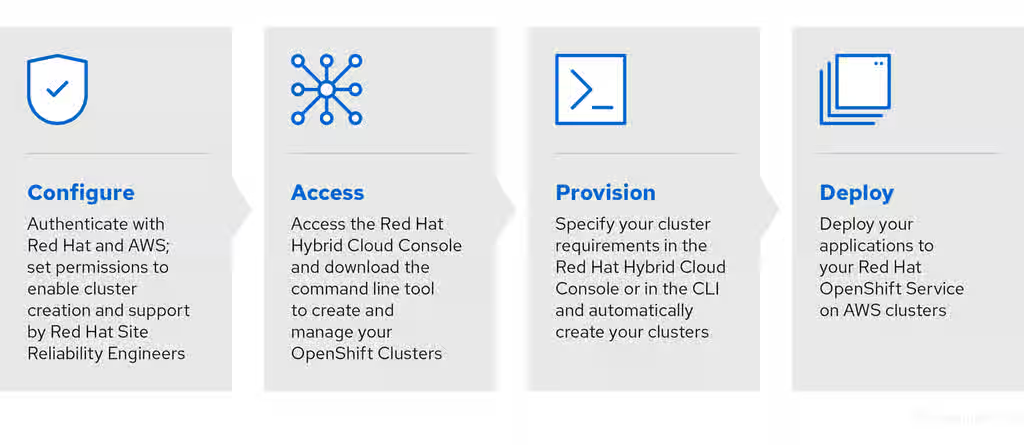
To navigate the ROSA documentation, use the left navigation bar.
Chapter 2. Learn more about ROSA with HCP
Red Hat OpenShift Service on AWS (ROSA) with hosted control planes (HCP) offers a reduced-cost solution to create a managed ROSA cluster with a focus on efficiency. You can quickly create a new cluster and deploy applications in minutes.
2.1. Key features of ROSA with HCP
- ROSA with HCP requires a minimum of only two nodes, making it ideal for smaller projects while still being able to scale to support larger projects and enterprises.
- The underlying control plane infrastructure is fully managed. Control plane components, such as the API server and etcd database, are hosted in a Red Hat-owned AWS account.
- Provisioning time is approximately 10 minutes.
- Customers can upgrade the control plane and machine pools separately, which means they do not have to shut down the entire cluster during upgrades.
2.2. Getting started with ROSA with HCP
Use the following sections to find content to help you learn about and use ROSA with HCP.
2.2.1. Architect
| Learn about ROSA with HCP | Plan ROSA with HCP deployment | Additional resources |
|---|---|---|
2.2.2. Cluster Administrator
| Learn about ROSA with HCP | Deploy ROSA with HCP | Manage ROSA with HCP | Additional resources |
|---|---|---|---|
| Content from learn.openshift.com is not included.OpenShift Interactive Learning Portal | |||
2.2.3. Developer
| Learn about application development in ROSA with HCP | Deploy applications | Additional resources |
|---|---|---|
| This content is not included.Red Hat OpenShift Dev Spaces (formerly Red Hat CodeReady Workspaces) | ||
Chapter 3. AWS STS and ROSA with HCP explained
Red Hat OpenShift Service on AWS (ROSA) with hosted control planes (HCP) uses an AWS (Amazon Web Services) Security Token Service (STS) for AWS Identity Access Management (IAM) to obtain the necessary credentials to interact with resources in your AWS account.
3.1. AWS STS credential method
As part of ROSA with HCP, Red Hat must be granted the necessary permissions to manage infrastructure resources in your AWS account. ROSA with HCP grants the cluster’s automation software limited, short-term access to resources in your AWS account.
The STS method uses predefined roles and policies to grant temporary, least-privilege permissions to IAM roles. The credentials typically expire an hour after being requested. Once expired, they are no longer recognized by AWS and no longer have account access from API requests made with them. For more information, see the Content from docs.aws.amazon.com is not included.AWS documentation.
AWS IAM STS roles must be created for each ROSA with HCP cluster. The ROSA command-line interface (CLI) (rosa) manages the STS roles and helps you attach the ROSA-specific, AWS-managed policies to each role. The CLI provides the commands and files to create the roles, attach the AWS-managed policies, and an option to allow the CLI to automatically create the roles and attach the policies.
3.2. AWS STS security
Security features for AWS STS include:
An explicit and limited set of policies that the user creates ahead of time.
- The user can review every requested permission needed by the platform.
- The service cannot do anything outside of those permissions.
- There is no need to rotate or revoke credentials. Whenever the service needs to perform an action, it obtains credentials that expire in one hour or less.
- Credential expiration reduces the risks of credentials leaking and being reused.
ROSA with HCP grants cluster software components least-privilege permissions with short-term security credentials to specific and segregated IAM roles. The credentials are associated with IAM roles specific to each component and cluster that makes AWS API calls. This method aligns with principles of least-privilege and secure practices in cloud service resource management.
3.3. Components of ROSA with HCP
- AWS infrastructure - The infrastructure required for the cluster including the Amazon EC2 instances, Amazon EBS storage, and networking components. See AWS compute types to see the supported instance types for compute nodes and provisioned AWS infrastructure for more information on cloud resource configuration.
- AWS STS - A method for granting short-term, dynamic tokens to provide users the necessary permissions to temporarily interact with your AWS account resources.
- OpenID Connect (OIDC) - A mechanism for cluster Operators to authenticate with AWS, assume the cluster roles through a trust policy, and obtain temporary credentials from AWS IAM STS to make the required API calls.
Roles and policies - The roles and policies used by ROSA with HCP can be divided into account-wide roles and policies and Operator roles and policies.
The policies determine the allowed actions for each of the roles. See About IAM resources for more details about the individual roles and policies. See ROSA IAM role resource for more details about trust policies.
The account-wide roles are:
-
<prefix>-HCP-ROSA-Worker-Role -
<prefix>-HCP-ROSA-Support-Role -
<prefix>-HCP-ROSA-Installer-Role
-
The account-wide AWS-managed policies are:
- Content from docs.aws.amazon.com is not included.ROSAInstallerPolicy
- Content from docs.aws.amazon.com is not included.ROSAWorkerInstancePolicy
- Content from docs.aws.amazon.com is not included.ROSASRESupportPolicy
- Content from docs.aws.amazon.com is not included.ROSAIngressOperatorPolicy
- Content from docs.aws.amazon.com is not included.ROSAAmazonEBSCSIDriverOperatorPolicy
- Content from docs.aws.amazon.com is not included.ROSACloudNetworkConfigOperatorPolicy
- Content from docs.aws.amazon.com is not included.ROSAControlPlaneOperatorPolicy
- Content from docs.aws.amazon.com is not included.ROSAImageRegistryOperatorPolicy
- Content from docs.aws.amazon.com is not included.ROSAKMSProviderPolicy
- Content from docs.aws.amazon.com is not included.ROSAKubeControllerPolicy
- Content from docs.aws.amazon.com is not included.ROSAManageSubscription
- Content from docs.aws.amazon.com is not included.ROSANodePoolManagementPolicy
NoteCertain policies are used by the cluster Operator roles, listed below. The Operator roles are created in a second step because they are dependent on an existing cluster name and cannot be created at the same time as the account-wide roles.
The Operator roles are:
- <operator_role_prefix>-openshift-cluster-csi-drivers-ebs-cloud-credentials
- <operator_role_prefix>-openshift-cloud-network-config-controller-cloud-credentials
- <operator_role_prefix>-openshift-machine-api-aws-cloud-credentials
- <operator_role_prefix>-openshift-cloud-credential-operator-cloud-credentials
- <operator_role_prefix>-openshift-image-registry-installer-cloud-credentials
- <operator_role_prefix>-openshift-ingress-operator-cloud-credentials
- Trust policies are created for each account-wide role and each Operator role.
3.4. Deploying a ROSA with HCP cluster
Deploying a ROSA with HCP cluster follows the following steps:
- You create the account-wide roles.
- You create the Operator roles.
- Red Hat uses AWS STS to send the required permissions to AWS that allow AWS to create and attach the corresponding AWS-managed Operator policies.
- You create the OIDC provider.
- You create the cluster.
During the cluster creation process, the ROSA CLI creates the required JSON files for you and outputs the commands you need. If desired, the ROSA CLI can also run the commands for you.
The ROSA CLI can automatically create the roles for you, or you can manually create them by using the --mode manual or --mode auto flags. For further details about deployment, see Creating a cluster with customizations.
3.5. ROSA with HCP workflow
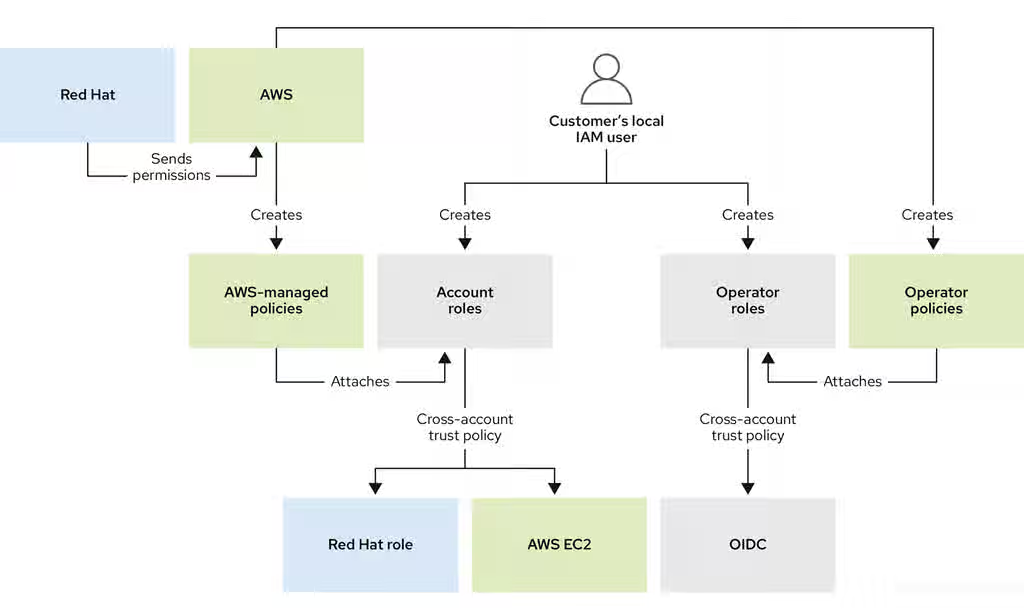
The user creates the required account-wide roles. During role creation, a trust policy, known as a cross-account trust policy, is created which allows a Red Hat-owned role to assume the roles. Trust policies are also created for the EC2 service, which allows workloads on EC2 instances to assume roles and obtain credentials. AWS assigns a corresponding permissions policy to each role.
After the account-wide roles and policies are created, the user can create a cluster. Once cluster creation is initiated, the user creates the Operator roles so that cluster Operators can make AWS API calls. These roles are then assigned to the corresponding permission policies that were created earlier and a trust policy with an OIDC provider. The Operator roles differ from the account-wide roles in that they ultimately represent the pods that need access to AWS resources. Because a user cannot attach IAM roles to pods, they must create a trust policy with an OIDC provider so that the Operator, and therefore the pods, can access the roles they need.
Once the user assigns the roles to the corresponding policy permissions, the final step is creating the OIDC provider.
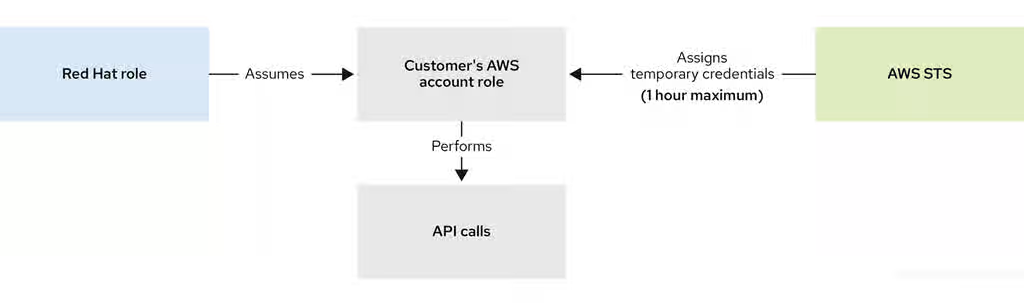
When a new role is needed, the workload currently using the Red Hat role will assume the role in the AWS account, obtain temporary credentials from AWS STS, and begin performing the actions using API calls within the user’s AWS account as permitted by the assumed role’s permissions policy. The credentials are temporary and have a maximum duration of one hour.
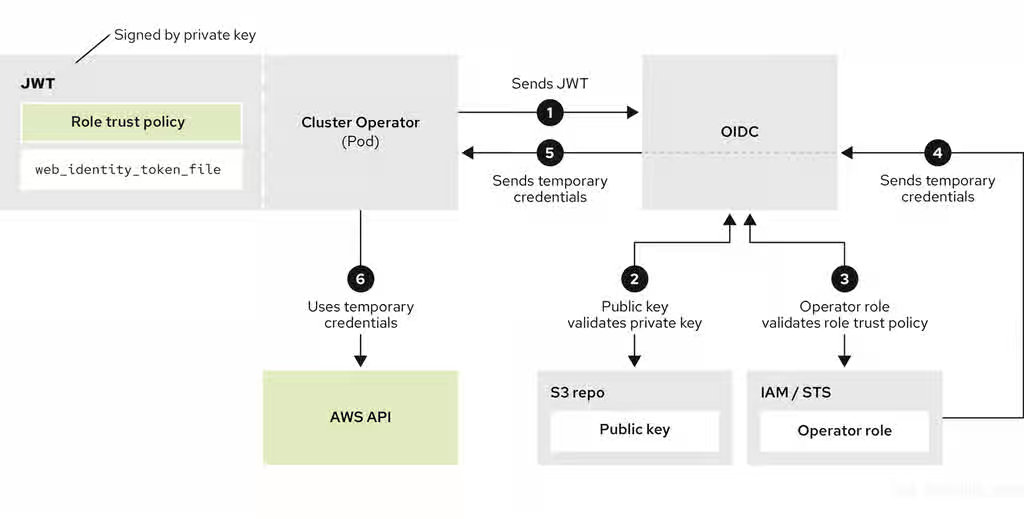
Operators use the following process to obtain the requisite credentials to perform their tasks. Each Operator is assigned an Operator role, a permissions policy, and a trust policy with an OIDC provider. The Operator will assume the role by passing a JSON web token that contains the role and a token file (web_identity_token_file) to the OIDC provider, which then authenticates the signed key with a public key. The public key is created during cluster creation and stored in an S3 bucket. The Operator then confirms that the subject in the signed token file matches the role in the role trust policy which ensures that the OIDC provider can only obtain the allowed role. The OIDC provider then returns the temporary credentials to the Operator so that the Operator can make AWS API calls. For a visual representation, see the following diagram: