Troubleshooting "virt-who/vCenter" connection problems. "virt-who" can not perform hosts-to-guests mapping
Environment
- Red Hat Enterprise Linux
- Red Hat Enterprise Linux for Virtual Datacenters
- VMware vCenter
Issue
- virt-who service can not perform hosts-to-guests mapping.
- All the hosts not reported to portal.
Resolution
FIREWALL
- virt-who uses port 443/tcp to communicate with vCenter server and to receive the data. Make sure that this port is open in firewall settings.
vCenter USER PERMISSIONS
- The user accessing vCenter database does not need to be "admin" user. Read-only permission is necessary and sufficient.
- Read-only account also needs to have inheritance set for each data center or specified for each host you want mapped.
USERNAME
- Windows Active Directory authentication has username in the form "DOMAIN\username". The "" character needs to be escaped by another "" character, thus the proper synthax is "DOMAIN\\username".
- Configuration file in "/etc/virt-who.d" directory uses a normal syntax "DOMAIN\username". Using "DOMAIN\\username" will in that case trigger the error message "'Cannot complete login due to an incorrect user name or password".
PASSWORD
- Special characters ( "$", "&", "\" ) under the VIRTWHO_ESX_PASSWORD entry need to be escaped by "" character.
For example, the password "$$ab1234" should be written as "$$ab1234". The characters "!", "@", "#", "%" are accepted without additional "" character. - Password specified in configuration file in "/etc/virt.who.d" directory is not so sensitive to special characters. One exception is "%" character which has to be written as "%%".
ESX HOSTNAME
- The name entry made on the vCenter must match with the actual hostname of the hypervisor.
For more KB articles/solutions related to Virt-who and Virtual Datacenter (VDC) Subscriptions Issues, please refer to the Consolidated Troubleshooting Article for Virt-who and Virtual Datacenter (VDC) Subscriptions Issues
Root Cause
- Firewall settings are too restrictive
- vCenter user does not have enough permissions to read the database
- Wrong username or password syntax
- The name entry made on the vCenter not matching with the actual hostname of the hypervisor.
Diagnostic Steps
FIREWALL PROBLEMS
Install network port scanner "nmap" and scan the vCenter server ports:
# nmap vcenter.domaincom

PORT     STATE    SERVICE
22/tcp   open     ssh
80/tcp   open     http
88/tcp   open     kerberos-sec
111/tcp  open     rpcbind
135/tcp  filtered msrpc
443/tcp  open     https
514/tcp  open     shell
8009/tcp filtered ajp13
8080/tcp filtered http-proxy
8443/tcp open     https-alt
9009/tcp filtered pichat
9090/tcp filtered zeus-admin
If the firewall settings are too restrictive, the command will report that the ports are filtered.
Another useful command to scan for open ports is "nc":
# nc -z vcenter.domain.com 443 (does not work on RHEL 7)
Connection to vcenter.domain.com 443 port [tcp/https] succeeded!
vCenter USER PERMISSIONS
Check "/var/log/rhsm/rhsm.log" file. The following is indicative of insufficient permissions to access the vCenter's database:
# tail -f /var/log/rhsm/rhsm.log
2015-04-27 11:41:20,012 [INFO]  @subscriptionmanager.py:119 - Sending update in hosts-to-guests mapping: {}
Notice that there are no virtual machine UUIDs in between the parentheses.
vCenter USERNAME/PASSWORD ISSUES
The following messages indicate that either username or password were entered incorrectly:
# tail -f /var/log/rhsm/rhsm.log
2015-04-28 16:15:37,950 [ERROR]  @esx.py:78 - Unable to login to ESX
Traceback (most recent call last):
  File "/usr/share/virt-who/virt/esx/esx.py", line 76, in scan
    self.client.service.Login(_this=self.sc.sessionManager, userName=self.username, password=self.password)
  File "/usr/lib/python2.6/site-packages/suds/client.py", line 542, in __call__
    return client.invoke(args, kwargs)
  File "/usr/lib/python2.6/site-packages/suds/client.py", line 602, in invoke
    result = self.send(soapenv)
  File "/usr/lib/python2.6/site-packages/suds/client.py", line 657, in send
    result = self.failed(binding, e)
  File "/usr/lib/python2.6/site-packages/suds/client.py", line 712, in failed
    r, p = binding.get_fault(reply)
  File "/usr/lib/python2.6/site-packages/suds/bindings/binding.py", line 265, in get_fault
    raise WebFault(p, faultroot)
WebFault: Server raised fault: 'Cannot complete login due to an incorrect user name or password.'
2015-04-28 16:15:38,001 [ERROR]  @virtwho.py:118 - Error in communication with virtualization backend, trying to recover:
Traceback (most recent call last):
  File "/usr/share/virt-who/virtwho.py", line 111, in _send
    virtualGuests = self._readGuests(config)
  File "/usr/share/virt-who/virtwho.py", line 147, in _readGuests
    return virt.getHostGuestMapping()
  File "/usr/share/virt-who/virt/esx/esx.py", line 124, in getHostGuestMapping
    self.scan()
  File "/usr/share/virt-who/virt/esx/esx.py", line 79, in scan
    raise virt.VirtError(str(e))
VirtError: Server raised fault: 'Cannot complete login due to an incorrect user name or password.'
After all errors have been corrected and virt-who is able to collect information from vCenter server, the output in "/var/log/rhsm/rhsm.log" will look as follows:
# tail -f /var/log/rhsm/rhsm.log
2015-04-28 16:45:40,593 [INFO]  @subscriptionmanager.py:119 - Sending update in hosts-to-guests mapping: {33343934-3932-4753-4830-313158395738:
[564d09f1-6b95-df96-b3cd-44323e6c7685, 564dbb73-2d68-2170-575f-32ebc6690852, 564d83f9-78eb-409b-b5dd-d4ea9a9c2146,
564d9b7c-2301-958e-d2f0-c99da5644faf, 564de85d-8e2f-7f30-72e2-83e6b06a34b1, 564d7303-f8ff-82d5-4726-dde6a07f8844,
 564db7ac-0cdd-fa8a-b231-0a5e33e54237, 564dcb34-75f2-af24-2b5c-90a88a770f27, 564d7032-2811-e353-6d33-21a488c97476,
 564df92c-e67c-25ed-6bb4-25239f621e44, 564dc675-dbfa-0513-c7fb-f9ea5eb2a50c, 564dd08e-5d93-6267-a1dd-b90cb69c1765,
 564dce2a-c4eb-df0f-be71-a29083abf281, 564daf5d-73d9-b0b1-de9c-7ea5a338d484, 564d4dde-36bd-711b-1690-31d0ce8e902a,
 564deaaa-54be-9943-ba12-e58ffc82e8aa, 564d1eeb-440f-e28c-6bcf-bac2aa74ed68, 564d105f-db53-8e8c-a980-d5faf872e720]}
The first number in parentheses is ESXi UUID - all other UUIDs belong to the corresponding virtual machines. To find out the ESXi UUID via web browser, use the following link:
Content from esxi.domain.com is not included.https://esxi.domain.com/mob/?moid=ha-host&doPath=hardware%2esystemInfo%20(substitute%20esxi.domain.com%20with%20the%20hostname%20of%20your%20hypervisor).
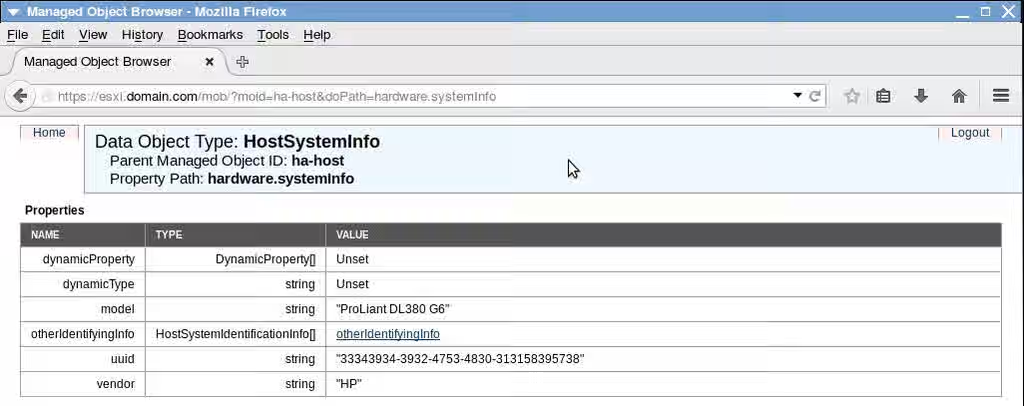
An alternative way to determine ESXi UUID is via vSphere PowerCLI (replace vcenter.domain.com and esxi.domain.com with your hostnames):
PowerCLI C:\> Connect-VIServer vcenter.domain.com
PowerCLI C:\> $(Get-VMhost esxi.domain.com|Get-View).Summary.Hardware.Uuid
The UUID of the virtual machine is easily verified by running the following command:
# subscription-manager facts --list |grep virt.uuid
virt.uuid: 564d1eeb-440f-e28c-6bcf-bac2aa74ed68
This solution is part of Red Hat’s fast-track publication program, providing a huge library of solutions that Red Hat engineers have created while supporting our customers. To give you the knowledge you need the instant it becomes available, these articles may be presented in a raw and unedited form.