How to use "virt-who" to register Esxi hosts with "Virtual Datacenter" entitlements ?
Environment
- Red Hat Enterprise Linux 6(All versions)
- Red Hat Enterprise Linux 7(All versions)
virt-who- VMware vCenter Server
- VMware Esxi host
Issue
- How to use
VDCentitlements inVMwareenvironment ?
Resolution
-
Install a new RHEL 6 or 7 VM in VMware ESXi host, this VM is used to gather information of the underlying ESXi host and then communicate to Red Hat Network, so we call it 'Liaison VM'.
-
Register the Liaison VM without subscribe
# subscription-manager register --username=<username> --password=<password> # subscription-manager identity system identity: f414206d-7ab5-4d6d-811a-ba0d6fe30e2e name: satellite.example.com org name: 5847285 org ID: 5847285 -
Install
virt-whoon Liaison VM.
Since this VM is not subscribed , so we can't useyumdirectly to install it. We need to configure local yum source with system ISO, here is How to create local repository distributed through apache of Red Hat Enterprise Linux 5/6/7 using DVD iso for update or installation ?
After configuring of local yum source ,installvirt-who.# yum install virt-who -
Configure
virt-whoon Liaison VM.# vim /etc/sysconfig/virt-who VIRTWHO_ESX=1 VIRTWHO_ESX_OWNER=5847285 (This number is from the previous command `subscription-manager identity`) VIRTWHO_ESX_ENV=5847285 VIRTWHO_ESX_SERVER=10.0.0.1 (IP address of ESXi host) VIRTWHO_ESX_USERNAME=root (username of ESXi host, not the 'root' user of the VM) VIRTWHO_ESX_PASSWORD=password (password of ESXi host) # /etc/init.d/virt-who start # chkconfig virt-who on -
How to verify the ESXi host is registered ? After start
virt-who,we could check/var/log/rhsm/rhsm.logof Liaison VM.# tail -f /var/log/rhsm/rhsm.log 2015-10-28 17:59:23,011 [INFO] @subscriptionmanager.py:119 - Sending update in hosts-to-guests mapping: {30323636-3238-4e43-3733-333030315956: [42018faf-c862-de4b-2088-3e49869c0552, 564df70d-6542-b691-8cfb-c6fde6910510, 564d9965-7b13-67a7-7dea-601cf4fc8efd]} 2015-10-28 17:59:28,896 [INFO] @virtwho.py:164 - Created host: 50c0f587-f96d-4f5f-8f84-e1a06df8cb14 with guests: [42018faf-c862-de4b-2088-3e49869c0552, 564df70d-6542-b691-8cfb-c6fde6910510, 564d9965-7b13-67a7-7dea-601cf4fc8efd] If you find `Sending update in hosts-to-guests mapping` and `Created host:` information in the log ,then the ESXi host is registered. -
Here is how to find out which ESXi host is the one that we just registered and attach entitlement into it .
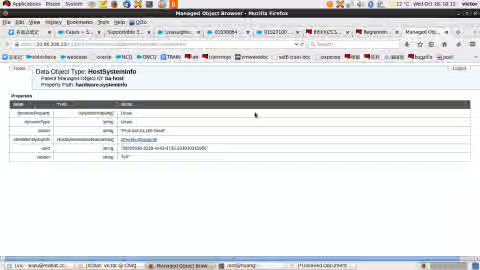
- In this page we can find hardware info of the ESXi host :
https://esxi-ip/mob/?moid=ha-host&doPath=hardware.systemInfo, please replaceesxi-ipwith ESXi host's IP address , in the section ofuuid stringis the ESXi host's UUID:
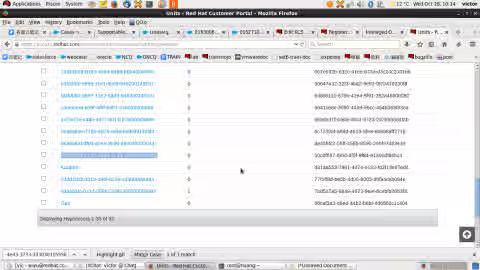
- Enter This content is not included.Subscription Management page ,and search with "30323636-3238-4e43-3733-333030315956".
- Attach entitlement into the ESXi host.
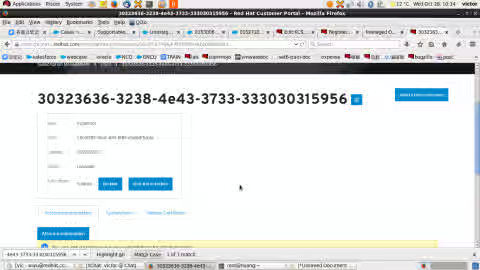
- In this page we can find hardware info of the ESXi host :
-
Subscribe newly installed VMs.
-
Login to a guest system on the hypervisor.
-
Subscribe the VMs:
      # subscription-manager register --username=username --password=password
      # subscription-manager subscribe --auto
      or
      # subscription-manager attach --auto
-
-
(OPTIONAL) Subscribe the Liaison VM
-
Login to the Liaison VM.
-
Subscribe the VM:
      # subscription-manager subscribe --auto
     or
      # subscription-manager attach --auto
-
For more KB articles/solutions related to Virt-who and Virtual Datacenter (VDC) Subscriptions Issues, please refer to the Consolidated Troubleshooting Article for Virt-who and Virtual Datacenter (VDC) Subscriptions Issues
Diagnostic Steps
- Here is an issue we might face :
How to deal with "Cannot complete login due to an incorrect user name or password" error of virt-who ?
This solution is part of Red Hat’s fast-track publication program, providing a huge library of solutions that Red Hat engineers have created while supporting our customers. To give you the knowledge you need the instant it becomes available, these articles may be presented in a raw and unedited form.