How to configure default workspace in BPM Suite dashbuilder
Environment
- Red Hat JBoss BPM Suite
- 6.4.1
Issue
- In the dashbuilder I want a user with developer role to access the jBPM dashboard with just view access and I just got into the showcase workspace.
Resolution
Set the following system properties (replace the value "bpmsAdmin" with your admin username).
example of standalone.xml)
    <system-properties>
        ...
        <property name="org.jboss.dashboard.users.UserStatus.rootLogin" value="bpmsAdmin"/>
        <property name="org.jboss.dashboard.users.UserStatus.rootUserName" value="bpmsAdmin"/>
    </system-properties>
Then, you can configure "Default workspace" in "Workspace properties" Edit page. Check "Default workspace" and save.
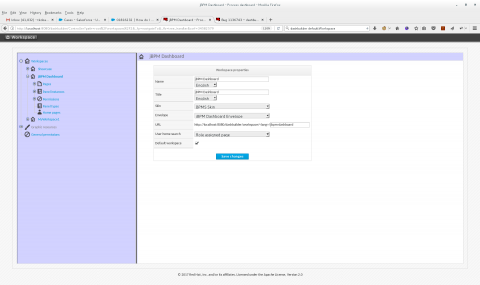
It will be the default workspace when users access to http://localhost:8080/dashbuilder/
Also please see How to switch workspaces for non-admin users in BPM Suite dashboard if you need to select workspaces after login.
Unfortunately, for business-central menu [Dashboards]->[Business Dashboards], "showcase" is hard-coded so it's not configurable.
This solution is part of Red Hat’s fast-track publication program, providing a huge library of solutions that Red Hat engineers have created while supporting our customers. To give you the knowledge you need the instant it becomes available, these articles may be presented in a raw and unedited form.