Getting started with Red Hat Enterprise Linux 6 High Availability Cluster
Environment
- Red Hat Enterprise Linux Server 6 (with the High Availability and Resilient Storage Add Ons)
Issue
- How do I create a cluster using Red Hat Enterprise Linux 6 High Availability?
- How do I get started with Red Hat cluster software in RHEL 6?
Resolution
NOTE:
- The steps covered in this brief tutorial do not result in a supported cluster configuration. For complete details on how to plan and deploy a supported cluster, see This content is not included.Red Hat Enterprise Linux 6 Cluster Administration.
- These steps feature Rgmanager as the cluster management component. Starting with RHEL 6.5, Pacemaker is available as an alternative to Rgmanager. Some of the following steps do not apply for Pacemaker clusters since Ricci and Luci currently only work with Rgmanager clusters. For more information, see the This content is not included.RHEL 6 Pacemaker documentation.
Register Cluster Systems for Software Updates
Before you proceed, make sure your account includes the following support entitlements:
- RHEL: Server
- Red Hat Applications: High availability
- Red Hat Applications: Resilient Storage (if using This content is not included.certain filesystems)
Please see the following article for detailed information about above support entitlements:
What subscriptions are required for using Red Hat Cluster Suite and GFS/GFS2?
As of this writing, there are two tools available to register your systems, as shown in the next two sections. If you do not have a preference between these options, see This content is not included.Which Subscription Management is Right for You?
Register with RHSM
-
Register the RHEL system on each node as described here.
-
Run the following commands to (https://access.redhat.com/site/solutions/392003) you need to access cluster software:
        # subscription-manager repos --enable=rhel-ha-for-rhel-6-server-rpms
        # subscription-manager repos --enable=rhel-rs-for-rhel-6-server-rpms
Register with RHN Classic
-
Register the RHEL system on each node as described This content is not included.here.
-
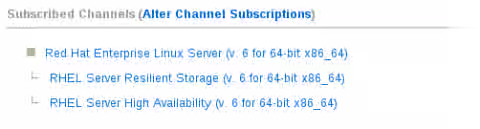
In the Customer Portal, use the "Alter Channel Subscriptions" as described This content is not included.here for each registered system to add the support channels that provide the cluster application packages. Click "Change Subscriptions" to save the change:
RHEL Server High Availability
RHEL Server Resilient Storage (This content is not included.if applicable)
Configure the Firewall
The iptables firewall can be disabled, or it can be configured to allow cluster traffic to pass through. To disable the iptables system firewall:
    # service iptables stop
    # chkconfig iptables off
Alternatively, to configure iptables to allow cluster traffic to pass through, see This content is not included.2.3.3. Configuring the iptables Firewall to Allow Cluster Components from the Red Hat Enterprise Linux 6 Cluster Administration Guide.
Configure SELinux
SELinux is supported on Red Hat Enterprise Linux 6 cluster nodes in Enforcing or Permissive mode with a targeted policy, or it can be disabled. To check the current SELinux state, run getenforce:
    # getenforce
    Permissive
See This content is not included.Enabling and Disabling SELinux for more information on how to enable or disable SELinux on your Red Hat Enterprise Linux systems.
Install Cluster Package Groups
-
On each node, install the cluster package groups:
# yum groupinstall 'High Availability' 'Resilient Storage' -
On the node that will be hosting the web management interface, install the luci package:
# yum install luci
Manage the Cluster
-
On both nodes, start the ricci agent
# service ricci start -
Once the ricci service is successfully started, we must give the service a password:
# passwd ricci New password: Retype new password: -
On the node that will be hosting the web management interface, start the luci service:
# service luci start -
To use the High Availability management web interface, point your browser to the link provided by the luci service and log in using the root account.
-
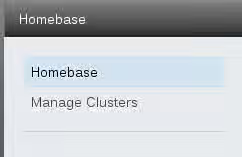
To create a new cluster, click the Manage Clusters button on the left navigation pane:
- Click the create button:

- Complete the appropriate fields:
- The Password field will be the ricci password previously created
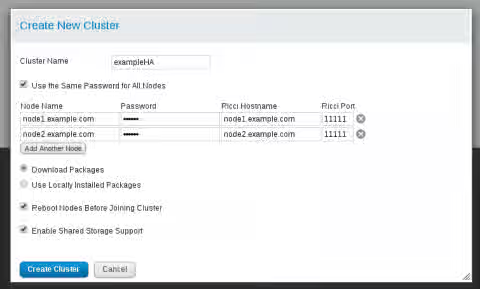
- Once complete, click the Create Cluster button.
- A progress bar is displayed while the cluster is formed.
- Once complete, luci will display the cluster general properties. You can also run the clustat command on either node to verify the cluster status.
Verify the Cluster Status
# clustat
Cluster Status for rh6-ex-cluster @ Thu Sep 29 12:17:39 2011
Member Status: Quorate

Member Name                                                     ID   Status
------ ----                                                               ---- ------
rhel6-node1                                                         1 Online, Local
rhel6-node2                                                         2 Online
Troubleshooting cluster formation
- If you can't get luci to create the cluster double check [firewall settings]This content is not included.https://access.redhat.com/site/documentation/en-US/Red_Hat_Enterprise_Linux/6/html-single/Cluster_Administration/index.html#s2-iptables_firewall-CA.
- If luci creates the cluster (there's a cluster.conf on each node) but the cluster won't form you may have multicast issues. Change the cluster to unicast as a test. Be aware of the limitations of unicast mode.
Configure Fencing
- Fencing is required for a supported configuration.
- Choose the appropriate fence device using this This content is not included.matrix.
- Most fence devices have a related configuration solution in our knowledgebase. For example VMWare Fencing and fence_ipmilan for HP, Dell, and IBM servers.
Split Brains and Fence Races
- With a two node cluster you'll need a tie breaking mechanism to avoid split brain situations.
- With three or more nodes this isn't an issue.
Where to go from here
Use the cluster administration and fencing guides in RHEL documentation to complete your cluster setup:
- Configure any shared storage devices and filesystems
- Configure cluster resources
- Configure resource groups and failover domains
Links to RHEL 6 cluster documentation:
- This content is not included.RHEL 6 High Availability Add-on Overview
- This content is not included.RHEL 6 Cluster Administration
- This content is not included.RHEL 6 Global Filesystem 2 (GFS2)
- This content is not included.RHEL 6 Fence Configuration Guide
- This content is not included.RHEL 6.5+ Configuring the Red Hat High Availability Add-on with Pacemaker
This solution is part of Red Hat’s fast-track publication program, providing a huge library of solutions that Red Hat engineers have created while supporting our customers. To give you the knowledge you need the instant it becomes available, these articles may be presented in a raw and unedited form.