How to configure VMware fencing using fence_vmware_soap in Red Hat Enterprise Linux High Availability Add On?
Environment
- Red Hat Enterprise Linux 5.7 or higher (with the High Availability or Resilient Storage Add-on)
- Red Hat Enterprise Linux 6.2 or higher (with the High Availability or Resilient Storage Add-on)
- VMware fencing (
fence_vmware_soap) - For configuration of fence_vmware_soap in pacemaker based clusters check the Solution 917813
Issue
- I have RHEL cluster nodes running as VMware virtual machines. How can I use VMware fencing as my cluster's fence device?
- How do I use
fence_vmware_soapas a fence device in my RHCS(Red Hat cluster Suite)? - Have two VMs running over VMware ESX server, need to know best recommendation on configuring fencing, which would be the best method for fencing(
fence_vmwareorfence_vmware_soap) and how to configure it in two node Red Hat High Availability Cluster ? - What is the recommended fence agent for running a cluster on VMware Vsphere?
- What is the fence agent provided by Red Hat High Availability Add-On Cluster for VMs running on VMware ESXi 5?
Resolution
-
Install Cluster packages, then add cluster members using conga GUI. Step by step procedures for
- Red Hat Enterprise Linux 5 is Getting started with Red Hat Enterprise Linux 5 High Availability Cluster
- Red Hat Enterprise Linux 6 is Getting started with Red Hat Enterprise Linux 6 High Availability Cluster
-
Please refer Virtualization Support for High Availability in Red Hat Enterprise Linux 5 and 6 to know the Virtualization Support Matrix.
-
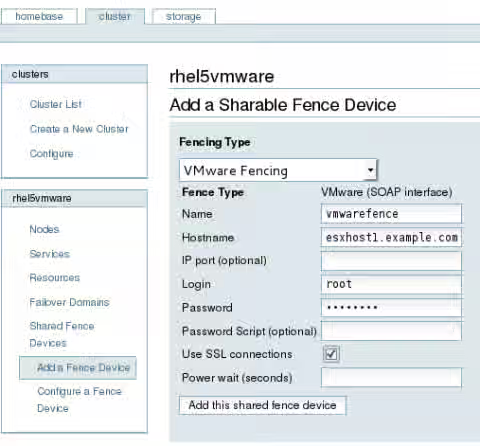
Select Vmware Fencing from "Fence Type" drop down menu.
-
Add vmware fence device details .
- Enable 'SSL' if the environment encountered 'connection timeout' issue reported here Running the fence_vmware_soap fence agent fails with a connection timeout
- The uuid attribute for the fencing agent is case sensitive. The uuid attribute value should be use the exact attribute string including the same cases for the characters. It is recommend that an exact copy of the uuid be used from the listing of the virtual machines managed by VMware with the --action list option. For more see The fencing agent fence_vmware_soap errors with the following message on RHEL 5 and RHEL 6 "Failed: Unable to obtain correct plug status or plug is not available"
- If SELinux in enforcing mode, becareful about it. For more see Fencing in RHEL 6 with fence_vmware_soap fails with "error from agent" when done automatically by cluster or using fence_node, but succeeds from command line
NOTE: Below screenshots are captured from RHEL5 Conga. However the procedures are same in Red Hat Enterprise Linux 6 Conga GUI.
-
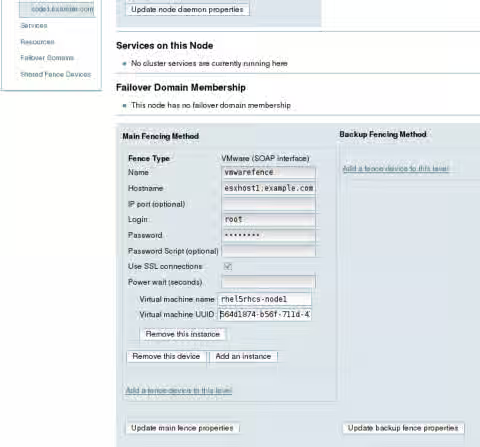
It is required to add Virtual Machine details ( Guest name and UUID ) while attaching the fence device with each cluster member.
-
Set the hostname ,username and password of VMware fencing
- Hostname - The IP address or resolvable hostname of the vCenter host
- Login & password - The vCenter's username and that user's password
-
Execute the following command to list the guest name and uuid
# fence_vmware_soap -z -l root -p mypasswd -a vcenter.example.com -o list rhel5rhcs-node1, 564d1874-b56f-711d-4167-3d97eaf24647 rhel5rhcs-node2, 564db341-39fc-1383-5e6d-3a71e14c540d -
Now add the Virtual Machine details for each nodes.
-
Eventually the cluster configuration file /etc/cluster/cluster.conf should looks like
  ...
  <clusternode name="node2.example.com" nodeid="1" votes="1">
    <fence>
     <method name="1">
        <device name="vmwarefence" port="rhel5rhcs-node2"
             uuid="564db341-39fc-1383-5e6d-3a71e14c540d"/>
     </method>
    </fence>
  </clusternode>
  <clusternode name="node1.example.com" nodeid="2" votes="1">
    <fence>
     <method name="1">
        <device name="vmwarefence" port="rhel5rhcs-node1"
             uuid="564d1874-b56f-711d-4167-3d97eaf24647"/>
     </method>
    </fence>
  </clusternode>
  </clusternodes>
  <cman expected_votes="1" two_node="1"/>
  <fencedevices>
    <fencedevice agent="fence_vmware_soap" ipaddr="vcenter.example.com"
       login="root" name="vmwarefence" passwd="mypasswd" ssl="1"/>
  </fencedevices>
  ...
This solution is part of Red Hat’s fast-track publication program, providing a huge library of solutions that Red Hat engineers have created while supporting our customers. To give you the knowledge you need the instant it becomes available, these articles may be presented in a raw and unedited form.