Connecting OpenStack instances directly to an external network with Neutron
Environment
- Red Hat Enterprise Linux OpenStack Platform
Issue
- I need to create some instances and connect them directly to an external network and use an external default gateway for those instances. I should still be able to add other instances to private tenant networks isolated using gre or vxlan or vlan and route them to different external networks using floating IPs via neutron virtual router. Is it possible to connect an instance directly to an external network using openvswitch plugin?
- How do I configure external networks in OpenStack
- We have a fresh install of openstack from packstack, and we need to configure neutron to use vlans.
- After a fresh installation of packstack, how do we setup neutron to use a provider network for external traffic?
Resolution
OpenStack Networking Topology
OpenStack Networking (neutron) services can be broadly classified into running on the following three node types:
-
Neutron API server - This service runs the OpenStack Networking API server, which has the main responsibility of providing an API for end users and services to interact with OpenStack Networking. This server also has the responsibility of interacting with underlying database to store and retrieve tenant network, router, loadbalancer, etc details.
-
Neutron Agents - These are the services that deliver various network functionality for OpenStack Networking. For example:
- neutron-dhcp-agent - manages dhcp ip addressing for tenant private networks
- neutron-l3-agent - facilitates layer 3 routing between tenant private networks and tenant private network and external network, and others.
- neutron-lbaas-agent - provisions the LBaaS routers created by tenants.
-
Compute node - This node runs the OpenStack instances (VMs). A compute node need to be wired directly to the external network if an instance running on it is intended to be connected directly to the external network.
Service Placement
The OpenStack Networking services can either run together on the same physical server, or on separate dedicated servers.
The server that runs API server is usually called the controller node, whereas the server that runs the agents is called the network node. A server that runs the instances is called a compute node.
This article explains configurations to be done on these three types of nodes to accomplish this. If both the Controller and Network node roles are on the same physical node, then the steps from both sections must be performed on that server. This is true for an HA environment deployed using rhel-osp-installer where all the three nodes will be running controller node services and network node services with High Availability. Sections from Controller nodes and network nodes need to be done on all three nodes.
Pre-requisite
This document cannot be used to configure neutron from scratch to support provider networks. This document expects that you have an OpenStack environment deployed by This content is not included.Packstack or This content is not included.rhel-osp-installer or This content is not included.manually setup. This document can be used to add support for provider networks in such an environment.
Flat Provider Networks
Multiple flat provider networks can be used to connect instances directly to external networks. This will be used if we have multiple physical networks (let us call it physnet1, physnet2, etc) and separate physical interfaces (eth0 - > physnet1 and eth1 -> physnet2) to connect each compute nodes and network nodes to those external networks. if you would like to use multiple vlan tagged interfaces on a single interface to connect to multiple provider networks, please refer to the VLAN provider networks section.
Controller nodes
-
Edit
/etc/neutron/plugin.ini(symbolic link to/etc/neutron/plugins/ml2/ml2_conf.ini) and add flat to the existing list of values and setflat_networksto *:type_drivers = vxlan,flat flat_networks =* -
Create an external network as flat networks and associate them correctly the configured
physical_network. Create it as shared network to let other users create instances directly to it.# neutron net-create public01 --provider:network_type flat --provider:physical_network physnet1 --router:external=True --shared -
Create subnet appropriately to this external network using
neutron subnet-createor horizon dashboard. -
Restart neutron-api server after this change.
# systemctl restart neutron-server
Both Network node and Compute node
These steps must be done on both network node and compute nodes. This will connect the nodes to external network to let instances communicate directly with external network.
-
Create external network bridge (
br-ex) and then add associated port (eth1) to it. -
Edit
/etc/sysconfig/network-scripts/ifcfg-eth1:DEVICE=eth1 TYPE=OVSPort DEVICEYPE=ovs OVS_BRIDGE=br-ex ONBOOT=yes NM_CONTROLLED=no BOOTPROTO=none -
Edit
/etc/sysconfig/network-scripts/ifcfg-br-ex:DEVICE=br-ex TYPE=OVSBridge DEVICETYPE=ovs ONBOOT=yes NM_CONTROLLED=no BOOTPROTO=none -
Reboot the node or restart network service for the networking changes to take effect.
-
Configure physical networks in
/etc/neutron/plugins/openvswitch/ovs_neutron_plugin.iniand map bridges accordingly to the physical network:bridge_mappings = physnet1:br-ex -
Restart
neutron-openvswitch-agentservice on both type of nodes for the changes to take effect:# systemctl restart neutron-openvswitch-agent
Only on the Network node
-
Set
external_network_bridge =to an empty value in/etc/neutron/l3_agent.ini(Content from docs.openstack.org is not included.configuration reference). This is required to use provider external networks, not bridge based external network where we will addexternal_network_bridge = br-ex:# Name of bridge used for external network traffic. This should be set to # empty value for the linux bridge external_network_bridge = -
Restart
neutron-l3-agentfor the changes to take effect:# systemctl restart neutron-l3-agent
Note: If there are multiple flat provider networks, each of them should have separate physical interface and bridge to connect them to external network. Please configure ifcfg-* scripts appropriately and use comma separated list for each network when specifying them via bridge_mappings.
Packstack deployment
-
If you used packstack for deployment, you can achieve all of the above except interface configuration via ifcfg-* by setting below in the answer file:
CONFIG_NEUTRON_L3_EXT_BRIDGE=provider CONFIG_NEUTRON_ML2_TYPE_DRIVERS=vxlan,flat CONFIG_NEUTRON_OVS_BRIDGE_MAPPINGS=physnet1:br-ex -
Finally, create an instance and add this instance directly to the created external network from "Networking" tab on dashboard.
How does packet flow work?
Outgoing packet
In this section, I will explain how packet flow for an instance running on a compute node works directly to external network. Once we set up br-ex, add physical interface to it and spawn an instance to a compute node, we will end up having interfaces and bridges created as shown in the diagram below.
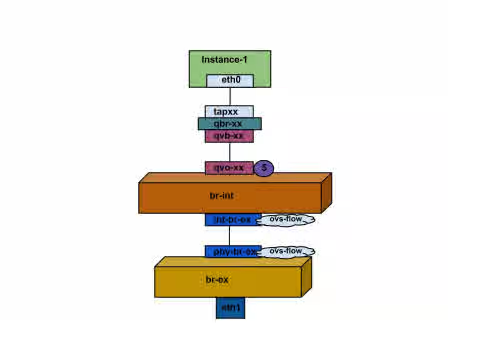
- Packet from eth0 of instance first reaches linux bridge qbr-xx.
- qbr-xx is connected to br-int using veth pair qvb-xx <-> qvo-xxx. qvb-xx is connected to qbr-xx linux bridge and qvo-xx is connected to br-int ovs bridge.
qbr-xx on Linux bridge:
qbr269d4d73-e7 8000.061943266ebb no qvb269d4d73-e7
tap269d4d73-e7
qvo-xx on br-int:
Bridge br-int
fail_mode: secure
Interface "qvof63599ba-8f"
Port "qvo269d4d73-e7"
tag: 5
Interface "qvo269d4d73-e7"
-
qvo-xx is tagged with the internal vlan tag associated with the flat provider network. In this case vlan tag is 5. Once the packet reaches qvo-xx, the packet header will get this vlan tagged added to it.
-
This packet is then moved to br-ex ovs bridge via patch-peer int-br-ex <-> phy-br-ex.
Patch-Peer on br-int:
Bridge br-int
fail_mode: secure
Port int-br-ex
Interface int-br-ex
type: patch
options: {peer=phy-br-ex}
Patch-peer on br-ex:
Bridge br-ex
Port phy-br-ex
Interface phy-br-ex
type: patch
options: {peer=int-br-ex}
Port br-ex
Interface br-ex
type: internal
- When this packet reaches phy-br-ex on br-ex, an ovs flow inside br-ex strips the vlan tag 5 and then sends it to the physical interface.
Below command shows port number of phy-br-ex is 2.
# ovs-ofctl show br-ex
OFPT_FEATURES_REPLY (xid=0x2): dpid:00003440b5c90dc6
n_tables:254, n_buffers:256
capabilities: FLOW_STATS TABLE_STATS PORT_STATS QUEUE_STATS ARP_MATCH_IP
actions: OUTPUT SET_VLAN_VID SET_VLAN_PCP STRIP_VLAN SET_DL_SRC SET_DL_DST SET_NW_SRC SET_NW_DST SET_NW_TOS SET_TP_SRC SET_TP_DST ENQUEUE
2(phy-br-ex): addr:ba:b5:7b:ae:5c:a2
config: 0
state: 0
speed: 0 Mbps now, 0 Mbps max
Below command shows any packet that arrives on phy-br-ex (in_port=2) which has vlan tag 5 (dl_vlan=5), remove vlan tag from it and forward (actions=strip_vlan,NORMAL).
# ovs-ofctl dump-flows br-ex
NXST_FLOW reply (xid=0x4):
cookie=0x0, duration=4703.491s, table=0, n_packets=3620, n_bytes=333744, idle_age=0, priority=1 actions=NORMAL
cookie=0x0, duration=3890.038s, table=0, n_packets=13, n_bytes=1714, idle_age=3764, priority=4,in_port=2,dl_vlan=5 actions=strip_vlan,NORMAL
cookie=0x0, duration=4702.644s, table=0, n_packets=10650, n_bytes=447632, idle_age=0, priority=2,in_port=2 actions=drop
- This packet is then forwarded to physical interface. If the physical interface is another vlan tagged interface, then that vlan tag will be added to the packet by the interface.
Incoming Packet
- An incoming packet for the instance from external network first reaches eth0. The it reaches br-ex.
- From br-ex, the packet is moved to br-int via patch-peer phy-br-ex <-> int-br-ex.
Below command shows int-br-ex has a port number 15.
ovs-ofctl show br-int
OFPT_FEATURES_REPLY (xid=0x2): dpid:00004e67212f644d
n_tables:254, n_buffers:256
capabilities: FLOW_STATS TABLE_STATS PORT_STATS QUEUE_STATS ARP_MATCH_IP
actions: OUTPUT SET_VLAN_VID SET_VLAN_PCP STRIP_VLAN SET_DL_SRC SET_DL_DST SET_NW_SRC SET_NW_DST SET_NW_TOS SET_TP_SRC SET_TP_DST ENQUEUE
15(int-br-ex): addr:12:4e:44:a9:50:f4
config: 0
state: 0
speed: 0 Mbps now, 0 Mbps max
- When the packet arrives on int-br-ex an ovs flow rule inside br-int adds internal vlan tag 5 to the packet.
# ovs-ofctl dump-flows br-int
NXST_FLOW reply (xid=0x4):
cookie=0x0, duration=5351.536s, table=0, n_packets=12118, n_bytes=510456, idle_age=0, priority=1 actions=NORMAL
cookie=0x0, duration=4537.553s, table=0, n_packets=3489, n_bytes=321696, idle_age=0, priority=3,in_port=15,vlan_tci=0x0000 actions=mod_vlan_vid:5,NORMAL
cookie=0x0, duration=5350.365s, table=0, n_packets=628, n_bytes=57892, idle_age=4538, priority=2,in_port=15 actions=drop
cookie=0x0, duration=5351.432s, table=23, n_packets=0, n_bytes=0, idle_age=5351, priority=0 actions=drop
The second rule says a packet that arrives on int-br-ex (in_port=15) which has no vlan tag on it (vlan_tci=0x0000), add vlan tag 5 to it and forward (actions=mod_vlan_vid:5,NORMAL).
- Then from int-br-ex, since the vlan tag is added to packet, qvo-xxx accepts it and forwards to qvb-xx after stripping the vlan tag which then reaches instance.
Note that the vlan tag 5 is an example that was used on my test compute node for the flat provider network automatically by neutron-openvswitch-agent. It may be different for a flat provider network for you and it can be different for the same network on two different compute node.
Troubleshooting
The section above - How does the packet flow work? - provides ample information to troubleshooting a flat provider network if anything goes wrong. However, the following steps are much easier.
- Verify that physical network name -
physnet1- used is same while creating the network and insidebridge_mappingconfiguration.
# grep bridge_mapping /etc/neutron/plugins/openvswitch/ovs_neutron_plugin.ini
bridge_mappings = physnet1:br-ex
# neutron net-show provider-flat
...
| provider:physical_network | physnet1
...
- Make sure that the network is created as
externaland isflat.
# neutron net-show provider-flat
...
| provider:network_type | flat |
| router:external | True |
...
- Run
ovs-vsctl showand verify thatbr-intandbr-exis connected using a patch-peerint-br-ex<->phy-br-ex. This connection is created while restartingneutron-openvswitch-agentprovidedbridge_mappingis correctly configured in/etc/neutron/plugins/openvswitch/ovs_neutron_plugin.ini. Recheckbridge_mappingsetting if this is not created even after restarting the service. - Run
ovs-ofctl dump-flows br-exandovs-ofctl dump-flows br-intand check if it has relevant flows to strip internal vlan ids for outgoing packets and add vlan id for incoming packets. This flow is added when we spawn an instance of this network to a specific compute node first time. If this flow is not created after spawning the instance, make sure that the network is created asflatand isexternalandphysical_networkname is correct as well as recheckbridge_mappingsettings. - Finally recheck
ifcfg-br-exandifcfg-ethxconfiguration. Make sure thatethxis added as a port insidebr-exand both of them have UP flag in the output ofip a. Below output shows eth1 is a port in br-ex.
Bridge br-ex
Port phy-br-ex
Interface phy-br-ex
type: patch
options: {peer=int-br-ex}
Port "eth1"
Interface "eth1"
Below command shows it's added as a port and kernel is aware to move all packets from interface to ovs bridge br-ex. Look at master ovs-system.
# ip a
5: eth1: <BROADCAST,MULTICAST,UP,LOWER_UP> mtu 1500 qdisc mq master ovs-system state UP qlen 1000
VLAN Provider Networks
Multiple vlan provider networks can be used to connect instances directly to external networks. We will be using a physical network (let us call it physnet1) for a range of vlans (eg 171-172) . The network nodes and compute nodes are connected to the physical network using a physical interface on them (let us call it eth1). This port on the switch to which this interface is connected is configured to trunk the vlan ranges used. Below are the steps to configure vlan provider networks. We are using the example ids and names given above.
Controller nodes
- Edit
/etc/neutron/plugin.ini(symbolic link to/etc/neutron/plugins/ml2/ml2_conf.ini) and add vlan to the existing list of values and setnetwork_vlan_rangesto reflect the physical network and vlan ranges appropriately. In the[ml2]section
type_drivers = vxlan,flat,vlan
- In the
[ml2_type_vlan]section:
network_vlan_ranges=physnet1:171:172
- Restart neutron-api server after this change.
systemctl restart neutron-server
- Create external network as vlan type network and associate them correctly to the configured
physical_network. Create it as shared network to let other users create instances directly to it. We will create two networks one for vlan 171 and another for vlan 172.
neutron net-create provider-vlan171 \
--provider:network_type vlan \
--router:external true \
--provider:physical_network physnet1 \
--provider:segmentation_id 171 --shared
neutron net-create provider-vlan172 \
--provider:network_type vlan \
--router:external true \
--provider:physical_network physnet1 \
--provider:segmentation_id 172 --shared
- Create subnet appropriately to this external network using
neutron subnet-createor horizon dashboard. Make sure that exact subnet details obtained from network admin associated with each vlan is used. In our example, vlan 171 uses subnet 10.65.217.0/24 and vlan 172 uses 10.65.218.0/24.
neutron subnet-create \
--name subnet-provider-171 provider-171 10.65.217.0/24 \
--enable-dhcp \
--gateway 10.65.217.254 \
neutron subnet-create \
--name subnet-provider-172 provider-172 10.65.218.0/24 \
--enable-dhcp \
--gateway 10.65.218.254 \
Both Network nodes and Compute nodes
These steps must be done on both network node and compute nodes. This will connect the nodes to external network to let instances communicate directly with external network.
- Create external network bridge (br-ex) and then add associated port (eth1) to it.
- /etc/sysconfig/network-scripts/ifcfg-eth1:
 DEVICE=eth1
 TYPE=OVSPort
 DEVICEYPE=ovs
 OVS_BRIDGE=br-ex
 ONBOOT=yes
 NM_CONTROLLED=no
 BOOTPROTO=none
- /etc/sysconfig/network-scripts/ifcfg-br-ex:
 DEVICE=br-ex
 TYPE=OVSBridge
 DEVICETYPE=ovs
 ONBOOT=yes
 NM_CONTROLLED=no
 BOOTPROTO=none
- Reboot the node or restart network service for the networking changes to take effect.
- Configure physical networks in
/etc/neutron/plugins/openvswitch/ovs_neutron_plugin.iniand map bridges accordingly to the physical network:
bridge_mappings = physnet1:br-ex
- Restart
neutron-openvswitch-agentservice on both network nodes and compute nodes for the changes to take effect.
systemctl restart neutron-openvswitch-agent
Only on the Network node
- Set
external_network_bridge =to an empty value in/etc/neutron/l3-agent.ini. This is required to use provider external networks, not bridge based external network where we will addexternal_network_bridge = br-ex:
 # Name of bridge used for external network traffic. This should be set to
 # empty value for the linux bridge
 external_network_bridge =
- Restart
neutron-l3-agentfor the changes to take effect.
systemctl restart neutron-l3-agent
Packstack deployment
If you used packstack for deployment, you can achieve all of the above except interface configuration via ifcfg-* by setting below in the answer file.
CONFIG_NEUTRON_L3_EXT_BRIDGE=provider
CONFIG_NEUTRON_ML2_TYPE_DRIVERS=vxlan,flat,vlan
CONFIG_NEUTRON_ML2_VLAN_RANGES=physnet1:171:172
CONFIG_NEUTRON_OVS_BRIDGE_MAPPINGS=physnet1:br-ex
Finally, create an instance and add this instance directly to the created external network from "Networking" tab on dashboard.
How does packet flow work with vlan provider networks?
Outgoing packets
In this section, I will explain how packet flow for an instance running on a compute node works directly to vlan provider external network. I will be using the two vlan networks 171 and 172 with each of them having an instance directly added to it as an example to explain this.
Once we set up br-ex, add physical interface to it and spawn an instance to a compute node, we will end up having interfaces and bridges created as shown in the diagram below.
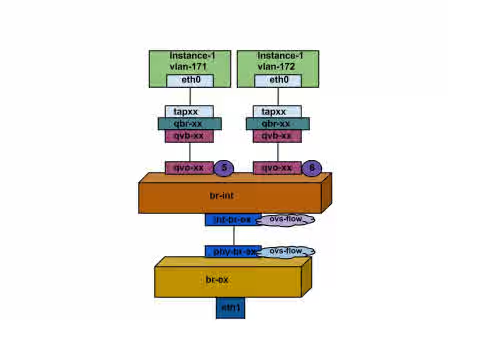
- Packets from eth0 of instances first reaches linux bridge qbr-xx for the instance.
- qbr-xx is connected to br-int using veth pair qvb-xx <-> qvo-xxx. qvb-xx is connected to qbr-xx linux bridge and qvo-xx is connected to br-int ovs bridge.
qbr-xx on Linux bridge. Since there are two instances, there would two linux bridges.
# brctl show
bridge name bridge id STP enabled interfaces
qbr84878b78-63 8000.e6b3df9451e0 no qvb84878b78-63
tap84878b78-63
qbr86257b61-5d 8000.3a3c888eeae6 no qvb86257b61-5d
tap86257b61-5d
qvo-xx on br-int:
options: {peer=phy-br-ex}
Port "qvo86257b61-5d"
tag: 3
Interface "qvo86257b61-5d"
Port "qvo84878b78-63"
tag: 2
Interface "qvo84878b78-63"
-
qvo-xx is tagged with the internal vlan tag associated with the vlan provider network. In this case internal vlan tag 2 is associated with vlan provider network provider-171 and vlan tag 3 is associated with vlan provider network provider-172. Once the packet reaches qvo-xx, the packet header will get this vlan tagged added to it.
-
This packet is then moved to br-ex ovs bridge via patch-peer int-br-ex <-> phy-br-ex.
Patch-Peer on br-int:
    Bridge br-int
        fail_mode: secure
       Port int-br-ex
            Interface int-br-ex
                type: patch
                options: {peer=phy-br-ex}
Patch-peer on br-ex:
    Bridge br-ex
        Port phy-br-ex
            Interface phy-br-ex
                type: patch
                options: {peer=int-br-ex}
        Port br-ex
            Interface br-ex
                type: internal
- When this packet reaches phy-br-ex on br-ex, an ovs flow inside br-ex replaces internal vlan tag with the actual vlan tag associated with the vlan provider network.
Below command shows port number of phy-br-ex is 4.
# ovs-ofctl show br-ex
4(phy-br-ex): addr:32:e7:a1:6b:90:3e
config: 0
state: 0
speed: 0 Mbps now, 0 Mbps max
Below command shows any packet that arrives on phy-br-ex (in_port=4) which has vlan tag 2 (dl_vlan=2), replace vlan tag with 171 (actions=mod_vlan_vid:171,NORMAL) and forward . It also shows any packet that arrives on phy-br-ex (in_port=4) which has vlan tag 3 (dl_vlan=3), replace vlan tag with 172 (actions=mod_vlan_vid:172,NORMAL) and forward . These rules are automatically added by neutron-openvswitch-agent.
# ovs-ofctl dump-flows br-ex
NXST_FLOW reply (xid=0x4):
NXST_FLOW reply (xid=0x4):
cookie=0x0, duration=6527.527s, table=0, n_packets=29211, n_bytes=2725576, idle_age=0, priority=1 actions=NORMAL
cookie=0x0, duration=2939.172s, table=0, n_packets=117, n_bytes=8296, idle_age=58, priority=4,in_port=4,dl_vlan=3 actions=mod_vlan_vid:172,NORMAL
cookie=0x0, duration=6111.389s, table=0, n_packets=145, n_bytes=9368, idle_age=98, priority=4,in_port=4,dl_vlan=2 actions=mod_vlan_vid:171,NORMAL
cookie=0x0, duration=6526.675s, table=0, n_packets=82, n_bytes=6700, idle_age=2462, priority=2,in_port=4 actions=drop
- This packet is then forwarded to physical interface eth1.
Incoming Packet
- An incoming packet for the instance from external network first reaches eth1. The it reaches br-ex.
- From br-ex, the packet is moved to br-int via patch-peer
phy-br-ex <-> int-br-ex.
Below command shows int-br-ex has a port number 15.
# ovs-ofctl show br-int
18(int-br-ex): addr:fe:b7:cb:03:c5:c1
config: 0
state: 0
speed: 0 Mbps now, 0 Mbps max
- When the packet arrives on int-br-ex an ovs flow rule inside br-int adds internal vlan tag 2 for provider-171 and vlan tag 3 for proivder-172 to the packet.
# ovs-ofctl dump-flows br-int
NXST_FLOW reply (xid=0x4):
cookie=0x0, duration=6770.572s, table=0, n_packets=1239, n_bytes=127795, idle_age=106, priority=1 actions=NORMAL
cookie=0x0, duration=3181.679s, table=0, n_packets=2605, n_bytes=246456, idle_age=0, priority=3,in_port=18,dl_vlan=172 actions=mod_vlan_vid:3,NORMAL
cookie=0x0, duration=6353.898s, table=0, n_packets=5077, n_bytes=482582, idle_age=0, priority=3,in_port=18,dl_vlan=171 actions=mod_vlan_vid:2,NORMAL
cookie=0x0, duration=6769.391s, table=0, n_packets=22301, n_bytes=2013101, idle_age=0, priority=2,in_port=18 actions=drop
cookie=0x0, duration=6770.463s, table=23, n_packets=0, n_bytes=0, idle_age=6770, priority=0 actions=drop
The second rule says a packet that arrives on int-br-ex (in_port=15) which has vlan tag 172 in it (dl_vlan=172), replace vlan tag with 3 (actions=mod_vlan_vid:3,NORMAL) and forward.
The third rule says a packet that arrives on int-br-ex (in_port=15) which has vlan tag 171 in it (dl_vlan=171), replace vlan tag with 2 (actions=mod_vlan_vid:2,NORMAL) and forward.
- Then from int-br-ex, since the internal vlan tag is added to packet, qvo-xxx accepts it and forwards to qvb-xx after stripping the vlan tag which then reaches instance.
Note that the vlan tag 2 and 3 is an example that was used on my test compute node for the vlan provider networks, provider-171 and provider-172 respectively, automatically by neutron-openvswitch-agent. It may be different for a vlan provider network for you and it can be different for the same network on two different compute node.
Troubleshooting
The section above - How does the packet flow work? - provides ample information to troubleshooting a vlan provider network if anything goes wrong. Following below steps would make it more easier.
- Verify that physical network name -
physnet1- used is same while creating the network and insidebridge_mappingconfiguration.
# grep bridge_mapping /etc/neutron/plugins/openvswitch/ovs_neutron_plugin.ini
bridge_mappings = physnet1:br-ex
# neutron net-show provider-vlan171
...
| provider:physical_network | physnet1
...
- Make sure that the network is created as
externaland is typevlanand it has correctsegmentation_id.
# neutron net-show provider-vlan171
...
| provider:network_type | vlan |
| provider:physical_network | physnet1 |
| provider:segmentation_id | 171 |
...
- Run
ovs-vsctl showand verify thatbr-intandbr-exis connected using a patch-peerint-br-ex<->phy-br-ex. This connection is created while restartingneutron-openvswitch-agentprovidedbridge_mappingis correctly configured in/etc/neutron/plugins/openvswitch/ovs_neutron_plugin.ini. Recheckbridge_mappingsetting if this is not created even after restarting the service. - Run
ovs-ofctl dump-flows br-exandovs-ofctl dump-flows br-intand check if it has relevant flows to map internal vlan ids to external vlan id (segmentation_id) for outgoing packets and add map external vlan id to internal vlan id for incoming packets. This flow is added by neutron openvswitch agent when we spawn an instance in this network to a specific compute node first time. If this flow is not created after spawning the instance, make sure that the network is created asvlanand isexternalandphysical_networkname is correct as well as recheckbridge_mappingsettings. - Finally recheck
ifcfg-br-exandifcfg-ethxconfiguration. Make sure thatethxis added as a port insidebr-exand both of them have UP flag in the output ofip a. Below output shows eth1 is a port in br-ex.
    Bridge br-ex
        Port phy-br-ex
            Interface phy-br-ex
                type: patch
                options: {peer=int-br-ex}
        Port "eth1"
            Interface "eth1"
Below command shows it's added as a port and kernel is aware to move all packets from interface to ovs bridge br-ex. Look at master ovs-system.
# ip a
5: eth1: <BROADCAST,MULTICAST,UP,LOWER_UP> mtu 1500 qdisc mq master ovs-system state UP qlen 1000
Enabling nova metadata access from instances
Since these are provider external networks, instances directly attached to them will have external routers configured as their default gateway and there are no neutron routers used. This means neutron routers cannot be used to proxy metadata requests from instances to nova-metadata server and may cause failure while running cloud-init. However this can be solved by configuring dhcp agent to proxy metadata requests. This can be achieved by adding below to /etc/neutron/dhcp_agent.ini
enable_isolated_metadata = True
Floating IPs
Note that the same network can be used to allocate floating ips to instances that are added to private networks at the same time. The ips allocated as floating ips from this network will be bound on the qrouter-xxx namespace on the network node and will do DNAT-SNAT to associated private ip where as the ips allocated for direct external network access will be bound directly inside the instance and allow the instance to communicate directly with external network.
This solution is part of Red Hat’s fast-track publication program, providing a huge library of solutions that Red Hat engineers have created while supporting our customers. To give you the knowledge you need the instant it becomes available, these articles may be presented in a raw and unedited form.