Creating cache in DG 8 in OCP 4
Environment
- Red hat OpenShift Container Platform (OCP)
- 4.x
- Red Hat Data Grid (RHDG)
- 8.x
Issue
What are the options to create a cache in DG 8?
What are the options to create a cache with persistence in DG 8?
Resolution
There are several options to create caches in DG 8 (deployed via Operator) in OCP:
- Create using a template yaml then oc apply. See example oc template
- Via Hot Rod creation. See example Hot Rod
- Via CLI command. See example CLI command
- Create with the Web Console in the DG 8 Operator board - created by DG 8 Operato. See example Web Console
Example via template yaml (or xml) creation
-
Template mycache.xml
kind: Cache apiVersion: infinispan.org/v2alpha1 metadata: name: example-cache namespace: rhdg8 spec: clusterName: example-infinispan name: mycache templateName: org.infinispan.DIST_SYNC -
oc apply -f mycache.xml
-
Verify the namespace, it should be the one that matters on the creation. Note the clusterName, which can even be wrong, as long as the namespace matches.
Example to create a persistent cache (where one declares the persistence as below, where it is still created even though the clusterName is random). Template mycache-persistence.xml:
apiVersion: infinispan.org/v2alpha1
kind: Cache
metadata:
  name: example-cache2
  namespace: rhdg8
spec:
  clusterName: example-random
  name: myXMLcache
  template: <distributed-cache mode="SYNC" statistics="true"><encoding media-type="application/x-protostream"/><persistence><file-store/></persistence></distributed-cache>
As detailed on the This content is not included.Red Hat DG 8.3 Guide.
The cache creation via yaml file is namespace bounded not cluster-wide even on cluster-wide operators. So the creation of cache will be in one single namespace to set the namespace, pass the metadata.namespace on the cache creation or -n namespace (e.g. oc create -f <name.yaml> -n mynamespace). Creating without any namespace attribute will result in creating on the namespace current being used.
Example via Hot Rod
In an application client, that connects to the Data Grid server via Hot Rod you can create a cache. Here is an example:
        //Get cache using the RemoteCache
        RemoteCache<Object, Object> cache = manager.getCache(cacheName);

        //If the cache value is null proceed to create it
        if(cache==null) {
            String template = "org.infinispan.DIST_SYNC";  //Use a valid cache template
            manager.administration().createCache(cacheName, template);
        }
Example via RHDG CLI
See the complete solution Connecting on DG 8 cli inside OCP 4 pod/terminal, short version below:
Connect to the CLI using the cluster exposed route and the developer user credentials, one can execute it in a pod or in an exernal data grid server.
Steps below:
-
Expose the route on the Infinispan's CR: the expose.annotations.type, where the expose.annotations.host is optional
-
Get the exposed host:
$ oc get routes NAME HOST/PORT PATH SERVICES PORT TERMINATION WILDCARD rhdg-external rhdg-external-rhdg8.example.com rhdg 11222 None -
Go on the pod's terminal and execute the cli from bin.
./opt/inifinispan/bin/cli.sh [disconnected]> connect http://rhdg-external-rhdg8.example.com Username: developer Password: **************** -
Then create the cache. Here is an example:
[infinispan-test-0-12345@infinispan-test//containers/default]> create cache mycache --template=org.infinispan.DIST_SYNC
[infinispan-test-0-12345@infinispan-test//containers/default]> put --cache=mycache hello world <--- to put data
On the example you have a cluster with security disabled, you can access it directly - example:
Given cluster with the following properties:
security:
      endpointAuthentication: false
      endpointEncryption:
        type: None
So then the connection:
### get the pod
$ oc get pod
NAME                                                      READY   STATUS    RESTARTS   AGE
dg-cluster-lon-0                                          1/1     Running   0          97m
...
### rsh to the pod:
$ oc rsh dg-cluster-8718-0
sh-4.4$ cd /opt/infinispan/bin/
### connection via ./cli.sh -c -
sh-4.4$ ./cli.sh -c -
[dg-cluster-8718-0-49719@//containers/default]>
Example via Web Console in the DG 8 Operator
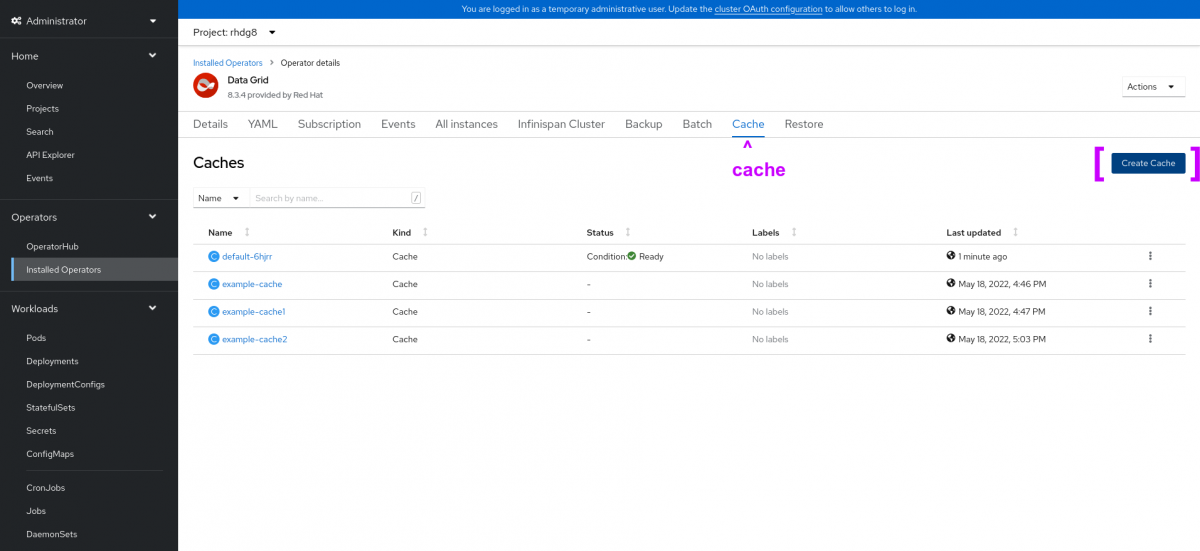
Confirming cache creation
To confirm the cache creation one can see the Infinispan's Web Console (Cache) or the cache in CLI.
The cache created with the DIST_SYNC template is shown below:
[rhdg-0-15794@//containers/default]> cd caches
[rhdg-0-15794@//containers/default/caches]> ls
___script_cache <----- it is always there
mycache              <------ cache just created
[rhdg-0-15794@//containers/default/caches]> describe mycache
{
  "distributed-cache" : {
    "mode" : "SYNC",
    "remote-timeout" : "17500",
    "statistics" : true,
Root Cause
The file caches.xml is a file that's in the server filesystem. The user shouldn't be interacting with this directly when deploying with DG Operator The options for adding caches are detailed above.
Diagnostic Steps
$ oc get routes
NAME                  HOST/PORT                                                                                 PATH      SERVICES                   PORT       TERMINATION   WILDCARD
dg-cluster-external   dg-cluster.apps.ci-ln-something-9999.somewhere.com             dg-cluster                 11222                    None
On the example above, the routes are externalized, so just use: connect http://dg-cluster.apps.ci-ln-something-9999.somewhere.com
To verify the cache creation see the Operator logs where a cache creation will be logged:
2022-06-22T21:57:16.562Z INFO controllers.Cache +++++ Reconciling Cache. {"Request.Namespace": "rhdg-lon", "Request.Name": "rhdg-lon-operator-cache-21"}
2022-06-22T21:57:16.563Z INFO controllers.Cache ----- End Reconciling Cache. {"Request.Namespace": "rhdg-lon", "Request.Name": "rhdg-lon-operator-cache-21"}
- To verify if a cache is working:
$ oc exec $POD_NAME -- curl -k https://POD.IPP.OD.IP:11222/rest/v2/cache-managers/default/health/status
This solution is part of Red Hat’s fast-track publication program, providing a huge library of solutions that Red Hat engineers have created while supporting our customers. To give you the knowledge you need the instant it becomes available, these articles may be presented in a raw and unedited form.