Automated Renewal of expired RHV Certs
Environment
- Red Hat Virtualization (RHV) 4.4
Issue
- RHV host SSL certificate expired and the host changed to Not Responding state. It is not possible to manage the VMs running on this host using the RHV-M portal.
- Is it possible to renew the host certificates in an automated way so that users can move the workload to a different host?
Resolution
IMPORTANT: The recommended method to renew the host certificate is either:
- Use the
Enroll Certificatefeature in the RHV-M portal as documented in KCS 6865861. - Or remove and re-add the host.
- From RHV 4.4 SP1, it is possible to use the
Enroll Certificatefrom the RHV-M administrative portal when the host is even inNonResponsivestatus after the certificate is expired.
The host must be in maintenance mode for either of the above steps and hence VMs on this host should be either be live migrated away or powered down. Only follow the below steps for a host already in not responding status and if there is no way to get a maintenance window to shut down VMs running on that host. After following the manual steps below and getting the host status to UP, Red Hat still recommends customers follow the automated steps above to ensure the host has the proper certificates.
Note: in some cases not only host certificates expire, but also the CA and the manager's. In such a case follow KCS 6865861 to automatically renew manager certificates with engine_setup.
Renew a host certificate with an automated script using the following. Note: you will do this one host at a time.
- Download the singlehost.sh script and save it to your RHV-M manager in /root/singleshost.sh. Note this file is attached to this article.
Once it is located in /root/, make it executable:
#chmod a+x /root/singlehost.sh
- Please run the following on both the manager and all of the hosts to back up the current certificates just in case:
#tar cJpf /root/pki.tar.xz /etc/pki
- Run the following from the RHV Manager command line, providing the host name as seen by RHV:
#/root/singlehost.sh <RHV HOSTNAME>
- After the script runs, please review in the GUI whether host now shows "up" status.
Confirm certs have been updated using the cert_date.sh script listed in the Diagnostic Steps.
Note for a manual solution, see How to manually renew RHV host SSL certificate if expired?
Root Cause
- The host SSL certificate expired which broke the communication between RHV manager and hypervisor.
Diagnostic Steps
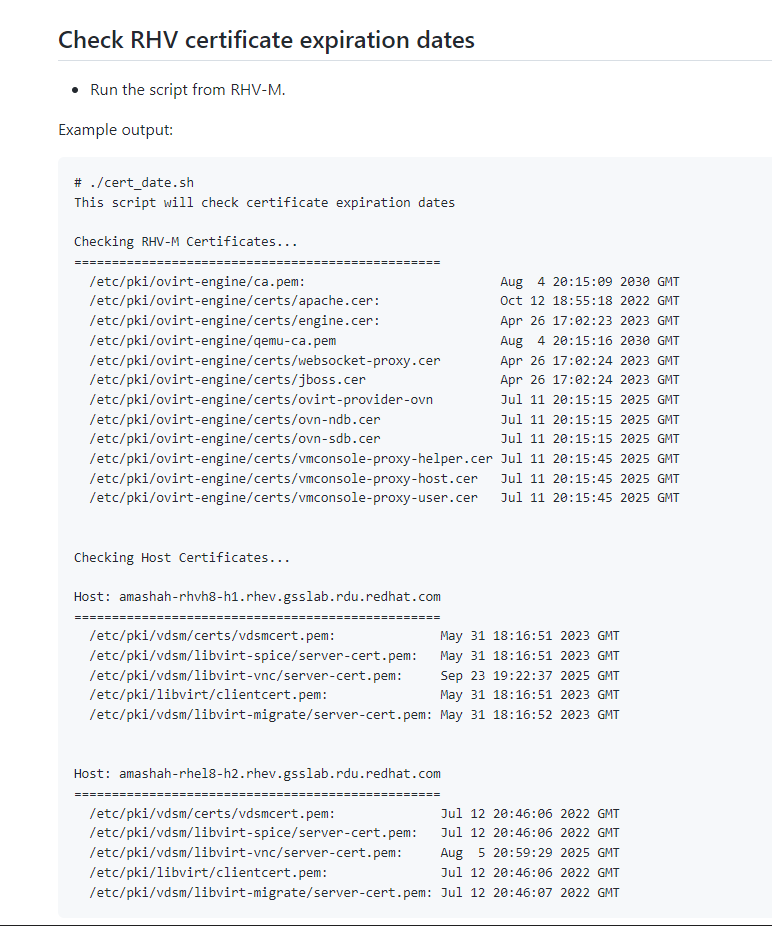
- To check the expiration date for host and Engine certificates:
- Download the cert_date.sh script. Save it as
cert_date.sh. - Copy it to a convenient directory on your RHV-M system.
- Log on to your RHV-M system as any convenient user and
cdto the directory where you savedcert_date.sh. - Make it executable
chmod 755 ./cert_date.sh - Run it on your RHV-M system.
./cert_date.sh - See the sample
cert_date.shscript output. - See KCS 6958665 for more information about the
cert_date.shscript.
- Download the cert_date.sh script. Save it as
This solution is part of Red Hat’s fast-track publication program, providing a huge library of solutions that Red Hat engineers have created while supporting our customers. To give you the knowledge you need the instant it becomes available, these articles may be presented in a raw and unedited form.