How to downgrade Red Hat OpenShift Logging and Loki Operator in RHOCP 4
Environment
- Red Hat OpenShift Container Platform (RHOCP)
- 4
- Red Hat OpenShift Logging (RHOL)
- 6
- Red Hat Loki Operator
- 6
Issue
- How to downgrade
Red Hat OpenShift Logging OperatorandLoki Operatorfrom version 6.4 to version 6.3 - How to downgrade
Red Hat OpenShift Logging OperatorandLoki Operatorfrom version 6.2 to version 6.1
Resolution
The steps described under this line are valid to downgrade the Red Hat OpenShift Logging Operator and Loki Operator from version 6.4 to version 6.3. Similar steps are valid for downgrading between any Red Hat OpenShift Logging Operator and Loki Operator minor and z stream v6 versions. Only adapt the versions to the required
In this exercise, it will be done for the version v6.4, but adapt to the needed.
-
Verify the Current Version of the
Red Hat OpenShift Logging OperatorandLoki Operator:$ oc get csv -n openshift-logging |grep logging $ oc get csv -n openshift-logging |grep loki -
Validate Existing Custom Resources associated with both operators not using a feature released in Red Hat OpenShift Logging v6.4 (see Release Notes):
$ oc get obsclf -n openshift-logging $ oc get logfilemetricexporters -n openshift-logging $ oc get lokistack -n openshift-logging -
Uninstall the Operators:
-
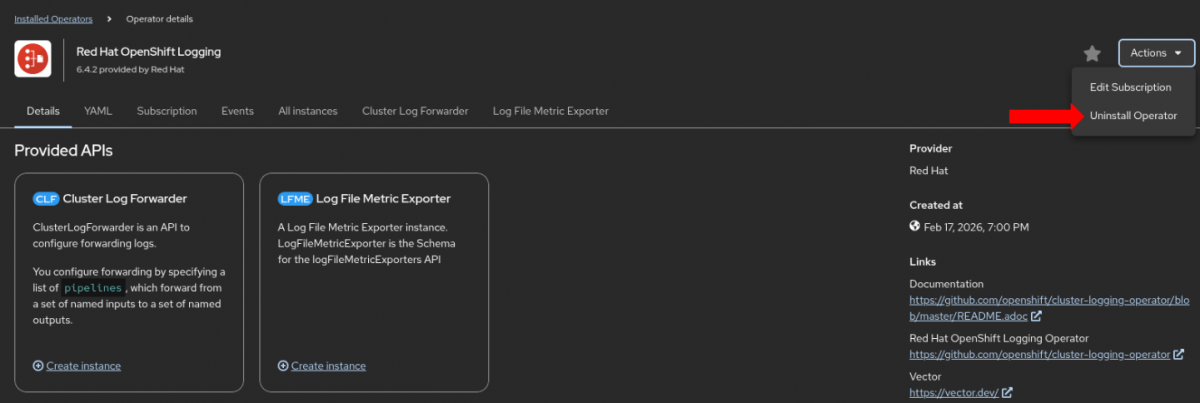
3.1. Red Hat OpenShift Logging Operator version 6.4:
In the OpenShift Web Console, in Administrative view, navigate to:
Ecosystem/Operators ==> Installed Operator ==> Red Hat OpenShift Logging ==> Action ==> Uninstall Operator ==> Don't check the box "Delete all operand instances for this operator" (keep the box unchecked) ==> Click on uninstall
-

  <figure class="cp-figure" data-cp-size="100%" data-cp-align="center">
<a href="/sites/default/files/styles/LG%20-%20Large/public/images/new_uncheck_logging_0.png" data-action="zoom">
<img size="100%" class="cp-img" src="/sites/default/files/styles/LG%20-%20Large/public/images/new_uncheck_logging_0.png" alt="Uninstall Red Hat OpenShift Logging Operator 1" title="Uninstall Red Hat OpenShift Logging Operator 1"/>
- 3.2. **Loki Operator** version 6.4:

  A similar method, as in (3.1), can be used to uninstall Loki Operator. (Ensure that the “Delete all operand instances for this operator” option remains unchecked to retain existing resources.)
-
Reinstall the Operators:
-
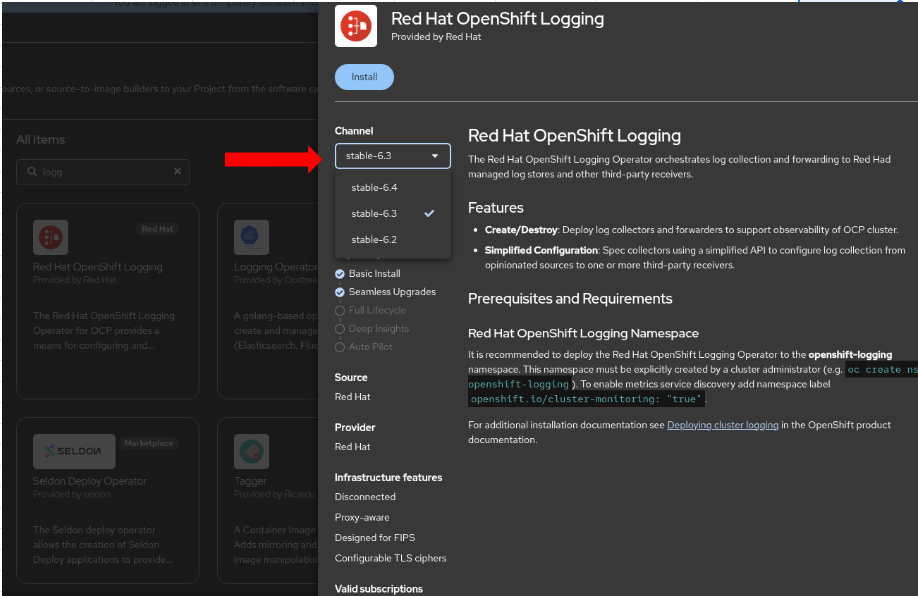
4.1. Red Hat OpenShift Logging Operator version 6.3:
In the OpenShift Web Console, in Administrative view, navigate to:
Ecosystem/Operators ==> Software Catlog/OperatorHub ==> Search for Red Hat OpenShift Logging ==> Channel ==> Click on Drop Down Arrow ==> Select stable-6.3 ==> Install ==> Install
-

- 4.2. **Loki Operator** version 6.3:

  A similar method, as in (4.1), can be used to install the `Loki Operator`.
-
Validate Custom Resources After Reinstallation:
$ oc get obsclf -n openshift-logging $ oc get logfilemetricexporters -n openshift-logging $ oc get lokistack -n openshift-logging -
Confirm the Downgraded Version of the
Red Hat OpenShift Logging OperatorandLoki Operator:$ oc get csv -n openshift-logging |grep logging $ oc get csv -n openshift-logging |grep loki
For more information, please open a new support case with Red Hat Support.
Diagnostic Steps
Verify the Red Hat OpenShift Logging Operator, Loki Operator versions and pods status of the openshift-logging namespace:
$ oc get csv -n openshift-logging
$ oc get pods -n openshift-logging
This solution is part of Red Hat’s fast-track publication program, providing a huge library of solutions that Red Hat engineers have created while supporting our customers. To give you the knowledge you need the instant it becomes available, these articles may be presented in a raw and unedited form.