How do I add the RHEV-M CA to Firefox so that I can use https to access the WebAdmin Portal or the UserPortal?
Environment
- Red Hat Enterprise Virtualization (RHEV)
- Red Hat Virtualization (RHV)
- Firefox web browser
Issue
- How do I add the RHEV-M CA to Firefox so that I can use https to access the WebAdmin Portal or the UserPortal?
- Note: This article shows how to add the CA cert using Firefox but a similar procedure exists for Internet Explorer
Resolution
The location of the CA certificate is version dependant:
- Open the CA file in Firefox by browsing
- RHEV 2.x and 3.x except RHEV 3.0 - http://rhevm.fqdn/ca.crt
- RHEV 3.0 - http://rhevm.fqdn:8080/ca.crt
- RHV 4.x - https://engine_address/ovirt-engine/services/pki-resource?resource=ca-certificate&format=X509-PEM-CA
- Check all 3 boxes and click "OK"
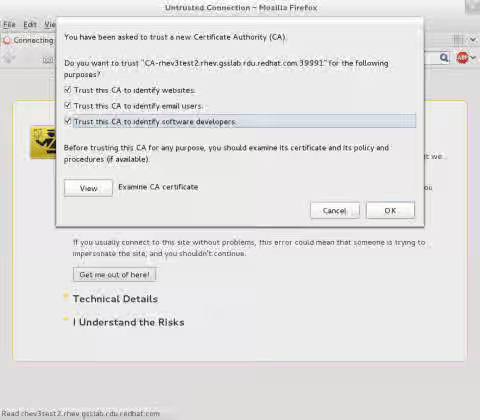
- Browse to the RHEVM start page to access the https portals.
Root Cause
The RHEVM CA Certificate Authority (CA) certificate is used by Firefox to authenticate the RHEV Manager web service. It needs to be installed in the client trying to access the WebAdmin Portal or the UserPortal for this authentication to take place, otherwise Firefox can't ensure the RHEV Manager Web service is trusted.
Normally when trying to access the RHEV Manager via https for the first time, it will offer to add a security exception. This process is recommended instead of adding an exception.
This solution is part of Red Hat’s fast-track publication program, providing a huge library of solutions that Red Hat engineers have created while supporting our customers. To give you the knowledge you need the instant it becomes available, these articles may be presented in a raw and unedited form.